Vscode-eslint: eslint server crashed 5 times in the last 3 minutes. the server will not be restarted.

 iosky
iosky
All 72 comments
first of all , I have globally instanlled eslint by npm
iosky
on 27 Mar 2018
@iosky anything special in the ESLint Output channel. What happens if you execute eslint from a terminal on the same file / project. Does it work correctly ?
 dbaeumer
on 27 Mar 2018
dbaeumer
on 27 Mar 2018
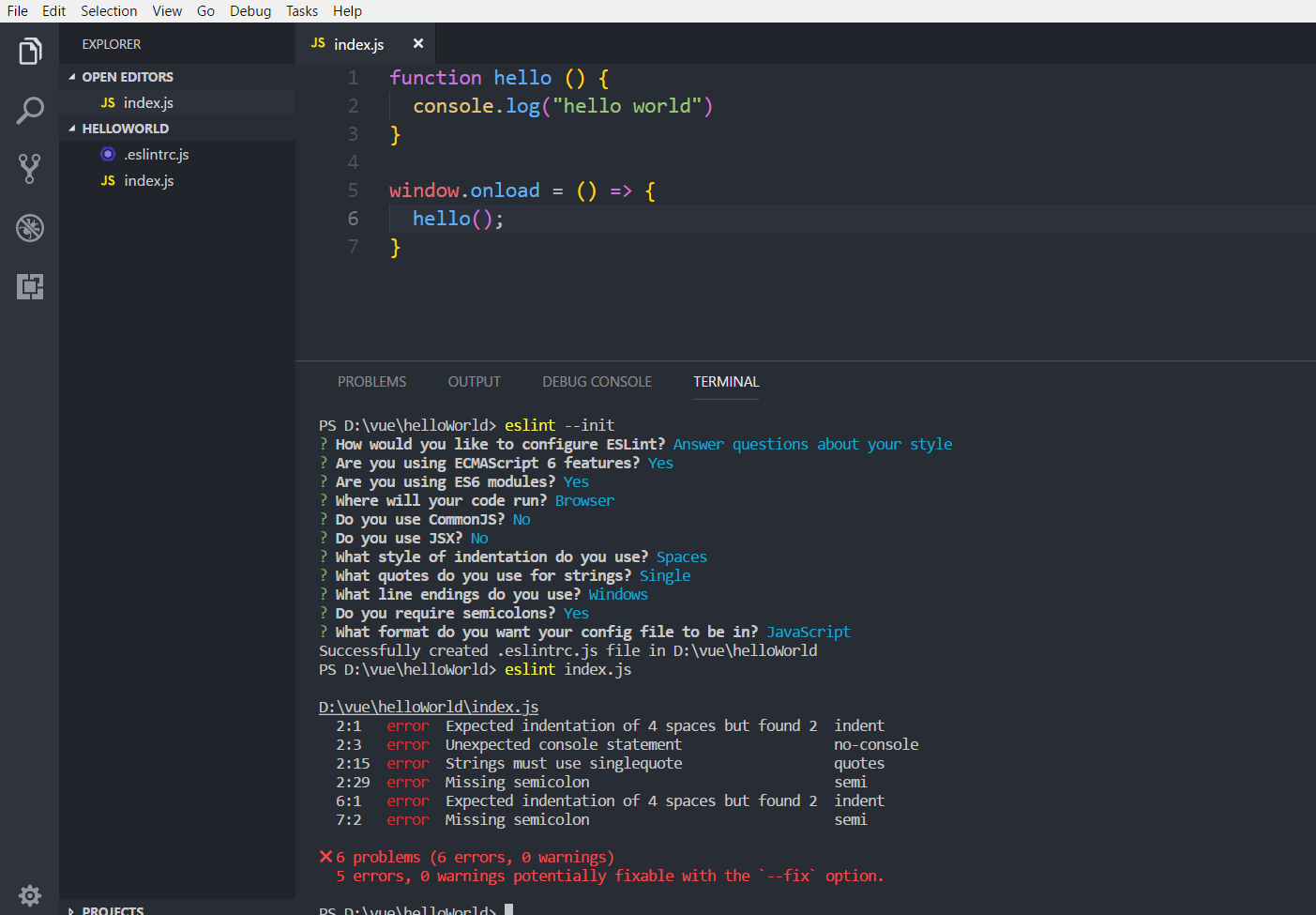
this has been tested ,and it works.
iosky
on 27 Mar 2018
Anything in the ESLint Output Channel (e.g. OUTPUT tab -> ESLint drop down). Can you provide the sample as a GitHub repository I can clone so that I can investigate ?
Does ESLint work for you on other projects or does it always fail ?
dbaeumer
on 27 Mar 2018
once the vscode is restarted, it will report this problem, but in terminal, eslint works normally
iosky
on 27 Mar 2018
during this time, I also completely uninstall be vscode and then reinstall it, but it will also report this error.
iosky
on 27 Mar 2018
this is my a test library for my local installation of eslint, but it's still wrong.
[email protected]:iosky/eslintTest.git
iosky
on 27 Mar 2018
The link in this comment https://github.com/Microsoft/vscode-eslint/issues/437#issuecomment-376545719 doesn't point to a valid GitHub repository. Can you please provide the correct link.
And is there anything in the ESLint Output Channel.
dbaeumer
on 28 Mar 2018
eslint does not run, so nothing appears in the output box
iosky
on 29 Mar 2018
[email protected]:iosky/eslintTest.git
isn't this repository ok ?
iosky
on 29 Mar 2018
Now the link doesn't work. The correct one is https://github.com/iosky/eslintTest :-)
dbaeumer
on 3 Apr 2018
The repository doesn't work for me. It contains a references to

dbaeumer
on 3 Apr 2018
Now, the repository is work, but eslint doesn't run in vscode
https://github.com/iosky/eslintTest.git
iosky
on 5 Apr 2018
I cloned the repository again and I still get

dbaeumer
on 5 Apr 2018
After removing the eslint options from the setting everything works for me as expected:

dbaeumer
on 5 Apr 2018
Is there anything in the ESLint Output Channel? And can you enable logging to see when the server crashes "eslint.trace.server": "verbose"
dbaeumer
on 5 Apr 2018
I set, but no thing in the output channel, I wonder if my local setting affects eslint server. Is there a requirement on node's path setting? I have changed the global installation path of node before
iosky
on 5 Apr 2018
I am having the same issue with vs code and eslint. Eslint server crashes everytime I open VS code. I have added eslint.trace.server": "verbose to settings and unfortunately when the eslint server crashes the output channel also disappears. I have no other eslint options in settings. I have tried uninstalling and reinstalling eslint, vscode, eslint vs code extension. Same error appears every time. This problem surfaced very recently. Was working only a few days ago. .eslintrc.js is working for others in VS Code with same versions. Any help would be appreciated.
 coyle5280
on 5 Apr 2018
coyle5280
on 5 Apr 2018
I created a special vsix that disables the disposing of the output channel to see if we get better tracing when the server crashes. To install the vsix do the following:
- download this zip:
vscode-eslint-1.4.8.zip - change the extension to vsix
- uninstall the eslint extension
- install the eslint extension from the downloaded vsix. To do so open VS Code and the F1 > Install from VSIX
- provide me with the output when the server crashes.
@coyle5280 can you think of anything that makes your machine different to others. As said I am not able to reproduce this.
dbaeumer
on 6 Apr 2018
I did,But,when the server crashes, there is nothing in the output panel except the error alert
iosky
on 6 Apr 2018
@iosky strange. Could you do the following: before opening the JS file open the developer console via Help > Toggle Developer Tools. Then open the JS file that makes the server crash. Is there anything in the console of the developer tools ?
dbaeumer
on 6 Apr 2018

iosky
on 6 Apr 2018
@dbaeumer I can't think of anything that I have changed or installed over the last few days that would make my machine different from my colleagues.
Here is the output from ESlisnt:

My console output is the same as @iosky
Here is a little info on what I am running. Maybe it will help maybe not...

ESLint Version: v4.19.1
Global node version: v8.11.1
coyle5280
on 6 Apr 2018
I am having the same problem with the same setup as @iosky and @coyle5280
 rheng001
on 8 Apr 2018
rheng001
on 8 Apr 2018
Actually I have no idea why this is happening. Could someone of you try to debug this ? Do the following:
- clone this repository
- cd into the directory
- npm install
- npm run compile
- open the workspace with VS Code.
- go to client\srcextension.ts
- on line 361 change inspect to inspect-brk
- Run Task > npm run watch:client
- open debug panel and select Lanuch Extension. Press the run button
- in the start Code instance select the workspace the makes the eslint server crash
- go back to the Code instance that contains the eslint code
- debug panel
- select Attach to server and press the run button. This should break in electronForkStart.js
- open server/out/eslintServer.js
- set a breakpoint at the top of the file
- press continue
- step through the eslintServer.js
I guess it bails out pretty early on one of the require calls. Let me know where it happens.
dbaeumer
on 9 Apr 2018
@dbaeumer Sorry I have not been able to get to those steps yet but I will soon. Hopefully tomorrow the 11th. Will post back then. Thanks!
coyle5280
on 11 Apr 2018
@dbaeumer I followed the steps you have listed above and was able to step through the file eslintServer.js. Unfortunately I did not come across any errors. Everything seems to proceed correctly as I step through the program. Any ideas? Or anything that I need to look for that i might be missing.
coyle5280
on 11 Apr 2018
@coyle5280 thanks for doing this. That indicates that it doesn't fail when the initial modules are loaded. Can you try setting a breakpiont at line 244 (content library = require(path);) and see if something wired happens there?
dbaeumer
on 12 Apr 2018
And do you have any special firewall or proxy setup which might terminate the connection between the extension host and the ESLint server?
dbaeumer
on 12 Apr 2018
This issue has been closed automatically because it needs more information and has not had recent activity. See also our issue reporting guidelines.
Happy Coding!
![vscodebot[bot] picture](https://avatars.githubusercontent.com/in/2406?v=4&s=40) vscodebot[bot]
on 19 Apr 2018
vscodebot[bot]
on 19 Apr 2018
OK so i had to go out of town for work and came back sick but I am back today and will see what is happening at line 244. I will post back shortly.
coyle5280
on 19 Apr 2018
@dbaeumer I do not have any firewalls or proxies setup that I am aware of. I placed several break points on and around line 244 but the program never halted at those locations.
coyle5280
on 19 Apr 2018
Reopening issue.
dbaeumer
on 20 Apr 2018
Then we need to set more breakpoints. Can you set one into the process.exit handler on line 168 and capture the exception ?
dbaeumer
on 20 Apr 2018
When stepping through eslintServer.js I am immediately taken to the .ts version. I placed break points on line 168 in file eslintServer.js and line 297 in eslintServer.ts. None of the break points inside the new exit function are hit. I can break at the line const nodeExit = process.exit; at line 295. I also turned off all firewalls to make sure that was not causing any issues and it did not have any impact of the eslint failure. (Yes I turned them back on :) )
coyle5280
on 20 Apr 2018
@coyle5280 This is really strange. I attached a new vsix with some improved error handling.
Can you install the vsix using the steps from here: https://github.com/Microsoft/vscode-eslint/issues/437#issuecomment-379174799 and let me know if there is any special output in the ESLint Output channel.
dbaeumer
on 25 Apr 2018
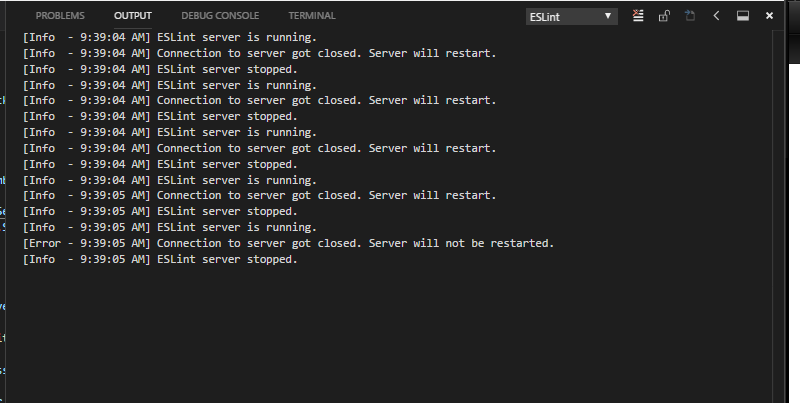
@dbaeumer I downloaded the new extension and reran. The output in the console does not appear to have changed any . Below is a picture. I downloaded and installed the extension twice to make sure that I was getting the newer version.
coyle5280
on 27 Apr 2018
I start to think that something else closes the connection. The server is not hitting the process.exit method nor does not report any uncaught exceptions.
The server exits itself if the connection closes and the client then restarts the server. This could exactly produce the output. I need to think how to best log this to verify this assumption.
I am out for a week. So please be patient.
dbaeumer
on 27 Apr 2018
Ok thanks for the help. One interesting thing to note. Not sure if it matters but I removed all of my eslint node modules and I get the same output from the eslint server. I was expecting to get a message about eslint not being installed but that was not the case. Again not sure if that matters but it might indicate that for some reason the plugin is not finding the eslint module installed globally. Let me know what i can do to help.
coyle5280
on 30 Apr 2018
@coyle5280 the plugin will complain in that case. I suspect that the server even has not the change to print that message :-(
dbaeumer
on 7 May 2018
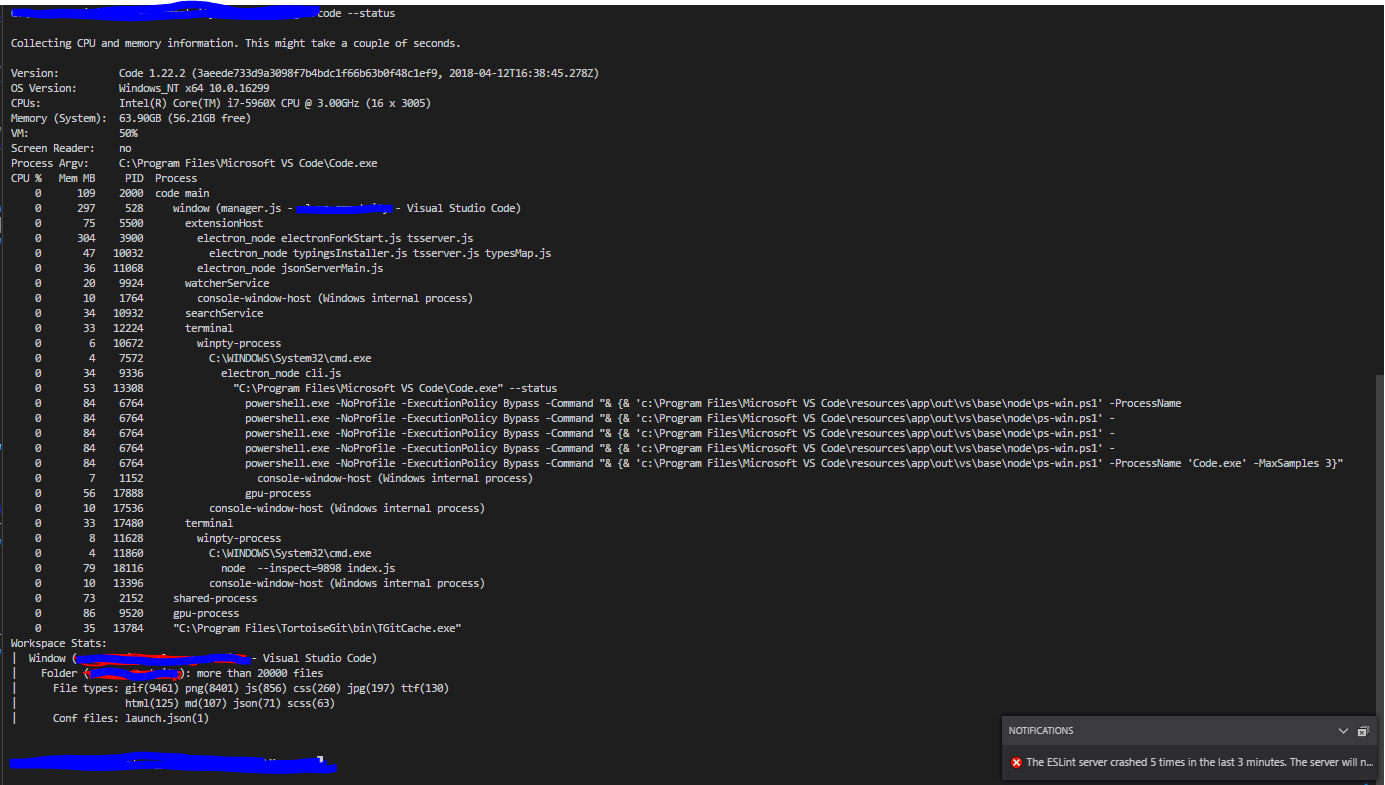
After that has happened can you run code --status from a terminal. I am wondering if the servers actually don't crash and the client simply looses the connection to the server?
dbaeumer
on 7 May 2018
@dbaeumer Here is a pic of the code --status output
coyle5280
on 7 May 2018
OK. That shows that the processes actually die. May be it would work the best if we try to debug this directly on our machine. Would this be something we could do using a screen sharing session?
dbaeumer
on 8 May 2018
Yeah. I am open to that. Do you want to send me an email and we can setup a time and method for the screen sharing? You can email me at [email protected]. Again thanks for the help.
coyle5280
on 10 May 2018
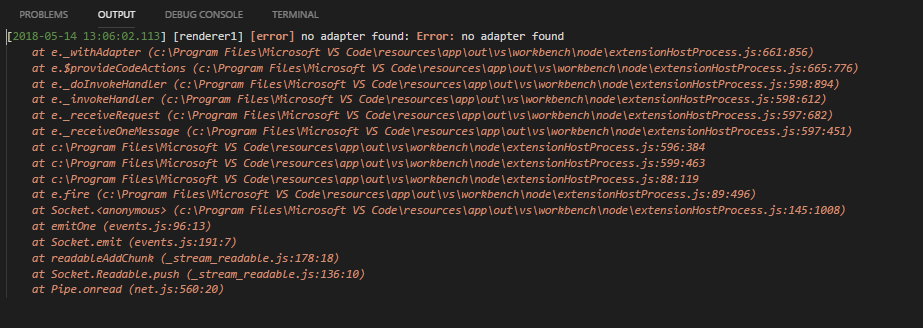
Not sure if this is related but I did notice that this error was being posted in the Log(Window) about the same time as the eslint server error appearing. Again not sure if its related.
coyle5280
on 14 May 2018
I think this is a follow up error of the server going down.
dbaeumer
on 15 May 2018
This issue has been closed automatically because it needs more information and has not had recent activity. See also our issue reporting guidelines.
Happy Coding!
vscodebot[bot]
on 22 May 2018
Reopening...
dbaeumer
on 22 May 2018
This issue has been closed automatically because it needs more information and has not had recent activity. See also our issue reporting guidelines.
Happy Coding!
vscodebot[bot]
on 29 May 2018
I got the same problem with that while I update my vscode-insider version coincidentally.
I try to install eslint locally but still crash like this.

my setting refer eslint:

my vscode info:

ESLint Version: v4.19.1
Global npm version: v6.1.0
Global yarn version: v1.8.0-20180525.0727
Global node version: v10.3.0
 nic611
on 30 May 2018
nic611
on 30 May 2018
@nic611 do I understand you correctly:
- the workspace worked before
- you updated VS Code
- now ESLint always crashes when you open it on that workspace
dbaeumer
on 30 May 2018
@dbaeumer yes, but only happened when I work with vscode (win), not happened in mac.
nic611
on 30 May 2018
@nic611 would you be able to share the project with me, best in a cloneable GitHub repository.
dbaeumer
on 30 May 2018
@dbaeumer I try it in vscode stable version, no problem with that. So I guess the insider version cause that.Hope it will be sovled soon(^_^).
nic611
on 31 May 2018
@nic611 since everything works for me without problems in the insider and the ESLint extension is independent of insider / stable I would be still interested in being able to reproduce this. Any chance you could share your code.
dbaeumer
on 31 May 2018
I also got this problem.
Log of ESlint window (version given above).
[Trace - 4:31:22 PM] Sending request 'initialize - (0)'.
Params: {
    "processId": 117184,
    "rootPath": "d:\\gits\\zero-chan",
    "rootUri": "file:///d%3A/gits/zero-chan",
    "capabilities": {
        "workspace": {
            "applyEdit": true,
            "workspaceEdit": {
                "documentChanges": true
            },
            "didChangeConfiguration": {
                "dynamicRegistration": true
            },
            "didChangeWatchedFiles": {
                "dynamicRegistration": true
            },
            "symbol": {
                "dynamicRegistration": true,
                "symbolKind": {
                    "valueSet": [
                        1,
                        2,
                        3,
                        4,
                        5,
                        6,
                        7,
                        8,
                        9,
                        10,
                        11,
                        12,
                        13,
                        14,
                        15,
                        16,
                        17,
                        18,
                        19,
                        20,
                        21,
                        22,
                        23,
                        24,
                        25,
                        26
                    ]
                }
            },
            "executeCommand": {
                "dynamicRegistration": true
            },
            "configuration": true,
            "workspaceFolders": true
        },
        "textDocument": {
            "publishDiagnostics": {
                "relatedInformation": true
            },
            "synchronization": {
                "dynamicRegistration": true,
                "willSave": true,
                "willSaveWaitUntil": true,
                "didSave": true
            },
            "completion": {
                "dynamicRegistration": true,
                "contextSupport": true,
                "completionItem": {
                    "snippetSupport": true,
                    "commitCharactersSupport": true,
                    "documentationFormat": [
                        "markdown",
                        "plaintext"
                    ],
                    "deprecatedSupport": true
                },
                "completionItemKind": {
                    "valueSet": [
                        1,
                        2,
                        3,
                        4,
                        5,
                        6,
                        7,
                        8,
                        9,
                        10,
                        11,
                        12,
                        13,
                        14,
                        15,
                        16,
                        17,
                        18,
                        19,
                        20,
                        21,
                        22,
                        23,
                        24,
                        25
                    ]
                }
            },
            "hover": {
                "dynamicRegistration": true,
                "contentFormat": [
                    "markdown",
                    "plaintext"
                ]
            },
            "signatureHelp": {
                "dynamicRegistration": true,
                "signatureInformation": {
                    "documentationFormat": [
                        "markdown",
                        "plaintext"
                    ]
                }
            },
            "definition": {
                "dynamicRegistration": true
            },
            "references": {
                "dynamicRegistration": true
            },
            "documentHighlight": {
                "dynamicRegistration": true
            },
            "documentSymbol": {
                "dynamicRegistration": true,
                "symbolKind": {
                    "valueSet": [
                        1,
                        2,
                        3,
                        4,
                        5,
                        6,
                        7,
                        8,
                        9,
                        10,
                        11,
                        12,
                        13,
                        14,
                        15,
                        16,
                        17,
                        18,
                        19,
                        20,
                        21,
                        22,
                        23,
                        24,
                        25,
                        26
                    ]
                }
            },
            "codeAction": {
                "dynamicRegistration": true
            },
            "codeLens": {
                "dynamicRegistration": true
            },
            "formatting": {
                "dynamicRegistration": true
            },
            "rangeFormatting": {
                "dynamicRegistration": true
            },
            "onTypeFormatting": {
                "dynamicRegistration": true
            },
            "rename": {
                "dynamicRegistration": true
            },
            "documentLink": {
                "dynamicRegistration": true
            },
            "typeDefinition": {
                "dynamicRegistration": true
            },
            "implementation": {
                "dynamicRegistration": true
            },
            "colorProvider": {
                "dynamicRegistration": true
            }
        }
    },
    "initializationOptions": {
        "legacyModuleResolve": false,
        "nodePath": null,
        "languageIds": [
            "javascript",
            "javascriptreact"
        ],
        "workspaceFolders": [
            "[object Object]"
        ]
    },
    "trace": "verbose",
    "workspaceFolders": [
        {
            "uri": "file:///d%3A/gits/zero-chan",
            "name": "zero-chan"
        }
    ]
}


[Trace - 4:31:22 PM] Received response 'initialize - (0)' in 310ms.
Result: {
    "capabilities": {
        "textDocumentSync": {
            "openClose": true,
            "change": 1,
            "willSaveWaitUntil": true,
            "save": {
                "includeText": false
            }
        },
        "codeActionProvider": true,
        "executeCommandProvider": {
            "commands": [
                "eslint.applySingleFix",
                "eslint.applySameFixes",
                "eslint.applyAllFixes",
                "eslint.applyAutoFix"
            ]
        }
    }
}


[Info  - 4:31:22 PM] ESLint server is running.
[Trace - 4:31:22 PM] Sending notification 'initialized'.
Params: {}


[Trace - 4:15:05 PM] Sending notification 'textDocument/didOpen'.
Params: {
    "textDocument": {
        "uri": "file:///d%3A/gits/zero-chan/src/monitors/tagHandler.js",
        "languageId": "javascript",
        "version": 1,
        "text": ... (removed this)
    }
}


[Trace - 4:15:05 PM] Received request 'client/registerCapability - (0)'.
Params: {
    "registrations": [
        {
            "id": "a374deb6-1f22-4854-90c6-6a29660c683e",
            "method": "workspace/didChangeConfiguration",
            "registerOptions": {}
        }
    ]
}


[Trace - 4:15:05 PM] Sending response 'client/registerCapability - (0)'. Processing request took 0ms
No result returned.


[Trace - 4:15:05 PM] Received request 'client/registerCapability - (1)'.
Params: {
    "registrations": [
        {
            "id": "2d951462-36b7-4e00-8aa6-cb4a266d1f83",
            "method": "workspace/didChangeWorkspaceFolders",
            "registerOptions": {}
        }
    ]
}


[Trace - 4:15:05 PM] Sending response 'client/registerCapability - (1)'. Processing request took 0ms
No result returned.


[Trace - 4:15:05 PM] Received request 'workspace/configuration - (2)'.
Params: {
    "items": [
        {
            "scopeUri": "file:///d%3A/gits/zero-chan/src/monitors/tagHandler.js",
            "section": ""
        }
    ]
}


[Trace - 4:15:05 PM] Sending response 'workspace/configuration - (2)'. Processing request took 1ms
Result: [
    {
        "validate": true,
        "packageManager": "yarn",
        "autoFix": true,
        "autoFixOnSave": false,
        "options": {},
        "run": "onType",
        "nodePath": null,
        "workspaceFolder": {
            "name": "zero-chan",
            "uri": "file:///d%3A/gits/zero-chan"
        }
    }
]


[Error - 4:15:06 PM] Connection to server got closed. Server will not be restarted.
[Info  - 4:15:06 PM] ESLint server stopped.
VS-code version:

code-insider.cmd --status output:
D:\gits\zero-chan [master ≡ +0 ~3 -0 !]> code-insiders.cmd --status


Version:          Code - Insiders 1.24.0-insider (43d168182c8df35a99c7f5ee0ef227de34f75fbd, 2018-05-30T05:16:49.918Z)
OS Version:       Windows_NT x64 10.0.17134
CPUs:             Intel(R) Core(TM) i7-3770K CPU @ 3.50GHz (8 x 3492)
Memory (System):  15.96GB (3.64GB free)
VM:               36%
Screen Reader:    no
Process Argv:     E:\Microsoft VS Code Insiders\Code - Insiders.exe
GPU Status:       2d_canvas:                    enabled
                  flash_3d:                     enabled
                  flash_stage3d:                enabled
                  flash_stage3d_baseline:       enabled
                  gpu_compositing:              enabled
                  multiple_raster_threads:      enabled_on
                  native_gpu_memory_buffers:    disabled_software
                  rasterization:                disabled_software
                  video_decode:                 enabled
                  video_encode:                 enabled
                  vpx_decode:                   enabled
                  webgl:                        enabled
                  webgl2:                       enabled
CPU %   Mem MB     PID  Process
    0       85  109620  code-insiders main
    0      234  107068     window (tagHandler.js - zero-chan - Visual Studio Code - Insiders)
    0       35   27776       searchService
    0       90  106876       extensionHost
    0      131  114920         electron_node electronForkStart.js tsserver.js
    0       40  115544           electron_node typingsInstaller.js tsserver.js typesMap.js
    0       29  114952         C:\Users\Dominic\.vscode-insiders\extensions\ms-vsliveshare.vsliveshare-0.3.246\dotnet_modules\vsls-agent.exe --autoexit --pipe de64774fb4c54ec0a37acac35dc51f25 --service https://insiders.liveshare.vsengsaas.visualstudio.com/
    0        9   99940           console-window-host (Windows internal process)
    0       33  109384       terminal
    0        7  114460         winpty-process
    0       11  111632           console-window-host (Windows internal process)
    0       96  115920           C:\Windows\System32\WindowsPowerShell\v1.0\powershell.exe
    0        7  116152             C:\WINDOWS\system32\cmd.exe /c ""E:\Microsoft VS Code Insiders\bin\code-insiders.cmd" --status"
    0       34  116260               electron_node cli.js
    0       54  116352                 "E:\Microsoft VS Code Insiders\Code - Insiders.exe" --status
    5        0  113716                   gpu-process
    0       12  111084       electron-crash-reporter
    0       15  112188       watcherService
    0       10  114528         console-window-host (Windows internal process)
    0       65  109932     shared-process
    0       61  114684     gpu-process
Workspace Stats:
|  Window (tagHandler.js - zero-chan - Visual Studio Code - Insiders)
|    Folder (zero-chan): 141 files
|      File types: js(102) png(17) json(6) md(2) yml(2) ttf(2) sh(2)
|                  dockerignore(1) gitignore(1) lock(1)
|      Conf files: package.json(1)
 majesnix
on 31 May 2018
majesnix
on 31 May 2018
I had a pair programming / debugging session with @coyle5280 last night (thanks again for doing this with me) and we were able to track this down. The ESLint server process basically crashes in the native npm module child_process when the server calls spwanSync. I have no idea yet why this is happening on your machines (since it doesn't on most of the others) but I will prepare a small test program to see if we can get more output about why this is happening.
dbaeumer
on 1 Jun 2018
Attached a new version of the eslint extension. Follow the steps from here https://github.com/Microsoft/vscode-eslint/issues/437#issuecomment-379174799 on how to install it. Can all of you give it a try and let me know if ESLint works for you again:
dbaeumer
on 1 Jun 2018
Works for me 👍
majesnix
on 2 Jun 2018
it works!! Thanks a lot @dbaeumer :+1:
nic611
on 4 Jun 2018
Great to hear that this fixes your problem. Will release a new version this week.
dbaeumer
on 4 Jun 2018
@dbaeumer Working here again.....thanks!!
coyle5280
on 4 Jun 2018
@coyle5280 thank you for helping me to track this down.
dbaeumer
on 4 Jun 2018
@dbaeumer what version is this fixed in? I'm seeing this in 1.4.12. 😢

 joshunger
on 14 Jun 2018
joshunger
on 14 Jun 2018
My fix is in 1.4.12
Can you enable tracing to see if the server crashes at a comparable location for you. Set "eslint.trace.server": "verbose" and provide me with the content of the ESLint output channel.
dbaeumer
on 15 Jun 2018
Additional question: are you using npm or yarn?
dbaeumer
on 15 Jun 2018
I'm using yarn. If you want me to create a separate issue please let me know. Thanks.
[Trace - 7:26:29 AM] Sending request 'initialize - (0)'.
Params: {
    "processId": 26466,
    "rootPath": "/Users/junger/dropbox/dev",
    "rootUri": "file:///Users/junger/dropbox/dev",
    "capabilities": {
        "workspace": {
            "applyEdit": true,
            "workspaceEdit": {
                "documentChanges": true
            },
            "didChangeConfiguration": {
                "dynamicRegistration": true
            },
            "didChangeWatchedFiles": {
                "dynamicRegistration": true
            },
            "symbol": {
                "dynamicRegistration": true,
                "symbolKind": {
                    "valueSet": [
                        1,
                        2,
                        3,
                        4,
                        5,
                        6,
                        7,
                        8,
                        9,
                        10,
                        11,
                        12,
                        13,
                        14,
                        15,
                        16,
                        17,
                        18,
                        19,
                        20,
                        21,
                        22,
                        23,
                        24,
                        25,
                        26
                    ]
                }
            },
            "executeCommand": {
                "dynamicRegistration": true
            },
            "configuration": true,
            "workspaceFolders": true
        },
        "textDocument": {
            "publishDiagnostics": {
                "relatedInformation": true
            },
            "synchronization": {
                "dynamicRegistration": true,
                "willSave": true,
                "willSaveWaitUntil": true,
                "didSave": true
            },
            "completion": {
                "dynamicRegistration": true,
                "contextSupport": true,
                "completionItem": {
                    "snippetSupport": true,
                    "commitCharactersSupport": true,
                    "documentationFormat": [
                        "markdown",
                        "plaintext"
                    ],
                    "deprecatedSupport": true
                },
                "completionItemKind": {
                    "valueSet": [
                        1,
                        2,
                        3,
                        4,
                        5,
                        6,
                        7,
                        8,
                        9,
                        10,
                        11,
                        12,
                        13,
                        14,
                        15,
                        16,
                        17,
                        18,
                        19,
                        20,
                        21,
                        22,
                        23,
                        24,
                        25
                    ]
                }
            },
            "hover": {
                "dynamicRegistration": true,
                "contentFormat": [
                    "markdown",
                    "plaintext"
                ]
            },
            "signatureHelp": {
                "dynamicRegistration": true,
                "signatureInformation": {
                    "documentationFormat": [
                        "markdown",
                        "plaintext"
                    ]
                }
            },
            "definition": {
                "dynamicRegistration": true
            },
            "references": {
                "dynamicRegistration": true
            },
            "documentHighlight": {
                "dynamicRegistration": true
            },
            "documentSymbol": {
                "dynamicRegistration": true,
                "symbolKind": {
                    "valueSet": [
                        1,
                        2,
                        3,
                        4,
                        5,
                        6,
                        7,
                        8,
                        9,
                        10,
                        11,
                        12,
                        13,
                        14,
                        15,
                        16,
                        17,
                        18,
                        19,
                        20,
                        21,
                        22,
                        23,
                        24,
                        25,
                        26
                    ]
                }
            },
            "codeAction": {
                "dynamicRegistration": true,
                "codeActionLiteralSupport": {
                    "codeActionKind": {
                        "valueSet": [
                            "",
                            "quickfix",
                            "refactor",
                            "refactor.extract",
                            "refactor.inline",
                            "refactor.rewrite",
                            "source",
                            "source.organizeImports"
                        ]
                    }
                }
            },
            "codeLens": {
                "dynamicRegistration": true
            },
            "formatting": {
                "dynamicRegistration": true
            },
            "rangeFormatting": {
                "dynamicRegistration": true
            },
            "onTypeFormatting": {
                "dynamicRegistration": true
            },
            "rename": {
                "dynamicRegistration": true
            },
            "documentLink": {
                "dynamicRegistration": true
            },
            "typeDefinition": {
                "dynamicRegistration": true
            },
            "implementation": {
                "dynamicRegistration": true
            },
            "colorProvider": {
                "dynamicRegistration": true
            }
        }
    },
    "trace": "verbose",
    "workspaceFolders": [
        {
            "uri": "file:///Users/junger/dropbox/dev",
            "name": "dev"
        }
    ]
}


[Trace - 7:26:29 AM] Received response 'initialize - (0)' in 88ms.
Result: {
    "capabilities": {
        "textDocumentSync": {
            "openClose": true,
            "change": 1,
            "willSaveWaitUntil": true,
            "save": {
                "includeText": false
            }
        },
        "codeActionProvider": true,
        "executeCommandProvider": {
            "commands": [
                "eslint.applySingleFix",
                "eslint.applySameFixes",
                "eslint.applyAllFixes",
                "eslint.applyAutoFix"
            ]
        }
    }
}


[Info  - 7:26:29 AM] ESLint server is running.
[Trace - 7:26:29 AM] Sending notification 'initialized'.
Params: {}


[Trace - 7:26:29 AM] Sending notification 'textDocument/didOpen'.
Params: {
    "textDocument": {
        "uri": "file:///Users/junger/dropbox/dev/REMOVED",
        "languageId": "javascript",
        "version": 1,
        "text": "REMOVED"
    }
}


[Trace - 7:26:29 AM] Received request 'client/registerCapability - (0)'.
Params: {
    "registrations": [
        {
            "id": "7e539f6e-7424-4c16-8b53-2241d1ef274f",
            "method": "workspace/didChangeConfiguration",
            "registerOptions": {}
        }
    ]
}


[Trace - 7:26:29 AM] Sending response 'client/registerCapability - (0)'. Processing request took 0ms
No result returned.


[Trace - 7:26:29 AM] Received request 'client/registerCapability - (1)'.
Params: {
    "registrations": [
        {
            "id": "6284ad33-f9b8-462b-aaf9-bee68c3e6530",
            "method": "workspace/didChangeWorkspaceFolders",
            "registerOptions": {}
        }
    ]
}


[Trace - 7:26:29 AM] Sending response 'client/registerCapability - (1)'. Processing request took 0ms
No result returned.


[Trace - 7:26:29 AM] Received request 'workspace/configuration - (2)'.
Params: {
    "items": [
        {
            "scopeUri": "file:///Users/junger/dropbox/dev/REMOVED",
            "section": ""
        }
    ]
}


[Trace - 7:26:29 AM] Sending response 'workspace/configuration - (2)'. Processing request took 0ms
Result: [
    {
        "validate": true,
        "packageManager": "yarn",
        "autoFix": true,
        "autoFixOnSave": true,
        "options": {},
        "run": "onType",
        "nodePath": "~/.config/yarn/global/node_modules/eslint/",
        "workspaceFolder": {
            "name": "dev",
            "uri": "file:///Users/junger/dropbox/dev"
        }
    }
]


[Trace - 7:26:30 AM] NODE_PATH value is: /Users/junger/dropbox/dev/~/.config/yarn/global/node_modules/eslint/
[Error - 7:26:30 AM] Connection to server got closed. Server will not be restarted.
[Info  - 7:26:30 AM] ESLint server stopped.
@joshunger actually the server crashes at a different location for you. Would you be willing to debug this since I am not able to reproduce this.
dbaeumer
on 18 Jun 2018
Yes you bet where can I find debugging instructions? Contributing.md?
joshunger
on 18 Jun 2018
Thanks. Here are the instructions:
- clone this repository
- cd into the directory
- npm install
- npm run compile
- open the workspace with VS Code.
- go to client\srcextension.ts
- on line 340 change inspect to inspect-brk
- Run Task > npm run watch:client
- open debug panel and select Lanuch Extension. Press the run button
- in the started Code instance select the workspace that makes the eslint server crash
- go back to the Code instance that contains the eslint code
- debug panel
- select Attach to server and press the run button. This should break in electronForkStart.js
- open server/out/eslintServer.js
- set a breakpoint at the top of the file
- press continue
- open server\node_modules\vscode-languageserver\libfiles.js
- set a breakpoint at line 133
- press run
- now step through the code
Let me know where the process actually crashes.
dbaeumer
on 19 Jun 2018
When I select Attach to server and press the run button I see the following dialog -

joshunger
on 19 Jun 2018
That is strange. Did you see the server crash output before connecting.
dbaeumer
on 20 Jun 2018
Related issues
 nicobarray
·
75Comments
nicobarray
·
75Comments
 txchen
·
31Comments
txchen
·
31Comments
 kentor
·
44Comments
kentor
·
44Comments
 empz
·
66Comments
empz
·
66Comments
 Beatusvir
·
35Comments
Beatusvir
·
35Comments
Most helpful comment
Attached a new version of the eslint extension. Follow the steps from here https://github.com/Microsoft/vscode-eslint/issues/437#issuecomment-379174799 on how to install it. Can all of you give it a try and let me know if ESLint works for you again:
vscode-eslint-1.4.11.zip