Vscode-docs: Video explanations of VS Code's settings
I've created a video playlist on YouTube explaining every single setting in VS Code (except 9 I don't yet understand, but will work on next) and I'd like to share that with the community. I'm guessing it would be most useful to share this in VS Code's documentation, but I'm not sure if that's appropriate. If it is, please let me know and I'll share the playlist link.
 andrecasal
All 22 comments
Hi @andrecasal What a cool project! We don't usually link to content that we don't maintain from the VS Code documentation. If you would like to share your playlist, we can have a look at see if we'd like to mention it from the @code twitter feed or other social sites.
I'm also curious which settings you don't understand. Maybe I can help or there is a documentation gap ;-).
 gregvanl
on 15 Oct 2019
gregvanl
on 15 Oct 2019
Hey @gregvanl thanks! Yeah that's what I figured.
Sure, here's the link for the playlist and here's the link for all the VS Code stuff. You're welcome to share whatever link you find most pertinent.
The settings I don't yet understand are the following ones:
css.lint.hexColorLength: can't figure out where this settings appliesdebug.enableAllHovers: can't see any difference in hovers while debuggingdebug.showSubSessionsInToolBar: can't see any difference in the debug toolbar when debugging a thread with sub-threads attached to iteditor.overviewRulerLanes: can't see any difference in the ruler lanes in the editor or diff editor when I have errors, warnings and git decorations showing up
If you could provide some clarification on these, I'd very much appreciate it!
andrecasal
on 16 Oct 2019
Hi @andrecasal You are down to the tricky settings. I'll need to ask the VS Code engineers about these 4 settings as I also don't see how they affect the VS Code UI.
gregvanl
on 19 Oct 2019
Hi @andrecasal The VS Code team provided this explanation for the two debug settings.
"showSubSessionsInToolBar is active when a debug extension creates debug subsessions. You can have session A, and session B which is a child of A. That setting controls if A should be shown in the tool bar drop down."
"debug.enableAllHovers - is a setting introduced for Live Share who want to show their custom hover while debugging. Usually VS Code will hide hovers while debugging and this setting allows the Live Share customer hover to be displayed."
gregvanl
on 25 Oct 2019
Hey @gregvanl Thanks for the explanations! Do you know of any extension that creates debug subsessions?
css.lint.hexColorLength has been confirmed as not working and a workaround is being thought about.
editor.overviewRulerLanes has been confirmed to be a remnant setting from the Monaco editor VS Code inherits, that no longer has an effect and is going to be removed from the settings.json file.
I'll test those 2 settings out and I'll share an update as soon as I have videos for those 2 last settings too. We nailed it 👊
andrecasal
on 26 Oct 2019
Hi @andrecasal The 1.33 release notes mention that the built-in Node.js debugger supports subsessions when doing Node.js cluster debugging.
https://code.visualstudio.com/updates/v1_33#_support-for-subsessions
gregvanl
on 26 Oct 2019
Oops, didn't mean to close. @andrecasal close when you are ready.
gregvanl
on 26 Oct 2019
@andrecasal ok if I reference your video series in my VS Code Tips and Tricks talk at Microsoft Ignite next week?
 chrisdias
on 29 Oct 2019
chrisdias
on 29 Oct 2019
@gregvanl looking forward to testing those out this week.
@chrisdias absolutely, I'd be honored! Is it recorded? Would love a link :)
andrecasal
on 29 Oct 2019
@andrecasal thanks! The session should be streamed live, I imagine you can find it from here next week: https://myignite.techcommunity.microsoft.com/sessions/81613?source=sessions
chrisdias
on 29 Oct 2019
That's great @chrisdias, thanks! @gregvanl would it be ok if I closed this issue after testing those 2 last settings out or would it be more appropriate to close it now?
andrecasal
on 29 Oct 2019
@andrecasal Either way is fine. I wanted to keep it open until we found a nice way to give your work some visibility.
gregvanl
on 29 Oct 2019
Hey @gregvanl I got the debug.showSubSessionsInToolBar setting to work and recorded a video on it. As for the debug.enableAllHovers, this being a setting, according to this introductory video on the Live Share page, that only makes sense if you have Live Share installed, wouldn't it make more sense for this to be a Live Share contributed setting instead of being in VS Code by default?
andrecasal
on 30 Oct 2019
@andrecasal Cool, glad you were able to get showSubSessionsInToolBar working. I think the enableAllHovers setting affects the core VS Code shared debugger UI and while currently only the Live Share debug extension uses it, other debug extensions might in the future. The setting isn't contributed by the Live Share extension (as you found out since it shows up in the core default settings list).
Just a heads up, there are a lot of new settings coming in 1.40. Check out Insiders or have a look at the this commit on settings.md https://github.com/microsoft/vscode-docs/commit/a4bbd18c87c5f648c10644b9c9993f9574629217. In the commit you can see that overviewRulerLanes is removed, thanks to your sleuthing.
gregvanl
on 31 Oct 2019
@gregvanl Hum I see... wouldn't it make sense to enable those hovers _per extension_ though?
Those are some very interesting new settings 😄
andrecasal
on 31 Oct 2019
@chrisdias Do you know the date and time of your MyIngite presentation? Also what's the timezone?
andrecasal
on 1 Nov 2019
@andrecasal Tuesday in Orlando, Florida so Eastern Standard Time. Chris is checking on the exact time.
I don't think there is currently a way to enable a setting per active extension, you can enable resource settings per active language of a file but not active extension. Might be tricky if a project has many extensions are running.
I'm going to close this issue now as I don't think there are any more open questions. Thanks again for your enthusiasm for VS Code!
gregvanl
on 2 Nov 2019
Alright, thanks for your help getting to the last ones @gregvanl 👊
andrecasal
on 2 Nov 2019
@andrecasal In case you didn't see this, VS Code Tips and Tricks https://myignite.techcommunity.microsoft.com/sessions/81613?source=sessions
Check out the end around 47:30.
gregvanl
on 6 Nov 2019
@gregvanl That's great, so kind of @chrisdias to mention me, I hope it benefits the community. On a curious note, the most watched video is about a deprecated setting: http.proxy, which makes sense - the first thing you want to do when setting up VS Code is actually connecting it to the internet if you're in a company that's behind a secure proxy.
andrecasal
on 6 Nov 2019
@andrecasal Thanks for the heads up about the most watched video. We'd be really curious to hear if you see an uplift in viewings with the Ignite talk mention. We'd also be curious about your top 10 list after the next month. It would help use learn what settings user like or need help with.
gregvanl
on 6 Nov 2019
@gregvanl Sure, here's the stats.
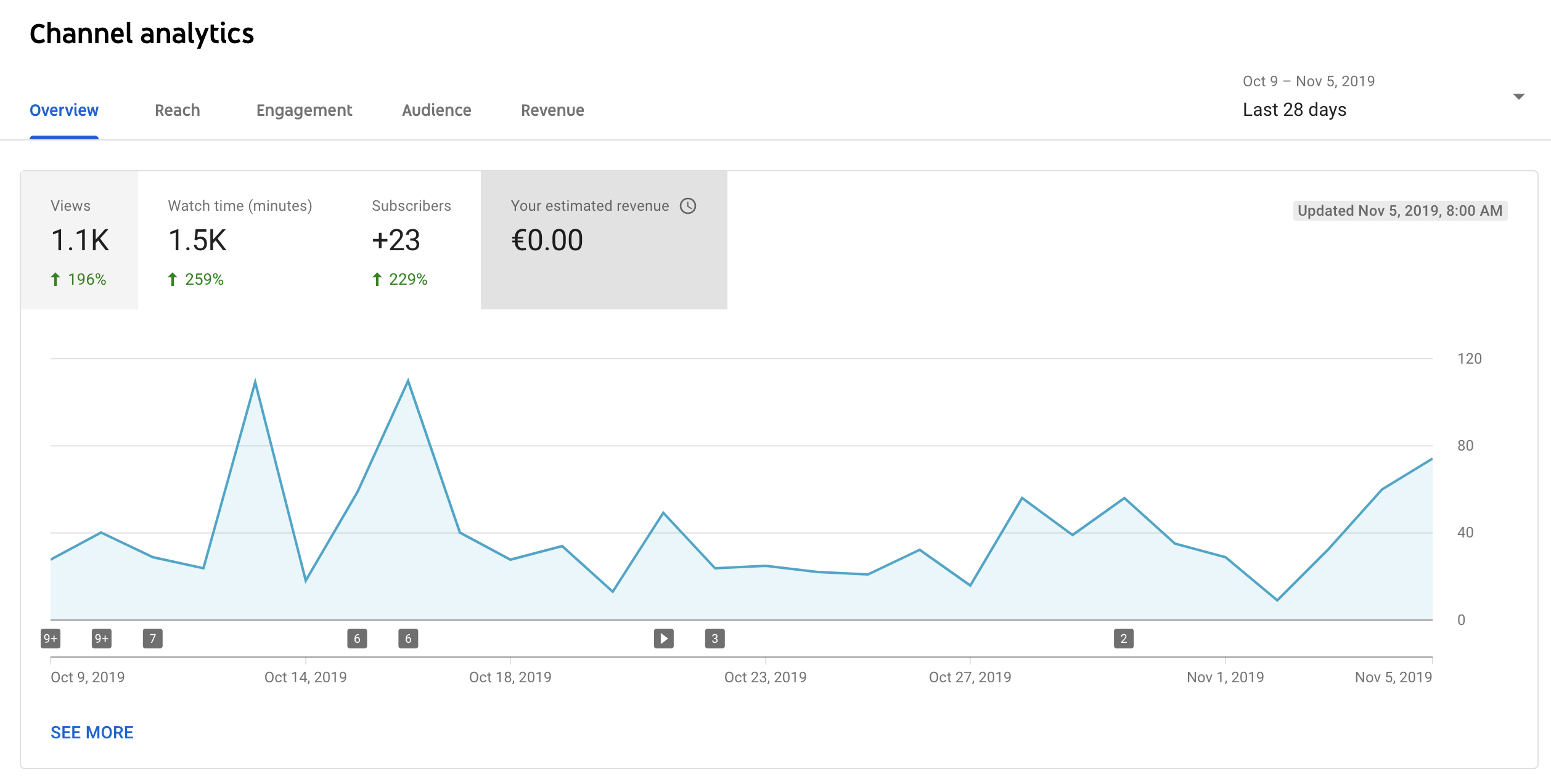
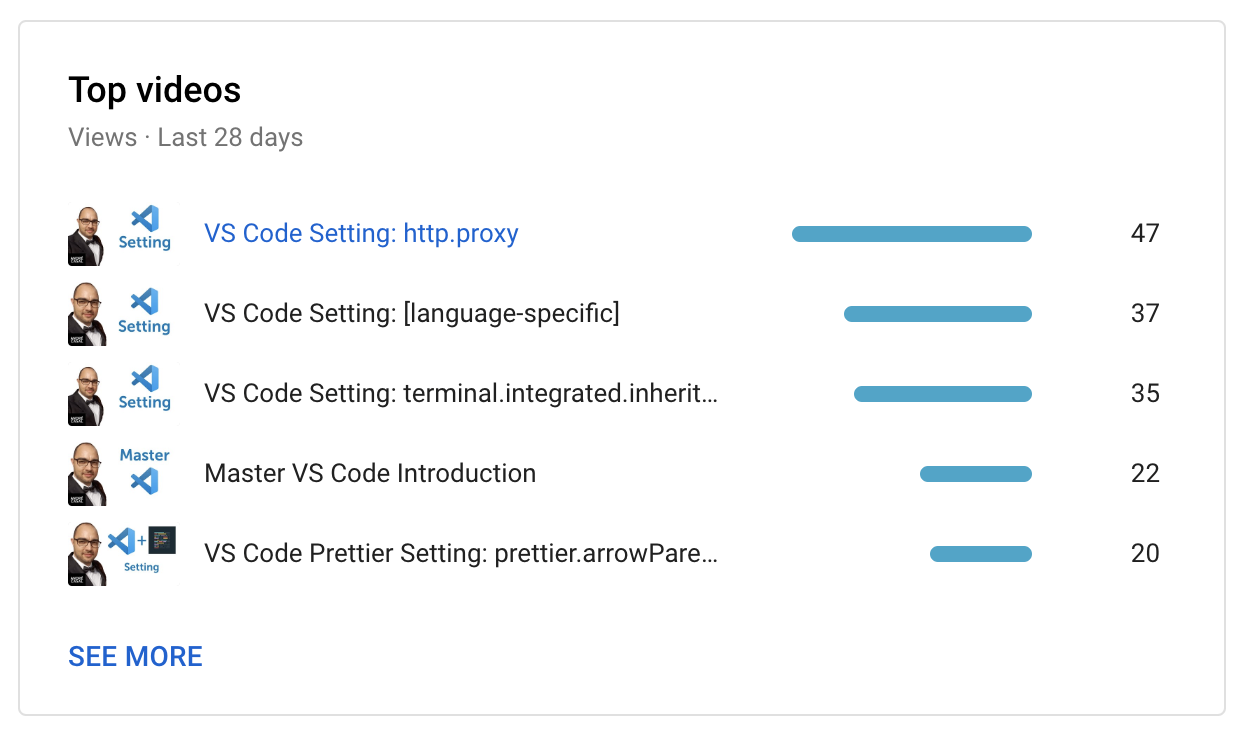
There was a bump, yes. I'd be happy to share the top 10 one month from now.
andrecasal
on 6 Nov 2019
Related issues
 tariqawni
·
5Comments
tariqawni
·
5Comments
 busticated
·
4Comments
busticated
·
4Comments
 brettcannon
·
7Comments
brettcannon
·
7Comments
 JanKok
·
4Comments
JanKok
·
4Comments
 isidorn
·
5Comments
isidorn
·
5Comments
Most helpful comment
@gregvanl That's great, so kind of @chrisdias to mention me, I hope it benefits the community. On a curious note, the most watched video is about a deprecated setting:
http.proxy, which makes sense - the first thing you want to do when setting up VS Code is actually connecting it to the internet if you're in a company that's behind a secure proxy.