Vscode-docs: Java Tutorial didn't work
_From @ksnyde on February 27, 2018 20:6_
I have the latest version of modern versions of all Java deps:
JDK: 9.0.4
Maven: 3.5.2
I and am running on MacOS and cloned the gs-spring-boot as described. When I open a source file
I am immediately given the error:
Classpath is incomplete. Only syntax errors will be reported
With optimism flowing eternal, I hit F5 to see if it will compile. Nada. Sadness ensues. I having written a line of Java since the 1990's so I'm completely out of my element and was hoping that the hand-holding of this 101 tutorial would at least give me a "hello world" moment.
_Copied from original issue: Microsoft/vscode#44649_
 gregvanl
All 18 comments
_From @ksnyde on February 27, 2018 20:9_
Oh also worth mentioning that I _do_ have the following plugins:
- Language Support Java(TM) by Red Hat (not the other Language Support module)
- Debugger for Java
- Maven for Java
- Java Etension Pack
I also shutdown vs-code and restarted hoping that might kick things into a higher gear.
gregvanl
on 28 Feb 2018
_From @ChrisColeTech on February 27, 2018 20:58_
I can confirm this issue.
The Java tutorial on visualstudio.com must be missing a few steps, the app doesn't run if you are following the tutorial.
gregvanl
on 28 Feb 2018
@gregvanl so have the public docs been updated or will be released on a schedule?
 ksnyde
on 1 Mar 2018
ksnyde
on 1 Mar 2018
@ksnyde I just moved the issue since it is related to the VS Code documentation not the product. The documentation will be updated once the issue has been solved. The tutorial is provided by the Java extension team and I've asked them to take a look.
gregvanl
on 1 Mar 2018
Oh sorry, I mistakenly thought it had been closed here.
ksnyde
on 1 Mar 2018
@andxu there are multiple issues reported here. Please help take a look to see if they are related to the debugger. If yes, then please help create issues in the debugger repo. Or if it's about the language server, please help create issue in redhat/vscode-java repo.
 akaroml
on 2 Mar 2018
akaroml
on 2 Mar 2018
@ksnyde are you opening the root folder at gs-spring-boot, if so, please open the sub folder named "complete" instead(see https://github.com/spring-guides/gs-spring-boot/tree/master/complete), if you prefer to use maven, please delete build.gradle/gradlew/gradlew.bat under the complete folder.
 andxu
on 2 Mar 2018
andxu
on 2 Mar 2018
I had to get up to speed on Java in a hurry and have since done so in the flurry I'll try and represent things as well as possible:
- After installing all suggested vs-code addons and cloning the spring-boot repo ...
When I open any source file I get the following error:
When then pressing F5 to have it build and choosing JAVA from the pull down it creates a
launch.json... this is in keeping with the documentationI then press F5 to kick off the debugger; debugger starts but in the _debug console_ I get the error:
Error: Unable to initialize main class hello.Application
Caused by: java.lang.NoClassDefFoundError: ApplicationContext
Hope this helps. BTW, I am using Maven now in my project but when the directions failed for me I was agnostic (read: unaware) and there's nothing in the directions about which build system you're using. Also you mention removing gradlew.bat but I'm assuming this is only ever used with Windows computers right? I'm on a Mac. Anyway I removed all traces of Gradle and hit F5 again. Same error.
Bear in mind that the direction I was following were these: https://code.visualstudio.com/docs/java/java-tutorial
I do notice that the repo's directions have specific directions for packaging with Maven. Sadly these too do not work. When I run mvn package && java -jar target/gs-spring-boot-0.1.0.jar it gives me the following error:

The goal you specified requires a project to execute but there is no POM in this directory (/Users/ken/mine/playground/gs-spring-boot). Please verify you invoked Maven from the correct directory. Of course this is because you need to be in the "complete" directory first. If I move to complete then it does work.
ksnyde
on 2 Mar 2018
@ksnyde Can you take a try of downgrading to jdk 8, the spring-boot with version 1.5.6 in the Tutorial only supports up to 1.8, see https://github.com/spring-projects/spring-boot/wiki/Spring-Boot-with-Java-9, if this doesn't solve your problem, please send us the error log using the command Open Java Language Server log file(see snapshots at last)
see Spring Boot 2 is the first version to support Java 9 (Java 8 is also supported). If you are using 1.5 and wish to use Java 9 you should upgrade to 2.0 as we have no plans to support Java 9 on Spring Boot 1.5.x.
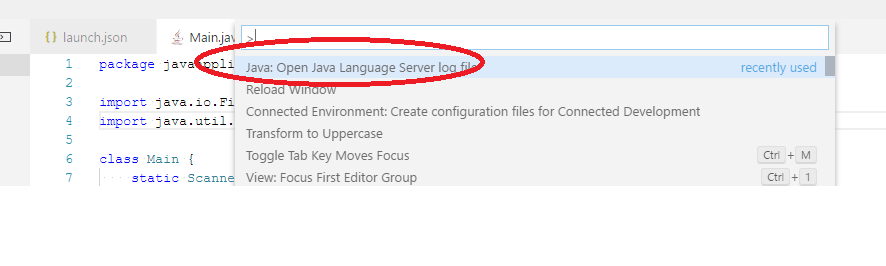

andxu
on 6 Mar 2018
Sorry but I just wanted to point out the documentation problem I had. I hope that has been helpful but I would not like to downgrade at this point.
On Mar 5, 2018, 10:34 PM -0800, Andy Xu(devdiv) notifications@github.com, wrote:
@ksnyde Can you take a try of downgrading to jdk 8, the spring-boot with version 1.5.6 in the Tutorial only supports up to 1.8, see https://github.com/spring-projects/spring-boot/wiki/Spring-Boot-with-Java-9
see Spring Boot 2 is the first version to support Java 9 (Java 8 is also supported). If you are using 1.5 and wish to use Java 9 you should upgrade to 2.0 as we have no plans to support Java 9 on Spring Boot 1.5.x.
—
You are receiving this because you were mentioned.
Reply to this email directly, view it on GitHub, or mute the thread.
ksnyde
on 7 Mar 2018
Thank you very much for bring our focus on the java tutorial, @hexiaokai the author of the doc has noticed in certain scenarios there might be errors for users which blocks users, we need to provide FAQ to users to setup their java development environment well.
andxu
on 7 Mar 2018
@andxu @hexiaokai Are there any VS Code documentation changes for this issue? Shall I close it or move it to the Java extension repo?
gregvanl
on 22 Mar 2018
This is still an issue.
 ms-schneider-electric
on 19 Jul 2018
ms-schneider-electric
on 19 Jul 2018
@andxu @hexiaokai Can you follow up if users are having trouble with the Java tutorial?
gregvanl
on 19 Jul 2018
Still an issue. The the app doesn't run if I follow the tutorial.
 alapini
on 20 Jul 2018
alapini
on 20 Jul 2018
@alapini @ms-schneider-electric , could you provides a error description to us? I tested through the tutorial just now and found no issue. (Hint: as maven would down load a lot pom and jar files for the first time, please wait for some minutes, you can refer to this help page for troubleshooting https://github.com/Microsoft/vscode-java-debug/blob/jinbo_dev/Troubleshooting.md)

andxu
on 23 Jul 2018
Hi,
java version 1.8.0_181
Ubuntu 18.04
Linux & Java newbie here...I'm having the same problem with the tutorial. I noticed the following pops up in the OUTPUT view (Language Support for Java) when first loading the project in VS Code:
``[Warn  - 9:07:20 PM] Jul 23, 2018 9:07:19 PM Could not load Gradle version information
Cannot download published Gradle versions.
org.gradle.api.UncheckedIOException: Cannot download published Gradle versions.
    at com.gradleware.tooling.toolingutils.distribution.PublishedGradleVersions.downloadVersionInformation(PublishedGradleVersions.java:175)
    at com.gradleware.tooling.toolingutils.distribution.PublishedGradleVersions.tryToDownloadAndCacheVersions(PublishedGradleVersions.java:159)
    at com.gradleware.tooling.toolingutils.distribution.PublishedGradleVersions.create(PublishedGradleVersions.java:119)
    at org.eclipse.buildship.core.util.gradle.PublishedGradleVersionsWrapper$LoadVersionsJob.run(PublishedGradleVersionsWrapper.java:66)
    at org.eclipse.core.internal.jobs.Worker.run(Worker.java:60)
Caused by: javax.net.ssl.SSLException: java.lang.RuntimeException: Unexpected error: java.security.InvalidAlgorithmParameterException: the trustAnchors parameter must be non-empty
    at sun.security.ssl.Alerts.getSSLException(Alerts.java:208)
    at sun.security.ssl.SSLSocketImpl.fatal(SSLSocketImpl.java:1964)
    at sun.security.ssl.SSLSocketImpl.fatal(SSLSocketImpl.java:1921)
    at sun.security.ssl.SSLSocketImpl.handleException(SSLSocketImpl.java:1904)
    at sun.security.ssl.SSLSocketImpl.startHandshake(SSLSocketImpl.java:1420)
    at sun.security.ssl.SSLSocketImpl.startHandshake(SSLSocketImpl.java:1397)
    at sun.net.www.protocol.https.HttpsClient.afterConnect(HttpsClient.java:559)
    at sun.net.www.protocol.https.AbstractDelegateHttpsURLConnection.connect(AbstractDelegateHttpsURLConnection.java:185)
    at sun.net.www.protocol.http.HttpURLConnection.getInputStream0(HttpURLConnection.java:1564)
    at sun.net.www.protocol.http.HttpURLConnection.getInputStream(HttpURLConnection.java:1492)
    at sun.net.www.protocol.https.HttpsURLConnectionImpl.getInputStream(HttpsURLConnectionImpl.java:263)
    at com.gradleware.tooling.toolingutils.distribution.PublishedGradleVersions.downloadVersionInformation(PublishedGradleVersions.java:172)
    ... 4 more
Caused by: java.lang.RuntimeException: Unexpected error: java.security.InvalidAlgorithmParameterException: the trustAnchors parameter must be non-empty
    at sun.security.validator.PKIXValidator.<init>(PKIXValidator.java:91)
    at sun.security.validator.Validator.getInstance(Validator.java:181)
    at sun.security.ssl.X509TrustManagerImpl.getValidator(X509TrustManagerImpl.java:312)
    at sun.security.ssl.X509TrustManagerImpl.checkTrustedInit(X509TrustManagerImpl.java:171)
    at sun.security.ssl.X509TrustManagerImpl.checkTrusted(X509TrustManagerImpl.java:184)
    at sun.security.ssl.X509TrustManagerImpl.checkServerTrusted(X509TrustManagerImpl.java:124)
    at sun.security.ssl.ClientHandshaker.serverCertificate(ClientHandshaker.java:1596)
    at sun.security.ssl.ClientHandshaker.processMessage(ClientHandshaker.java:216)
    at sun.security.ssl.Handshaker.processLoop(Handshaker.java:1052)
    at sun.security.ssl.Handshaker.process_record(Handshaker.java:987)
    at sun.security.ssl.SSLSocketImpl.readRecord(SSLSocketImpl.java:1072)
    at sun.security.ssl.SSLSocketImpl.performInitialHandshake(SSLSocketImpl.java:1385)
    at sun.security.ssl.SSLSocketImpl.startHandshake(SSLSocketImpl.java:1413)
    ... 11 more
Caused by: java.security.InvalidAlgorithmParameterException: the trustAnchors parameter must be non-empty
    at java.security.cert.PKIXParameters.setTrustAnchors(PKIXParameters.java:200)
    at java.security.cert.PKIXParameters.<init>(PKIXParameters.java:120)
    at java.security.cert.PKIXBuilderParameters.<init>(PKIXBuilderParameters.java:104)
    at sun.security.validator.PKIXValidator.<init>(PKIXValidator.java:89)
    ... 23 more

[Error - 9:07:21 PM] Jul 23, 2018 9:07:19 PM Initialization failed
Could not install Gradle distribution from 'https://services.gradle.org/distributions/gradle-4.6-bin.zip'.
org.gradle.tooling.GradleConnectionException: Could not install Gradle distribution from 'https://services.gradle.org/distributions/gradle-4.6-bin.zip'.
    at org.gradle.tooling.internal.consumer.DistributionFactory$ZippedDistribution.getToolingImplementationClasspath(DistributionFactory.java:137)
    at org.gradle.tooling.internal.consumer.loader.CachingToolingImplementationLoader.create(CachingToolingImplementationLoader.java:40)
    at org.gradle.tooling.internal.consumer.loader.SynchronizedToolingImplementationLoader.create(SynchronizedToolingImplementationLoader.java:43)
    at org.gradle.tooling.internal.consumer.connection.LazyConsumerActionExecutor.onStartAction(LazyConsumerActionExecutor.java:101)
    at org.gradle.tooling.internal.consumer.connection.LazyConsumerActionExecutor.run(LazyConsumerActionExecutor.java:83)
    at org.gradle.tooling.internal.consumer.connection.CancellableConsumerActionExecutor.run(CancellableConsumerActionExecutor.java:45)
    at org.gradle.tooling.internal.consumer.connection.ProgressLoggingConsumerActionExecutor.run(ProgressLoggingConsumerActionExecutor.java:58)
    at org.gradle.tooling.internal.consumer.connection.RethrowingErrorsConsumerActionExecutor.run(RethrowingErrorsConsumerActionExecutor.java:38)
    at org.gradle.tooling.internal.consumer.async.DefaultAsyncConsumerActionExecutor$1$1.run(DefaultAsyncConsumerActionExecutor.java:55)
    at org.gradle.internal.concurrent.ExecutorPolicy$CatchAndRecordFailures.onExecute(ExecutorPolicy.java:63)
    at org.gradle.internal.concurrent.ManagedExecutorImpl$1.run(ManagedExecutorImpl.java:46)
    at java.util.concurrent.ThreadPoolExecutor.runWorker(ThreadPoolExecutor.java:1149)
    at java.util.concurrent.ThreadPoolExecutor$Worker.run(ThreadPoolExecutor.java:624)
    at org.gradle.internal.concurrent.ThreadFactoryImpl$ManagedThreadRunnable.run(ThreadFactoryImpl.java:55)
    at java.lang.Thread.run(Thread.java:748)
    at org.gradle.tooling.internal.consumer.BlockingResultHandler.getResult(BlockingResultHandler.java:46)
    at org.gradle.tooling.internal.consumer.DefaultModelBuilder.get(DefaultModelBuilder.java:50)
    at org.gradle.tooling.internal.consumer.DefaultProjectConnection.getModel(DefaultProjectConnection.java:41)
    at org.eclipse.buildship.core.workspace.internal.ConnectionAwareLauncherProxy.newModelBuilder(ConnectionAwareLauncherProxy.java:64)
    at org.eclipse.buildship.core.workspace.internal.DefaultModelProvider.fetchModel(DefaultModelProvider.java:68)
    at org.eclipse.buildship.core.workspace.internal.DefaultModelProvider.supportsCompositeBuilds(DefaultModelProvider.java:165)
    at org.eclipse.buildship.core.workspace.internal.DefaultModelProvider.fetchModels(DefaultModelProvider.java:75)
    at org.eclipse.buildship.core.workspace.internal.DefaultModelProvider.fetchEclipseGradleProjects(DefaultModelProvider.java:99)
    at org.eclipse.jdt.ls.core.internal.managers.GradleProjectImporter.startSynchronization(GradleProjectImporter.java:152)
    at org.eclipse.jdt.ls.core.internal.managers.GradleProjectImporter.importDir(GradleProjectImporter.java:99)
    at org.eclipse.jdt.ls.core.internal.managers.GradleProjectImporter.lambda$0(GradleProjectImporter.java:91)
    at java.util.ArrayList.forEach(ArrayList.java:1257)
    at java.util.Collections$UnmodifiableCollection.forEach(Collections.java:1080)
    at org.eclipse.jdt.ls.core.internal.managers.GradleProjectImporter.importToWorkspace(GradleProjectImporter.java:91)
    at org.eclipse.jdt.ls.core.internal.managers.ProjectsManager.importProjects(ProjectsManager.java:132)
    at org.eclipse.jdt.ls.core.internal.managers.ProjectsManager.access$1(ProjectsManager.java:126)
    at org.eclipse.jdt.ls.core.internal.managers.ProjectsManager$2.run(ProjectsManager.java:120)
    at org.eclipse.jdt.internal.core.BatchOperation.executeOperation(BatchOperation.java:38)
    at org.eclipse.jdt.internal.core.JavaModelOperation.run(JavaModelOperation.java:733)
    at org.eclipse.core.internal.resources.Workspace.run(Workspace.java:2289)
    at org.eclipse.core.internal.resources.Workspace.run(Workspace.java:2316)
    at org.eclipse.jdt.core.JavaCore.run(JavaCore.java:5733)
    at org.eclipse.jdt.core.JavaCore.run(JavaCore.java:5690)
    at org.eclipse.jdt.ls.core.internal.managers.ProjectsManager.initializeProjects(ProjectsManager.java:113)
    at org.eclipse.jdt.ls.core.internal.handlers.InitHandler$1.runInWorkspace(InitHandler.java:217)
    at org.eclipse.core.internal.resources.InternalWorkspaceJob.run(InternalWorkspaceJob.java:39)
    at org.eclipse.core.internal.jobs.Worker.run(Worker.java:60)
Caused by: javax.net.ssl.SSLException: java.lang.RuntimeException: Unexpected error: java.security.InvalidAlgorithmParameterException: the trustAnchors parameter must be non-empty
    at sun.security.ssl.Alerts.getSSLException(Alerts.java:208)
    at sun.security.ssl.SSLSocketImpl.fatal(SSLSocketImpl.java:1964)
    at sun.security.ssl.SSLSocketImpl.fatal(SSLSocketImpl.java:1921)
    at sun.security.ssl.SSLSocketImpl.handleException(SSLSocketImpl.java:1904)
    at sun.security.ssl.SSLSocketImpl.startHandshake(SSLSocketImpl.java:1420)
    at sun.security.ssl.SSLSocketImpl.startHandshake(SSLSocketImpl.java:1397)
    at sun.net.www.protocol.https.HttpsClient.afterConnect(HttpsClient.java:559)
    at sun.net.www.protocol.https.AbstractDelegateHttpsURLConnection.connect(AbstractDelegateHttpsURLConnection.java:185)
    at sun.net.www.protocol.http.HttpURLConnection.getInputStream0(HttpURLConnection.java:1564)
    at sun.net.www.protocol.http.HttpURLConnection.getInputStream(HttpURLConnection.java:1492)
    at sun.net.www.protocol.https.HttpsURLConnectionImpl.getInputStream(HttpsURLConnectionImpl.java:263)
    at org.gradle.wrapper.Download.downloadInternal(Download.java:66)
    at org.gradle.wrapper.Download.download(Download.java:51)
    at org.gradle.tooling.internal.consumer.DistributionInstaller$1.run(DistributionInstaller.java:128)
Caused by: java.lang.RuntimeException: Unexpected error: java.security.InvalidAlgorithmParameterException: the trustAnchors parameter must be non-empty
    at sun.security.validator.PKIXValidator.<init>(PKIXValidator.java:91)
    at sun.security.validator.Validator.getInstance(Validator.java:181)
    at sun.security.ssl.X509TrustManagerImpl.getValidator(X509TrustManagerImpl.java:312)
    at sun.security.ssl.X509TrustManagerImpl.checkTrustedInit(X509TrustManagerImpl.java:171)
    at sun.security.ssl.X509TrustManagerImpl.checkTrusted(X509TrustManagerImpl.java:184)
    at sun.security.ssl.X509TrustManagerImpl.checkServerTrusted(X509TrustManagerImpl.java:124)
    at sun.security.ssl.ClientHandshaker.serverCertificate(ClientHandshaker.java:1596)
    at sun.security.ssl.ClientHandshaker.processMessage(ClientHandshaker.java:216)
    at sun.security.ssl.Handshaker.processLoop(Handshaker.java:1052)
    at sun.security.ssl.Handshaker.process_record(Handshaker.java:987)
    at sun.security.ssl.SSLSocketImpl.readRecord(SSLSocketImpl.java:1072)
    at sun.security.ssl.SSLSocketImpl.performInitialHandshake(SSLSocketImpl.java:1385)
    at sun.security.ssl.SSLSocketImpl.startHandshake(SSLSocketImpl.java:1413)
    ... 9 more
Caused by: java.security.InvalidAlgorithmParameterException: the trustAnchors parameter must be non-empty
    at java.security.cert.PKIXParameters.setTrustAnchors(PKIXParameters.java:200)
    at java.security.cert.PKIXParameters.<init>(PKIXParameters.java:120)
    at java.security.cert.PKIXBuilderParameters.<init>(PKIXBuilderParameters.java:104)
    at sun.security.validator.PKIXValidator.<init>(PKIXValidator.java:89)
    ... 21 more
 sev-g
on 23 Jul 2018
sev-g
on 23 Jul 2018
Moved to Java extension repo issue https://github.com/redhat-developer/vscode-java/issues/595
gregvanl
on 12 Sep 2018
Related issues
 karrtikr
·
6Comments
karrtikr
·
6Comments
 bpasero
·
3Comments
bpasero
·
3Comments
 tbrodbeck
·
4Comments
tbrodbeck
·
4Comments
 brettcannon
·
7Comments
brettcannon
·
7Comments
 bersbersbers
·
6Comments
bersbersbers
·
6Comments
Most helpful comment
This is still an issue.