Vscode-docs: Add advice for setting up the powerlines font in the integrated terminal
 Tyriar
All 19 comments
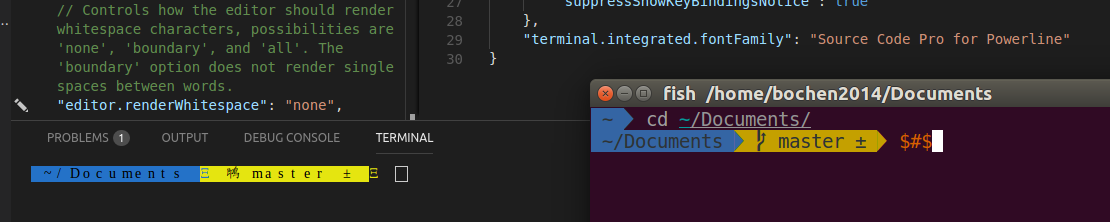
didn't work on my Ubuntu. screenshot attached
 bochen2014
on 5 Apr 2018
bochen2014
on 5 Apr 2018
@bochen2014 try wrapping the value in quotes like https://github.com/Microsoft/vscode/issues/15119#issuecomment-322609608
Tyriar
on 5 Apr 2018
it's most certainly not straight forward but i finally figured it out

bochen2014
on 5 Apr 2018
@bochen2014 how did you land on that string?
Tyriar
on 5 Apr 2018
Dup of fixed https://github.com/Microsoft/vscode-docs/issues/1534
 gregvanl
on 17 Jul 2018
gregvanl
on 17 Jul 2018
@Tyriar How can I have this two fonts working on my VSCode terminal? (_Operator Mono + Inconsolata for Powerline_)
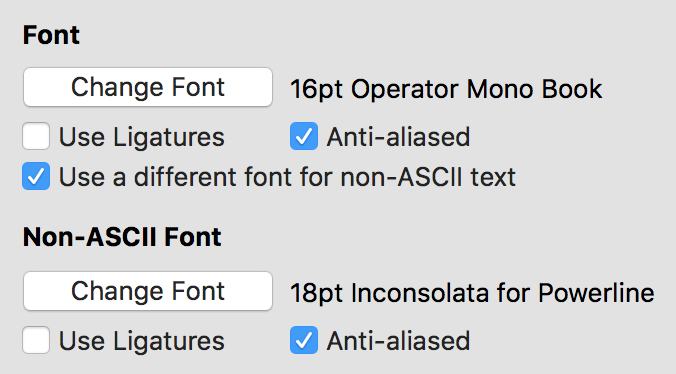
I have done this and ASCII characters are showing up correctly but now I want to change my base font to look as my iTerm config also with the theme colors:
{
  "terminal.integrated.fontFamily": "'inconsolata for powerline'",
}
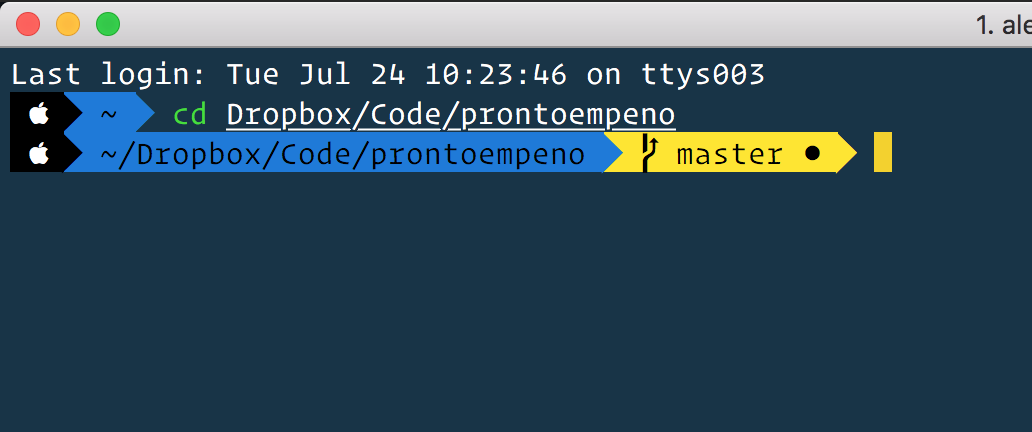
iTerm look and feel:
 alexventuraio
on 24 Jul 2018
alexventuraio
on 24 Jul 2018
@AlexVentura we don't support that currently (and this is the first time I've seen the request), feel free to create a feature request in https://github.com/xtermjs/xterm.js
Tyriar
on 24 Jul 2018
@Tyriar So, is it not possible to use two fonts? or is it not possible to use specific colors?
Actually, I can deal with the colors but what about the fonts I would like to use one for the text _(Operator Mono)_ and a different one for the ASCII characters which is working fine right now _(Inconsolata for Powerline)_ is that possible?
alexventuraio
on 24 Jul 2018
@AlexVentura I'm not sure what you mean with the colors, the colors should just work as you expect I would think? It's not possible to specify 2 fonts, unless fallback works "terminal.integrated.fontFamily": "'inconsolata for powerline', 'operator mono'" (ie. inconsolata doesn't have the characters that operator mono does).
It will also be a bit tricky to implement as the size of a cell means something different with 2 fonts.
Tyriar
on 24 Jul 2018
@Tyriar I was referring to be able to change the colors from the terminal to be the same as in my iTerm config but the colors is a nice to have. I was more interested in the fonts because I would like to have the terminal with the Operator Mono font but it does not have the required ASCII characters as the Powerline font has, that's why I use to use two fonts on iTerm and wondered to have the same look and feel in the VSCode terminal.
But thanks for clarifying this topic.
alexventuraio
on 24 Jul 2018
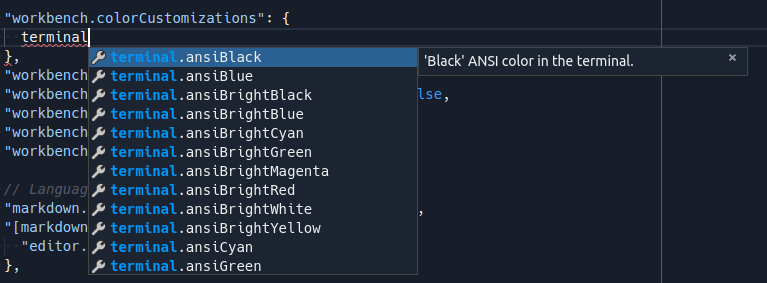
@AlexVentura you can override the theme colors for the terminal in settings:
Tyriar
on 25 Jul 2018
@Tyriar Cool, I will try to do it thank you so much!
alexventuraio
on 25 Jul 2018
My issue was not having the font weight in vs code match the weight of the font on my system.
{
    "terminal.integrated.fontWeightBold": "normal"
}
Fixed my special characters appearing as boxes.
 beauremus
on 18 Oct 2018
beauremus
on 18 Oct 2018
I also has some problems to set this parameter because there are "User" and "Workspace" setting and the "User" setting seem ignored
 woprandi
on 3 Apr 2019
woprandi
on 3 Apr 2019
Install PowerlineFonts
git clone https://github.com/powerline/fonts.git --depth=1 ~/Downloads/fonts-powerline && ~/Downloads/fonts-powerline/install.sh
Install Awesome Terminal Fonts
git clone https://github.com/gabrielelana/awesome-terminal-fonts ~/Downloads/awesome-terminal-fonts && ~/Downloads/awesome-terminal-fonts/install.sh
Edit vscode settings.json
"terminal.integrated.fontFamily": "'Hack', 'FontAwesome'"
if you prefer another font
"terminal.integrated.fontFamily": 'Meslo LG M for Powerline', 'FontAwesome'

 valmormn
on 17 Jul 2019
valmormn
on 17 Jul 2019
Why I tried every single setting in here and there https://github.com/microsoft/vscode/issues/15119 but my VScode keep saying : "The terminal only supports monospace fonts."
Do anyone know the solution ?
never mind, I install proper patched font - https://github.com/abertsch/Menlo-for-Powerline
and it works with this setting:
"terminal.integrated.fontFamily": "Menlo for Powerline"
Remember to not to press the "monospace" dialog that Visual Studio Code presents as this would set "terminal.integrated.fontFamily": "monospace" and restart the VS Code
Thanks to @Simon Larsen https://github.com/icefire1 and Matt Stratton http://github.com/mattstratton from this post : https://dev.to/mattstratton/making-powerline-work-in-visual-studio-code-terminal-1m7
 thinh105
on 3 Jan 2020
thinh105
on 3 Jan 2020
Hi, I'm new at macOS and I'm very confused
I have this question mark at the end and I'm unsure if this is alright. Nor do I have anyone to ask.
Thanks in advance, here is my problem:

I'm unsure what to do or where do you find settings for it. I've tried to follow this topic but it's hard.
 dusanbass
on 14 Jul 2020
dusanbass
on 14 Jul 2020
Hi @dusanbass You could try posting a question to Stack Overflow. This repo is for VS Code documentation.
For example, here's an existing post on Stack Overflow that might be helpful https://stackoverflow.com/questions/42271657/oh-my-zsh-showing-weird-character-on-terminal
gregvanl
on 15 Jul 2020
Hi @gregvanl
Thanks! I will do that!
But in a meantime I've found out that this indicates that uncommitted changes inside the repository.
dusanbass
on 15 Jul 2020
Related issues
 busticated
·
4Comments
busticated
·
4Comments
 brettcannon
·
7Comments
brettcannon
·
7Comments
 bpasero
·
3Comments
bpasero
·
3Comments
 jrieken
·
4Comments
jrieken
·
4Comments
 tetchel
·
6Comments
tetchel
·
6Comments
Most helpful comment
Install PowerlineFonts
git clone https://github.com/powerline/fonts.git --depth=1 ~/Downloads/fonts-powerline && ~/Downloads/fonts-powerline/install.shInstall Awesome Terminal Fonts
git clone https://github.com/gabrielelana/awesome-terminal-fonts ~/Downloads/awesome-terminal-fonts && ~/Downloads/awesome-terminal-fonts/install.shEdit vscode settings.json
"terminal.integrated.fontFamily": "'Hack', 'FontAwesome'"if you prefer another font
"terminal.integrated.fontFamily": 'Meslo LG M for Powerline', 'FontAwesome'