Vscode-docker: Docker Build Image Issue
Action: vscode-docker.images.build
Error type: 5
Error Message: Task to execute is undefined
Version: 0.9.0
OS: win32
Product: Visual Studio Code
Product Version: 1.40.2
Language: en
 idcristi
All 15 comments
@idcristi Is this error reproducible? If so, could you provide repro steps?
 philliphoff
on 4 Dec 2019
philliphoff
on 4 Dec 2019
I can confirm that I am having this same issue, however am not sure how to reproduce it exactly.
 ShadowRanger
on 15 Dec 2019
ShadowRanger
on 15 Dec 2019
The problem was when I wanted to build an image in VS Code Docker Images: Build Image and then try to run the image it appeared the error mentioned above.

In my case, the issue was solved, I downloaded the last version of VS Code 1.41 November Edition and I don't have this problem anymore.
idcristi
on 15 Dec 2019
Same issue here. No output at all, but the report says:
Action: vscode-docker.images.build
Error type: 5
Error Message: Task to execute is undefined

Version: 0.9.0
OS: darwin
Product: Visual Studio Code
Product Version: 1.41.0
Language: en
 FokkeZB
on 18 Dec 2019
FokkeZB
on 18 Dec 2019
@FokkeZB Can you provide more context? Was a folder/workspace open in VS Code? Was the command invoked from the command palette or the right-click context menu? Did the folder/workspace have a Dockerfile present? Are any docker-build tasks present in tasks.json or the workspace file?
philliphoff
on 18 Dec 2019
Sure!
This happened when I followed @burkeholland's https://frontendmasters.com/courses/customize-vs-code/dockerizing-an-application/ which uses the workspace https://github.com/burkeholland/workshop-vs-code-can-do-that/blob/master/exercise-5-docker/open-me.code-workspace and project https://github.com/burkeholland/workshop-vs-code-can-do-that/tree/master/exercise-5-docker/solution.
I invoked the command from the command palette, but also tried the context menu.
There's no tasks.json and the workspace file doesn't have tasks either.
FokkeZB
on 19 Dec 2019
I don't know this could help or not but I've got same experience as @FokkeZB (on same repository and command palette ), I tried to use right-click and "Build Image..." then after selecting the workspace I saw this in terminal: docker build --rm -f "ckerfile" -t solution:latest "." which missed the Do on ckerfile
 mojtabast
on 19 Dec 2019
mojtabast
on 19 Dec 2019
@philliphoff here is tasks part on workspace file:
"tasks": {
    "tasks": [
      {
        "type": "docker-build",
        "label": "docker-build",
        "platform": "node",
        "dockerBuild": {
          "dockerfile": "${workspaceFolder}/Dockerfile",
          "context": "${workspaceFolder}"
        }
      },
      {
        "type": "docker-run",
        "label": "docker-run: release",
        "dependsOn": ["docker-build"],
        "platform": "node"
      },
      {
        "type": "docker-run",
        "label": "docker-run: debug",
        "dependsOn": ["docker-build"],
        "dockerRun": {
          "env": {
            "DEBUG": "*",
            "NODE_ENV": "development"
          }
        },
        "node": {
          "enableDebugging": true
        }
      }
    ]
  },
Edit: I deleted this from the workspace file and it works fine again.
mojtabast
on 19 Dec 2019
@philliphoff I can confirm that deleting the tasks from my workspace file as @mojtabast did the issue seems to have resolved.
I'm thinking this issue may be due to the task in the workspace file passing ${workspaceFolder} as the dockerfile and context, rather than the directory that the task is actually being executed in, such as a sub directory of the main project? Maybe ${fileDirname} or something needs to be used instead?
ShadowRanger
on 23 Dec 2019
@philliphoff I can confirm that replacing ${workspaceFolder} with ${fileDirname} in the task definitions resolved the issue for me. Hopefully this helps with releasing a fix for the issue.
ShadowRanger
on 24 Dec 2019
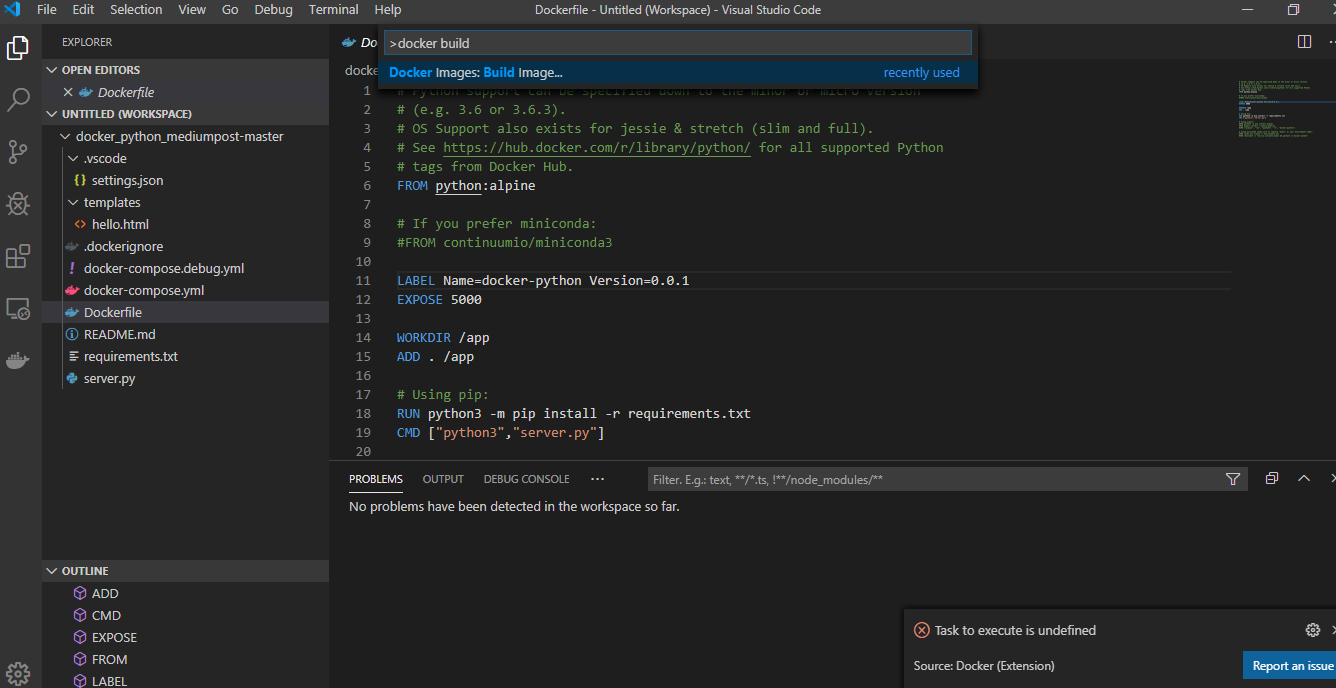
hello, i have same problem on docker:build but i don´t have the workspace file on my folder:
 hig897
on 15 Jan 2020
hig897
on 15 Jan 2020
hello, i have same problem on docker:build but i don´t have the workspace file on my folder:
For information, I generate the file for workspace on menu File -> Save Workspace As. Then I Open it e delete tasks like described on comment https://github.com/microsoft/vscode-docker/issues/1462#issuecomment-567510258. It worked.
hig897
on 15 Jan 2020
I think this is fixed by #1639. I will investigate in the morning and confirm; if so will close this issue.
 bwateratmsft
on 3 Mar 2020
bwateratmsft
on 3 Mar 2020
Yes, it looks like this is the same issue as those fixed by #1639. All of the reports here involve workspaces, where we know things were going wrong. #1639 ensures we only ever scaffold workspace folder tasks.
bwateratmsft
on 3 Mar 2020
A fix for this has been released.
bwateratmsft
on 20 Apr 2020
Related issues
 calbot
·
7Comments
calbot
·
7Comments
 revmischa
·
6Comments
revmischa
·
6Comments
 dwbelliston
·
4Comments
dwbelliston
·
4Comments
 dschuessler
·
5Comments
dschuessler
·
5Comments
 sajayantony
·
6Comments
sajayantony
·
6Comments