Vscode-docker: command 'vscode-docker.images.selectGroupBy' already exists
Repro steps:
1.
2.
Action: docker.activate
Error type: Error
Error Message: command 'vscode-docker.images.selectGroupBy' already exists
Version: 0.6.3
OS: linux
Product: Visual Studio Code
Product Version: 1.35.1
Language: en
Call Stack
d.registerCommand extensionHostProcess.js:497:447
Object.registerCommand extensionHostProcess.js:716:422
Object.module.exports.t.registerCommand extension.bundle.js:211:110531
ue extension.bundle.js:157:609314
Object.<anonymous> extension.bundle.js:157:611927
Object.<anonymous> extension.bundle.js:1:394616
module.exports.n extension.bundle.js:1:392954
module.exports.n extension.bundle.js:1:392731
Object.module.exports.t.callWithTelemetryAndErrorHandling extension.bundle.js:1:394533
Object.module.exports.t.activateInternal extension.bundle.js:157:610822
 tvilot
All 12 comments
@tvilot we just changed the publisher from "PeterJausovec" to "ms-azuretools". It's possible your machine still has an extension under the old publisher. Can you try reloading VS Code?
As a manual workaround, you can go to your "Extensions" page and uninstall v0.6.2 of the extension with "PeterJausovec" as the publisher:

 ejizba
on 19 Jun 2019
ejizba
on 19 Jun 2019
@EricJizbaMSFT , a clean uninstall -> reload VS Code -> install of ms-azuretools.vscode-docker seems to have resolved the issue. Thank you!
Edit: clean uninstall existing docker extension (not VS Code)
 rrmistry
on 19 Jun 2019
rrmistry
on 19 Jun 2019
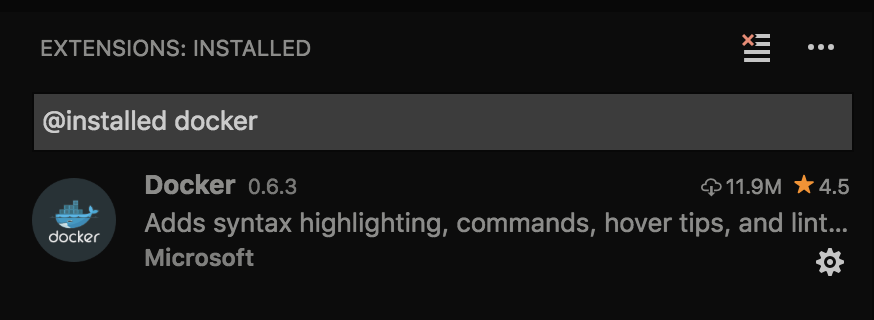
I followed @rrmistry steps but I still have issues with the extension. vscode recommends the extension when opening a Dockerfile even though I have it installed.
 arush0
on 19 Jun 2019
arush0
on 19 Jun 2019
Hello @arush0 , I was not precise in my comment. I had uninstalled the docker extension and not VS Code. As far as I understand, extensions do not get uninstalled when you uninstall VS code.
My apologies for the unintentional misdirection.
rrmistry
on 19 Jun 2019
@rrmistry No, you were clear enough. I did exactly that. I uninstalled the docker extension and I verified the extension was gone under my ~/.vscode directory. Even after reloading and re-installing I still see the issue.
arush0
on 19 Jun 2019
@arush0 We have an update to VS Code core coming to correct the extension recommendation. Sorry about that!
Right now, the recommendation should fail to find and install the old version of the extension - that's what I'm currently seeing.
 fiveisprime
on 19 Jun 2019
fiveisprime
on 19 Jun 2019
The recommendation updates will be in Insiders either today or tomorrow and will ship in the next stable release (early July).
Again, so sorry for the issues.
fiveisprime
on 19 Jun 2019
But why would that prevent the new extension from working? I don't care so much about the pop up, but the extension isn't working, there's no syntax highlighting, no formatting.
arush0
on 19 Jun 2019
I'm experiencing the same issue and I have a clean install of vscode and the following extensions:
code --install-extension Acrolinx.vscode-sidebar
code --install-extension akamud.vscode-theme-onedark
code --install-extension DavidAnson.vscode-markdownlint
code --install-extension docsmsft.docs-article-templates
code --install-extension docsmsft.docs-authoring-pack
code --install-extension docsmsft.docs-markdown
code --install-extension docsmsft.docs-preview
code --install-extension docsmsft.docs-yaml
code --install-extension Equinusocio.vsc-material-theme
code --install-extension ms-azuretools.vscode-docker
code --install-extension ms-vscode.azurecli
code --install-extension ms-vsliveshare.vsliveshare
code --install-extension PKief.material-icon-theme
code --install-extension redhat.vscode-yaml
code --install-extension streetsidesoftware.code-spell-checker
 IEvangelist
on 19 Jun 2019
IEvangelist
on 19 Jun 2019
@tvilot we just changed the publisher from "PeterJausovec" to "ms-azuretools". It's possible your machine still has an extension under the old publisher. Can you try reloading VS Code?
As a manual workaround, you can go to your "Extensions" page and uninstall v0.6.2 of the extension with "PeterJausovec" as the publisher:
This doesn't seem to be the issue. I am experiencing it from a clean install.
IEvangelist
on 19 Jun 2019
@arush0 @IEvangelist @tvilot This should have been fixed with the 0.6.4 update last week. If that's not the case, could you please let us know? Thanks!
Current known status:
The most recent update is 0,.6.4 (with the new publisher name)
Vscode still recommends the 0.6.2 extension with the old publisher name (will be fixed with next vscode update - see #1075)
It should be okay to have both the old and new publisher versions installed (0.6.2 and 0.6.4), everything should still work as expected (once vscode is fixed, we'll put in a patch to recommend uninstalling the old one)
 StephenWeatherford
on 25 Jun 2019
StephenWeatherford
on 25 Jun 2019
@arush0 @IEvangelist @tvilot This should have been fixed with the 0.6.4 update last week. If that's not the case, could you please let us know? Thanks!
Current known status:
The most recent update is 0,.6.4 (with the new publisher name)
Vscode still recommends the 0.6.2 extension with the old publisher name (will be fixed with next vscode update - see #1075)
It should be okay to have both the old and new publisher versions installed (0.6.2 and 0.6.4), everything should still work as expected (once vscode is fixed, we'll put in a patch to recommend uninstalling the old one)
Great, thank you @StephenWeatherford ... I have been using VS Code without experiencing the issue since I've updated - seems to have been fixed. Thanks again
IEvangelist
on 26 Jun 2019
Related issues
 tecandrew
·
6Comments
tecandrew
·
6Comments
 wsmelton
·
4Comments
wsmelton
·
4Comments
 calbot
·
7Comments
calbot
·
7Comments
 gngchrs
·
3Comments
gngchrs
·
3Comments
 thernstig
·
3Comments
thernstig
·
3Comments
Most helpful comment
@arush0 @IEvangelist @tvilot This should have been fixed with the 0.6.4 update last week. If that's not the case, could you please let us know? Thanks!
Current known status:
The most recent update is 0,.6.4 (with the new publisher name)
Vscode still recommends the 0.6.2 extension with the old publisher name (will be fixed with next vscode update - see #1075)
It should be okay to have both the old and new publisher versions installed (0.6.2 and 0.6.4), everything should still work as expected (once vscode is fixed, we'll put in a patch to recommend uninstalling the old one)