Vscode-docker: Deploy to different Azure subscription from ACR causes issues
I'm not sure what to do about this yet so it's up for discussion.
It's recognized as an ACR connection but shows up like this in the config (notice the warning)
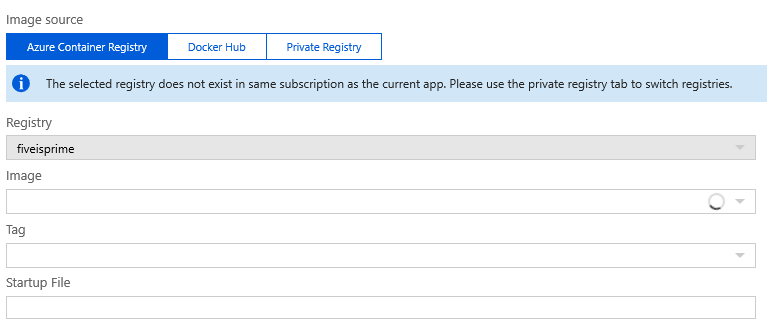
Switching over to the private registry tab, it's blank so I can't make changes to the config once deployed. Maybe only allow the user to create an app in the same sub as the registry when deploying from ACR would make this smoother, but I'm worried about a) confusion as to why the sub selection is gone and b) is this a common enough problem to fix?
 fiveisprime
All 15 comments
@rosanch Thoughts?
 StephenWeatherford
on 15 Jan 2019
StephenWeatherford
on 15 Jan 2019
I'm not sure where that screenshot was taken. However, the way you can filter your subscriptions in the visual studio code app it's by clicking in your account at the bottom right corner. It should be shown after you open the extension.
In a case when a command needs the subscription to be specified. The information will be requested when the command it's executed.
If this does not solve your doubt. Could you please provide more information about the previous issue, please?
 rosanch
on 16 Jan 2019
rosanch
on 16 Jan 2019
The screenshot is from the app service containers blade after deploying via the extension.
Subs can be filtered and control what registries are visible; however, the subs aren't visible in this extension the same way we show them in the others (e.g. app service). Filtering the subs doesn't solve the problem though.
fiveisprime
on 16 Jan 2019
Should we have restrictions on them selecting a deployment and registry subscription that are different?
StephenWeatherford
on 17 Jan 2019
I assume you deployed an image from ACR in sub1 to an app service in sub2 and it succeeded. It seems legitimate and it's supposed to use ACR username/password to retrieve images. But you mentioned switching to Private Registry showed empty page. It sounds like a bug in App Service portal.
 northtyphoon
on 18 Jan 2019
northtyphoon
on 18 Jan 2019
I have the same issue (kind of). Registry and app service are in different subscriptions. In this case you are not able to select the image from the dropdown. The loading indicator just never stops. When you decide to enter the image on the private registry tab you can save. But when you re-enter container settings Azure has automatically "moved" the settings back to the "ACR" tab. You'll see the message from the screenshot above and are not able to make any changes. The container won't start.
 nk111
on 12 Nov 2019
nk111
on 12 Nov 2019
I have same issue, I create the webapp from cli or from portal, and setting the private registry to an azure registry in other subscription is not working, whe you review container settings, the private registry tab is empty, and the azure container registry tab is populated, also de env variables are created, but it fails to download the image.
 jhonnatanpb
on 31 Jan 2020
jhonnatanpb
on 31 Jan 2020
Same issue here. I am fairly sure this is not vscode related. This seems to be an app-service specific problem. As mentioned here, there are three settings that need to be set when using ACR. It seems VSCode and other tools (such as the portal) faithfully set these settings. However, it doesn't work when these settings concern an ACR in a different subscription. The screenshot as in the OP will be shown.
Private repositories use these same three settings, so unfortunately, using an ACR as a private repository (as is suggested in the screenshot in the OP) does not help, as the underlying settings don't change at all, it is just recognized as an ACR again.
 fennovj
on 17 Feb 2020
fennovj
on 17 Feb 2020
I've created an issue with the ACR team since as @fennovj mentions this seems like a Portal issue (feel free to upvote there).
 ThomasPe
on 25 Feb 2020
ThomasPe
on 25 Feb 2020
Interestingly - If you deploy the app_settings like:
DOCKER_REGISTRY_SERVER_URL = "myawesomeregistry.azurecr.io"
instead of
DOCKER_REGISTRY_SERVER_URL = "https://myawesomeregistry.azurecr.io"
Then it appears to work ok. I am using terraform to deploy.
So try leaving https:// out of the registry URL - I suspect microsoft are looking for patterns matching https://**.azurecr.io. This worked for me today.
 mcollis2
on 10 Jul 2020
mcollis2
on 10 Jul 2020
Interestingly - If you deploy the app_settings like:
DOCKER_REGISTRY_SERVER_URL = "myawesomeregistry.azurecr.io"
instead of
DOCKER_REGISTRY_SERVER_URL = "https://myawesomeregistry.azurecr.io"
Then it appears to work ok. I am using terraform to deploy.So try leaving https:// out of the registry URL - I suspect microsoft are looking for patterns matching https://**.azurecr.io. This worked for me today.
Unfortunately this didn't work for me.
 matthiasguentert
on 5 Jan 2021
matthiasguentert
on 5 Jan 2021
I have spend some time on this issue and figured it out. Here is my solution:
Assuming we are having two subscriptions, let's call them SUB-A and SUB-B, where we are having an Azure Container Registry in SUB-A (called azurebluedev in my example).
Now we'd like to create an App Service in SUB-B that pulls its image of our container registry by using the admin username.
It's critical that you use the correct format under Image and tag in the docker blade when creating the app service. It must follow the format url/image:tag (without https) otherwise you will run into the described problem. I was using image:tag format beforehand which didn't work.

Still the Azure Portal UI will not show the correct information, however at least you can make it work.
matthiasguentert
on 5 Jan 2021
I found a similar thing above working with YAML pipelines/deploys, but I still couldn't get cross-subscription access to work in the task AzureWebAppContainer@1. The imageName property needs to be something like myacr.azurecr.io/myimage:$(build.buildId) but if the container registry is outside of the subscription/service connection of the task, it won't work.
 justinpitcher
on 5 Jan 2021
justinpitcher
on 5 Jan 2021
I found a similar thing above working with YAML pipelines/deploys, but I still couldn't get cross-subscription access to work in the task
AzureWebAppContainer@1. TheimageNameproperty needs to be something likemyacr.azurecr.io/myimage:$(build.buildId)but if the container registry is outside of the subscription/service connection of the task, it won't work.
For me it worked adding the service principal created in Azure by the service connection created in azure devops to the other subscription (if in same tenant), because when you create a service connection in ADO, the service principal is added in the role assigments of the main subscription, but if you do the same manually for other subscription, those tasks in pipeline work, or at least in my case I managed to solve some cross subscription issues that way
jhonnatanpb
on 5 Jan 2021
As far as it pertains to the Docker extension, I don't think there are any changes needed at this point. The experience is a little better now than when @fiveisprime opened it:

That message looks decidedly by-design to me (and regardless, is up to Azure, not us). However, unlike in the original screenshots, it now shows the other images/tags in that ACR--rather than blank. If you want to change to a different registry, then the images/tags in the ACR don't matter anymore.
IMO we should keep the ability to deploy cross-subscription. I don't like adding in arbitrary roadblocks to things that mostly work.
Relatedly though is using service principle or MSI to access the ACR, we're tracking that in #1685.
 bwateratmsft
on 5 Jan 2021
bwateratmsft
on 5 Jan 2021
Related issues
 Szauka
·
6Comments
Szauka
·
6Comments
 sajayantony
·
6Comments
sajayantony
·
6Comments
 gngchrs
·
3Comments
gngchrs
·
3Comments
 thernstig
·
3Comments
thernstig
·
3Comments
 chrisdias
·
7Comments
chrisdias
·
7Comments
Most helpful comment
I have the same issue (kind of). Registry and app service are in different subscriptions. In this case you are not able to select the image from the dropdown. The loading indicator just never stops. When you decide to enter the image on the private registry tab you can save. But when you re-enter container settings Azure has automatically "moved" the settings back to the "ACR" tab. You'll see the message from the screenshot above and are not able to make any changes. The container won't start.