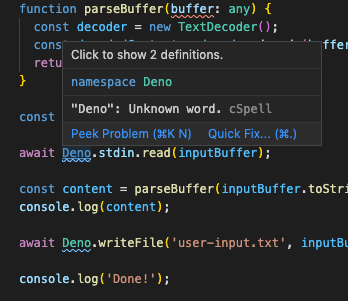
Vscode_deno: "Deno": Unknown word.
Hi All,
For whatever reason, I have the extension installed on 2 separate machines and I can't get it to recognize the namespace Deno. Am I missing something?
I have this in .vscode/settings.json
{
"deno.enable": true,
}
 justdayan
All 7 comments
Hey @justdayan, this is likely caused by the Code Spell Checker extension, not the Deno VS Code extension.
 Flaque
on 23 Jun 2020
Flaque
on 23 Jun 2020
Similar issue:
Cannot find name 'Deno'
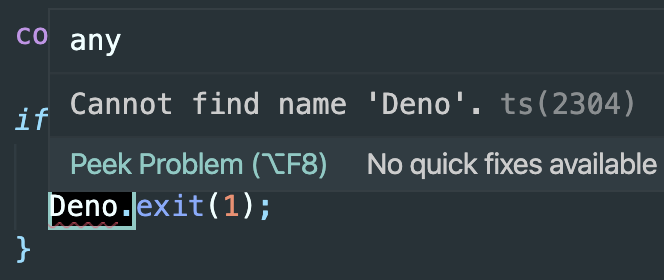
settings.json:
{
  "deno.enable": true
}
 jeroenptrs
on 2 Jul 2020
jeroenptrs
on 2 Jul 2020
I'm having the same issue than @jeroenptrs but when using the deprecated vscode extensions everything works fine.
 BentoumiTech
on 14 Aug 2020
BentoumiTech
on 14 Aug 2020
This should be fixed now. If you still encounter this error, please open a new issue.
 lucacasonato
on 9 Sep 2020
lucacasonato
on 9 Sep 2020
@BentoumiTech should be resolved when setting deno.enable on your workspace instead of globally
jeroenptrs
on 9 Sep 2020
@jeroenptrs Thank you I will try
BentoumiTech
on 9 Sep 2020
If you've set deno.enable and it still says cannot find "Deno" then just restart vscode and it should work.
 rvdende
on 4 Oct 2020
rvdende
on 4 Oct 2020
Related issues
 TradeIdeasPhilip
·
10Comments
TradeIdeasPhilip
·
10Comments
 trentjones21
·
4Comments
trentjones21
·
4Comments
 chenguzhen87
·
5Comments
chenguzhen87
·
5Comments
 elazutkin-dynata
·
8Comments
elazutkin-dynata
·
8Comments
 lgarron
·
8Comments
lgarron
·
8Comments
Most helpful comment
Similar issue:

Cannot find name 'Deno'settings.json: