Vscode-cpptools: [cppdbg] Cygwin 10.1-1: intergatedTerminal unable to take input
@WardenGnaw I use cygwin's gdb in vscode, but I can't launch the debugger. I'm sure the environment variable setting is no problem.
This is the information debug console output: (I have already set "logging": {"engineLogging": true} )
_ERROR: Unable to start debugging. Unexpected GDB output from command "-exec-run". Error creating process /usr/bin/C:\Users\Lch\Desktop\hello/c:\Users\Lch\Desktop\hello\hello.exe, (error 2).
1: (1951) <--gdb-exit
1: (1966) ->^exit
1: (1979) Send Event AD7ProgramDestroyEvent_
_The program 'c:\Users\Lch\Desktop\hello\hello.exe' has exited with code 42 (0x0000002a).
1: (1992) Shell exited, stop debugging_
The C++ source file is very simple, it is compiled by cygwin's g++ successfully.
#include<iostream>
using namespace std;
int main(void)
{
       int i = 0;
       cin >> i;
       cout << "HelloWorld!";
       return 0;
}
This is the launch.json
{
    // Use IntelliSense to learn about possible attributes.
    // Hover to view descriptions of existing attributes.
    // For more information, visit: https://go.microsoft.com/fwlink/?linkid=830387
    "version": "0.2.0",
    "configurations": [
        {
            "name": "g++.exe - 生成和调试活动文件",
            "type": "cppdbg",
            "request": "launch",
            "program": "${fileDirname}\\${fileBasenameNoExtension}.exe",
            "args": [],
            "stopAtEntry": false,
            "cwd": "${workspaceFolder}",
            "environment": [],
            "externalConsole": false,
            "MIMode": "gdb",
            "miDebuggerPath": "D:\\cygwin\\bin\\gdb.exe",
            "setupCommands": [
                {
                    "description": "为 gdb 启用整齐打印",
                    "text": "-enable-pretty-printing",
                    "ignoreFailures": true
                }
            ],
            "preLaunchTask": "C/C++: g++.exe build active file"
        }
    ]
}
And this is my tasks.json
{
    "version": "2.0.0",
    "tasks": [
        {
            "type": "cppbuild",
            "label": "C/C++: g++.exe build active file",
            "command": "D:\\cygwin\\bin\\g++.exe",
            "args": [
                "-g",
                "${file}",
                "-o",
                "${fileDirname}\\${fileBasenameNoExtension}.exe"
            ],
            "options": {
                "cwd": "D:\\cygwin\\bin"
            },
            "problemMatcher": [
                "$gcc"
            ],
            "group": {
                "kind": "build",
                "isDefault": true
            },
            "detail": "compiler: D:\\cygwin\\bin\\g++.exe"
        }
    ]
}
 lch2000
All 13 comments
I just tried with GDB Cygwin 8.3.1-1 and could not reproduce this issue.
Is it possible for you to share the full log from "logging": {"engineLogging": true}?
It will be interesting to see what solib-search-path, environment-cd, and -file-exec-and-symbols are set to.
 WardenGnaw
on 9 Nov 2020
WardenGnaw
on 9 Nov 2020
@WardenGnaw Hello, this is the complete debug console output :
1: (85) LaunchOptions{"name":"g++.exe - 生成和调试活动文件","type":"cppdbg","request":"launch","logging":{"engineLogging":true},"program":"c:\Users\Lch\Desktop\hello\hello.exe","args":[],"stopAtEntry":false,"cwd":"C:\Users\Lch\Desktop\hello","environment":[],"externalConsole":false,"MIMode":"gdb","miDebuggerPath":"D:\cygwin\bin\gdb.exe","setupCommands":[{"description":"为 gdb 启用整齐打印","text":"-enable-pretty-printing","ignoreFailures":true}],"preLaunchTask":"C/C++: g++.exe build active file","__configurationTarget":5,"__sessionId":"74f5ab2b-2584-46a4-a53c-3974c732dadd"}
1: (170) Wait for connection completion.
1: (1846) ->=thread-group-added,id="i1"
1: (1850) ->\~"GNU gdb (GDB) (Cygwin 10.1-1) 10.1\n"
1: (1850) ->\~"Copyright (C) 2020 Free Software Foundation, Inc.\n"
1: (1850) ->\~"License GPLv3+: GNU GPL version 3 or later http://gnu.org/licenses/gpl.html\nThis is free software: you are free to change and redistribute it.\nThere is NO WARRANTY, to the extent permitted by law."
1: (1850) ->\~"\nType \"show copying\" and \"show warranty\" for details.\n"
1: (1850) ->\~"This GDB was configured as \"x86_64-pc-cygwin\".\n"
1: (1850) ->\~"Type \"show configuration\" for configuration details.\n"
1: (1850) ->\~"For bug reporting instructions, please see:\n"
1: (1854) ->\~"https://www.gnu.org/software/gdb/bugs/.\n"
1: (1854) ->\~"Find the GDB manual and other documentation resources online at:\n http://www.gnu.org/software/gdb/documentation/."
1: (1854) ->\~"\n\n"
1: (1854) ->\~"For help, type \"help\".\n"
1: (1854) ->\~"Type \"apropos word\" to search for commands related to \"word\".\n"
1: (2027) ->=cmd-param-changed,param="confirm",value="off"
1: (2027) ->=cmd-param-changed,param="output-radix",value="16"
1: (2027) ->=cmd-param-changed,param="prompt",value="\001\e[;31m\002gdb-peda$ \001\e[0m\002"
1: (2027) ->=cmd-param-changed,param="history expansion",value="on"
1: (2027) ->=cmd-param-changed,param="history save",value="on"
1: (2027) ->=cmd-param-changed,param="disassembly-flavor",value="intel"
1: (2027) ->=cmd-param-changed,param="follow-fork-mode",value="child"
1: (2027) ->=cmd-param-changed,param="backtrace past-main",value="on"
1: (2027) ->=cmd-param-changed,param="step-mode",value="on"
1: (2027) ->=cmd-param-changed,param="print pretty",value="on"
1: (2027) ->(gdb)
1: (2043) <-1001-gdb-set target-async on
1: (2066) ->1001^done
1: (2066) ->(gdb)
1: (2066) ->&"\n"
1: (2066) ->^done
1: (2066) ->(gdb)
1: (2066) 1001: elapsed time 22
1: (2073) <-1002-enable-pretty-printing
1: (2081) ->1002^done
1: (2081) 1002: elapsed time 8
1: (2081) <-1003-interpreter-exec console "set pagination off"
1: (2081) ->(gdb)
1: (2081) ->&"\n"
1: (2081) ->^done
1: (2081) ->(gdb)
1: (2101) ->=cmd-param-changed,param="pagination",value="off"
1: (2101) ->1003^done
1: (2101) 1003: elapsed time 20
1: (2101) ->(gdb)
1: (2101) <-1004-gdb-set auto-solib-add on
1: (2101) ->&"\n"
1: (2101) ->^done
1: (2101) ->(gdb)
1: (2119) ->1004^done
1: (2119) 1004: elapsed time 18
1: (2119) <-1005-gdb-set solib-search-path c:\Users\Lch\Desktop\hello;
1: (2119) ->(gdb)
1: (2119) ->&"\n"
1: (2119) ->^done
1: (2119) ->(gdb)
1: (2135) ->1005^done
1: (2135) 1005: elapsed time 15
1: (2135) ->(gdb)
1: (2135) ->&"\n"
1: (2135) ->^done
1: (2135) ->(gdb)
1: (2135) <-1006-environment-cd C:\Users\Lch\Desktop\hello
1: (2154) ->1006^done
1: (2154) 1006: elapsed time 18
1: (2154) ->(gdb)
1: (2154) ->&"\n"
1: (2154) ->^done
1: (2154) ->(gdb)
1: (2154) <-1007-interpreter-exec console "show configuration"
1: (2180) ->\~"This GDB was configured as follows:\n configure --host="
1: (2180) ->\~"x86_64-pc-cygwin --target=x86_64-pc-cygwin\n"
1: (2180) ->\~" --with-auto-load-dir=$debugdir:$datadir/auto-load\n --with-auto-load-safe-path="
1: (2180) ->\~"$debugdir:$datadir/auto-load\n"
1: (2180) ->\~" --with-expat\n"
1: (2180) ->\~" --with-gdb-datadir=/usr/share/gdb (relocatable)\n"
1: (2180) ->\~" --with-jit-reader-dir=/usr/lib/gdb (relocatable)\n"
1: (2180) ->\~" --without-libunwind-ia64\n"
1: (2180) ->\~" --with-lzma\n"
1: (2180) ->\~" --without-babeltrace\n"
1: (2180) ->\~" --without-intel-pt\n"
1: (2180) ->\~" --with-mpfr\n"
1: (2180) ->\~" --without-xxhash\n"
1: (2180) ->\~" --with-python=/usr (relocatable)\n"
1: (2180) ->\~" --with-python-libdir=/usr/lib (relocatable)\n"
1: (2180) ->\~" --without-debuginfod\n"
1: (2180) ->\~" --without-guile\n"
1: (2180) ->\~" --enable-source-highlight\n"
1: (2180) ->\~" --with-separate-debug-dir=/usr/lib/debug (relocatable)\n"
1: (2180) ->\~"\n(\"Relocatable\" means the directory can be moved with the GDB installation\ntree, and GDB will still find it.)\n"
1: (2180) ->1007^done
1: (2180) 1007: elapsed time 26
1: (2180) ->(gdb)
1: (2180) ->&"\n"
1: (2180) ->^done
1: (2180) ->(gdb)
1: (2187) <-1008-file-exec-and-symbols c:\Users\Lch\Desktop\hello\hello.exe
1: (2211) ->1008^done
1: (2211) 1008: elapsed time 23
1: (2211) ->(gdb)
1: (2211) ->&"\n"
1: (2211) ->^done
1: (2211) ->(gdb)
1: (2211) <-1009-interpreter-exec console "show architecture"
1: (2235) ->~"The target architecture is set to \"auto\" (currently \"i386:x86-64\").\n"
1: (2235) ->1009^done
1: (2235) 1009: elapsed time 24
1: (2235) ->(gdb)
1: (2235) ->&"\n"
1: (2235) ->^done
1: (2235) ->(gdb)
1: (2235) <-1010-exec-arguments 2>CON 1>CON
1: (2250) 1010: elapsed time 15
1: (2250) <-1011-break-insert -f main
1: (2250) ->(gdb)
1: (2250) ->&"\n"
1: (2250) ->^done
1: (2250) ->(gdb)
1: (2273) ->1011^done,bkpt={number="1",type="breakpoint",disp="keep",enabled="y",addr="0x0000000100401088",func="main()",file="c:\Users\Lch\Desktop\hello/hello.cpp",fullname="/usr/bin/c:\Users\Lch\Desktop\hello/hello.cpp",line="5",thread-groups=["i1"],times="0",original-location="main"}
1: (2273) ->(gdb)
1: (2273) ->&"\n"
1: (2273) ->^done
1: (2273) ->(gdb)
1: (2289) 1011: elapsed time 39
1: (2298) Send Event AD7EngineCreateEvent
1: (2301) Send Event AD7ProgramCreateEvent
1: (2341) ShellPid=12184
1: (2349) DebuggerPid=13844
1: (2425) Send Event AD7LoadCompleteEvent
=thread-group-added,id="i1"
GNU gdb (GDB) (Cygwin 10.1-1) 10.1
Copyright (C) 2020 Free Software Foundation, Inc.
License GPLv3+: GNU GPL version 3 or later http://gnu.org/licenses/gpl.html
This is free software: you are free to change and redistribute it.
There is NO WARRANTY, to the extent permitted by law.
Type "show copying" and "show warranty" for details.
This GDB was configured as "x86_64-pc-cygwin".
Type "show configuration" for configuration details.
For bug reporting instructions, please see:
https://www.gnu.org/software/gdb/bugs/.
Find the GDB manual and other documentation resources online at:
http://www.gnu.org/software/gdb/documentation/.
For help, type "help".
Type "apropos word" to search for commands related to "word".
=cmd-param-changed,param="confirm",value="off"
=cmd-param-changed,param="output-radix",value="16"
=cmd-param-changed,param="prompt",value="\001\e[;31m\002gdb-peda$ \001\e[0m\002"
=cmd-param-changed,param="history expansion",value="on"
=cmd-param-changed,param="history save",value="on"
=cmd-param-changed,param="disassembly-flavor",value="intel"
=cmd-param-changed,param="follow-fork-mode",value="child"
=cmd-param-changed,param="backtrace past-main",value="on"
=cmd-param-changed,param="step-mode",value="on"
=cmd-param-changed,param="print pretty",value="on"
Warning: Debuggee TargetArchitecture not detected, assuming x86_64.
=cmd-param-changed,param="pagination",value="off"
1: (2433) <-1012-exec-run
1: (2445) ->1012^error,msg="Error creating process /usr/bin/C:\\Users\\Lch\\Desktop\\hello/c:\Users\Lch\Desktop\hello\hello.exe, (error 2)."
1: (2445) 1012: elapsed time 12
1: (2445) ->(gdb)
1: (2445) ->&"\n"
1: (2445) ->^done
1: (2445) ->(gdb)
1: (2453) Send Event AD7MessageEvent
ERROR: Unable to start debugging. Unexpected GDB output from command "-exec-run". Error creating process /usr/bin/C:\Users\Lch\Desktop\hello/c:\Users\Lch\Desktop\hello\hello.exe, (error 2).
1: (2466) <--gdb-exit
1: (2487) ->^exit
1: (2487) Send Event AD7ProgramDestroyEvent
The program 'c:\Users\Lch\Desktop\hello\hello.exe' has exited with code 42 (0x0000002a).
1: (2535) Shell exited, stop debugging
lch2000
on 10 Nov 2020
@WardenGnaw And I have also made a screen recording. If you need it, I will send it to your email.
lch2000
on 10 Nov 2020
@WardenGnaw It seems that gdb can't attach to the process. And the gcc/g++ which I install is just gcc/g++ core, rather than mingw gcc/g++ core. This picture is the page of cygwin's installation. But actually mingw's gdb doesn't work in my vscode too. I'm not sure what to say is meaningful. This problem is really really annoying.
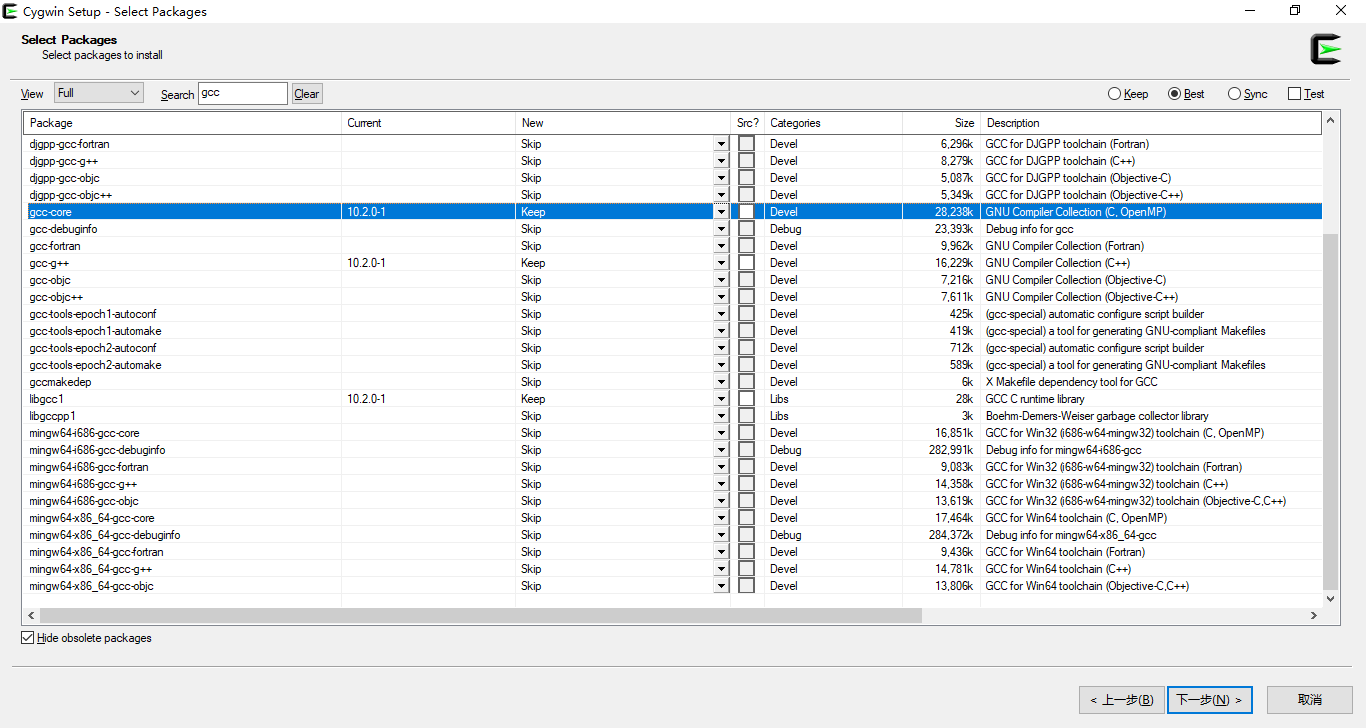
lch2000
on 10 Nov 2020
I can reproduce this issue with GNU gdb (GDB) (Cygwin 10.1-1) 10.1. This is a bug on their end.
I would revert to a version that is not labeled (Test)

WardenGnaw
on 10 Nov 2020
@WardenGnaw Great! I can start debugger. You are skillful. But I have met another problem. I can't type into the integrated terminal when debugging. In other words, when I control the program run to the line "scanf" or "cin", but at this time we can't type on the bottom integrated terminal. It is no responding. I can only let "externalConsole": true to use external console to type in. The C++ source code isn't changed.
#include <iostream>
using namespace std;
int main(void)
{
    int i = 0;
    cin >> i;
    cout << "HelloWorld!";
    return 0;
}
@WardenGnaw And a second problem, sir, do you find external console can't output? When I use external console to debug and run to the line cout << "HelloWorld!";, it won't output the charsequence "HelloWorld!". Why?
lch2000
on 11 Nov 2020
I can't type into the integrated terminal when debugging. In other words, when I control the program run to the line "scanf" or "cin", but at this time we can't type on the bottom integrated terminal. It is no responding. I can only let "externalConsole": true to use external console to type in. The C++ source code isn't changed.
When "externalConsole": false, you will need to type your input in the terminal tab.

When I use external console to debug and run to the line cout << "HelloWorld!";, it won't output the charsequence "HelloWorld!". Why?
This is by C++ language's design, if you do not flush the output buffer (cout), it will not print to the screen. By changing that line to cout << "HelloWorld!" << endl;, you should see output once you step over that line.
WardenGnaw
on 11 Nov 2020
@WardenGnaw Well, now I can see the output in the console. But I still can't type in the vscode's terminal when debugging to the line "cin". Someone says that it is the reason for cygwin. I think you are able to deal with it.

Then step over.
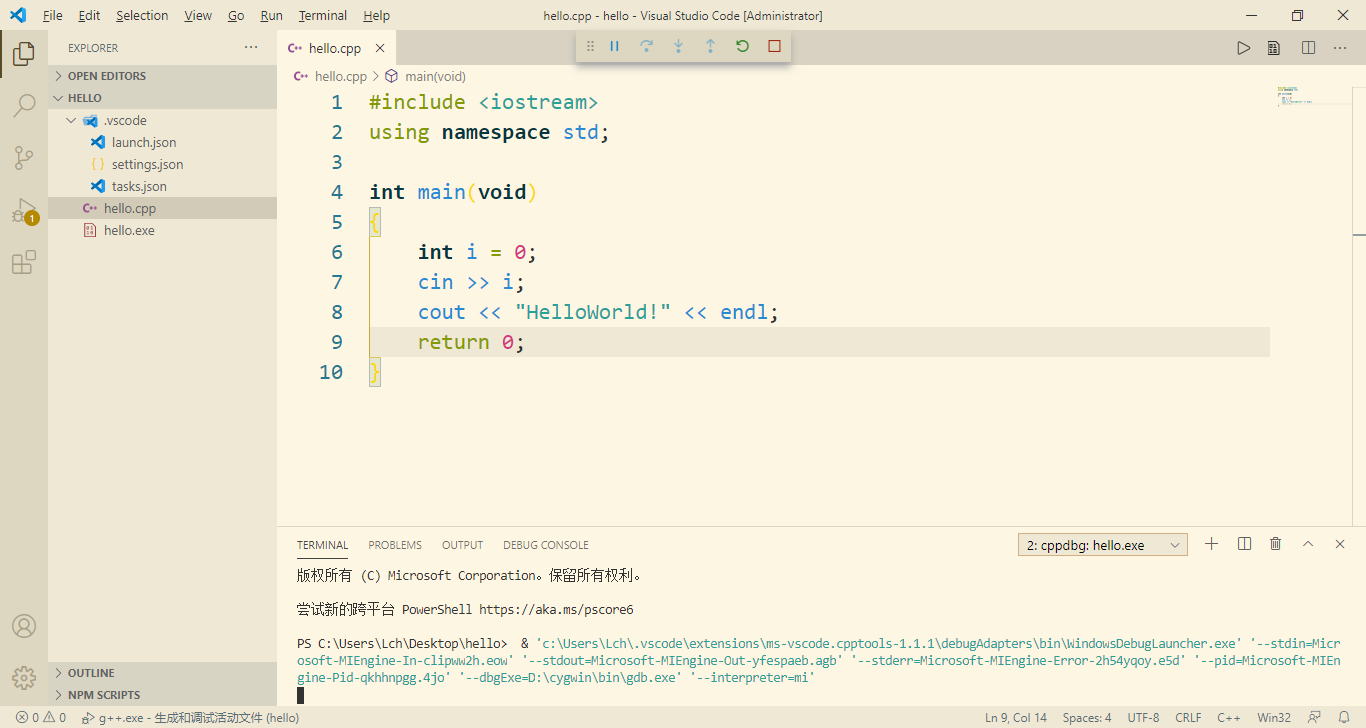
I can't type in the terminal at this time.
lch2000
on 12 Nov 2020
@WardenGnaw I find that MinGW can't type in the terminal too. By the way MinGW can output the charsequence when not adding "endl".
lch2000
on 12 Nov 2020
Ah. I can reproduce the integratedTerminal issue with Cygwin. Thank you for pointing this out.
Are you using the MinGW from https://sourceforge.net/projects/mingw-w64/files/Toolchains%20targetting%20Win32/Personal%20Builds/mingw-builds/installer/mingw-w64-install.exe/download?
WardenGnaw
on 12 Nov 2020
@WardenGnaw Oh sorry, I installed the wrong MinGW version before. I have already downloaded a fit one from the website you provided. Now it's all ok. I can type in the integraded terminal. To be honest, the guide of setting vscode+cygwin on the internet is so poor. I was confused about it. Thanks to your help, I can start writing C++ code in vscode.
lch2000
on 13 Nov 2020
Thank you for letting us know. We will look into improving the docs for using VS Code C++ extension + Cygwin.
From this we know there is an issue with Cygwin 10.1-1 which is an external issue.
I will be closing this issue for now. Please re-open if you are still experiencing issues on starting debugging / using the integrated terminal.
If it is other issues, please file a new bug.
Thank you for using and making the VS Code C++ extension better.
WardenGnaw
on 13 Nov 2020
Related issues
 chrisckc
·
3Comments
chrisckc
·
3Comments
 thndrwrks
·
3Comments
thndrwrks
·
3Comments
 ecbrodie
·
3Comments
ecbrodie
·
3Comments
 wdc596933938
·
3Comments
wdc596933938
·
3Comments
 SkyRiderMike
·
3Comments
SkyRiderMike
·
3Comments