Vscode-cpptools: C++ IntelliSense works fine except for PCL (Point Cloud Library)
Type: LanguageService
Describe the bug
- OS and Version: Ubuntu 18.04 (also, Ubuntu 16.04)
- VS Code Version: 1.47.2
- C/C++ Extension Version: v0.29.0
- Other extensions you installed (and if the issue persists after disabling them): CMake Tools (by Microsoft), CMake (by twxs), Python (by Microsoft)
- Does this issue involve using SSH remote to run the extension on a remote machine?: No
- A clear and concise description of what the bug is, including information about the workspace (i.e. is the workspace a single project or multiple projects, size of the project, etc).:
I'm already using C/C++ Extension by Microsoft and IntelliSense works fine for all the different in-built classes, functions, STLs, etc. But, when it comes toPCL(Point Cloud Library), somehow, mysteriously, IntelliSense doesn't work.
If you are familiar with PCL then must be knowing that most of its syntaxes are too big. And as the IntelliSense not working for it, there are very high chances of making typos if you don't pay close attention while typing every single character, e.g.,
pcl::PointCloud<pcl::PointXYZ>::Ptr point_cloud_ptr (new pcl::PointCloud<pcl::PointXYZ>);
In fact, auto-completion for even those variables and functions do not work--i.e., from the above example, I have to manually type every single character of point_cloud_ptr every time I want to use it.
So, how can I fix this? or it's not possible for PCL?
Steps to reproduce
- Go to https://pointclouds.org/downloads/ for more info
- Install PCL library in your Ubuntu:
$ sudo apt install libpcl-dev
3.
$ cd ~
$ mkdir planar_segmentation
$ cd planar_segmentation
$ touch planar_segmentation.cpp
$ touch CMakeLists.txt
- Go to https://pcl.readthedocs.io/projects/tutorials/en/latest/planar_segmentation.html#planar-segmentation and copy the given code to
planar_segmentation.cpp - In
CMakeLists.txt, copy this:
cmake_minimum_required(VERSION 3.1.0)

project(planar_segmentation)

set(CMAKE_CXX_STANDARD 14)
set(CMAKE_CXX_STANDARD_REQUIRED TRUE)

find_package(PCL 1.3 REQUIRED)

include_directories(${PCL_INCLUDE_DIRS})
link_directories(${PCL_LIBRARY_DIRS})
add_definitions(${PCL_DEFINITIONS})

# specific to PCL
# list(REMOVE_ITEM PCL_LIBRARIES "vtkproj4")

add_executable(${PROJECT_NAME} planar_segmentation.cpp)

target_link_libraries(${PROJECT_NAME} ${PCL_LIBRARIES})
Previously, myc_cpp_properties.jsonwas like this:
{
    "configurations": [
        {
            "name": "Linux",
            "includePath": [
                "${workspaceFolder}/**"
            ],
            "defines": [],
            "compilerPath": "/usr/bin/gcc",
            "cStandard": "gnu11",
            "cppStandard": "gnu++14",
            "intelliSenseMode": "clang-x64"
        }
    ],
    "version": 4
}
All the Header files for PCL library are located at /usr/include/pcl-1.8/pcl/ so as per the documentation on IntelliSense for cross-compiling, I tried modifying my c_cpp_properties.json file like this:
.
.
           "includePath": [
                "${workspaceFolder}/**",
                "/usr/include/pcl-1.8/**"
            ],
.
.
and even like this:
.
.
           "includePath": [
                "${workspaceFolder}/**",
                "/usr/include/pcl-1.8/pcl/**"
            ],
.
.
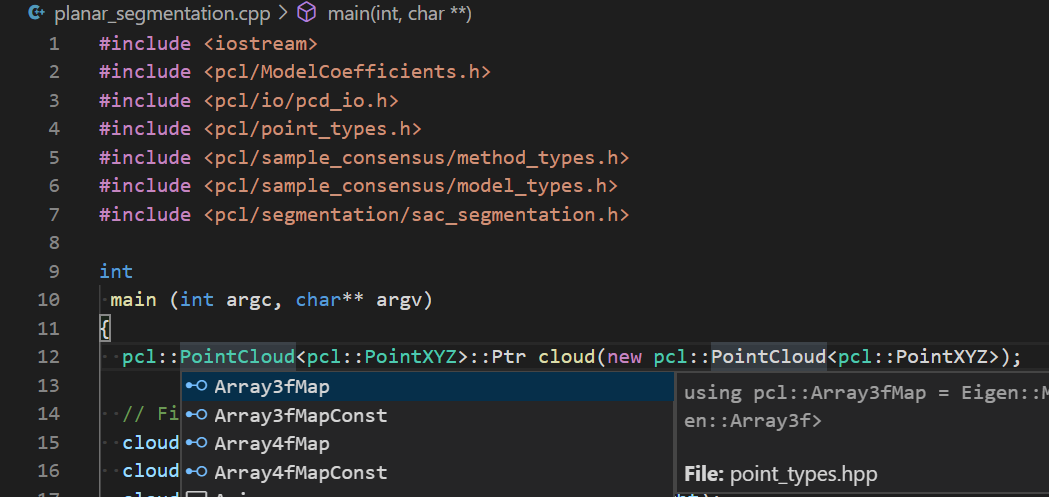
- But, as shown in the below screenshot at line number 12, in spite of above modifications, IntelliSense/auto-complete is not working with
PCLlibrary:

Expected behavior
Just like other in-built functions & STLs, when I typed pcl::P at line number 12 in the above screenshot, is should suggest auto-complete pcl::PointCloud<pcl::PointXYZ>
I couldn't figure out how to get this log. Is it possible to address this issue without this?
Logs
C/C++: Log Diagnostics-------- Diagnostics - 7/27/2020, 6:29:56 PM
Version: 0.29.0
Current Configuration:
{
"name": "Linux",
"includePath": [
"${workspaceFolder}/**",
"/usr/include/pcl-1.8/pcl/**"
],
"defines": [],
"compilerPath": "/usr/bin/gcc",
"cStandard": "gnu11",
"cppStandard": "gnu++14",
"intelliSenseMode": "clang-x64",
"compilerArgs": [],
"browse": {
"path": [
"${workspaceFolder}/**",
"/usr/include/pcl-1.8/pcl/**"
],
"limitSymbolsToIncludedHeaders": true
}
}
Translation Unit Mappings:
[ /home/milan/Desktop/Issues_on_GitHub/Cpp_extension_issues/planar_segmentation/planar_segmentation.cpp ]:
/home/milan/Desktop/Issues_on_GitHub/Cpp_extension_issues/planar_segmentation/planar_segmentation.cpp
Translation Unit Configurations:
[ /home/milan/Desktop/Issues_on_GitHub/Cpp_extension_issues/planar_segmentation/planar_segmentation.cpp ]:
Process ID: 9517
Memory Usage: 57 MB
Compiler Path: /usr/bin/gcc
Includes:
/usr/include/c++/7
/usr/include/x86_64-linux-gnu/c++/7
/usr/include/c++/7/backward
/usr/lib/gcc/x86_64-linux-gnu/7/include
/usr/local/include
/usr/lib/gcc/x86_64-linux-gnu/7/include-fixed
/usr/include/x86_64-linux-gnu
/usr/include
Standard Version: c++14
IntelliSense Mode: gcc-x64
Other Flags:
--g++
--gnu_version=70500
Total Memory Usage: 57 MB
Screenshots
As attached above.
Additional context
 milan-r-shah
All 18 comments
IntelliSense works for me, but I did randomly hit the issue you were seeing -- I'm not sure the repro steps are yet (UPDATE: I tried a bunch of times more, but I wasn't able to get it to repro any further). If you do a Reset IntelliSense Database command that might fix the issue. Another thing to try is to stop using the "**" and use
"/usr/include/pcl-1.10",
"/usr/include/eigen3"
"/usr/include/pcl-1.10/pcl/common"
Are you able to get it working?
The bug looks like something is causing the recursive include to not be used.
 sean-mcmanus
on 30 Jul 2020
sean-mcmanus
on 30 Jul 2020
Hi @sean-mcmanus ,
Sincere apology for the late reply from my end and thank you so much for all the suggestions.
Just to confirm, what did you mean by?
If you do a Reset IntelliSense Database command that might fix the issue.
Being not that much expert, I don't know about this!
For another method, you are right: "/usr/include/pcl-1.8/**" does not work. I had to replace it with:
    "/usr/include/eigen3",
    "/usr/include/pcl-1.8",
    "/usr/include/pcl-1.8/pcl",
    "/usr/include/pcl-1.8/pcl/2d",
    "/usr/include/pcl-1.8/pcl/apps",
    "/usr/include/pcl-1.8/pcl/common",
    "/usr/include/pcl-1.8/pcl/compression",
    "/usr/include/pcl-1.8/pcl/console",
    "/usr/include/pcl-1.8/pcl/features",
    "/usr/include/pcl-1.8/pcl/filters",
    "/usr/include/pcl-1.8/pcl/geometry",
    "/usr/include/pcl-1.8/pcl/impl",
    "/usr/include/pcl-1.8/pcl/in_hand_scanner",
    "/usr/include/pcl-1.8/pcl/io",
    "/usr/include/pcl-1.8/pcl/kdtree",
    "/usr/include/pcl-1.8/pcl/keypoints",
    "/usr/include/pcl-1.8/pcl/ml",
    "/usr/include/pcl-1.8/pcl/modeler",
    "/usr/include/pcl-1.8/pcl/octree",
    "/usr/include/pcl-1.8/pcl/outofcore",
    "/usr/include/pcl-1.8/pcl/people",
    "/usr/include/pcl-1.8/pcl/range_image",
    "/usr/include/pcl-1.8/pcl/recognition",
    "/usr/include/pcl-1.8/pcl/registration",
    "/usr/include/pcl-1.8/pcl/ros",
    "/usr/include/pcl-1.8/pcl/sample_consensus",
    "/usr/include/pcl-1.8/pcl/search",
    "/usr/include/pcl-1.8/pcl/segmentation",
    "/usr/include/pcl-1.8/pcl/stereo",
    "/usr/include/pcl-1.8/pcl/surface",
    "/usr/include/pcl-1.8/pcl/tracking",
    "/usr/include/pcl-1.8/pcl/visualization"
However, I noticed that the changes I made in c_cpp_properties.json file were limited to that particular project. Is there any way that I can make these changes globally so that I don't have to update the c_cpp_properties.json file in every single project?
Thanks again!
milan-r-shah
on 31 Jul 2020
It's in the Command Palette:
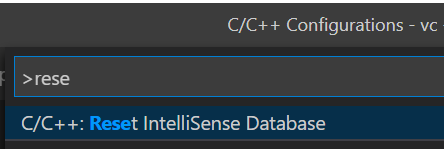
I was thinking doing a Reset IntelliSense Database command might fix the issue because it saves some "does not exist" headers, and those headers might be incorrectly getting added to that list when the recursive includes code is run.
The recursive includes "**" should work in general, but it sounds like you're hitting some unexpected case that is causing it to not work. Let me know if you figure out a repro.
sean-mcmanus
on 5 Aug 2020
Hi @sean-mcmanus ,
Thanks for your reply. I tried resetting IntelliSense Database but it didn't make any difference. I still have to mention all the subdirectories explicitly c_cpp_properties.json.
Also, could you please tell me what should I do so that the changes I made in c_cpp_properties.json file in one project reflect in all the other projects? Right now, I have to update c_cpp_properties.json file in every single project!
milan-r-shah
on 5 Aug 2020
Yeah, I don't have an explanation for why recursive includes isn't working for you.
Do the projects all use the same includes? You could set C_Cpp.default.includePath at the User setting level and those could be referenced using ${default} in your includePath in c_cpp_properties.json.
sean-mcmanus
on 6 Aug 2020
Hi @sean-mcmanus ,
Thanks for your reply. Yes, currently, most of my projects use the same includes i.e. Eigen & PCL.
One thing that I have noticed is that in spite of putting all the includes in c_cpp_properties.json, many times, I get the following warning/error:
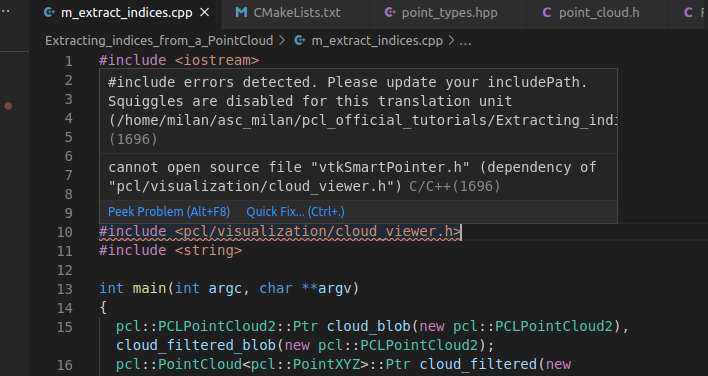
Is this a bug? Because IntelliSense seems to work fine.
Sometimes, I even get the same warning/error for C++ standard libraries like iostream e.g.
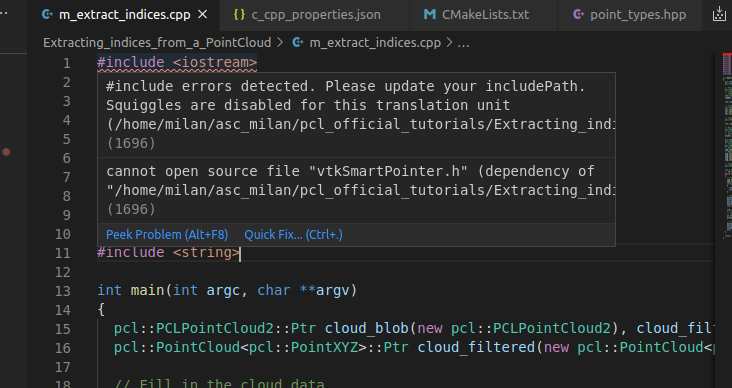
Regarding setting C_Cpp.default.includePath at the User setting level, did you mean updating settings.json to like this:
{
    "telemetry.enableTelemetry": false,
    "telemetry.enableCrashReporter": false,
    "files.autoSave": "afterDelay",
    "window.zoomLevel": 0,
    "[cpp]": {
        "editor.wordBasedSuggestions": false,
        "editor.suggest.insertMode": "replace",
        "editor.semanticHighlighting.enabled": true
    },
    "C_Cpp.default.includePath": [
        "/usr/include/eigen3",
        "/usr/include/pcl-1.8",
        "/usr/include/pcl-1.8/pcl",
        "/usr/include/pcl-1.8/pcl/2d",
        "/usr/include/pcl-1.8/pcl/apps",
        "/usr/include/pcl-1.8/pcl/common",
        "/usr/include/pcl-1.8/pcl/compression",
        "/usr/include/pcl-1.8/pcl/console",
        "/usr/include/pcl-1.8/pcl/features",
        "/usr/include/pcl-1.8/pcl/filters",
        "/usr/include/pcl-1.8/pcl/geometry",
        "/usr/include/pcl-1.8/pcl/impl",
        "/usr/include/pcl-1.8/pcl/in_hand_scanner",
        "/usr/include/pcl-1.8/pcl/io",
        "/usr/include/pcl-1.8/pcl/kdtree",
        "/usr/include/pcl-1.8/pcl/keypoints",
        "/usr/include/pcl-1.8/pcl/ml",
        "/usr/include/pcl-1.8/pcl/modeler",
        "/usr/include/pcl-1.8/pcl/octree",
        "/usr/include/pcl-1.8/pcl/outofcore",
        "/usr/include/pcl-1.8/pcl/people",
        "/usr/include/pcl-1.8/pcl/range_image",
        "/usr/include/pcl-1.8/pcl/recognition",
        "/usr/include/pcl-1.8/pcl/registration",
        "/usr/include/pcl-1.8/pcl/ros",
        "/usr/include/pcl-1.8/pcl/sample_consensus",
        "/usr/include/pcl-1.8/pcl/search",
        "/usr/include/pcl-1.8/pcl/segmentation",
        "/usr/include/pcl-1.8/pcl/stereo",
        "/usr/include/pcl-1.8/pcl/surface",
        "/usr/include/pcl-1.8/pcl/tracking",
        "/usr/include/pcl-1.8/pcl/visualization"
    ]
}
and c_cpp_properties.json to like this:
{
    "configurations": [
        {
            "name": "Linux",
            "includePath": [
                "${workspaceFolder}/**",
                "${default}"
            ],
            "defines": [],
            "compilerPath": "/usr/bin/gcc",
            "cStandard": "gnu11",
            "cppStandard": "gnu++14",
            "intelliSenseMode": "clang-x64"
        }
    ],
    "version": 4
}
right?
milan-r-shah
on 6 Aug 2020
One more weird thing that I have noticed:
If I have included #include <pcl/visualization/cloud_viewer.h> as shown below (line 11)
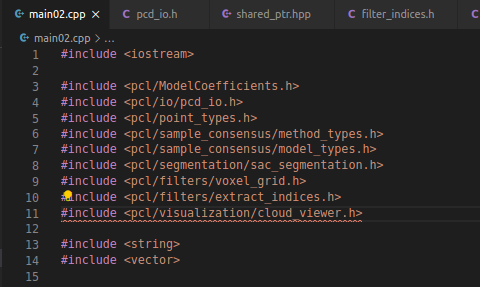
then IntelliSense is showing the wrong result for pcl::PointCloud<pcl::PointXYZRGB>::Ptr as shown below (line 29):

it should display boost::shared_ptr<pcl::PointCloud<pcl::PointXYZRGB>>.
If I comment out #include <pcl/visualization/cloud_viewer.h> like this (line 11)
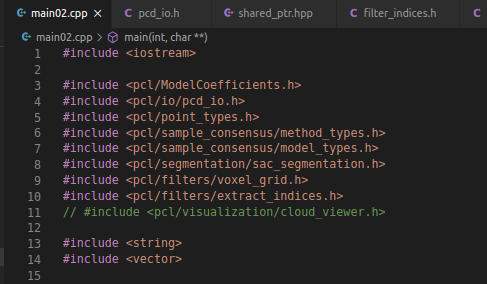
then it's showing the correct result like this (line 29)

But, I can't always comment out #include <pcl/visualization/cloud_viewer.h>!!
milan-r-shah
on 11 Aug 2020
@milan-r-shah
I'm helping out investigate this issue. When I tried to setup the sample code from https://pcl.readthedocs.io/projects/tutorials/en/latest/planar_segmentation.html#planar-segmentation I initially ran into some dependency errors like:
cannot open source file "vtkSmartPointer.h" (dependency of "pcl/visualization/cloud_viewer.h").
In order to ensure all the required dependencies is added to the include path for the extension's IntelliSense engine, I used the extension ms-vscode.cmake-tools to provide the configuration to the IntelliSense engine. This seems to resolve the #include errors from the pcl library.
Could you try using "ms-vscode.cmake-tools" as the configurationProvider to see if this resolves the issue? Below are my repro steps. Alternatively, you can also try manually adding the full list of include paths and defines to c_cpp_properties.json.
Here is my repro steps to resolve the issue:
- First I verified that CMake tools can build the provide sample code with the provided CMakeLists.txt configuration.
- In c_cpp_properties.json I specified to use the custom configuration provided by "ms-vscode.cmake-tools". Note that I told CMake to use Clang-9 to compile and in c_cpp_properties.json, compilerPath is set to gcc, but compilerPath is not used if cmake-tools is sending custom configurations, so in the Log Diagnostics, it shows Clang-9.
{
    "configurations": [
        {
            "name": "Linux",
            "includePath": [
                "${workspaceFolder}/**"
            ],
            "defines": [],
            "compilerPath": "/usr/bin/gcc",
            "cStandard": "c11",
            "cppStandard": "c++14",
            "intelliSenseMode": "gcc-x64",
            "configurationProvider": "ms-vscode.cmake-tools"
        }
    ],
    "version": 4
}
- I ran
C/C++: Log Diagnosticsto see the full list of include paths and defines provided by "ms-vscode.cmake-tools". It looks like there are several include paths that need to be specified in order for IntelliSense engine to find the correct header files.
Output from C/C++: Log Diagnostics :
```
-------- Diagnostics - 8/11/2020, 3:02:13 PM
Version: 0.30.0-insiders
Current Configuration:
{
"name": "Linux",
"includePath": [
"${workspaceFolder}/"
],
"defines": [],
"compilerPath": "/usr/bin/gcc",
"cStandard": "c11",
"cppStandard": "c++14",
"intelliSenseMode": "gcc-x64",
"configurationProvider": "ms-vscode.cmake-tools",
"compilerArgs": [],
"browse": {
"path": [
"${workspaceFolder}/"
],
"limitSymbolsToIncludedHeaders": true
}
}
Custom browse configuration:
{
"browsePath": [
"/usr/include/vtk-6.3",
"/usr/include/freetype2",
"/usr/lib/x86_64-linux-gnu/openmpi/include/openmpi",
"/usr/lib/x86_64-linux-gnu/openmpi/include/openmpi/opal/mca/event/libevent2022/libevent",
"/usr/lib/x86_64-linux-gnu/openmpi/include/openmpi/opal/mca/event/libevent2022/libevent/include",
"/usr/lib/x86_64-linux-gnu/openmpi/include",
"/usr/include/python2.7",
"/usr/include/x86_64-linux-gnu",
"/usr/include/hdf5/openmpi",
"/usr/include/libxml2",
"/usr/include/jsoncpp",
"/usr/include/tcl",
"/usr/include/pcl-1.8",
"/usr/include/eigen3",
"/usr/include/ni",
"/usr/include/openni2",
"/usr/include/x86_64-linux-gnu/qt5",
"/usr/include/x86_64-linux-gnu/qt5/QtWidgets",
"/usr/include/x86_64-linux-gnu/qt5/QtGui",
"/usr/include/x86_64-linux-gnu/qt5/QtCore",
"/usr/lib/x86_64-linux-gnu/qt5/mkspecs/linux-g++",
"/home/blue/planar_segmentation"
],
"standard": "gnu++14",
"compilerPath": "/usr/bin/clang++-9",
"compilerArgs": [
"-g",
"-fPIC",
"-std=gnu++14"
]
}
Custom configurations:
[ /home/blue/planar_segmentation/planar_segmentation.cpp ]
{
"defines": [
"DISABLE_DAVIDSDK",
"DISABLE_DSSDK",
"DISABLE_ENSENSO",
"DISABLE_LIBUSB_1_0",
"DISABLE_PCAP",
"DISABLE_PNG",
"DISABLE_RSSDK",
"FLANN_STATIC",
"QT_CORE_LIB",
"QT_GUI_LIB",
"QT_WIDGETS_LIB",
"qh_QHpointer",
"vtkFiltersFlowPaths_AUTOINIT=1(vtkFiltersParallelFlowPaths)",
"vtkIOExodus_AUTOINIT=1(vtkIOParallelExodus)",
"vtkIOGeometry_AUTOINIT=1(vtkIOMPIParallel)",
"vtkIOImage_AUTOINIT=1(vtkIOMPIImage)",
"vtkIOParallel_AUTOINIT=1(vtkIOMPIParallel)",
"vtkIOSQL_AUTOINIT=2(vtkIOMySQL,vtkIOPostgreSQL)",
"vtkRenderingContext2D_AUTOINIT=1(vtkRenderingContextOpenGL)",
"vtkRenderingCore_AUTOINIT=3(vtkInteractionStyle,vtkRenderingFreeType,vtkRenderingOpenGL)",
"vtkRenderingFreeType_AUTOINIT=2(vtkRenderingFreeTypeFontConfig,vtkRenderingMatplotlib)",
"vtkRenderingLIC_AUTOINIT=1(vtkRenderingParallelLIC)",
"vtkRenderingVolume_AUTOINIT=1(vtkRenderingVolumeOpenGL)"
],
"standard": "gnu++14",
"includePath": [
"/usr/include/vtk-6.3",
"/usr/include/freetype2",
"/usr/lib/x86_64-linux-gnu/openmpi/include/openmpi",
"/usr/lib/x86_64-linux-gnu/openmpi/include/openmpi/opal/mca/event/libevent2022/libevent",
"/usr/lib/x86_64-linux-gnu/openmpi/include/openmpi/opal/mca/event/libevent2022/libevent/include",
"/usr/lib/x86_64-linux-gnu/openmpi/include",
"/usr/include/python2.7",
"/usr/include/x86_64-linux-gnu",
"/usr/include/hdf5/openmpi",
"/usr/include/libxml2",
"/usr/include/jsoncpp",
"/usr/include/tcl",
"/usr/include/pcl-1.8",
"/usr/include/eigen3",
"/usr/include/ni",
"/usr/include/openni2",
"/usr/include/x86_64-linux-gnu/qt5",
"/usr/include/x86_64-linux-gnu/qt5/QtWidgets",
"/usr/include/x86_64-linux-gnu/qt5/QtGui",
"/usr/include/x86_64-linux-gnu/qt5/QtCore",
"/usr/lib/x86_64-linux-gnu/qt5/mkspecs/linux-g++"
],
"intelliSenseMode": "clang-x64",
"compilerPath": "/usr/bin/clang++-9",
"compilerArgs": [
"-g",
"-fPIC",
"-std=gnu++14"
]
}
Translation Unit Mappings:
Translation Unit Configurations:
Memory Usage: 190 MB
Compiler Path: /usr/bin/clang++-9
Includes:
/usr/include/vtk-6.3
/usr/include/freetype2
/usr/lib/x86_64-linux-gnu/openmpi/include/openmpi
/usr/lib/x86_64-linux-gnu/openmpi/include/openmpi/opal/mca/event/libevent2022/libevent
/usr/lib/x86_64-linux-gnu/openmpi/include/openmpi/opal/mca/event/libevent2022/libevent/include
/usr/lib/x86_64-linux-gnu/openmpi/include
/usr/include/python2.7
/usr/include/hdf5/openmpi
/usr/include/libxml2
/usr/include/jsoncpp
/usr/include/tcl8.6
/usr/include/pcl-1.8
/usr/include/eigen3
/usr/include/ni
/usr/include/openni2
/usr/include/x86_64-linux-gnu/qt5
/usr/include/x86_64-linux-gnu/qt5/QtWidgets
/usr/include/x86_64-linux-gnu/qt5/QtGui
/usr/include/x86_64-linux-gnu/qt5/QtCore
/usr/lib/x86_64-linux-gnu/qt5/mkspecs/linux-g++
/usr/include/c++/8
/usr/include/x86_64-linux-gnu/c++/8
/usr/include/c++/8/backward
/usr/local/include
/usr/lib/llvm-9/lib/clang/9.0.0/include
/usr/include/x86_64-linux-gnu
/usr/include
Defines:
DISABLE_DAVIDSDK
DISABLE_DSSDK
DISABLE_ENSENSO
DISABLE_LIBUSB_1_0
DISABLE_PCAP
DISABLE_PNG
DISABLE_RSSDK
FLANN_STATIC
QT_CORE_LIB
QT_GUI_LIB
QT_WIDGETS_LIB
qh_QHpointer
vtkFiltersFlowPaths_AUTOINIT=1(vtkFiltersParallelFlowPaths)
vtkIOExodus_AUTOINIT=1(vtkIOParallelExodus)
vtkIOGeometry_AUTOINIT=1(vtkIOMPIParallel)
vtkIOImage_AUTOINIT=1(vtkIOMPIImage)
vtkIOParallel_AUTOINIT=1(vtkIOMPIParallel)
vtkIOSQL_AUTOINIT=2(vtkIOMySQL,vtkIOPostgreSQL)
vtkRenderingContext2D_AUTOINIT=1(vtkRenderingContextOpenGL)
vtkRenderingCore_AUTOINIT=3(vtkInteractionStyle,vtkRenderingFreeType,vtkRenderingOpenGL)
vtkRenderingFreeType_AUTOINIT=2(vtkRenderingFreeTypeFontConfig,vtkRenderingMatplotlib)
vtkRenderingLIC_AUTOINIT=1(vtkRenderingParallelLIC)
vtkRenderingVolume_AUTOINIT=1(vtkRenderingVolumeOpenGL)
Standard Version: c++14
IntelliSense Mode: clang-x64
Other Flags:
--clang
--clang_version=90000
Total Memory Usage: 190 MB
``
 michelleangela
on 12 Aug 2020
michelleangela
on 12 Aug 2020
Hi @michelleangela ,
Sincere apologies for the late reply from my end & thank you so much for such a detailed response.
However, what did you mean by this:
- In c_cpp_properties.json I specified to use the custom configuration provided by "ms-vscode.cmake-tools". Note that I told CMake to use Clang-9 to compile and in c_cpp_properties.json, compilerPath is set to gcc, but compilerPath is not used if cmake-tools is sending custom configurations, so in the Log Diagnostics, it shows Clang-9.
especially, "Note that I told CMake to use Clang-9 to compile " I mean, I'm just running the code by running the following commands:
$ cd <project_directory>
$ mkdir build && cd build
$ cmake ..
$ make
$ ./planar_segmentation
I have already been using ms-vscode.cmake-tools and while compiling the code, I don't get the error that you have mentioned in your reply.
Anyway, I followed you repro steps and added "configurationProvider": "ms-vscode.cmake-tools" in my c_cpp_properties.json as you suggested. So, now, that file looks like this:
{
    "configurations": [
        {
            "name": "Linux",
            "includePath": [
                "${workspaceFolder}/**",
                "${default}"
            ],
            "defines": [],
            "compilerPath": "/usr/bin/gcc",
            "cStandard": "gnu11",
            "cppStandard": "gnu++14",
            "intelliSenseMode": "clang-x64",
            "configurationProvider": "ms-vscode.cmake-tools"
        }
    ],
    "version": 4
}
My settings.json :
{
    "telemetry.enableTelemetry": false,
    "telemetry.enableCrashReporter": false,
    "files.autoSave": "afterDelay",
    "window.zoomLevel": -1,
    "[cpp]": {
        "editor.wordBasedSuggestions": false,
        "editor.suggest.insertMode": "replace",
        "editor.semanticHighlighting.enabled": true
    },
    "C_Cpp.default.includePath": [
        "/usr/include/pcl-1.8",
        "/usr/include/pcl-1.8/pcl",
        "/usr/include/pcl-1.8/pcl/2d",
        "/usr/include/pcl-1.8/pcl/apps",
        "/usr/include/pcl-1.8/pcl/common",
        "/usr/include/pcl-1.8/pcl/compression",
        "/usr/include/pcl-1.8/pcl/console",
        "/usr/include/pcl-1.8/pcl/features",
        "/usr/include/pcl-1.8/pcl/filters",
        "/usr/include/pcl-1.8/pcl/geometry",
        "/usr/include/pcl-1.8/pcl/impl",
        "/usr/include/pcl-1.8/pcl/in_hand_scanner",
        "/usr/include/pcl-1.8/pcl/io",
        "/usr/include/pcl-1.8/pcl/kdtree",
        "/usr/include/pcl-1.8/pcl/keypoints",
        "/usr/include/pcl-1.8/pcl/ml",
        "/usr/include/pcl-1.8/pcl/modeler",
        "/usr/include/pcl-1.8/pcl/octree",
        "/usr/include/pcl-1.8/pcl/outofcore",
        "/usr/include/pcl-1.8/pcl/people",
        "/usr/include/pcl-1.8/pcl/range_image",
        "/usr/include/pcl-1.8/pcl/recognition",
        "/usr/include/pcl-1.8/pcl/registration",
        "/usr/include/pcl-1.8/pcl/ros",
        "/usr/include/pcl-1.8/pcl/sample_consensus",
        "/usr/include/pcl-1.8/pcl/search",
        "/usr/include/pcl-1.8/pcl/segmentation",
        "/usr/include/pcl-1.8/pcl/stereo",
        "/usr/include/pcl-1.8/pcl/surface",
        "/usr/include/pcl-1.8/pcl/tracking",
        "/usr/include/pcl-1.8/pcl/visualization",
        "/usr/include/pcl-1.8/pcl/visualization/common",
        "/usr/include/pcl-1.8/pcl/visualization/impl",
        "/usr/include/pcl-1.8/pcl/visualization/vtk",
        "/usr/include/eigen3",
        "/usr/include/eigen3/Eigen",
        "/usr/include/eigen3/Eigen/Core"
    ],
    "C_Cpp.clang_format_fallbackStyle": "{ BasedOnStyle: Google, IndentWidth: 4, ColumnLimit: 0, AccessModifierOffset: -4}"
}
Here is the output from C/C++: Log Diagnostics:
-------- Diagnostics - 9/15/2020, 9:05:14 PM
Version: 1.0.0
Current Configuration:
{
    "name": "Linux",
    "includePath": [
        "${workspaceFolder}/**",
        "/usr/include/pcl-1.8",
        "/usr/include/pcl-1.8/pcl",
        "/usr/include/pcl-1.8/pcl/2d",
        "/usr/include/pcl-1.8/pcl/apps",
        "/usr/include/pcl-1.8/pcl/common",
        "/usr/include/pcl-1.8/pcl/compression",
        "/usr/include/pcl-1.8/pcl/console",
        "/usr/include/pcl-1.8/pcl/features",
        "/usr/include/pcl-1.8/pcl/filters",
        "/usr/include/pcl-1.8/pcl/geometry",
        "/usr/include/pcl-1.8/pcl/impl",
        "/usr/include/pcl-1.8/pcl/in_hand_scanner",
        "/usr/include/pcl-1.8/pcl/io",
        "/usr/include/pcl-1.8/pcl/kdtree",
        "/usr/include/pcl-1.8/pcl/keypoints",
        "/usr/include/pcl-1.8/pcl/ml",
        "/usr/include/pcl-1.8/pcl/modeler",
        "/usr/include/pcl-1.8/pcl/octree",
        "/usr/include/pcl-1.8/pcl/outofcore",
        "/usr/include/pcl-1.8/pcl/people",
        "/usr/include/pcl-1.8/pcl/range_image",
        "/usr/include/pcl-1.8/pcl/recognition",
        "/usr/include/pcl-1.8/pcl/registration",
        "/usr/include/pcl-1.8/pcl/ros",
        "/usr/include/pcl-1.8/pcl/sample_consensus",
        "/usr/include/pcl-1.8/pcl/search",
        "/usr/include/pcl-1.8/pcl/segmentation",
        "/usr/include/pcl-1.8/pcl/stereo",
        "/usr/include/pcl-1.8/pcl/surface",
        "/usr/include/pcl-1.8/pcl/tracking",
        "/usr/include/pcl-1.8/pcl/visualization",
        "/usr/include/pcl-1.8/pcl/visualization/common",
        "/usr/include/pcl-1.8/pcl/visualization/impl",
        "/usr/include/pcl-1.8/pcl/visualization/vtk",
        "/usr/include/eigen3",
        "/usr/include/eigen3/Eigen",
        "/usr/include/eigen3/Eigen/Core"
    ],
    "defines": [],
    "compilerPath": "/usr/bin/gcc",
    "cStandard": "gnu11",
    "cppStandard": "gnu++14",
    "intelliSenseMode": "clang-x64",
    "configurationProvider": "ms-vscode.cmake-tools",
    "compilerArgs": [],
    "browse": {
        "path": [
            "${workspaceFolder}/**",
            "/usr/include/pcl-1.8",
            "/usr/include/pcl-1.8/pcl",
            "/usr/include/pcl-1.8/pcl/2d",
            "/usr/include/pcl-1.8/pcl/apps",
            "/usr/include/pcl-1.8/pcl/common",
            "/usr/include/pcl-1.8/pcl/compression",
            "/usr/include/pcl-1.8/pcl/console",
            "/usr/include/pcl-1.8/pcl/features",
            "/usr/include/pcl-1.8/pcl/filters",
            "/usr/include/pcl-1.8/pcl/geometry",
            "/usr/include/pcl-1.8/pcl/impl",
            "/usr/include/pcl-1.8/pcl/in_hand_scanner",
            "/usr/include/pcl-1.8/pcl/io",
            "/usr/include/pcl-1.8/pcl/kdtree",
            "/usr/include/pcl-1.8/pcl/keypoints",
            "/usr/include/pcl-1.8/pcl/ml",
            "/usr/include/pcl-1.8/pcl/modeler",
            "/usr/include/pcl-1.8/pcl/octree",
            "/usr/include/pcl-1.8/pcl/outofcore",
            "/usr/include/pcl-1.8/pcl/people",
            "/usr/include/pcl-1.8/pcl/range_image",
            "/usr/include/pcl-1.8/pcl/recognition",
            "/usr/include/pcl-1.8/pcl/registration",
            "/usr/include/pcl-1.8/pcl/ros",
            "/usr/include/pcl-1.8/pcl/sample_consensus",
            "/usr/include/pcl-1.8/pcl/search",
            "/usr/include/pcl-1.8/pcl/segmentation",
            "/usr/include/pcl-1.8/pcl/stereo",
            "/usr/include/pcl-1.8/pcl/surface",
            "/usr/include/pcl-1.8/pcl/tracking",
            "/usr/include/pcl-1.8/pcl/visualization",
            "/usr/include/pcl-1.8/pcl/visualization/common",
            "/usr/include/pcl-1.8/pcl/visualization/impl",
            "/usr/include/pcl-1.8/pcl/visualization/vtk",
            "/usr/include/eigen3",
            "/usr/include/eigen3/Eigen",
            "/usr/include/eigen3/Eigen/Core"
        ],
        "limitSymbolsToIncludedHeaders": true
    }
}
No active translation units.

------- Workspace parsing diagnostics -------
Number of folders and files enumerated: 31110
Number of files discovered (not excluded): 29047
I noticed that the output of my C/C++: Log Diagnostics is quite different from yours. But, now, the biggest problem is, IntelliSense has completely stopped working!!
milan-r-shah
on 16 Sep 2020
"No active translation units." means the IntelliSense process hasn't loaded yet -- if you wait does it load later? Has the cpptools process crashed?
sean-mcmanus
on 17 Sep 2020
Hi @sean-mcmanus
Thanks a lot for your reply. Nope, I tried waiting for different durations but it doesn't load. Just to confirm, how can I check whether cpptools process has been crashed or not? I mean I don't see any notifications/pop-ups in my VSCode.
I even tried reinstalling VSCode as well as all the extensions i.e. C/C++, CMake Tools, etc. But still, that didn't work either!
In fact, apart from the PCL library, IntelliSense has stopped working even for C++ standard libraries & STLs.
milan-r-shah
on 17 Sep 2020
@milan-r-shah
In c_cpp_properties.json I specified to use the custom configuration provided by "ms-vscode.cmake-tools". Note that I told CMake to use Clang-9 to compile and in c_cpp_properties.json, compilerPath is set to gcc, but compilerPath is not used if cmake-tools is sending custom configurations, so in the Log Diagnostics, it shows Clang-9
This means that in the ms-vscode.cmake-tools extension, I selected the Clang-9 for the build kit. For the solution I tried, I used the ms-vscode.cmake-tools extension to build and not manually with the command line.
Could you confirm that the ms-vscode.cmake-tools extension was able to configure the project correctly? If the ms-vscode.cmake-tools configuration is successful and correct, the ms-vscode.cmake-tools should provide the correct information (includePaths, libraries, defines, etc) to the cpptools extension.
michelleangela
on 17 Sep 2020
@milan-r-shah If cpptools is crashing, you would see a "Connection to server got closed. Server will not be restarted" message in a cpptools log. Or the cpptools-srv process could be crashing (a "Failed to read response from server" in the C/C++ logs).
I'm not aware of a known issue that could cause "No active translation units" and we haven't gotten other reports like this yet.
Does the issue repro with 0.29.0?
sean-mcmanus
on 17 Sep 2020
This means that in the ms-vscode.cmake-tools extension, I selected the Clang-9 for the build kit. For the solution I tried, I used the ms-vscode.cmake-tools extension to build and not manually with the command line.
Could you confirm that the ms-vscode.cmake-tools extension was able to configure the project correctly? If the ms-vscode.cmake-tools configuration is successful and correct, the ms-vscode.cmake-tools should provide the correct information (includePaths, libraries, defines, etc) to the cpptools extension.
@michelleangela
Sorry for the late reply but as I was not used to compiling the code that way, it took me some time to figure that out. I have followed this link
My configurations:
| Command | My Config |
|---------------------------------|------------------------|
|CMake: Select Variant | RelWithDebInfo |
|CMake: Select a Kit | GCC 7.5.0 |
- The "ms-vscode.cmake-tools" extension couldn't compile the code when I didn't create
builddirectory manually. It was showing this output:
[main] Building folder: planar_segmentation
[build] Starting build
[proc] Executing command: /usr/local/bin/cmake --build /home/milan/Desktop/mrshah/Issues_on_GitHub/Cpp_extension_issues/planar_segmentation/build --config RelWithDebInfo --target planar_segmentation -- -j 14
[build] Error: /home/milan/Desktop/mrshah/Issues_on_GitHub/Cpp_extension_issues/planar_segmentation/build is not a directory
[build] Build finished with exit code 1
- After creating
builddirectory and upon pressingBuildicon, the output was:
[main] Building folder: planar_segmentation
[build] Starting build
[proc] Executing command: /usr/local/bin/cmake --build /home/milan/Desktop/mrshah/Issues_on_GitHub/Cpp_extension_issues/planar_segmentation/build --config RelWithDebInfo --target planar_segmentation -- -j 14
[build] Error: could not load cache
[build] Build finished with exit code 1
- The above error disappeared when I selected the
active kitagain and pressedBuildicon. There were some warning but yet it successfully created the executable:
[main] Building folder: planar_segmentation
[main] Configuring folder: planar_segmentation
[proc] Executing command: /usr/local/bin/cmake --no-warn-unused-cli -DCMAKE_EXPORT_COMPILE_COMMANDS:BOOL=TRUE -DCMAKE_BUILD_TYPE:STRING=RelWithDebInfo -DCMAKE_C_COMPILER:FILEPATH=/usr/bin/gcc-7 -DCMAKE_CXX_COMPILER:FILEPATH=/usr/bin/g++-7 -H/home/milan/Desktop/mrshah/Issues_on_GitHub/Cpp_extension_issues/planar_segmentation -B/home/milan/Desktop/mrshah/Issues_on_GitHub/Cpp_extension_issues/planar_segmentation/build -G "Unix Makefiles"
[cmake] Not searching for unused variables given on the command line.
[cmake] -- The C compiler identification is GNU 7.5.0
[cmake] -- The CXX compiler identification is GNU 7.5.0
.
.
.
[build] [100%] Linking CXX executable planar_segmentation
[build] [100%] Built target planar_segmentation
[cmakefileapi-parser] Code model version (2.1) of cmake-file-api is unexpected. Expecting (2.0). IntelliSense configuration may be incorrect.
[cmakefileapi-parser] Code model version (2.1) of cmake-file-api is unexpected. Expecting (2.0). IntelliSense configuration may be incorrect.
[build] Build finished with exit code 0
@milan-r-shah If cpptools is crashing, you would see a "Connection to server got closed. Server will not be restarted" message in a cpptools log. Or the cpptools-srv process could be crashing (a "Failed to read response from server" in the C/C++ logs).
I'm not aware of a known issue that could cause "No active translation units" and we haven't gotten other reports like this yet.
Does the issue repro with 0.29.0?
@sean-mcmanus got your point.
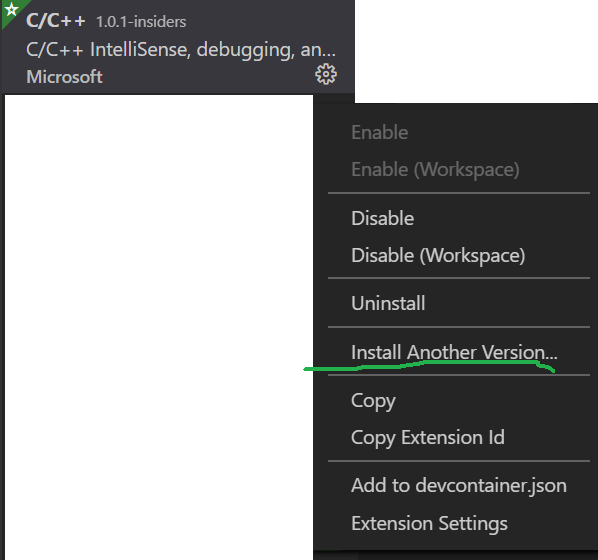
I think when I reinstalled VSCode and then C/C++ extension, v1.0.0 got installed. So, now, how can I check whether this issue repro with v0.29.0 ?
milan-r-shah
on 17 Sep 2020
The Install Another Version... option.
sean-mcmanus
on 18 Sep 2020
This issue has been closed automatically because it needs more information and has not had recent activity.
![github-actions[bot] picture](https://avatars2.githubusercontent.com/in/15368?v=4&s=40) github-actions[bot]
on 17 Nov 2020
github-actions[bot]
on 17 Nov 2020
TL;DR:
- Put PCL directory into C/C++ Extension configuration, eg. "/usr/include/pcl-1.10/pcl"
- Click the Cmake extension button on the sidebar
- Configure all and then build all
Finally, I get rid of all the squiggles! Not just for pcl, but for other 3rd party libs. I've tried to include almost every pcl folder to c_cpp_properties.json, and tweaked the compiler/intellisense settings... All failed. I thought "configure all" should configure vscode with all inclusions, but "build all" is the crux to solve the problem.
After "build all", eigen doesn't need to be included by "#include
This trick sounds weird, because if a project is not finished, it might not be able to be built. Besides, reloading will bring the include squiggles back.
Still looking forward to an official elegant solution.
 YukunXia
on 15 Dec 2020
YukunXia
on 15 Dec 2020
Related issues
 wdc596933938
·
3Comments
wdc596933938
·
3Comments
 igorPhelype
·
3Comments
igorPhelype
·
3Comments
 SkyRiderMike
·
3Comments
SkyRiderMike
·
3Comments
 lutianqi
·
3Comments
lutianqi
·
3Comments
 peterwoods1
·
3Comments
peterwoods1
·
3Comments