Vscode-cpptools: change "C_Cpp: Clang_format_fallback Style" is fail!
version : 0.28.0
os : windows 10
option of “C_Cpp: Clang_format_fallback Style” can not change.
 xtzt
xtzt
All 6 comments
Can you clarify what you mean?
 sean-mcmanus
on 13 May 2020
sean-mcmanus
on 13 May 2020
Is this setting item removed in 0.28.0? This setting doesn't work at all...
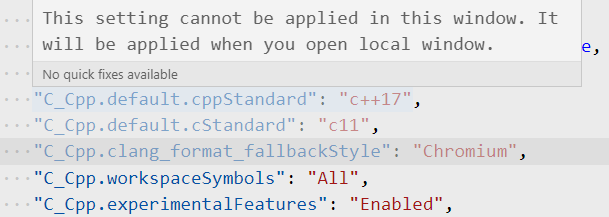
This setting cannot be applied in this window. It will be applied when you open local window.

 BOT-Man-JL
on 13 May 2020
BOT-Man-JL
on 13 May 2020
If you're using a remote session, it should be changeable in the Remote or Workspace or Workspace Folder settings.
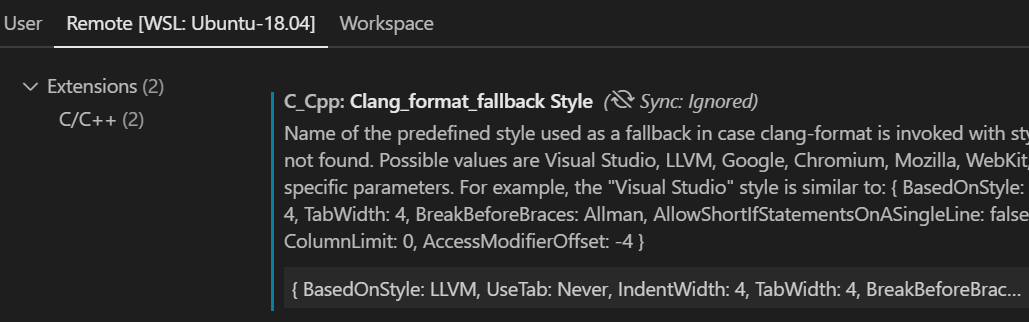
This is intentional, because your remote machine's instance of clang_format may not accept the same fallbackStyle that your local machine is able to use.
sean-mcmanus
on 13 May 2020
These settings are all removed in 0.28.0... Is there a fast way to config them on all my remote machines?
I think it would be better to have a place to set the default setting for all remotes... And the extension use the remote's settings only if the local's are not acceptable.
BOT-Man-JL
on 13 May 2020
- Copy your existing settings that are greyed out.
- File->Preferences->Settings->Remote.
- Click the Open Settings icon in the top right.
- Paste the settings.
Are you saying you want a setting that applies to all the different remote machines you use? For that, I recommend filing a feature request at https://github.com/Microsoft/vscode-remote-release/issues .
The change we may was based on recommendations from https://github.com/microsoft/vscode/issues/73985 .
I'm not sure how we would know if the remote settings are acceptable or not.
sean-mcmanus
on 13 May 2020
Currently, this is by design. We changed it due to feedback we received from the VS Code team at #3774 . Closing this issue.
 Colengms
on 28 Jul 2020
Colengms
on 28 Jul 2020
Related issues
 wdc596933938
·
3Comments
wdc596933938
·
3Comments
 CDitzel
·
3Comments
CDitzel
·
3Comments
 timothy
·
3Comments
timothy
·
3Comments
 jrieken
·
3Comments
jrieken
·
3Comments
 narutse
·
3Comments
narutse
·
3Comments
Most helpful comment
If you're using a remote session, it should be changeable in the Remote or Workspace or Workspace Folder settings.
This is intentional, because your remote machine's instance of clang_format may not accept the same fallbackStyle that your local machine is able to use.