Vscode-cpptools: "hello-world" would like to access files in your Documents folder
- OS and Version: macOS 10.15.4
- VS Code Version: 1.44.0
- C/C++ Extension Version: 0.27.0
Hello, every time I start debugging, I get prompt like this:
"hello-world" would like to access files in your Documents folder
How to disable the prompt?
Thanks,
 kzhui125
All 3 comments
The "hello-world" would like to access files in your Documents folder comes from the macOS operating system. The terminal program you are using does not permissions to access your file system. You can fix this by giving your terminal access in Security & Privacy -> Privacy -> Files and Folders and click on the checkbox for Terminal.

 WardenGnaw
on 13 Apr 2020
WardenGnaw
on 13 Apr 2020
I see hello-world appear at the Files and Folders list, and I uncheck the hello-world, now it works.
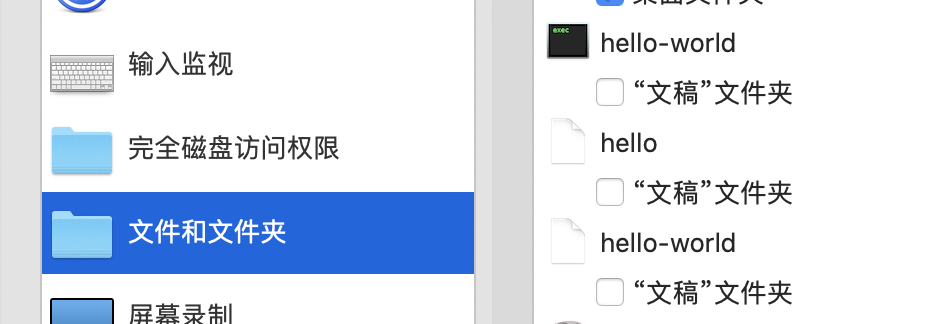
I have tried to use g++-9(Homebrew GCC 9.3.0) / gdb(GNU gdb (GDB) 9.1) to build and debug. I have signed the gdb following this article: https://sourceware.org/gdb/wiki/PermissionsDarwin
codesign -vv /usr/local/bin/gdb
/usr/local/bin/gdb: valid on disk
/usr/local/bin/gdb: satisfies its Designated Requirement
But I still can't debug using VSCode with g++-9/gdb. It seems when using g++-9 to build, it will generate an application for hello-world.
Now I switch to use clang/lldb to build and debug. Hope VSCode will support documents for how to debug using gdb on macOS.
Thanks,
kzhui125
on 14 Apr 2020
The
"hello-world" would like to access files in your Documents foldercomes from the macOS operating system. The terminal program you are using does not permissions to access your file system. You can fix this by giving your terminal access inSecurity & Privacy->Privacy->Files and Foldersand click on the checkbox forTerminal.
This solution doesn't work for me. Access to Terminal is granted, but the permission popups haven't gone away.
 swineone
on 23 Apr 2020
swineone
on 23 Apr 2020
Related issues
 jrieken
·
3Comments
jrieken
·
3Comments
 igorPhelype
·
3Comments
igorPhelype
·
3Comments
 lutianqi
·
3Comments
lutianqi
·
3Comments
 narutse
·
3Comments
narutse
·
3Comments
 jyavenard
·
3Comments
jyavenard
·
3Comments
Most helpful comment
I see hello-world appear at the Files and Folders list, and I uncheck the hello-world, now it works.
I have tried to use g++-9(Homebrew GCC 9.3.0) / gdb(GNU gdb (GDB) 9.1) to build and debug. I have signed the gdb following this article: https://sourceware.org/gdb/wiki/PermissionsDarwin
But I still can't debug using VSCode with g++-9/gdb. It seems when using g++-9 to build, it will generate an application for hello-world.
Now I switch to use clang/lldb to build and debug. Hope VSCode will support documents for how to debug using gdb on macOS.
Thanks,