Vscode-cpptools: SDL2 VS Code error: Undefined symbols for architecture x86_64 (compiling on MacOS)
MacOS 10.13.2
Visual Studio Code 1.43.1
c++
SDL 2
I'm trying to compile a simple program using SDL. SDL functions are not read or can't be found?
This is my super simple code:
#include <SDL2/SDL.h>
#include <stdio.h>

int main() {

    if( SDL_Init( SDL_INIT_VIDEO ) < 0 )
    {
        printf( "SDL could not initialize! SDL_Error: %s\n", SDL_GetError() );
    }
    else
    {
        printf("success! quiting...");
        SDL_Quit();
    }

    return 0;
}
This is what I get:
Undefined symbols for architecture x86_64:
"_SDL_GetError", referenced from:
_main in 01_hello_SDL-0907f8.o
"_SDL_Init", referenced from:
_main in 01_hello_SDL-0907f8.o
"_SDL_Quit", referenced from:
_main in 01_hello_SDL-0907f8.o
ld: symbol(s) not found for architecture x86_64
clang: error: linker command failed with exit code 1 (use -v to see invocation)
[Done] exited with code=1 in 0.143 seconds
I hope someone can help me. I didn't have this problem in Visual Studio for Windows...
 martinlizo
All 11 comments
@martinlizo
In the first issue you reported, I posted a comment on the compiler error. Have you tried the solution from https://stackoverflow.com/questions/18751868/undefined-symbols-for-architecture-x86-64-compiling-problems?
 michelleangela
on 23 Mar 2020
michelleangela
on 23 Mar 2020
@martinlizo
Sorry, I didn't know that SDL is a library. It looks like the option -framework SDL2 will need to be added to the compile arguments as well. This is from https://stackoverflow.com/questions/35407368/sdl-undefined-symbols-for-architecture-x86-64-mac
michelleangela
on 23 Mar 2020
Thank you mechelleangela, how can I do this? I'm very new to VS Code. This has been very frustrating, since I cannot even run a single window...
martinlizo
on 23 Mar 2020
You can try adding the compiler option -framework SDL2 to the arguments list of the g++ compiler command:

Alternatively, you can manually execute the compiler command on a terminal. Example:
$/usr/bin/g++ -framework SDL2 -g /pathToWorkspaceFolder/someSourceFile.cpp -i someIncludePath -o /pathToOutputFolder/outputFile
For more information about using the tasks.json to build, go to https://code.visualstudio.com/docs/cpp/config-clang-mac#_build-helloworldcpp. The build section explains the JSON properties.
michelleangela
on 24 Mar 2020
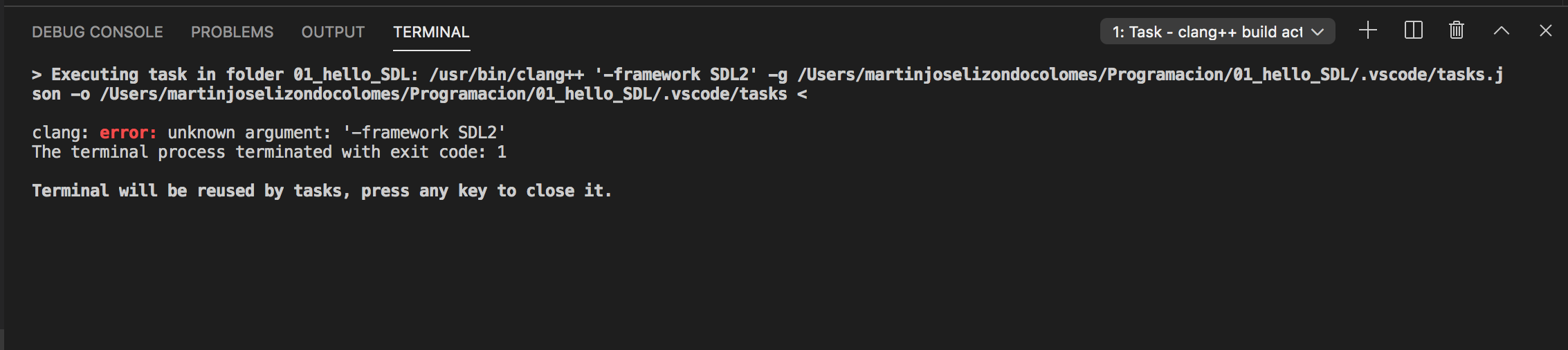
Thanks, but it's not recognized. I recieve this message:
martinlizo
on 24 Mar 2020
I see from the command arguments that the tasks.json file was passed in or is that the output of tasks.json?
I don't have knowledge on how to compile with SDL. I suggest to do research on how to compile with SDL2 framework using either clang or gcc compilers on a Mac.
michelleangela
on 24 Mar 2020
I too have this problem. I use mac os 10.15.1 and vs code 1.44.2.
My task.json
{
    "version": "2.0.0",
    "tasks": [
        {
            "type": "shell",
            "label": "C/C++: clang++ build active file",
            "command": "/usr/bin/clang++",
            "args": [
                "-std=c++11",
                "-stdlib=libc++",
                "-lSDL2",
                "-lSDL2_image",
                "-g",
                "${file}",
                "-o",
                "${fileDirname}/${fileBasenameNoExtension}"
            ],
            "options": {
                "cwd": "${workspaceFolder}"
            },
            "problemMatcher": [
                "$gcc"
            ],
            "group": {
                "kind": "build",
                "isDefault": true
            }
        }
    ]
}
Error in output:
`[Running] cd "/Users/nantha/Projc/vscode/sdl/proj1/" && g++ main.cpp -o main && "/Users/nantha/Projc/vscode/sdl/proj1/"main
Undefined symbols for architecture x86_64:
"_SDL_GetError", referenced from:
_main in main-bd57bc.o
"_SDL_Init", referenced from:
_main in main-bd57bc.o
ld: symbol(s) not found for architecture x86_64
clang: error: linker command failed with exit code 1 (use -v to see invocation)
[Done] exited with code=1 in 1.33 seconds`
 nantha42
on 21 May 2020
nantha42
on 21 May 2020
It's working now. When I choose Terminal->Run build Task it works, but if I click the Run Code button, I get
I too have this problem. I use mac os 10.15.1 and vs code 1.44.2.
My task.json
{ "version": "2.0.0", "tasks": [ { "type": "shell", "label": "C/C++: clang++ build active file", "command": "/usr/bin/clang++", "args": [ "-std=c++11", "-stdlib=libc++", "-lSDL2", "-lSDL2_image", "-g", "${file}", "-o", "${fileDirname}/${fileBasenameNoExtension}" ], "options": { "cwd": "${workspaceFolder}" }, "problemMatcher": [ "$gcc" ], "group": { "kind": "build", "isDefault": true } } ] }
Error in output:
`[Running] cd "/Users/nantha/Projc/vscode/sdl/proj1/" && g++ main.cpp -o main && "/Users/nantha/Projc/vscode/sdl/proj1/"main
Undefined symbols for architecture x86_64:
"_SDL_GetError", referenced from:
_main in main-bd57bc.o
"_SDL_Init", referenced from:
_main in main-bd57bc.o
ld: symbol(s) not found for architecture x86_64
clang: error: linker command failed with exit code 1 (use -v to see invocation)[Done] exited with code=1 in 1.33 seconds`
It's working now. When I choose Terminal->Run build Task it works, but if I click the Run Code button, I get the above error.
nantha42
on 22 May 2020
@nantha42 Thank you that helped me out.
 Agonz937
on 25 Jul 2020
Agonz937
on 25 Jul 2020
@nantha42 Thank you that helped me out.
Hmm tried your approach and it didn't work ... any other ideas?
 deafwing
on 4 Sep 2020
deafwing
on 4 Sep 2020
Closing this issue because it has not had recent activity.
michelleangela
on 9 Dec 2020
Related issues
 BDZNH
·
3Comments
BDZNH
·
3Comments
 CDitzel
·
3Comments
CDitzel
·
3Comments
 lutianqi
·
3Comments
lutianqi
·
3Comments
 arl
·
3Comments
arl
·
3Comments
 montery8
·
3Comments
montery8
·
3Comments