Vscode-cpptools: 在进行解析时是否可以使用GPU进行加速呢?
当项目过大时,解析会占用CPU和大量时间,是否可以用过GPU进行加速呢?
 lujfsd
All 8 comments
@lujfsd, I translated your post to English. Is the translation below correct?
When the project is too large, the resolution will take up CPU and a lot of time. Can you use the GPU to accelerate?
 michelleangela
on 3 Sep 2019
michelleangela
on 3 Sep 2019
What does "resolution" refer to? Are you referring to the database icon (tag parsing), flame icon (IntelliSense parsing), or search icon (Find All References). Using the GPU to accelerate is unlikely, since most of our code is too general purpose (compiling and database querying) to run on a GPU.
 sean-mcmanus
on 3 Sep 2019
sean-mcmanus
on 3 Sep 2019
@sean-mcmanus that's tag parsing and IntelliSense parsing ,when the project is too large,they will take more time and more cpu .
it take 72s,cpp_tools_log.txt
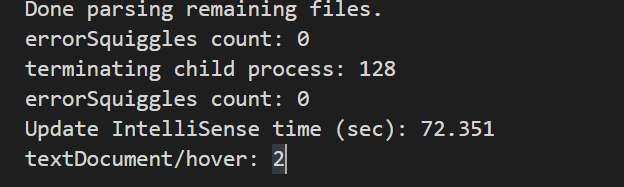
Extension version: 0.25.1
VS Code version: Code 1.37.1 (f06011ac164ae4dc8e753a3fe7f9549844d15e35, 2019-08-15T16:17:55.855Z)
OS version: Windows_NT x64 10.0.18362
Fetching remote diagnostics for 'wsl+default' timed out.
System Info
|Item|Value|
|---|---|
|CPUs|Intel(R) Core(TM) i5-8250U CPU @ 1.60GHz (8 x 1800)|
|GPU Status|2d_canvas: enabled
flash_3d: enabled
flash_stage3d: enabled
flash_stage3d_baseline: enabled
gpu_compositing: enabled
multiple_raster_threads: enabled_on
native_gpu_memory_buffers: disabled_software
oop_rasterization: disabled_off
protected_video_decode: enabled
rasterization: enabled
skia_deferred_display_list: disabled_off
skia_renderer: disabled_off
surface_synchronization: enabled_on
video_decode: enabled
viz_display_compositor: disabled_off
webgl: enabled
webgl2: enabled|
|Load (avg)|undefined|
|Memory (System)|7.86GB (2.21GB free)|
|Process Argv||
|Screen Reader|no|
|VM|0%|
Fetching remote diagnostics for 'wsl+default' timed out.
Process Info
CPU %   Mem MB     PID  Process
    1      156   13964  code main
    0       70   13128     window (问题报告程序)
    0       13   14756     electron-crash-reporter
    0      240   15016     window (cv2xCollWarn.h - cgu_minetruck_v2.0 [WSL] - Visual Studio Code)
    0       76   17644       extensionHost
    0       31    8400         electron_node wslDaemon.js
    0        5    1996           C:\WINDOWS\System32\wsl.exe sh -c "\"\$(wslpath -u 'c:/Users/lu/.vscode/extensions/ms-vscode-remote.remote-wsl-0.39.2/scripts/wslServer.sh')\" 'f06011ac164ae4dc8e753a3fe7f9549844d15e35' 'stable' '.vscode-server' '' 0  "
    0       11   14684             console-window-host (Windows internal process)
    0        5   17428             C:\WINDOWS\System32\lxss\wslhost.exe {ec51d0da-8a26-4444-8818-06a2d2643ec6} 448 460 464
    0       13   11568               console-window-host (Windows internal process)
    0      190   16848     gpu-process
    0       81   17016     shared-process
    0       30   18716     utility
Fetching remote diagnostics for 'wsl+default' timed out.
Workspace Info
Fetching remote diagnostics for 'wsl+default' timed out.;
Yeah, 72 seconds is an unusually large amount of time for the IntelliSense updating. There is probably something special with your TU that is causing our IntelliSense parsing to take an abnormally long time. The size of your project probably shouldn't matter in this case, just the source file and included headers (i.e. the TU). Is your intelliSenseCacheSize set to a non-zero value?
sean-mcmanus
on 4 Sep 2019

intelliSenseCacheSize is default.
lujfsd
on 4 Sep 2019
Coming back to this issue. In this source file, do you write an implementation of your class methods inside the class declaration, or do you forward declare them in a header file and implement them elsewhere (outside the class declaration)?
For example:
class Foo {
public:
  void f() {
    // implement everything here
    ...
  }
  void g(); // forward declare here, but implement elsewhere
};
 bobbrow
on 5 Mar 2020
bobbrow
on 5 Mar 2020
The second method, declare them in a header file and implement them in cpp
lujfsd
on 6 Mar 2020
Closing this issue because it has not had recent activity. Please install the latest version of the C++ extension to see if the issue has been fixed. If the issue still reproduces, please re-open the issue with any additional new information.
michelleangela
on 9 Dec 2020
Related issues
 montery8
·
3Comments
montery8
·
3Comments
 vicatcu
·
3Comments
vicatcu
·
3Comments
 DemoCrazer
·
3Comments
DemoCrazer
·
3Comments
 narutse
·
3Comments
narutse
·
3Comments
 timothy
·
3Comments
timothy
·
3Comments
Most helpful comment
@lujfsd, I translated your post to English. Is the translation below correct?