Vscode-cpptools: Variable colourisation stopping part way through a variable
Type: LanguageService
Variable colour highlighting stops part way through a variable. For example, if I enter:
int Class::VariableName[];
I get
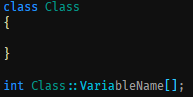
With the extension disabled, I get
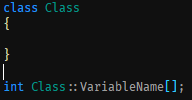
Version: 1.36.0 (user setup)
Commit: 0f3794b38477eea13fb47fbe15a42798e6129338
Date: 2019-07-03T13:25:46.372Z
Electron: 4.2.5
Chrome: 69.0.3497.128
Node.js: 10.11.0
V8: 6.9.427.31-electron.0
OS: Windows_NT x64 10.0.17134
C/C++ Extension Version:
Name: C/C++
Id: ms-vscode.cpptools
Description: C/C++ IntelliSense, debugging, and code browsing.
Version: 0.24.0
Publisher: Microsoft
VS Marketplace Link: https://marketplace.visualstudio.com/items?itemName=ms-vscode.cpptoolsOther extensions you installed (and if the issue persists after disabling them):
- A clear and concise description of what the bug is.
To Reproduce
Put the following code in a C++ file:
class Class
{
}
int Class::VariableName[];
Expected behaviour
The whole of "VariableName" should be coloured.
 BillDenton
All 8 comments
I haven't observed the above, but I'm having all kinds of colorization issues with C++ right now that I assume must stem from the same source.
As another data point, the extension currently seems to be unable to correctly tokenize (some?) user-defined types. The screenshot below shows that the entire line of the function body up to the = is a single TextMate token.

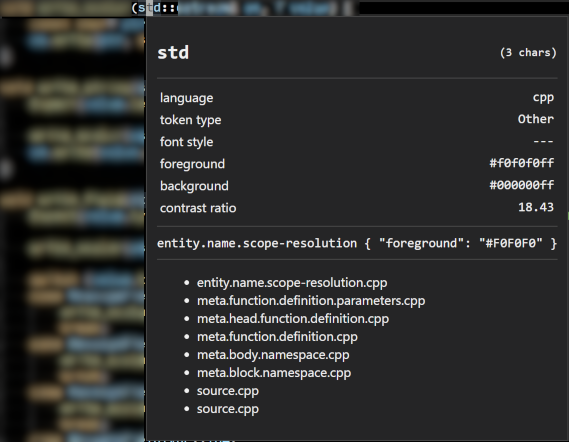
Here's one more that I'm unable to reproduce in a discrete test file. Note that std is tokenized correctly and the TM scope inspector reports a foreground of #F0F0F0 (which is correct), but the token is not actually that color.
 jason-watkins
on 9 Jul 2019
jason-watkins
on 9 Jul 2019
@BillDenton , This repros in VS, so appears to be an issue with VS IntelliSense. I've opened an issue against VS. https://developercommunity.visualstudio.com/content/problem/638776/incorrectincomplete-colorization-for-c-global-vari.html Feel free to up-vote it.
@jason-watkins , I'm not able to repro these issue, per se. Rather, I think they are working as expected. With C_Cpp.enhancedColorization enabled, semantic tokens are colored based on IntelliSense, not the Text Mate grammar (whereas the TM scope inspector would show the color that would be chosen based on the grammar). I think you are seeing these correctly colored as semantic tokens (Type and Namespace: https://github.com/microsoft/vscode-cpptools/blob/master/Documentation/LanguageServer/colorization.md ), and your theme is resolving them to different colors than you are expecting. You could customize colors for semantic tokens. Disabling enhancedColorization would restore the original behavior.
 Colengms
on 9 Jul 2019
Colengms
on 9 Jul 2019
@Colengms I can't access the link, so can't up vote. I'm not using VS for editing (am using command line compiler and debugger from VS). Does VS and VS Code share use of some Microsoft internal code? Any idea how and when this will get fixed? It is only a minor irritation.
BillDenton
on 9 Jul 2019
@BillDenton , Yes, the C/C++ Extension for VS Code leverages VC++ IntelliSense which is code shared with VS. Generally, if the issue repros in VS, we route it to the VS team.
The feedback system seems to be a bit sluggish today. You might try the link again after several minutes.
Colengms
on 9 Jul 2019
@Colengms You appear to be correct. Was that option just added? I just encountered this behavior this morning.
You mention that it's possible to customize colors for semantic tokens. Where are those settings located/documented? I'm not seeing it in the extension settings.
jason-watkins
on 9 Jul 2019
@jason-watkins This feature was newly added in our latest release, 0.24.0, which went out last week. It's been available in insider builds of the extension for a few weeks.
enhancedColorization leverages the existing system for theming and color customization. We've associated arbitrary TM scopes with the semantic tokens. A good starting point is here: https://github.com/microsoft/vscode-cpptools/blob/master/Documentation/LanguageServer/colorization.md
Documentation on theming and overriding colors via settings, is here: https://code.visualstudio.com/docs/getstarted/themes
Colengms
on 9 Jul 2019
@BillDenton @Colengms The issue was filed as "Microsoft Internal" -- I've moved it to be public so it should be upvotable now if you have a Microsoft account.
 sean-mcmanus
on 9 Jul 2019
sean-mcmanus
on 9 Jul 2019
@sean-mcmanus @Colengms I've upvoted it now.
BillDenton
on 10 Jul 2019
Related issues
 SkyRiderMike
·
3Comments
SkyRiderMike
·
3Comments
 ismadelgad11
·
3Comments
ismadelgad11
·
3Comments
 DemoCrazer
·
3Comments
DemoCrazer
·
3Comments
 narutse
·
3Comments
narutse
·
3Comments
 thndrwrks
·
3Comments
thndrwrks
·
3Comments