Vscode-cpptools: 0.24.0-insiders - Syntax colorization showing incorrect background color for highlighted lines
Type: LanguageService
Some themes highlight the selected line with a color that doesn't match the unselected lines' background color. In these cases the new syntax highlighting doesn't honor the theme. This affects multiple themes.
It gets more visible when you select things:
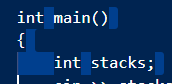
To disable the new syntax highlighting, set "C_Cpp.enhancedColorization": "Disabled" and you will get the old behavior again.
Themes with known issues:
- Abyss
- Monokai
- Monokai Dimmed
- One Monokai
- Red
- Quiet Light
- Solarized Dark
- Solarized Light
- Tomorrow Night Blue
 bobbrow
All 3 comments
I'm having this issue too for the same set of themes. It also affects my usual theme, unfortunately. I have a lot of other themes installed too (too many, really—still trying to find the perfect theme) and I went through them to check which ones are affected. I first started experiencing the issue within the past few hours or so. Before then, everything worked fine.
Affected:
- Abyss
- Clymate Pop Neon
- Flatland Monokai
- Kimbie Dark
- Material Theme (default, Darker, Darker High Contrast, High Contrast, Ocean, Ocean High Contrast, Palenight, Palenight High Contrast)
- Monokai
- Monokai Dark Soda
- Monokai Dimmed
- Monokai++
- One Monokai
- Palenight (Italic, Operator, Theme)
- Quango Classic
- Red
- Reed Alert
- sandstorm - classic
- Solarized (Dark, Light)
- Spirited Away (my usual theme :-/)
- Tomorrow Night Blue
Not affected:
- Atom One Dark
- Clymate, Clymate Monochrome, Clymate Vintage
- Cyberpunk+
- Dark (Visual Studio)
- Dark Wiwa
- Dark+ (default dark)
- Electron
- Hackz, Hackz Darker
- Henna
- Radical
- sandstorm - darker
- Sidious
- skGRTT
- Spotify
- High Contrast
Thanks for the workaround!
 heimskr
on 15 Jun 2019
heimskr
on 15 Jun 2019
Please up-vote the following issue: https://github.com/microsoft/vscode/issues/75642
 Colengms
on 17 Jun 2019
Colengms
on 17 Jun 2019
Fixed with 0.24.0-insiders2. Set the "C_Cpp.updateChannel" setting to "Insiders" to auto-install it.
 sean-mcmanus
on 26 Jun 2019
sean-mcmanus
on 26 Jun 2019
Related issues
 narutse
·
3Comments
narutse
·
3Comments
 timothy
·
3Comments
timothy
·
3Comments
 lutianqi
·
3Comments
lutianqi
·
3Comments
 jheinzel
·
3Comments
jheinzel
·
3Comments
 ismadelgad11
·
3Comments
ismadelgad11
·
3Comments
Most helpful comment
I'm having this issue too for the same set of themes. It also affects my usual theme, unfortunately. I have a lot of other themes installed too (too many, really—still trying to find the perfect theme) and I went through them to check which ones are affected. I first started experiencing the issue within the past few hours or so. Before then, everything worked fine.
Affected:
Not affected:
Thanks for the workaround!