Vscode-cpptools: Macro expansion fails to fully work with clang/gcc
Does this only expand one level of macros?
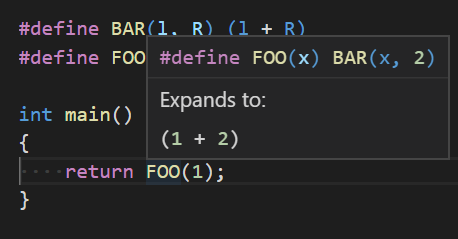
That is, if I have two macros like
#define BAR(l,r) (l + r)
#define FOO(x) BAR(x,2)
and I write FOO(1) I would want this to say "Expands to (1 + 2)" since that is the final fully expanded form. Instead, it seems to say "Expands to BAR(1,2)" which is much less useful.
Or if showing the final form immediately isn't desirable maybe an way to trigger further expansion. Many macros are multiple levels in practice and the first expansion only doens't show much.
_Originally posted by @travisdowns in https://github.com/Microsoft/vscode-cpptools/issues/1734#issuecomment-488921102_
 sean-mcmanus
All 8 comments
@travisdowns I'm not able to repro the issue. It fully expands for me. Can you give more repro details, such as your extension version, OS, compilerPath/intelliSenseMode, etc.?
sean-mcmanus
on 3 May 2019
C/C++ extension v0.22.1
vscode 1.33.1
Ubuntu 16.04
here's my c_cpp json:
{
    "configurations": [
        {
            "name": "Linux",
            "includePath": [
                "${workspaceFolder}/**"
            ],
            "defines": ["STRIDE=64", "_GNU_SOURCE"],
            "compilerPath": "/usr/bin/gcc -march=haswell",
            "cStandard": "c11",
            "cppStandard": "c++11",
            "intelliSenseMode": "${default}",
            "browse": {
                "limitSymbolsToIncludedHeaders": true
            }
        }
    ],
    "version": 4
}
 travisdowns
on 3 May 2019
travisdowns
on 3 May 2019
Okay, thanks for reporting this -- I repro it with WSL/gcc mode. Looks like there is an unexpected behavior difference in that case (seems like a bug).
sean-mcmanus
on 3 May 2019
The bug repros with VS 2019 -- I've reported the bug there: https://developercommunity.visualstudio.com/content/problem/556656/c-intellisense-macro-expansion-fails-to-fully-work.html . If you have a "Microsoft account" you could upvote that.
sean-mcmanus
on 3 May 2019
Hi, I work with WSL2/gcc and noticed that macros are not expanded recursively. Then I found this issue open since May 2019.
Any chance to solve this issue in the nearest future?
 eruanno123
on 7 Oct 2020
eruanno123
on 7 Oct 2020
The issue needs more upvotes on the developer community site.
sean-mcmanus
on 8 Oct 2020
Still suffering from this. Very hard to read source codes, specially linux kernel which relies on lots of nested macros :(
 lucaszanella
on 20 Nov 2020
lucaszanella
on 20 Nov 2020
@lucaszanella I mentioned at https://developercommunity.visualstudio.com/content/problem/556656/c-intellisense-macro-expansion-fails-to-fully-work.html that the VS Code issue has more upvotes (versus the 2 on their page).
sean-mcmanus
on 20 Nov 2020
Related issues
 lutianqi
·
3Comments
lutianqi
·
3Comments
 BDZNH
·
3Comments
BDZNH
·
3Comments
 timothy
·
3Comments
timothy
·
3Comments
 narutse
·
3Comments
narutse
·
3Comments
 jheinzel
·
3Comments
jheinzel
·
3Comments