Vscode-cpptools: Duplicated formatter registrations
For https://github.com/Microsoft/vscode/issues/70314 and https://github.com/Microsoft/vscode/issues/41882 I have analysed formatter conflicts, e.g. multiple formatters that are registered and enabled for one language. Telemetry shows that this extension (sometimes?) registers the its own formatter two times.
 jrieken
All 22 comments
Do you see multiple registrations when using multi-root workspaces? We don't do dynamic registration as your task suggests we should. We use the vscode-languageclient module and it's possible that we return that capability multiple times during static initialization since we have one language client per folder.
@dbaeumer, what would you recommend we do for the multi-client case?
 bobbrow
on 13 Mar 2019
bobbrow
on 13 Mar 2019
Do you see multiple registrations when using multi-root workspaces?
I can't tell, I am just looking at the telemetry from here and that shows there are sometimes two formatters from this extension.
jrieken
on 13 Mar 2019
If I remember correctly the CPP extension uses different document selectors in the multi client case. Something like:
documentSelector: [
    { scheme: 'file', language: 'plaintext', pattern: `${folder.uri.fsPath}/**/*` }
]
@bobbrow is this still the case for the CPP extension
@jrieken this is supported and shouldn't cause any problems. Right?
 dbaeumer
on 14 Mar 2019
dbaeumer
on 14 Mar 2019
Yeah, that shouldn't be a problem
jrieken
on 14 Mar 2019
I routinely use multi-root workspaces, and can confirm that the "Format Document" action per document fails routinely, in which case I had to use "Format Document With..." and select one of the 2 or even more same-named options to trigger functional formatting, where only one of them works per specific document.
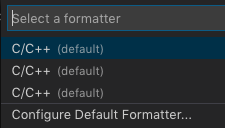
I suggest that overall, it's a problem.
 complyue
on 15 Apr 2019
complyue
on 15 Apr 2019
@jrieken @dbaeumer I don't see how we can fix this on our end. Our provideDocumentFormattingEdits implementation chooses which of the 2+ clients to handle the formatting request, but VS Code is only sending us the 1st workspace folder client, i.e. by default formatting only works on the 1st folder and you have to switch to a different C/C++ formatter in the drop down to format files in other workspace folders.
 sean-mcmanus
on 23 Apr 2019
sean-mcmanus
on 23 Apr 2019
@sean-mcmanus accroding to @jrieken using a document selector like this
documentSelector: [
    { scheme: 'file', language: 'plaintext', pattern: `${folder.uri.fsPath}/**/*` }
]
(see also https://github.com/Microsoft/vscode-cpptools/issues/3285#issuecomment-472749272) should only send it to one format provider. Which document selectors are you using?
dbaeumer
on 24 Apr 2019
We can't use the pattern property in our documentSelector because we support LSP for code files outside the workspace folder (e.g. STL, 3rd party libraries). Right now we use the Middleware interface to do the filtering ourselves.
bobbrow
on 24 Apr 2019
Right now we use the Middleware interface to do the filtering ourselves.
@bobbrow That's a bad idea. The document selector drives enablement of keybindings, menus etc. Doing some extra filtering will make your extension appear as defunct. Can you fully explain why you can't use document selectors?
jrieken
on 25 Apr 2019
For files outside you could IMO have two selectors one with a pattern and one without. If more than one document selector wins then the one that is more specific (e.g. has a pattern wins). @jrieken is this correct?
dbaeumer
on 25 Apr 2019
i have the exact problem in multi root workspace. Only one of the formatter works with selected. It is really annoying. Is there any temporary solution?
 anbarrasu
on 21 Jun 2019
anbarrasu
on 21 Jun 2019
@anbarrasu You could try setting C_Cpp.formatting to "Disabled" and using another formatter like the "clang-format" extension, but I haven't tried if that works yet.
sean-mcmanus
on 21 Jun 2019
@sean-mcmanus I tried your suggestion (using the extension "clang-format") but when I save I just get the message "Extension C/C++ cannot format
 kisielk
on 21 Jun 2019
kisielk
on 21 Jun 2019
You need to reload window -- afterwhich, our extension should not register as a format provider. A popup to reload should appear...after setting the C_Cpp.formatting to "Disabled".
sean-mcmanus
on 21 Jun 2019
I did that, even restarted VSCode entirely. I still get the same "Extension C/C++ cannot format" message every time I save, and no formatting applied from clang-format.
kisielk
on 21 Jun 2019
That is strange. I just tried the repro (with a single workspace) and it worked for me after setting "clang-format.executable". I have never seen that error message before and I don't see it in the vscode source code, so I don't know where it is coming from.
sean-mcmanus
on 21 Jun 2019
It's in source code here: https://github.com/microsoft/vscode/blob/01423e458d496588ba0d32f9afb17937a571260b/src/vs/workbench/contrib/format/browser/formatActionsMultiple.ts#L97
kisielk
on 21 Jun 2019
Ah, thanks for finding that -- that result was in my search, but I skipped it accidentally :).
It looks like somehow VS Code is still trying to use the C/C++ extension to formatting -- I wasn't able to repro it, but it seems like it'd be a VS Code bug. Can you try using Format Document With and selecting the "Clang-Format" extension (or another formatter?).
sean-mcmanus
on 21 Jun 2019
It works fine if I use "Format Document With", and "clang-format" is the only option there.
kisielk
on 21 Jun 2019
Yeah, and then choose the "Configure Default Formatter" option in the dropdown -- my guess is your default formatter is somehow set to C++ even though we didn't register as a formatter.
sean-mcmanus
on 21 Jun 2019
Ah gotcha. That seems to work. I'll use this for now, I had previously uninstalled the clang-format extension because it was conflicting with the other formatter, but I'll use this for now while I wait for a fix for this.
kisielk
on 21 Jun 2019
Our latest Insiders release has a new multi-root implementation (which fixes this bug): https://github.com/microsoft/vscode-cpptools/releases/tag/0.27.0-insiders. Please let us know if you find any multi-root-related bugs or regressions so we can prioritize fixing those for 0.27.0.
sean-mcmanus
on 4 Mar 2020
Related issues
 peterwoods1
·
3Comments
peterwoods1
·
3Comments
 ecbrodie
·
3Comments
ecbrodie
·
3Comments
 timothy
·
3Comments
timothy
·
3Comments
 vicatcu
·
3Comments
vicatcu
·
3Comments
 jheinzel
·
3Comments
jheinzel
·
3Comments
Most helpful comment
I routinely use multi-root workspaces, and can confirm that the "Format Document" action per document fails routinely, in which case I had to use "Format Document With..." and select one of the 2 or even more same-named options to trigger functional formatting, where only one of them works per specific document.
I suggest that overall, it's a problem.