Vscode-cpptools: Incorrect code highlight std::swap
Type: LanguageService
Describe the bug
- OS and Version: Windows_NT x64 10.0.17763
- VS Code Version: 1.31.1
- C/C++ Extension Version: 0.21.0
- Other extensions you installed (and if the issue persists after disabling them): Yes
- A clear and concise description of what the bug is.
I'm getting an error highlight for std::swap as shown in this image - https://photos.app.goo.gl/JWpLGewodLgZDcRn6
Here's the program - https://gist.github.com/GauthamBanasandra/c69bad2dcbb96d82834b1fb26f00fcee
The error highlight is seen on this line - https://gist.github.com/GauthamBanasandra/c69bad2dcbb96d82834b1fb26f00fcee#file-test-the-rods-cpp-L129
Please note that the program compiles and runs fine with Visual C++ compiler.
To Reproduce
- Just open the program https://gist.github.com/GauthamBanasandra/c69bad2dcbb96d82834b1fb26f00fcee in Visual Studio Code.
- Scroll down to line 129
- See error
Expected behavior
There shouldn't have been any error indication for std::swap.
Screenshots
https://photos.app.goo.gl/JWpLGewodLgZDcRn6
 GauthamBanasandra
All 10 comments
Can you please share your configuration? (c_cpp_properties.json - it should be in the .vscode folder)
 bobbrow
on 12 Mar 2019
bobbrow
on 12 Mar 2019
@bobbrow I could only find settings.json with the following as its content
{
    "files.exclude": {
        "**/.classpath": true,
        "**/.project": true,
        "**/.settings": true,
        "**/.factorypath": true
    }
}
I couldn't find c_cpp_properties.json in .vscode folder.
GauthamBanasandra
on 13 Mar 2019
Ok. That means you're using whatever defaults the extension picked for you. Can you run the C/C++: Edit Configurations... command?

This will generate and open a c_cpp_properties.json file that we can use to modify your configuration. Please do that and then share the contents on this issue so I can see what we are starting with.
bobbrow
on 13 Mar 2019
Sure. Here's c_cpp_properties.json
{
    "configurations": [
        {
            "name": "Win32",
            "includePath": [
                "${workspaceFolder}/**"
            ],
            "defines": [
                "_DEBUG",
                "UNICODE",
                "_UNICODE"
            ],
            "windowsSdkVersion": "10.0.17763.0",
            "compilerPath": "C:/Program Files (x86)/Microsoft Visual Studio/2017/Community/VC/Tools/MSVC/14.16.27023/bin/Hostx64/x64/cl.exe",
            "cStandard": "c11",
            "cppStandard": "c++17",
            "intelliSenseMode": "msvc-x64"
        }
    ],
    "version": 4
}
The cppStandard is set to c++17, and you are relying on c++14 rules. Changing cppStandard to "c++14" should remove the squiggle.
If you're planning to move to c++17 at some point, the following explanation might help:
Your Metadata type is not "move assignable" so std::swap doesn't work with it out of the box. You have a few options to deal with this though. You can implement a swap function and allow the compiler to pick the right one based on context, or you can ensure your custom types satisfy the contract for std::swap.
#include <tuple>

using tup = std::tuple<size_t, int, int>;

struct foo  // trivial
{
    int n;
};

struct bar  // non-trivial
{
    tup t;
};

struct baz  // non-trivial
{
    tup t;
    friend void swap(baz &, baz &)
    {
        // actually swap it...
    }
};

struct baz2 // non-trivial
{
    tup t;
    baz2& operator=(baz2 &)
    {
        // actually assign it...
    }
};

int main()
{
    const bool is_foo_swappable = std::is_move_constructible_v<foo> && std::is_move_assignable_v<foo>;  // true
    foo f1, f2;
    std::swap(f1, f2);  // works

    const bool is_bar_swappable = std::is_move_constructible_v<bar> && std::is_move_assignable_v<bar>;  // false
    bar b1, b2;
    std::swap(b1, b2);  // error, cannot swap this type

    const bool is_baz_swappable = std::is_move_constructible_v<baz> && std::is_move_assignable_v<baz>;  // false
    using std::swap;
    baz ba1, ba2;
    swap(ba1, ba2);     // std::swap wasn't picked, use our own implementation

    const bool is_baz2_swappable = std::is_move_constructible_v<baz2> && std::is_move_assignable_v<baz2>; // true
    baz2 z1, z2;
    std::swap(z1, z2);  // works

    return 0;
}
Thanks @bobbrow . I've a follow-up question.
The cppStandard is set to c++17, and you are relying on c++14 rules.
Why is this so? I'm using Visual Studio 2017. Since it implements C++17, shouldn't it rely on C++17 rules rather than that of 14? Also, where in the configuration does it say that my vscode is using C++14 rules?
GauthamBanasandra
on 14 Mar 2019
Sorry, let me clarify. Visual Studio 2017 has support for C++17, but you have to opt in to it. The default property pages don't add the standard version to the command line, so you get cl.exe's default value and cl.exe defaults to c++14.

Your c_cpp_properties.json says you want the c++17 standard applied ("cppStandard": "c++17"), but your code is relying on the c++14 rules (perhaps because you originally wrote the code in Visual Studio).
This is good feedback though. The extension should align defaults more closely with Visual Studio when cl.exe is chosen as the compiler.
bobbrow
on 14 Mar 2019
Yes, I wrote the code in Visual Studio and later happened to view it through vscode, that's when I came across this bug.
Upon checking the project properties in Visual Studio, I see C++ Language Standard is set to ISO C++17 Standard (/std:c++17) and yet I get the red squiggly line for std::swap inspite of which the code compiles and runs fine.
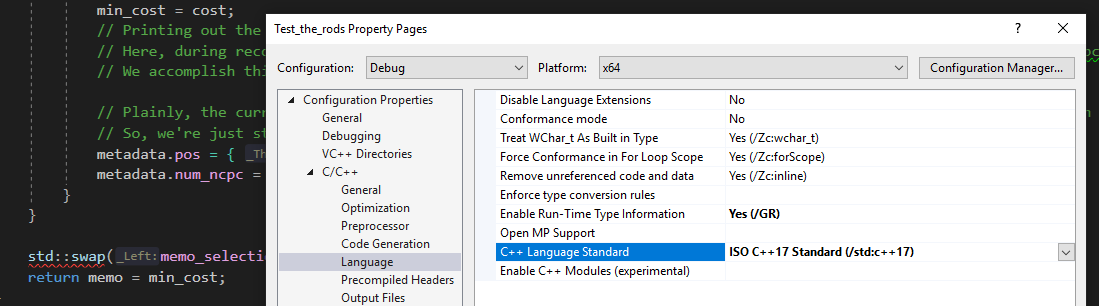
Perhaps this is a bug for Visual Studio too. I've started a thread here - https://developercommunity.visualstudio.com/content/problem/485358/incorrect-code-highlight-for-stdswap.html
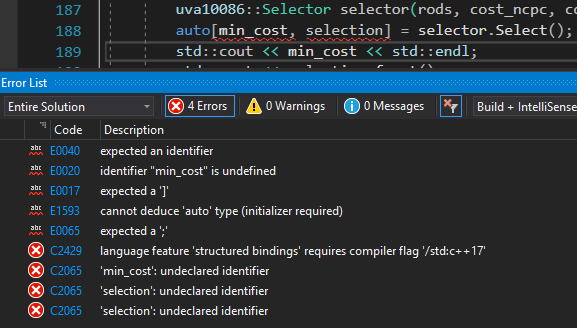
Pertaining to vscode, I'm quite sure that cl.exe is using C++17 rather C++14 because I have used C++17 constructs such as Structured Bindings in my code - https://gist.github.com/GauthamBanasandra/c69bad2dcbb96d82834b1fb26f00fcee#file-test-the-rods-cpp-L188 . If vscode was using cl.exe with C++14, it would've given the following errors -
GauthamBanasandra
on 15 Mar 2019
We use the same linter as Visual Studio, so that would explain why the squiggles are the same. Do note that the linter and the compiler are not sharing the same parsing code, so sometimes they don't agree 100%.
I'll get your Developer Community issue sent to the right person so we can get the two pieces into alignment on this issue. I'm also seeing that my baz2 example is showing a squiggle in VS when it didn't show in VS Code. We'll need to investigate that too.
bobbrow
on 15 Mar 2019
The linked bug in VS appears to have been fixed, so closing this one as well. If there is still an issue here, please re-open.
 Colengms
on 11 Jan 2020
Colengms
on 11 Jan 2020
Related issues
 ecbrodie
·
3Comments
ecbrodie
·
3Comments
 peterwoods1
·
3Comments
peterwoods1
·
3Comments
 wdc596933938
·
3Comments
wdc596933938
·
3Comments
 CDitzel
·
3Comments
CDitzel
·
3Comments
 arl
·
3Comments
arl
·
3Comments
Most helpful comment
We use the same linter as Visual Studio, so that would explain why the squiggles are the same. Do note that the linter and the compiler are not sharing the same parsing code, so sometimes they don't agree 100%.
I'll get your Developer Community issue sent to the right person so we can get the two pieces into alignment on this issue. I'm also seeing that my
baz2example is showing a squiggle in VS when it didn't show in VS Code. We'll need to investigate that too.