Vscode-cpptools: [lldb][macOS] Debugger not starting due to space in home directory
Type: Debugger
Debbuger not starting
Describe the bug
- OS and Version: macOS Mojave 10.14
- VS Code Version: 1.28.0
- C/C++ Extension Version: 0.19.0
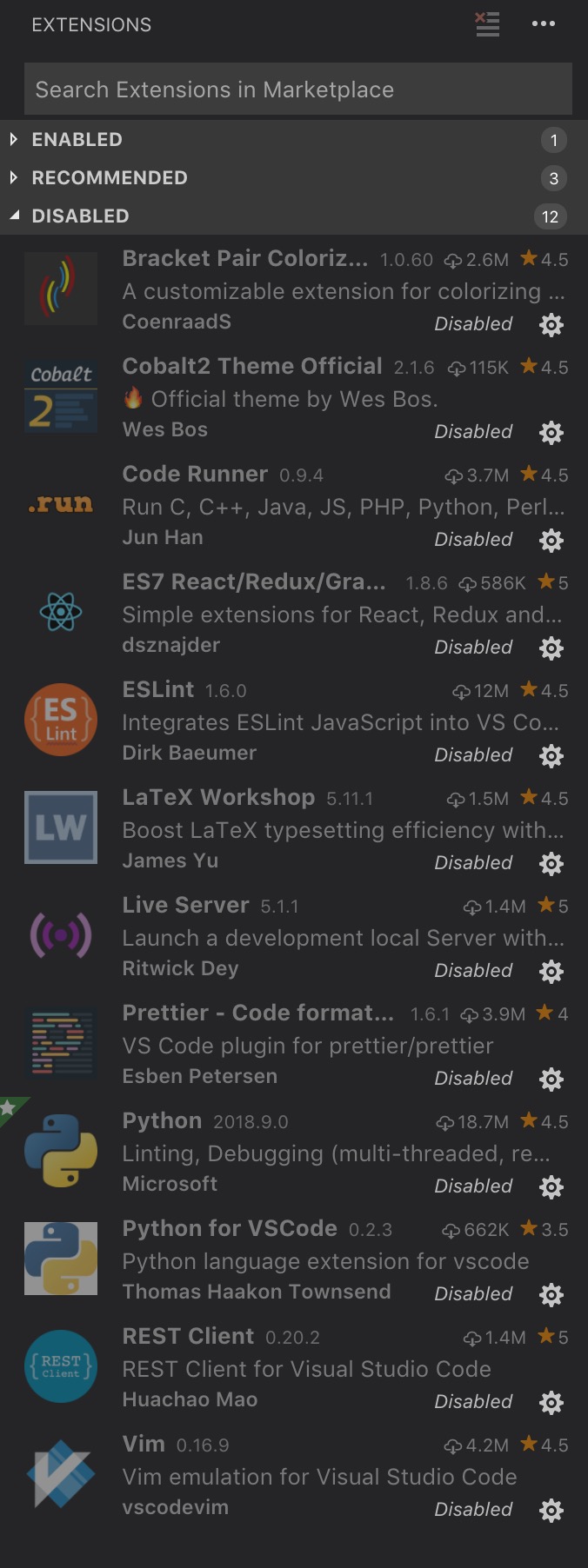
- Other extensions you installed (and if the issue persists after disabling them): various see picture, however the issue persists are disabling all of them.
- Running the debugged presents the error message: 'Debug adapter process has terminated unexpectedly (read error)'. I've created a lauch.json and a task.json, and have tried compiling externally and with the 'preLaunchTask' attribute. Still no change.
To Reproduce
Please include a code sample and launch.json configuration.
{
  // Use IntelliSense to learn about possible attributes.
  // Hover to view descriptions of existing attributes.
  // For more information, visit: https://go.microsoft.com/fwlink/?linkid=830387
  "version": "0.2.0",
  "configurations": [
    {
      "name": "(lldb) Launch",
      "type": "cppdbg",
      "request": "launch",
      "program": "${workspaceFolder}/test",
      "args": [],
      "stopAtEntry": false,
      "cwd": "${workspaceFolder}",
      "environment": [],
      "externalConsole": true,
      "MIMode": "lldb"
    }
  ]
}
Comments:
_I have read the documentation on both the c++ extension and the vs code debbuger, neither have helped. I have also looked at the offical code examples on github, copied and pasted them (changing the program attribute), still no luck. Any help will be appreciated now. Thanks._
Error Message

Extensions
 femioladipo
All 22 comments
Can you check your processes and see if mono.osx is running? If so, can you terminate the process and try again? Your configuration looks fine.
 pieandcakes
on 12 Oct 2018
pieandcakes
on 12 Oct 2018
Hi, thanks for the reply.
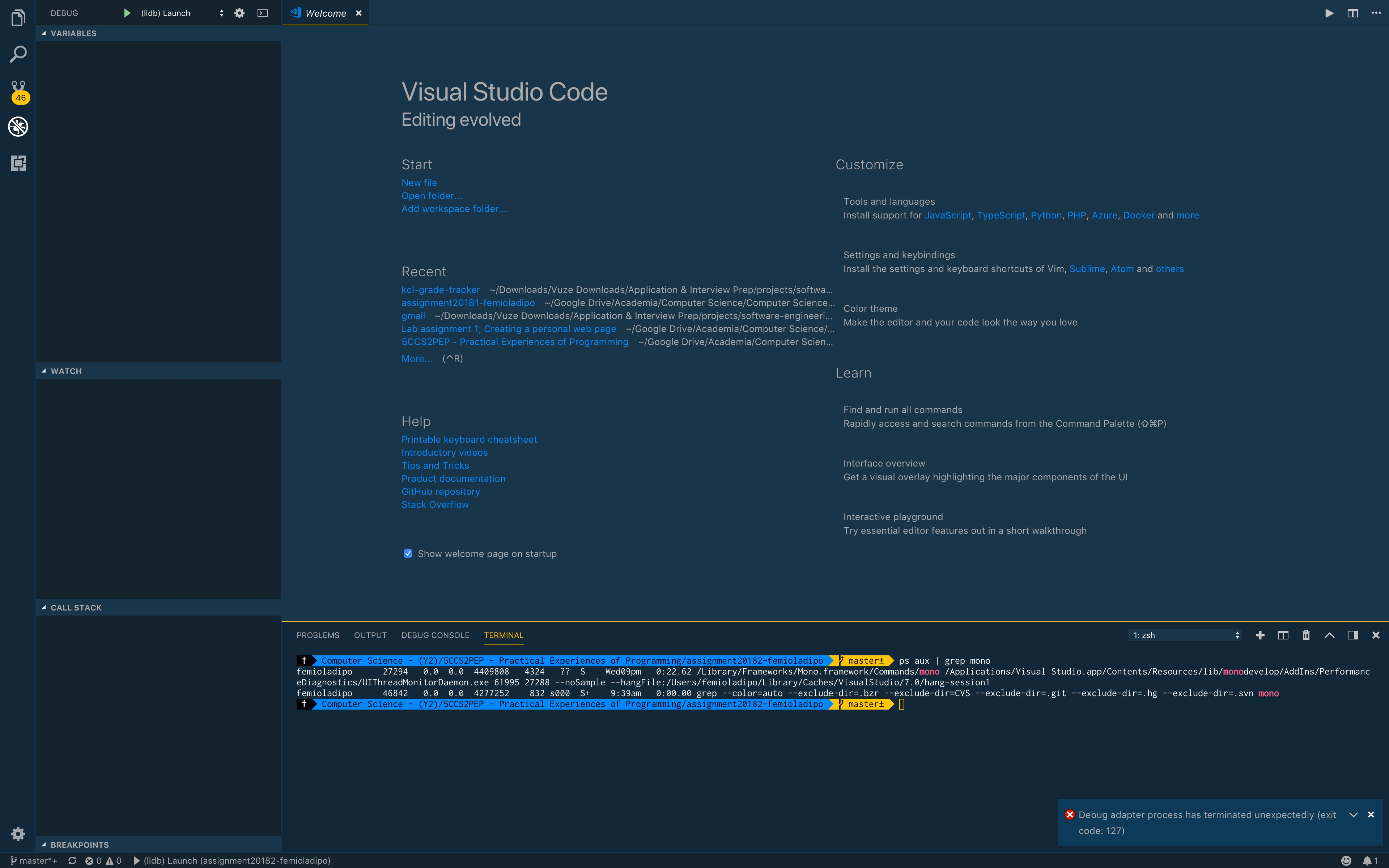
Do you mean I should check like this?
ps aux | grep mono
Hence should I just type?
kill 46842
I may be misunderstanding if not.
femioladipo
on 12 Oct 2018
You have mono running another app 27294 but the 46842 is the grep command. Can you see if you stop 27294 and it starts working? I don't know what that process is and if you are running it on purpose.
pieandcakes
on 12 Oct 2018
Thanks, I typed
kill 27294
and now the proccess hase gone. So, I tried restarting vs code the issue still persists.
femioladipo
on 12 Oct 2018
can you add "logging": { "engineLogging": true, "traceResponse": true } and try again and see if anything gets logged to the DebugConsole?
Can you also show me which extensions you have Enabled? Your screenshot shows the disabled ones.
pieandcakes
on 12 Oct 2018
I've added the lines, unfortunately as the debugger seems to not even start I there's no output in the debug console.

And oh sorry, the only extension running is 'c/c++'.
https://user-images.githubusercontent.com/33262154/46888521-aaa23080-ce58-11e8-8175-ea64b42639d7.png
femioladipo
on 12 Oct 2018
Sounds like something happened during installation then.
If you look in the folder ~/.vscode/extensions/ms-vscode.cpptools-0.19.0/debugAdapters there should be a few files:
mono.osxframeworkfolderlldbfolder
Those are downloaded after installing the extension and are required for it to run.
If those are there correctly, please do the following:
- Close VS Code
- Delete the entire
ms-vscode.cpptools-0.19.0folder - Reopen VS Code and reinstall the extension
- Reload VS Code when prompted
After reload, it should download a few items and install it on your machine. This is placing files into the extension, among them mono.osx, the framework folder, and the lldb folder.
pieandcakes
on 12 Oct 2018
Done exactly that, the c/c++ extension disappered when restarting vs code. So as you prompted I reinstalled, then reloaded the window when prompt. However, the issue still persists.
cd ~/.vscode/extensions/ms-vscode.cpptools-0.19.0/debugAdapters

ls -laH

total 8128
drwxr-xr-x   7 femioladipo  staff   224B 12 Oct 20:19 .
drwxr-xr-x  26 femioladipo  staff   832B 12 Oct 20:19 ..
-rwxr-xr-x   1 femioladipo  staff   864B 12 Oct 20:19 OpenDebugAD7
drwxr-xr-x  15 femioladipo  staff   480B 12 Oct 20:19 bin
drwxr-xr-x  40 femioladipo  staff   1.3K 12 Oct 20:20 framework
drwxr-xr-x   6 femioladipo  staff   192B 12 Oct 20:19 lldb
-rwxr-xr-x   1 femioladipo  staff   4.0M 12 Oct 20:19 mono.osx

cd ../..
rm -rf ms-vscode.cpptools-0.19.0
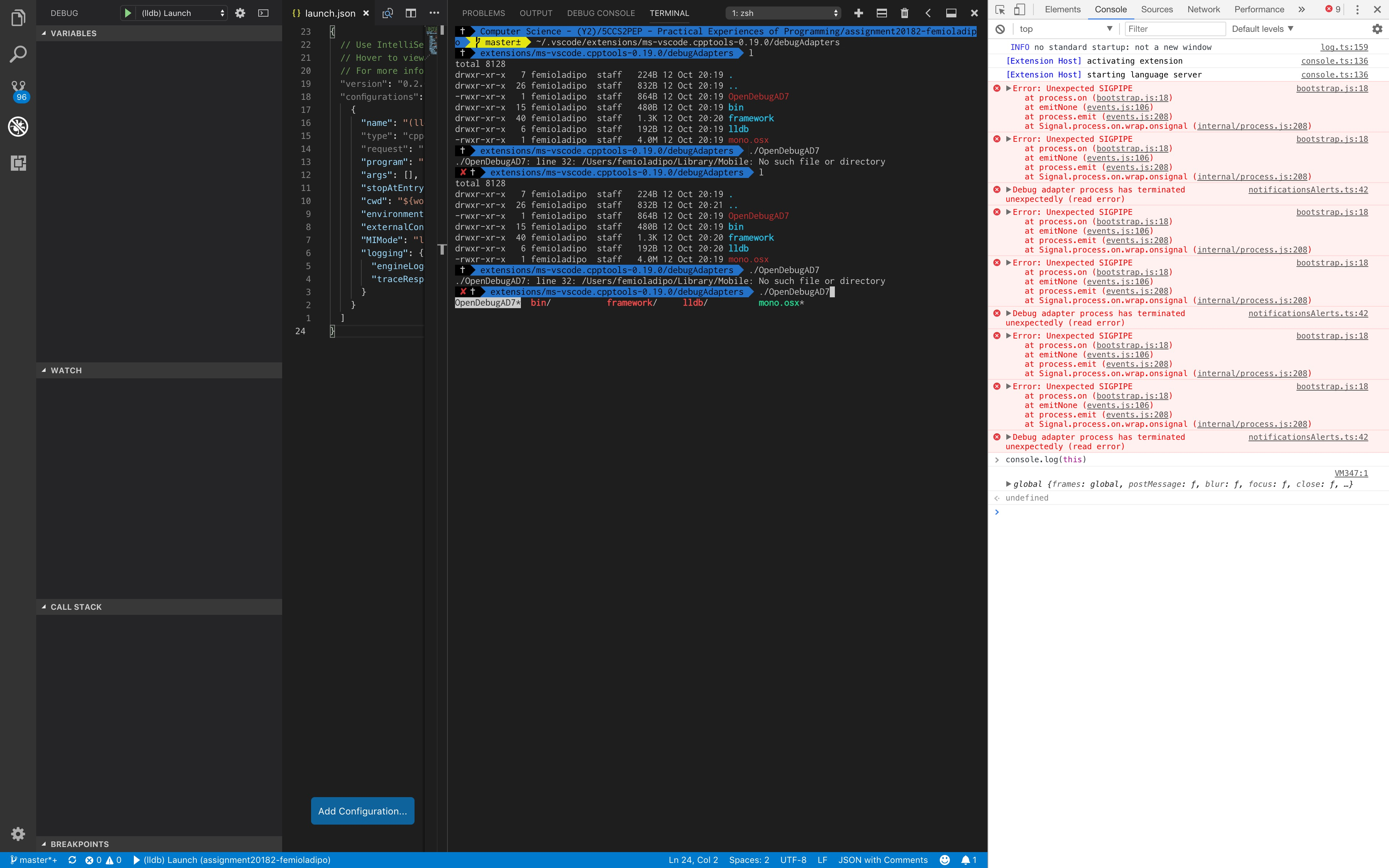
If you run OpenDebugAD7 from that folder in a Terminal window, does it start? It should give you something about waiting for V8 protocol. Ctrl + C will terminate it after you see that message.
Also, try enabling Developer Tools in VS Code (Help -> Show Developer Tools) and try and launch again and see if errors show up there?
pieandcakes
on 12 Oct 2018
If it try running it by typing
./OpenDebugAD7
I get the error message.
./OpenDebugAD7: line 32: /Users/femioladipo/Library/Mobile: No such file or directory
And yeah i've opened the developer tools now.
femioladipo
on 12 Oct 2018
OpenDebugAD7 is a script that calls our instance of mono and then the executable we need to run to start debugging. It seems like your terminal environment is configured differently and it is resolving values incorrectly.
Can you run bash -x OpenDebugAD7 from that directory? I don't know why its looking in your Library/Mobile directory.
pieandcakes
on 12 Oct 2018
Hi, we may be on to something. When I type:
bash -x OpenDebugAD7
The output is:
+++ dirname OpenDebugAD7
++ cd .
++ pwd -P
+ BIN_DIR='/Users/femioladipo/Library/Mobile Documents/com~apple~CloudDocs/.config/mackup/.vscode/extensions/ms-vscode.cpptools-0.19.0/debugAdapters'
+ PLATFORM_SUFFIX=
+ ARCH_SUFFIX=
+ case `uname` in
++ uname
+ PLATFORM_SUFFIX=.osx
+ MONO_CMD='/Users/femioladipo/Library/Mobile Documents/com~apple~CloudDocs/.config/mackup/.vscode/extensions/ms-vscode.cpptools-0.19.0/debugAdapters/mono.osx'
+ '[' '!' -e '/Users/femioladipo/Library/Mobile Documents/com~apple~CloudDocs/.config/mackup/.vscode/extensions/ms-vscode.cpptools-0.19.0/debugAdapters/mono.osx' ']'
+ export 'MONO_PATH=/Users/femioladipo/Library/Mobile Documents/com~apple~CloudDocs/.config/mackup/.vscode/extensions/ms-vscode.cpptools-0.19.0/debugAdapters/framework'
+ MONO_PATH='/Users/femioladipo/Library/Mobile Documents/com~apple~CloudDocs/.config/mackup/.vscode/extensions/ms-vscode.cpptools-0.19.0/debugAdapters/framework'
+ MONO_CMD='/Users/femioladipo/Library/Mobile Documents/com~apple~CloudDocs/.config/mackup/.vscode/extensions/ms-vscode.cpptools-0.19.0/debugAdapters/mono.osx --config /Users/femioladipo/Library/MobileDocuments/com~apple~CloudDocs/.config/mackup/.vscode/extensions/ms-vscode.cpptools-0.19.0/debugAdapters/framework/config.osx'
+ /Users/femioladipo/Library/Mobile Documents/com~apple~CloudDocs/.config/mackup/.vscode/extensions/ms-vscode.cpptools-0.19.0/debugAdapters/mono.osx --config /Users/femioladipo/Library/Mobile Documents/com~apple~CloudDocs/.config/mackup/.vscode/extensions/ms-vscode.cpptools-0.19.0/debugAdapters/framework/config.osx /Users/femioladipo/Library/Mobile Documents/com~apple~CloudDocs/.config/mackup/.vscode/extensions/ms-vscode.cpptools-0.19.0/debugAdapters/bin/OpenDebugAD7.exe
OpenDebugAD7: line 32: /Users/femioladipo/Library/Mobile: No such file or directory
The full path it's trying to access seems to be
'/Users/femioladipo/Library/Mobile Documents/com\~apple\~CloudDocs/.config/mackup/.vscode/extensions/ms-vscode.cpptools-0.19.0/debugAdapters'
but theres a space between 'Mobile' and 'Documents'. So it says
'/Users/femioladipo/Library/Mobile: No such file or directory'
because I presume its chopping off the end of the path.
Or am I wrong?
femioladipo
on 12 Oct 2018
Is that really where the .vscode folder lives? I thought it installed at ~/ although I suppose if your user folder root is that entire path, then I can see why it is looking there.
If so, you can try and add quotes on the last line
"${MONO_CMD}" "${BIN_DIR}/bin/OpenDebugAD7.exe" $*
and see if that works?
CORRECTION: there are a few more places that need to be updated
try replacing the contents of the file with:
#!/usr/bin/env bash

BIN_DIR="$(cd "$(dirname "$0")" && pwd -P)"

PLATFORM_SUFFIX=""
ARCH_SUFFIX=""

case `uname` in
    "Darwin") PLATFORM_SUFFIX=".osx" ;;
    "Linux")
        PLATFORM_SUFFIX=".linux"
        case `uname -m` in
            "x86" | "i386" | "i686") ARCH_SUFFIX="-x86" ;;
            "x86_64") ARCH_SUFFIX="-x86_64" ;;
        esac
        ;;
esac

MONO_CMD="${BIN_DIR}/mono${PLATFORM_SUFFIX}${ARCH_SUFFIX}"

# If we don't have a mono binary from the platform, try a globally-installed one
if [ ! -e "${MONO_CMD}" ] ; then
    MONO_CMD="mono"
fi

export MONO_PATH="${BIN_DIR}/framework"
MONO_ARGS=("--config" "${BIN_DIR}/framework/config${PLATFORM_SUFFIX}")

# Uncomment to remote debug MIEngine
#MONO_ARGS+=("--debug" "--debugger-agent=transport=dt_socket,address=0.0.0.0:1234,server=y")

"${MONO_CMD}" "${MONO_ARGS[@]}" "${BIN_DIR}/bin/OpenDebugAD7.exe" $*
If that works, I'll check it in
pieandcakes
on 12 Oct 2018
The .vscode is not usually there, I move all my preferences there because its the icloud folder so it lets me sync them more easily. However, i've moved them back for now.
I also had to repeat a few of the steps you mentioned before, but terrific thanks it works now. How can I make it add quotes around the path normally though. I would like to move the files back to my icloud folder?
femioladipo
on 12 Oct 2018
@femioladipo
How can I make it add quotes around the path normally though. I would like to move the files back to my icloud folder?
If you replace the contents of OpenDebugAD7 with what I shared, let me know if it works. If it does, I'll make the change so it ships with the next release.
pieandcakes
on 12 Oct 2018
I see what you mean now, I should edit the file. Thanks i'll do it now.
Your help has been much appreciated, I'm surprised no one else has come across the issue however because the developer tool Mackup moves preferences to various locations. That's what I was using.
Anyway thanks again.
femioladipo
on 12 Oct 2018
@femioladipo
How can I make it add quotes around the path normally though. I would like to move the files back to my icloud folder?
If you replace the contents of
OpenDebugAD7with what I shared, let me know if it works. If it does, I'll make the change so it ships with the next release.
Sorry again, just adding the quotes doesn't seem to work. The contents of the 'OpenDebugAD7' looks like:
#!/usr/bin/env bash

BIN_DIR="$(cd "$(dirname "$0")" && pwd -P)"

PLATFORM_SUFFIX=""
ARCH_SUFFIX=""

case `uname` in
    "Darwin") PLATFORM_SUFFIX=".osx" ;;
    "Linux")
        PLATFORM_SUFFIX=".linux"
        case `uname -m` in
            "x86" | "i386" | "i686") ARCH_SUFFIX="-x86" ;;
            "x86_64") ARCH_SUFFIX="-x86_64" ;;
        esac
        ;;
esac

MONO_CMD=${BIN_DIR}/mono${PLATFORM_SUFFIX}${ARCH_SUFFIX}

# If we don't have a mono binary from the platform, try a globally-installed one
if [ ! -e "${MONO_CMD}" ] ; then
    MONO_CMD="mono"
fi

export MONO_PATH=${BIN_DIR}/framework
MONO_CMD="${MONO_CMD} --config ${BIN_DIR}/framework/config${PLATFORM_SUFFIX}"

# Uncomment to remote debug MIEngine
#MONO_CMD="${MONO_CMD} --debug --debugger-agent=transport=dt_socket,address=0.0.0.0:1234,server=y"

"${MONO_CMD} ${BIN_DIR}/bin/OpenDebugAD7.exe" $*
I get the error message:
/Users/femioladipo/Library/Mobile Documents/com~apple~CloudDocs/.config/mackup/.vscode/extensions/ms-vscode.cpptools-0.19.0/debugAdapters/bin/OpenDebugAD7.exe: No such file or directory
femioladipo
on 12 Oct 2018
@femioladipo Sorry. One more time. I updated the block above. I realized I forgot to escape a set of quotes.
I tested the updated one locally and it works for me
pieandcakes
on 12 Oct 2018
It's really strange, i've left the files in their usual location. But even there, as soon as I add the quotes, running
bash -x OpenDebugAD7
causes error messages to appear. I've tried various combinations but still no luck. I don't mind leaving it like this, I would be nice it there could be fix sometime soon however.
femioladipo
on 12 Oct 2018
@femioladipo Ok I was wrong. I don't know why it was working for me then. I had a colleague try and he was having the same problem. We came up with another fix, and I updated the comment above again. Can you try that and see if it works in your instance?
pieandcakes
on 12 Oct 2018
Alls good and working now, even if move the settings somewhere where there is a space in the path. Thanks again.
femioladipo
on 13 Oct 2018
Related issues
 jheinzel
·
3Comments
jheinzel
·
3Comments
 vicatcu
·
3Comments
vicatcu
·
3Comments
 montery8
·
3Comments
montery8
·
3Comments
 ismadelgad11
·
3Comments
ismadelgad11
·
3Comments
 ecbrodie
·
3Comments
ecbrodie
·
3Comments