Vscode-cpptools: Intellisense gives error messages when using structured binding
Type: LanguageService
- OS and Version: Windows 10 1803
- VS Code Version: 1.27.2
- C/C++ Extension Version: 0.19.0
- Other extensions you installed (and if the issue persists after disabling them): None
Intellisense giving std::tuple_size<"const [Type name]">::value is not a valid integral constant-expression when there isn't actually any code wrong.
To Reproduce
For example this code will induce Intellisense to report an error:
struct Test{
    int a;
    int b;
};
Test test{0, 0};
const auto [a, b] = test;
Now in the "Problems" tab following error message will appear:
std::tuple_size<"const Test">::value is not a valid integral constant-expression
Screenshots

My configuration:
{
    "configurations": [
        {
            "name": "Win32",
            "includePath": [
                "${workspaceFolder}/**"
            ],
            "defines": [
                "_DEBUG",
                "UNICODE",
                "_UNICODE"
            ],
            "windowsSdkVersion": "10.0.17134.0",
            "compilerPath": "C:/Program Files (x86)/Microsoft Visual Studio/2017/Community/VC/Tools/MSVC/14.14.26428/bin/Hostx64/x64/cl.exe",
            "cStandard": "c11",
            "cppStandard": "c++17",
            "intelliSenseMode": "msvc-x64"
        }
    ],
    "version": 4
}
 BSG-75
All 16 comments
Thanks a lot for reporting this. Visual Studio 2017 doesn't have this bug so it appears that we are doing something incorrectly different in this case.
 sean-mcmanus
on 3 Oct 2018
sean-mcmanus
on 3 Oct 2018
Actually, I'm able to repro the bug with Visual Studio 2017 15.8 once #include <tuple> is added, so I've reported a bug to VS at https://developercommunity.visualstudio.com/content/problem/348561/c-intellisense-reports-an-incorrect-error-not-a-va.html , but it looks like it got reported as "internal" so you can't see it. There still might be some bug on our side in regards to the #include <tuple> difference.
UPDATE: No fix yet -- seems like the bug may have gotten assigned to the wrong team :(
sean-mcmanus
on 3 Oct 2018
This currently looks like this is a bug with the cl.exe compiler and it shouldn't compile (gcc/clang give errors). I'm not sure yet if the IntelliSense compiler will be updated to match the buggy cl.exe behavior or not yet.
sean-mcmanus
on 2 Nov 2018
This currently looks like this is a bug with the cl.exe compiler and it shouldn't compile (gcc/clang give errors)
It seems that it was fixed in GCC 7.2 (this one?), so it's probably a bug in IntelliSense, rather than in cl.exe.
 TheQwertiest
on 15 Nov 2018
TheQwertiest
on 15 Nov 2018
@TheQwertiest Okay, looks like you're correct. Bug https://developercommunity.visualstudio.com/content/problem/238287/structured-bindings-for-a-struct-using-const-auto.html is tracking this fix. The more people that upvote that issue the more likely (and sooner) they are to fix it.
sean-mcmanus
on 15 Nov 2018
The incorrect structured binding error squiggle should be fixed now with our latest Insiders release: https://github.com/Microsoft/vscode-cpptools/releases . If you're using VS Code Insiders or have http.proxySupport not set to "off", you might not get the 0.21.0-insiders2 update automatically with C_Cpp.updateChannel set to "Insiders".
sean-mcmanus
on 18 Dec 2018
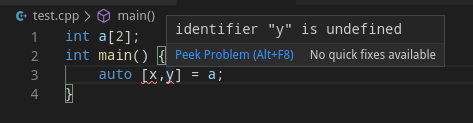
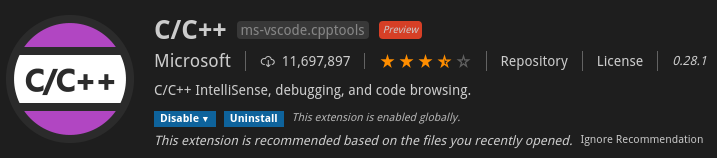
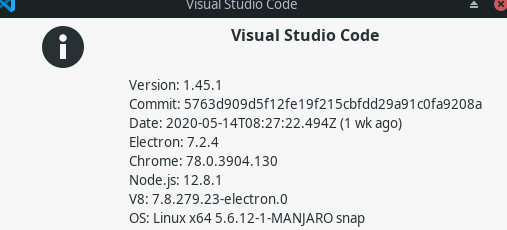
The error still seems to exist in VSCode 1.45.1 with cpptools 0.28.1.
 exprosic
on 28 May 2020
exprosic
on 28 May 2020
Hi @exprosic . I'm unable to repro this issue, with the cppStandard set to c++17 or c++20. Structured binding was added in c++17. Run C/C++: Log Diagnostics to see the effective settings for the file, to ensure the cppStandard is >= c++17. If it is and still repros, let us know.
 Colengms
on 28 May 2020
Colengms
on 28 May 2020
@Colengms The cppStandard is not specified in the configuration and is reported to be c++14 in the diagnostics. Setting it to c++17 indeed solves the problem. Thanks for the instruction.
But I guess c++17 should probably be a better default choice for cppStandard than c++14.
exprosic
on 28 May 2020
@exprosic What compiler and version have you configured the extension to use? We recently added code to probe gcc/clang compilers to determine what their default cpp standard version is, and use that if not explicitly set in the configuration. Let us know (with a new issue) if that probe is selecting the wrong standard version for your compiler.
Colengms
on 28 May 2020
@Colengms The only non-empty configuration for the extension is the cppStandard=c++17 set after the discovery of the problem.
I have both gcc 9.3.0 and clang 10.0.0 installed in Manjaro.
exprosic
on 29 May 2020
Previously, we would use the latest cppStandard supported by the compiler as the default, i.e. c++17, but we changed it to use the actual default, which is usually c++14 still. So for users that were relying on the old behavior to get c++17 automatically, it might appear as a regression. Setting C_Cpp.default.cppStandard to "c++17" is another workaround.
sean-mcmanus
on 29 May 2020
Setting C_cpp.default.cppStandard to "c++17" doesn't work for me. Clicking somewhere else after selecting it from the dropdown menu in settings appears to "erase" the setting. Opening settings.json, it appears that the setting was indeed saved. However, hovering over the setting shows, "This setting cannot be applied in this window. It will be applied when you open local window." Opening a new window or restarting VS Code does nothing. I'm running VS Code on WSL and have the latest versions of VS Code and the C++ extension installed.
 verngutz
on 5 Jun 2020
verngutz
on 5 Jun 2020
You have to set the setting in your remote, workspace, or workspace folder settings and not user settings.
sean-mcmanus
on 6 Jun 2020
But I'm not sure what is causing your settings to be erased. It sounds like that could be some VS Code issue.
sean-mcmanus
on 6 Jun 2020
You have to set the setting in your remote, workspace, or workspace folder settings and not user settings.
Yes, this worked. Thanks. Never noticed the setting being ignored before since the default was already c++17.
But I'm not sure what is causing your settings to be erased. It sounds like that could be some VS Code issue.
The settings.json gets updated. It only gets erased in the UI. And only for user/workspace settings marked "Sync: Ignored". It works fine for other settings and in remote settings. I'm not sure if it's intended behavior. It could indeed be a VS Code issue.
verngutz
on 6 Jun 2020
Related issues
 ismadelgad11
·
3Comments
ismadelgad11
·
3Comments
 montery8
·
3Comments
montery8
·
3Comments
 peterwoods1
·
3Comments
peterwoods1
·
3Comments
 jyavenard
·
3Comments
jyavenard
·
3Comments
 narutse
·
3Comments
narutse
·
3Comments
Most helpful comment
The incorrect structured binding error squiggle should be fixed now with our latest Insiders release: https://github.com/Microsoft/vscode-cpptools/releases . If you're using VS Code Insiders or have http.proxySupport not set to "off", you might not get the 0.21.0-insiders2 update automatically with C_Cpp.updateChannel set to "Insiders".