Vscode-cpptools: Not all files are being included from path in "includePath" inside c_cpp_properties.json
Type: LanguageService
Describe the bug
- OS and Version: Linux Mint Cinnamon 19 Tara
VS Code Version: 1.27.2
C/C++ Extension Version: ms-vscode.cpptools
Other extensions you installed: austin.code-gnu-global, issue persists after disabling it.
-I am starting to use openGl and freeglut API, I have it installed and after I include the path to the header files needed the tool and intellisense only recognize some of the header files inside the included directory. I can compile the program without any issues via terminal.
Expected behavior
I should be able to include the header I need for the program to compile.
Screenshots


Both "freeglut.h" and "gl.h" are inside "/usr/include/GL" but the Parser only recognizes "gl.h" and other headers as a file inside the directory, but not "freeglut.h" and some others.
 rybertm-old
All 28 comments
Can you try setting "C_Cpp.loggingLevel": "Debug" and then run the "Reload Window" command? This will reset IntelliSense for that file and print out the include path that we used for it in the Output Window (in the C/C++ channel).
 bobbrow
on 17 Sep 2018
bobbrow
on 17 Sep 2018

Did what you said but issue still persists, but thank you fot the suggestion.
rybertm-old
on 17 Sep 2018
Did you look at the Output window and check the include path that the extension reported? I was hoping you could paste it here so I can take a look.
bobbrow
on 17 Sep 2018
It sounds like the /usr/include folder is not being used. This could occur if recursive includes is used and the required files are found at a different location (i.e. gl folder with gl.h but not freeglut.h).
It's also possible there was a failure adding those particular files to the database or it got mistakenly added to our "never found" list. You can try doing a Reset IntelliSense Database operation to try to fix this. If that doesn't work you could try to remove the "**" from your paths to disable recursive includes to see if that fixes it.
 sean-mcmanus
on 17 Sep 2018
sean-mcmanus
on 17 Sep 2018
Can you try setting
"C_Cpp.loggingLevel": "Debug"and then run the "Reload Window" command? This will reset IntelliSense for that file and print out the include path that we used for it in the Output Window (in the C/C++ channel).
There is an output in the "Problems" section of the .cpp file that quotes:
"#include errors detected. Please update your includePath. IntelliSense features for this translation unit (/home/rybert/Desktop/Programacao/OpenGL/PNM_Files/main.cpp) will be provided by the Tag Parser."
I don't know if I am quoting the right output window, but that is the only one I see which shows something.
rybertm-old
on 17 Sep 2018
It sounds like the /usr/include folder is not being used. This could occur if recursive includes is used and the required files are found at a different location (i.e. gl folder with gl.h but not freeglut.h).
It's also possible there was a failure adding those particular files to the database or it got mistakenly added to our "never found" list. You can try doing a Reset IntelliSense Database operation to try to fix this. If that doesn't work you could try to remove the "**" from your paths to disable recursive includes to see if that fixes it.
The only recursive include path I am using is the default ${workspaceFolder}. The header in question, "freeglut.h" is in the same folder as "gl.h", wich the Intellisense recognizes, and the GL directory, wich is to be included, is inside the general "/usr/include" directory of my system. I already tried resetting the database, including "usr/include/GL" directly but nothing fixed the problem.
Thanks for the input.
rybertm-old
on 17 Sep 2018
The Problems window is not the one I'm referring to. There is a tab called "Output" in the same panel. Some screenshots here: https://github.com/Microsoft/vscode-cpptools/blob/master/Documentation/LanguageServer/Enabling%20logging.md
bobbrow
on 17 Sep 2018
All paths mentioned in the Output:
"initialized
workspace/didChangeConfiguration
IntelliSense Engine = Default.
The extension will use the Tag Parser for IntelliSense when #includes don't resolve.
Autocomplete is enabled.
Error squiggles are enabled.
File exclude: */.git
File exclude: */.svn
File exclude: */.hg
File exclude: */CVS
File exclude: */.DS_Store
File exclude: */.vscode
Search exclude: */node_modules
Search exclude: */bower_components
Search exclude: **/.vscode
textDocument/didOpen
cpptools/queryCompilerDefaults
Attempting to get defaults from compiler found on the machine: '/usr/bin/clang'
terminating child process: 931
terminating child process: 935
cpptools/activeDocumentChange
cpptools/textEditorSelectionChange
textDocument/documentSymbol
textDocument/codeAction
cpptools/didChangeFolderSettings
Attempting to get defaults from compiler in "compilerPath" property: '/usr/bin/g++'
terminating child process: 937
Code browsing service initialized
Attempting to get defaults from compiler in "compilerPath" property: '/usr/bin/g++'
terminating child process: 939
Folder: /usr/lib/gcc/x86_64-unknown-linux/6.2.0/include/ will be indexed
Folder: /usr/lib/gcc/x86_64-unknown-linux/6.2.0/include-fixed/ will be indexed
Folder: /usr/include/ will be indexed
Folder: /home/rybert/Desktop/Programacao/OpenGL/PNM_Files/ will be indexed
Discovering files...
textDocument/didOpen
sending compilation args for /home/rybert/Desktop/Programacao/OpenGL/PNM_Files/main.cpp
include: /home/rybert/Desktop/Programacao/OpenGL/PNM_Files
include: /usr/include/c++/6.2.0
include: /usr/include/c++/6.2.0/x86_64-unknown-linux
include: /usr/include/c++/6.2.0/backward
include: /usr/lib/gcc/x86_64-unknown-linux/6.2.0/include
include: /usr/lib/gcc/x86_64-unknown-linux/6.2.0/include-fixed
include: /usr/include
Checking for syntax errors: file:///home/rybert/Desktop/Programacao/OpenGL/PNM_Files/main.cpp
queue_update_intellisense for files in tu of: /home/rybert/Desktop/Programacao/OpenGL/PNM_Files/main.cpp
Processing folder (recursive): /usr/lib/gcc/x86_64-unknown-linux/6.2.0/include/
Processing folder (recursive): /usr/lib/gcc/x86_64-unknown-linux/6.2.0/include-fixed/
Processing folder (recursive): /usr/include/
Processing folder (recursive): /home/rybert/Desktop/Programacao/OpenGL/PNM_Files/
Discovering files: 7182 file(s) processed
0 file(s) removed from database
textDocument/codeAction
0 include path suggestion(s) discovered.
Done discovering files.
Parsing open files...
Parsing remaining files...
Parsing: 0 files(s) processed
Done parsing remaining files.
Done parsing open files.
textDocument/codeAction
0 include path suggestion(s) discovered.
terminating child process: 951
errorSquiggles count: 2
Tag Parser will be used for IntelliSense operations in: file:///home/rybert/Desktop/Programacao/OpenGL/PNM_Files/main.cpp
textDocument/codeAction
0 include path suggestion(s) discovered.
textDocument/codeAction
cpptools/textEditorSelectionChange
textDocument/codeAction
cpptools/activeDocumentChange
cpptools/textEditorSelectionChange
cpptools/textEditorSelectionChange
textDocument/codeAction
0 include path suggestion(s) discovered.
cpptools/activeDocumentChange
cpptools/textEditorSelectionChange
cpptools/activeDocumentChange
cpptools/textEditorSelectionChange"
rybertm-old
on 17 Sep 2018
Yeah, /usr/include is being correctly sent as an include path to our IntelliSense process, so I'm not sure what could be causing this. We may need to try out the repro using GL headers later...
sean-mcmanus
on 17 Sep 2018
Thank you for helping. And for reference, I am using the "freeglut3-dev" package.
rybertm-old
on 18 Sep 2018
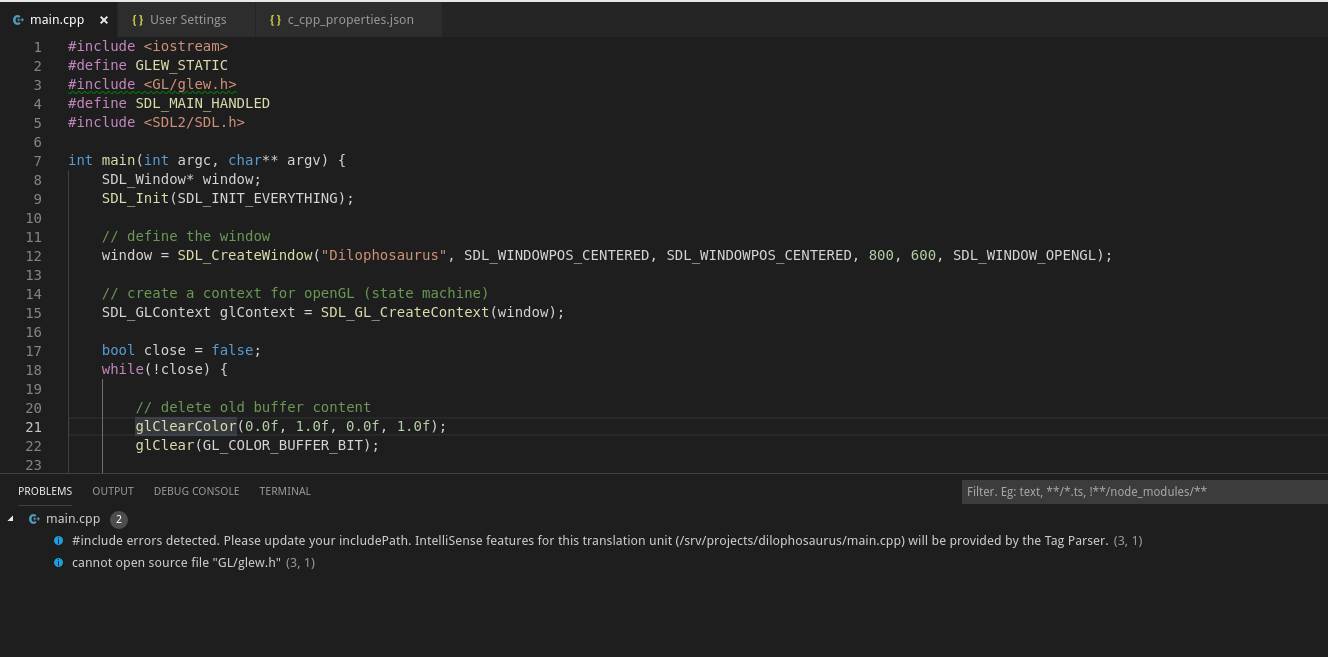
I've got the same issue with Fedora 29 and the include of <GL/glew.h> which cannot be found. I can compile the project with bash but not with the integrated terminal.
Version: 1.29.1
Commit: bc24f98b5f70467bc689abf41cc5550ca637088e
Date: 2018-11-15T19:07:43.495Z
Electron: 2.0.12
Chrome: 61.0.3163.100
Node.js: 8.9.3
V8: 6.1.534.41
Architecture: x64
c_cpp_properties.json
{
    "configurations": [
        {
            "name": "Linux",
            "includePath": [
                "/usr/include",
                "/usr/local/include",
                "${workspaceFolder}/**"
            ],
            "defines": [],
            "compilerPath": "/usr/bin/clang",
            "cStandard": "c11",
            "cppStandard": "c++17",
            "intelliSenseMode": "clang-x64",
            "browse": {
                "path": [
                    "/usr/include",
                    "usr/local/include",
                    "${workspaceRoot}"
                ],
                "limitSymbolsToIncludedHeaders": false
            }
        }
    ],
    "version": 4
}
All files are existing and the project is runnable outside vscode.
 yvesbeutler
on 22 Nov 2018
yvesbeutler
on 22 Nov 2018
@rybertm I installed freeglut3-dev on Linux and I used the same config but I'm not observing any problem.
@yvesbeutler Where is glew.h located? I don't have that on my machine.

sean-mcmanus
on 26 Nov 2018
@yvesbeutler Where is glew.h located? I don't have that on my machine.
It's located under
/usr/include/GL/glew.hand I also tried to add it next to the *.cpp-file but none of this did work out for me.
yvesbeutler
on 27 Nov 2018
@yvesbeutler What source is glew.h from? What OS are you on? It's not at that location for me on Linux with the freeglut3-dev package.
sean-mcmanus
on 27 Nov 2018
@sean-mcmanus I'm not using the freeglut3-dev package. I'm currently working on Fedora 29 and I need the glew and glew-devel packages.
yvesbeutler
on 28 Nov 2018
@yvesbeutler It set the path to GL/glew.h and it works for me. If you enable logging you can double check that the "/usr/include" is getting used. You could try temporarily removing the "**" in your includePath and/or doing a Reset IntelliSense Database in case the file incorrectly got marked as "non-existent" in our database.
sean-mcmanus
on 28 Nov 2018
@sean-mcmanus Thanks for your suggestions. I tried removing the "**" but this didn't solve my issue. How can I reset the IntelliSense Database? After some research I think every restart should reset it or am I wrong?
That's the debug logging if I open main.cpp
textDocument/didOpen
sending compilation args for /srv/projects/dilophosaurus/main.cpp
  include: /usr/include/GL
  include: /srv/projects/dilophosaurus
  include: /usr/include/c++/8.2.0
  include: /usr/include/c++/8.2.0/x86_64-unknown-linux-gnu
  include: /usr/include/c++/8.2.0/backward
  include: /usr/lib/x86_64-linux-gnu/clang/6.0.1/include
  include: /usr/include
  define: __llvm__=1
  ...
If any directory wouldn't exist, I should see an error at the debug log. So it seems that vscode can include the /usr/include/GL folder.
yvesbeutler
on 6 Dec 2018
@yvesbeutler There's a "Reset IntelliSense Database" command from the command palette. The database should be saved after restarting unless there's was a problem. I see "/usr/include" in your log, so recursive includes and the database shouldn't matter, and GL/glew.h should be found. I don't know why it wouldn't be -- I don't recall anyone else having that sort of issue before.
sean-mcmanus
on 6 Dec 2018
I'm struggling with the same issue here... code compiles fine (on my makefile and compiler), but IDE shows errors. A very simple application with tests.
- src/
   A.h
   core/
       B.h
       C.h
- tests/
    A.Test.cpp
    gtestlib/
        googletest/
              include/
                   gtest/
                       gtest.h
File: C.h

File: A.Test.cpp

Looks like nothing is ever found by intellisense, outside the scope of the current directory:
c_cpp_properties.json
{
    "configurations": [
        {
            "name": "Linux",
            "browse": {
                "path": [
                    "${workspaceFolder}",
                    "${workspaceFolder}/src",
                    "${workspaceFolder}/tests/gtestlib/googletest/include"
                ],
                "limitSymbolsToIncludedHeaders": true
            },
            "includePath": [
                "${workspaceFolder}/src",
                "${workspaceFolder}/tests/gtestlib/googletest/include"
            ],
            "defines": ["_DEBUG"],
            "compilerPath": "/usr/bin/g++",
            "cStandard": "c11",
            "cppStandard": "c++11",
            "intelliSenseMode": "gcc-x64"
        }
    ],
    "version": 4
}
These are the debugging logs (directories seem to be correctly included):
initialized
workspace/didChangeConfiguration
IntelliSense Engine = Default.
Autocomplete is enabled.
Error squiggles are disabled.
File exclude: **/.git
File exclude: **/.svn
File exclude: **/.hg
File exclude: **/CVS
File exclude: **/.DS_Store
File exclude: **/.vscode
Search exclude: **/node_modules
Search exclude: **/bower_components
Search exclude: **/.vscode
cpptools/queryCompilerDefaults: 1
Attempting to get defaults from compiler found on the machine: '/usr/bin/clang'
terminating child process: 30201
Attempting to get defaults from compiler found on the machine: '/usr/bin/clang'
terminating child process: 30205
textDocument/didOpen
cpptools/activeDocumentChange
cpptools/textEditorSelectionChange
cpptools/didChangeFolderSettings
Attempting to get defaults from compiler in "compilerPath" property: '/usr/bin/g++'
terminating child process: 30213
Code browsing service initialized
Attempting to get defaults from compiler in "compilerPath" property: '/usr/bin/g++'
terminating child process: 30217
  Folder: /usr/lib/gcc/x86_64-linux-gnu/7/include/ will be indexed
  Folder: /usr/local/include/ will be indexed
  Folder: /usr/lib/gcc/x86_64-linux-gnu/7/include-fixed/ will be indexed
  Folder: /usr/include/ will be indexed
  Folder: /home/imcoelho/git-reps/debug-tests/ will be indexed
Populate include completion cache.
textDocument/didOpen
Discovering files...
textDocument/codeAction: 2
  Processing folder (recursive): /usr/lib/gcc/x86_64-linux-gnu/7/include/
idle loop: reparsing the active document
Checking for syntax errors: file:///home/imcoelho/git-reps/debug-tests/tests/A.Test.cpp
sending compilation args for /home/imcoelho/git-reps/debug-tests/tests/A.Test.cpp
  include: /home/imcoelho/git-reps/debug-tests/tests
  include: /home/imcoelho/git-reps/debug-tests/tests/gtestlib/googletest/include
  include: /usr/include/c++/7
  include: /usr/include/x86_64-linux-gnu/c++/7
  include: /usr/include/c++/7/backward
  include: /usr/lib/gcc/x86_64-linux-gnu/7/include
  include: /usr/local/include
  include: /usr/lib/gcc/x86_64-linux-gnu/7/include-fixed
  include: /usr/include/x86_64-linux-gnu
  include: /usr/include
  include: /home/imcoelho/git-reps/debug-tests/src
  define: __STDC__=1
  define: __cplusplus=201103L
  define: __STDC_UTF_16__=1
  define: __STDC_UTF_32__=1
                    MANY USELESS LINES REMOVED FROM HERE
  define: __STDC_ISO_10646__=201706L
  define: __STDC_NO_THREADS__=1
  define: _DEBUG
  other: --g++
  other: --gnu_version=70300
  stdver: c++11
  intelliSenseMode: gcc
  Processing folder (recursive): /usr/local/include/
  Processing folder (recursive): /usr/lib/gcc/x86_64-linux-gnu/7/include-fixed/
  Processing folder (recursive): /usr/include/
queue_update_intellisense for files in tu of: /home/imcoelho/git-reps/debug-tests/tests/A.Test.cpp
  Processing folder (recursive): /home/imcoelho/git-reps/debug-tests/
  Discovering files: 6811 file(s) processed
  0 file(s) removed from database
Done discovering files.
Parsing remaining files...
  Parsing: 0 files(s) processed
Done parsing remaining files.
errorSquiggles count: 0
terminating child process: 30238
cpptools/textEditorSelectionChange
textDocument/codeAction: 3
textDocument/didChange
Checking for syntax errors: file:///home/imcoelho/git-reps/debug-tests/tests/A.Test.cpp
queue_update_intellisense for files in tu of: /home/imcoelho/git-reps/debug-tests/tests/A.Test.cpp
textDocument/didSave
  tag parsing file: /home/imcoelho/git-reps/debug-tests/tests/A.Test.cpp
sending 1 changes to server
errorSquiggles count: 0
textDocument/codeAction: 4
idle loop: reparsing the active document
Checking for syntax errors: file:///home/imcoelho/git-reps/debug-tests/tests/A.Test.cpp
queue_update_intellisense for files in tu of: /home/imcoelho/git-reps/debug-tests/tests/A.Test.cpp
errorSquiggles count: 0
cpptools/fileCreated
cpptools/fileDeleted
Database safe to open
 igormcoelho
on 2 May 2019
igormcoelho
on 2 May 2019
@igormcoelho What exactly is the missing header file it's complaining about? Is the path shown in the "include: " list?
sean-mcmanus
on 3 May 2019
What exactly is the missing header file it's complaining about?
It's just informing File not found. Not displaying any light bulb to fix... strange is that if I put a unexisting include (example Z.h), the error is different... a green mark informs that the file actually do not exist. So this red error is strange, because somehow it knows the file exist (as I can click and go to the file), but it keeps complaining anyway.
Is the path shown in the "include: " list?
On the first image, it complains that A.h is missing, but the path is successfully included on logs:
include: /home/imcoelho/git-reps/debug-tests/src
For the second image, the gtests framework is also included successfully on logs:
include: /home/imcoelho/git-reps/debug-tests/tests/gtestlib/googletest/include
So, it really looks like a bug to me... I'm just learning how to use the tool, so perhaps if I have more understanding of its internals, I could help debug and fix this. This would also help me a lot here.
igormcoelho
on 3 May 2019
@igormcoelho "File not found" is not a message our extensions shows. Are you using another extension?
sean-mcmanus
on 3 May 2019
Really?? I don't know exactly, I thought only one existed hahaha

This is the extension. C/C++ 0.23.0-insiders2
Or perhaps... C++ Intellisense 0.2.2
Is that one of yours?
This is the precise message:

My full extension list:
$ code --list-extensions | xargs -L 1 echo code --install-extension
code --install-extension DavidSchuldenfrei.gtest-adapter
code --install-extension mitaki28.vscode-clang
code --install-extension ms-vscode.cpptools
code --install-extension ms-vscode.csharp
I just noticed I'm using the version released yesterday hahaha man, this is real fast development :joy:
igormcoelho
on 3 May 2019
I got it @sean-mcmanus !! It was not caused by your extension indeed, it was C/C++ Clang Command Adapter Extension.
Anyway, Intellisense stopped indicating if includes existed or not, so I had to add this configuration on my settings.json: "C_Cpp.intelliSenseEngine": "Tag Parser"
Thanks a lot!
igormcoelho
on 3 May 2019
@igormcoelho That message is coming from either C/C++ Clang Command Adapter or the C++ IntelliSense extension, not our C/C++ extension.
VS Code enables extensions to set a "source" for the errors, but none of the C/C++-related extensions set the source so it can be confusing.
sean-mcmanus
on 3 May 2019
@igormcoelho Using the "Tag Parser" is not recommended (it only does global symbol parsing and not actual compilaton with IntelliSense). What do you mean "IntelliSense stopped indicating if includes existed or not"? You may need to adjust your errorSquiggles setting to not be "Disabled".
sean-mcmanus
on 3 May 2019
I had the same problem on the same OS, Linux Mint, and researched it a bit then I found that I had the VSCode installed through Flatpak which sandboxes applications and thus also sandboxed include files, creates its own include directory and does not include "/usr/include". So VSCode could not see my official include directory.
Solved it by installing VSCode from Microsoft.
 yunusemregul
on 24 Jan 2020
yunusemregul
on 24 Jan 2020
Closing this issue due to long inactivity. Please re-open for further investigation and with any updated information.
 michelleangela
on 21 May 2020
michelleangela
on 21 May 2020
Related issues
 CDitzel
·
3Comments
CDitzel
·
3Comments
 BDZNH
·
3Comments
BDZNH
·
3Comments
 timothy
·
3Comments
timothy
·
3Comments
 thndrwrks
·
3Comments
thndrwrks
·
3Comments
 ecbrodie
·
3Comments
ecbrodie
·
3Comments