Vscode-cpptools: Ignore Certain Exceptions while Debugging
Type: Debugger
- OS and Version: Windows 10 Enterprise x64
- VS Code Version: 1.25.1
- C/C++ Extension Version: 0.17.7
- Other extensions you installed (and if the issue persists after disabling them): N/A
There currently doesn't appear to be a way to ignore/skip breaking on specific exceptions when debugging.
In my specific use case, an Antivirus DLL is injected (beyond my control) that monitors and regulates memory access, and causes a _large_ number of access violation errors in OS libraries.
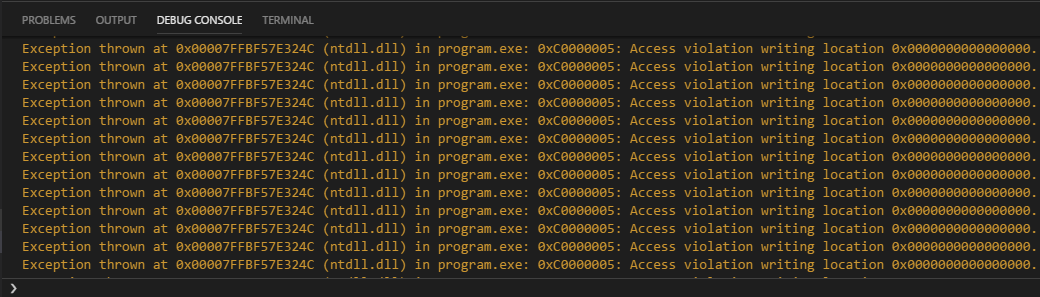
These errors don't seem to cause functional issues with the program, and I can step over them to continue, but there are often 10, 20, or more steps that cause violations _per line_ in the code I write, and it very quickly becomes unreasonable.
This is with the "All Exceptions" box unchecked, when checked the errors are not logged to the debug console, but execution is still paused and so I am presented with the same problem.

Being able to even truly ignore all exceptions and only stop on breakpoints (as mentioned, execution is till paused on thrown exceptions with the "All Exceptions" breakpoint checkbox left clear) would be beneficial, but the ability to specifically ignore types of exceptions would be preferential.
Apologies if this is an existing feature or if an issue was already opened, I spent a good couple of hours digging for a solution and checking to make sure it wasn't already a requested feature and didn't see anything, but I'm new to issue reporting and may have overlooked something.
 MasonEdgel
All 4 comments
@MasonEdgel Are you debugging Visual C++ or GNU C++? I think our limitation is with VS Code and it not allowing us to exclude specific exceptions. The debugger is probably stopping because of unhandled exception that is happening,
I'd know better if you can include a log of you debugging this scenario.
 pieandcakes
on 8 Aug 2018
pieandcakes
on 8 Aug 2018
Sorry, debugging with Visual C++. The exception is occurring outside of code I've written - it happens even with the most basic "Hello World". I believe this is the relevant log information-
Exception thrown at 0x00007FFBF57E324C (ntdll.dll) in diamilo_win32_console.exe: 0xC0000005: Access violation writing location 0x0000000000000000.
<- (E) {"seq":116,"type":"event","event":"stopped","body":{"reason":"exception","threadId":11328,"text":"Unhandled exception at 0x00007FFBF57E324C (ntdll.dll) in program.exe: 0xC0000005: Access violation writing location 0x0000000000000000.","allThreadsStopped":true,"source":{"name":"","path":"","sources":[],"checksums":[]},"line":0,"column":0}}
The only other information logged is PDB load failures and stack trace requests, which are all appear to be normal.
Here's a full log of launching the program and stepping through the error a handful of times, if you want it anyway.
As I mentioned though, I'm certain the exception is caused by the AV's memory management DLL being injected; I've run and debugged the same program on another machine without the AV just fine using the same configuration. Under this bizarre set of circumstances (and I could see some others), having the ability to skip breaking on these errors would help immensely.
MasonEdgel
on 8 Aug 2018
Currently, since it is an unhandled exception, they are always caught as we're assuming a program crash shortly after. In this case, my assumption is that the AV program catches it through a different process (which we can't detect) and it doesn't crash. I'll see if I can find more information and I'll let you know.
pieandcakes
on 5 Sep 2018
On the other hand if you want the error not to show up in the output window, you can add:
"logging": {
     "exceptions": false
}
to your launch.json and it won't fill up your output window, but it will also suppress all other exceptions. You will still stop at them though.
pieandcakes
on 5 Sep 2018
Related issues
 lutianqi
·
3Comments
lutianqi
·
3Comments
 montery8
·
3Comments
montery8
·
3Comments
 timothy
·
3Comments
timothy
·
3Comments
 SkyRiderMike
·
3Comments
SkyRiderMike
·
3Comments
 CDitzel
·
3Comments
CDitzel
·
3Comments
Most helpful comment
On the other hand if you want the error not to show up in the output window, you can add:
to your
launch.jsonand it won't fill up your output window, but it will also suppress all other exceptions. You will still stop at them though.