Vscode-cpptools: Intellisense not working with non-latin characters in Windows user name
Type: LanguageService
Describe the bug
- OS and Version: Windows 10 Education x64 - 1803 - 17134.191
- VS Code Version: 1.25.1 x64 (same problem with latest Insiders version)
- C/C++ Extension Version: 0.17.7
- Other extensions you installed (and if the issue persists after disabling them): None
- Intellisense cannot find the header files listed in the include paths.
To Reproduce
Steps to reproduce the behavior:
- Install Windows 10, install WSL (ubuntu 18.04), install build utilities inside WSL
- Install VS Code, install Cpp extension
- Create or open a C or C++ project and setup include paths properly.
{
    "configurations": [
        {
            "name": "WSL",
            "intelliSenseMode": "clang-x64",
            "compilerPath": "/usr/bin/gcc",
            "includePath": [
                "${workspaceFolder}",
                "/mnt/c/libraries/lib1/include",
                "C:/libraries/lib2/include"
            ],
            "defines": [],
            "browse": {
                "path": [
                    "${workspaceFolder}",
                    "/mnt/c/libraries"
                ],
                "limitSymbolsToIncludedHeaders": true,
                "databaseFilename": ""
            },
            "cStandard": "c11",
            "cppStandard": "c++17"
        }
    ],
    "version": 4
}
- The error squiggles in the code never go away and the include files are not found. I can only see an error in the Developer Tools console:
/C:/Program Files/Microsoft VS Code/resources/app/out/vs/workbench/workbench.main.js:1382 Error: Failed opening file C:\Users\Σπύρος\AppData\Roaming\Code\logs\20180803T023610\renderer1.log for writing: No such file or directory
    at RotatingLogger (C:\Program Files\Microsoft VS Code\resources\app\node_modules.asar\spdlog\index.js:16:3)
    at Object.t.createSpdLogService (file:///C:/Program Files/Microsoft VS Code/resources/app/out/vs/workbench/workbench.main.js:1382:434)
    at file:///C:/Program Files/Microsoft VS Code/resources/app/out/vs/workbench/workbench.main.js:5337:441
    at file:///C:/Program Files/Microsoft VS Code/resources/app/out/vs/workbench/workbench.main.js:5337:678
    at Object.K [as startup] (file:///C:/Program Files/Microsoft VS Code/resources/app/out/vs/workbench/workbench.main.js:5339:235)
    at file:///C:/Program%20Files/Microsoft%20VS%20Code/resources/app/out/vs/workbench/electron-browser/bootstrap/index.js:10:553
    at <anonymous>
t.createSpdLogService @ /C:/Program Files/Microsoft VS Code/resources/app/out/vs/workbench/workbench.main.js:1382
/C:/Program Files/Microsoft VS Code/resources/app/out/vs/workbench/workbench.main.js:1376   ERR Error: Failed opening file c:\Users\Σπύρος\AppData\Roaming\Code\logs\20180803T023610\output_1_20180803T023612\tasks.log for writing: No such file or directory
    at RotatingLogger (C:\Program Files\Microsoft VS Code\resources\app\node_modules.asar\spdlog\index.js:16:3)
    at new t (file:///C:/Program Files/Microsoft VS Code/resources/app/out/vs/workbench/workbench.main.js:3380:318)
    at t.create (file:///C:/Program Files/Microsoft VS Code/resources/app/out/vs/workbench/workbench.main.js:110:430)
    at e._createInstance (file:///C:/Program Files/Microsoft VS Code/resources/app/out/vs/workbench/workbench.main.js:1356:458)
    at e.createInstance (file:///C:/Program Files/Microsoft VS Code/resources/app/out/vs/workbench/workbench.main.js:1355:721)
    at t.instantiateChannel (file:///C:/Program Files/Microsoft VS Code/resources/app/out/vs/workbench/workbench.main.js:3388:349)
    at t.createChannel (file:///C:/Program Files/Microsoft VS Code/resources/app/out/vs/workbench/workbench.main.js:3387:445)
    at t.onDidRegisterChannel (file:///C:/Program Files/Microsoft VS Code/resources/app/out/vs/workbench/workbench.main.js:3386:592)
    at new t (file:///C:/Program Files/Microsoft VS Code/resources/app/out/vs/workbench/workbench.main.js:3385:403)
    at t.create (file:///C:/Program Files/Microsoft VS Code/resources/app/out/vs/workbench/workbench.main.js:110:430)
    at e._createInstance (file:///C:/Program Files/Microsoft VS Code/resources/app/out/vs/workbench/workbench.main.js:1356:458)
    at e._createAndCacheServiceInstance (file:///C:/Program Files/Microsoft VS Code/resources/app/out/vs/workbench/workbench.main.js:1357:403)
    at e._getOrCreateServiceInstance (file:///C:/Program Files/Microsoft VS Code/resources/app/out/vs/workbench/workbench.main.js:1356:595)
    at e._createInstance (file:///C:/Program Files/Microsoft VS Code/resources/app/out/vs/workbench/workbench.main.js:1355:977)
    at e.createInstance (file:///C:/Program Files/Microsoft VS Code/resources/app/out/vs/workbench/workbench.main.js:1355:721)
    at e.createActionBarContributor (file:///C:/Program Files/Microsoft VS Code/resources/app/out/vs/workbench/workbench.main.js:2282:33)
    at e.setInstantiationService (file:///C:/Program Files/Microsoft VS Code/resources/app/out/vs/workbench/workbench.main.js:2281:864)
    at t.initServices (file:///C:/Program Files/Microsoft VS Code/resources/app/out/vs/workbench/workbench.main.js:5277:39)
    at t.startup (file:///C:/Program Files/Microsoft VS Code/resources/app/out/vs/workbench/workbench.main.js:5269:494)
    at e.createWorkbench (file:///C:/Program Files/Microsoft VS Code/resources/app/out/vs/workbench/workbench.main.js:5323:66)
    at e.createContents (file:///C:/Program Files/Microsoft VS Code/resources/app/out/vs/workbench/workbench.main.js:5322:477)
    at e.open (file:///C:/Program Files/Microsoft VS Code/resources/app/out/vs/workbench/workbench.main.js:5330:989)
    at file:///C:/Program Files/Microsoft VS Code/resources/app/out/vs/workbench/workbench.main.js:5339:28
    at Object.g [as _notify] (file:///C:/Program Files/Microsoft VS Code/resources/app/out/vs/workbench/workbench.main.js:150:807)
    at Object.enter (file:///C:/Program Files/Microsoft VS Code/resources/app/out/vs/workbench/workbench.main.js:154:85)
    at n.Class.derive._oncancel._run (file:///C:/Program Files/Microsoft VS Code/resources/app/out/vs/workbench/workbench.main.js:155:896)
    at n.Class.derive._oncancel._completed (file:///C:/Program Files/Microsoft VS Code/resources/app/out/vs/workbench/workbench.main.js:155:337)
    at runCallback (timers.js:672:20)
    at tryOnImmediate (timers.js:645:5)
    at processImmediate [as _immediateCallback] (timers.js:617:5)
/C:/Program Files/Microsoft VS Code/resources/app/out/vs/workbench/workbench.main.js:1376   ERR Error: Failed opening file c:\Users\Σπύρος\AppData\Roaming\Code\logs\20180803T023610\output_1_20180803T023612\extensions.log for writing: No such file or directory
    at RotatingLogger (C:\Program Files\Microsoft VS Code\resources\app\node_modules.asar\spdlog\index.js:16:3)
    at new t (file:///C:/Program Files/Microsoft VS Code/resources/app/out/vs/workbench/workbench.main.js:3380:318)
    at t.create (file:///C:/Program Files/Microsoft VS Code/resources/app/out/vs/workbench/workbench.main.js:110:430)
    at e._createInstance (file:///C:/Program Files/Microsoft VS Code/resources/app/out/vs/workbench/workbench.main.js:1356:458)
    at e.createInstance (file:///C:/Program Files/Microsoft VS Code/resources/app/out/vs/workbench/workbench.main.js:1355:721)
    at t.instantiateChannel (file:///C:/Program Files/Microsoft VS Code/resources/app/out/vs/workbench/workbench.main.js:3388:349)
    at t.createChannel (file:///C:/Program Files/Microsoft VS Code/resources/app/out/vs/workbench/workbench.main.js:3387:445)
    at t.onDidRegisterChannel (file:///C:/Program Files/Microsoft VS Code/resources/app/out/vs/workbench/workbench.main.js:3386:592)
    at new t (file:///C:/Program Files/Microsoft VS Code/resources/app/out/vs/workbench/workbench.main.js:3385:403)
    at t.create (file:///C:/Program Files/Microsoft VS Code/resources/app/out/vs/workbench/workbench.main.js:110:430)
    at e._createInstance (file:///C:/Program Files/Microsoft VS Code/resources/app/out/vs/workbench/workbench.main.js:1356:458)
    at e._createAndCacheServiceInstance (file:///C:/Program Files/Microsoft VS Code/resources/app/out/vs/workbench/workbench.main.js:1357:403)
    at e._getOrCreateServiceInstance (file:///C:/Program Files/Microsoft VS Code/resources/app/out/vs/workbench/workbench.main.js:1356:595)
    at e._createInstance (file:///C:/Program Files/Microsoft VS Code/resources/app/out/vs/workbench/workbench.main.js:1355:977)
    at e.createInstance (file:///C:/Program Files/Microsoft VS Code/resources/app/out/vs/workbench/workbench.main.js:1355:721)
    at e.createActionBarContributor (file:///C:/Program Files/Microsoft VS Code/resources/app/out/vs/workbench/workbench.main.js:2282:33)
    at e.setInstantiationService (file:///C:/Program Files/Microsoft VS Code/resources/app/out/vs/workbench/workbench.main.js:2281:864)
    at t.initServices (file:///C:/Program Files/Microsoft VS Code/resources/app/out/vs/workbench/workbench.main.js:5277:39)
    at t.startup (file:///C:/Program Files/Microsoft VS Code/resources/app/out/vs/workbench/workbench.main.js:5269:494)
    at e.createWorkbench (file:///C:/Program Files/Microsoft VS Code/resources/app/out/vs/workbench/workbench.main.js:5323:66)
    at e.createContents (file:///C:/Program Files/Microsoft VS Code/resources/app/out/vs/workbench/workbench.main.js:5322:477)
    at e.open (file:///C:/Program Files/Microsoft VS Code/resources/app/out/vs/workbench/workbench.main.js:5330:989)
    at file:///C:/Program Files/Microsoft VS Code/resources/app/out/vs/workbench/workbench.main.js:5339:28
    at Object.g [as _notify] (file:///C:/Program Files/Microsoft VS Code/resources/app/out/vs/workbench/workbench.main.js:150:807)
    at Object.enter (file:///C:/Program Files/Microsoft VS Code/resources/app/out/vs/workbench/workbench.main.js:154:85)
    at n.Class.derive._oncancel._run (file:///C:/Program Files/Microsoft VS Code/resources/app/out/vs/workbench/workbench.main.js:155:896)
    at n.Class.derive._oncancel._completed (file:///C:/Program Files/Microsoft VS Code/resources/app/out/vs/workbench/workbench.main.js:155:337)
    at runCallback (timers.js:672:20)
    at tryOnImmediate (timers.js:645:5)
    at processImmediate [as _immediateCallback] (timers.js:617:5)
/C:/Program Files/Microsoft VS Code/resources/app/out/vs/workbench/workbench.main.js:1375  INFO no standard startup: panel is active
/C:/Program Files/Microsoft VS Code/resources/app/out/vs/workbench/workbench.main.js:270 [Extension Host] Error: Failed opening file C:\Users\Σπύρος\AppData\Roaming\Code\logs\20180803T023610\exthost1.log for writing: No such file or directory
    at RotatingLogger (c:\Program Files\Microsoft VS Code\resources\app\node_modules.asar\spdlog\index.js:16:3)
    at Object.t.createSpdLogService (c:\Program Files\Microsoft VS Code\resources\app\out\vs\workbench\node\extensionHostProcess.js:408:29)
    at new t (c:\Program Files\Microsoft VS Code\resources\app\out\vs\workbench\node\extensionHostProcess.js:453:241)
    at new t (c:\Program Files\Microsoft VS Code\resources\app\out\vs\workbench\node\extensionHostProcess.js:808:950)
    at c:\Program Files\Microsoft VS Code\resources\app\out\vs\workbench\node\extensionHostProcess.js:816:31
    at <anonymous>
t.log @ /C:/Program Files/Microsoft VS Code/resources/app/out/vs/workbench/workbench.main.js:270
/C:/Program Files/Microsoft VS Code/resources/app/out/vs/workbench/workbench.main.js:1376   ERR Error: Failed opening file c:\Users\Σπύρος\AppData\Roaming\Code\logs\20180803T023610\output_1_20180803T023612\extension-output-#1.log for writing: No such file or directory
    at RotatingLogger (C:\Program Files\Microsoft VS Code\resources\app\node_modules.asar\spdlog\index.js:16:3)
    at new t (file:///C:/Program Files/Microsoft VS Code/resources/app/out/vs/workbench/workbench.main.js:3380:318)
    at t.create (file:///C:/Program Files/Microsoft VS Code/resources/app/out/vs/workbench/workbench.main.js:110:430)
    at e._createInstance (file:///C:/Program Files/Microsoft VS Code/resources/app/out/vs/workbench/workbench.main.js:1356:458)
    at e.createInstance (file:///C:/Program Files/Microsoft VS Code/resources/app/out/vs/workbench/workbench.main.js:1355:721)
    at t.instantiateChannel (file:///C:/Program Files/Microsoft VS Code/resources/app/out/vs/workbench/workbench.main.js:3388:349)
    at t.createChannel (file:///C:/Program Files/Microsoft VS Code/resources/app/out/vs/workbench/workbench.main.js:3387:445)
    at t.onDidRegisterChannel (file:///C:/Program Files/Microsoft VS Code/resources/app/out/vs/workbench/workbench.main.js:3386:592)
    at e.fire (file:///C:/Program Files/Microsoft VS Code/resources/app/out/vs/workbench/workbench.main.js:171:364)
    at e.registerChannel (file:///C:/Program Files/Microsoft VS Code/resources/app/out/vs/workbench/workbench.main.js:2536:689)
    at e._getChannel (file:///C:/Program Files/Microsoft VS Code/resources/app/out/vs/workbench/workbench.main.js:3420:446)
    at e.$append (file:///C:/Program Files/Microsoft VS Code/resources/app/out/vs/workbench/workbench.main.js:3420:103)
    at e._doInvokeHandler (file:///C:/Program Files/Microsoft VS Code/resources/app/out/vs/workbench/workbench.main.js:3127:983)
    at e._invokeHandler (file:///C:/Program Files/Microsoft VS Code/resources/app/out/vs/workbench/workbench.main.js:3127:701)
    at e._receiveRequest (file:///C:/Program Files/Microsoft VS Code/resources/app/out/vs/workbench/workbench.main.js:3126:767)
    at e._receiveOneMessage (file:///C:/Program Files/Microsoft VS Code/resources/app/out/vs/workbench/workbench.main.js:3126:536)
    at file:///C:/Program Files/Microsoft VS Code/resources/app/out/vs/workbench/workbench.main.js:3125:424
    at file:///C:/Program Files/Microsoft VS Code/resources/app/out/vs/workbench/workbench.main.js:3128:575
    at e.fire (file:///C:/Program Files/Microsoft VS Code/resources/app/out/vs/workbench/workbench.main.js:171:344)
    at c (file:///C:/Program Files/Microsoft VS Code/resources/app/out/vs/workbench/workbench.main.js:302:1008)
    at Socket.<anonymous> (file:///C:/Program Files/Microsoft VS Code/resources/app/out/vs/workbench/workbench.main.js:303:171)
    at emitOne (events.js:96:13)
    at Socket.emit (events.js:191:7)
    at readableAddChunk (_stream_readable.js:178:18)
    at Socket.Readable.push (_stream_readable.js:136:10)
    at Pipe.onread (net.js:560:20)
/C:/Program Files/Microsoft VS Code/resources/app/out/vs/workbench/workbench.main.js:1376   ERR File not found (file:///c:/Users/Σπύρος/AppData/Roaming/Code/logs/20180803T023610/exthost1.log): Error: File not found (file:///c:/Users/Σπύρος/AppData/Roaming/Code/logs/20180803T023610/exthost1.log)
    at new t (file:///C:/Program Files/Microsoft VS Code/resources/app/out/vs/workbench/workbench.main.js:1349:65)
    at file:///C:/Program Files/Microsoft VS Code/resources/app/out/vs/workbench/workbench.main.js:3173:162
    at Object.v [as _notify] (file:///C:/Program Files/Microsoft VS Code/resources/app/out/vs/workbench/workbench.main.js:151:375)
    at Object.enter (file:///C:/Program Files/Microsoft VS Code/resources/app/out/vs/workbench/workbench.main.js:154:592)
    at n.Class.derive._oncancel._run (file:///C:/Program Files/Microsoft VS Code/resources/app/out/vs/workbench/workbench.main.js:155:896)
    at n.Class.derive._oncancel._error (file:///C:/Program Files/Microsoft VS Code/resources/app/out/vs/workbench/workbench.main.js:155:413)
    at file:///C:/Program Files/Microsoft VS Code/resources/app/out/vs/workbench/workbench.main.js:199:93
    at file:///C:/Program Files/Microsoft VS Code/resources/app/out/vs/workbench/workbench.main.js:287:58
    at C:\Program Files\Microsoft VS Code\resources\app\node_modules.asar\graceful-fs\polyfills.js:284:29
    at FSReqWrap.oncomplete (original-fs.js:114:15)
/C:/Program Files/Microsoft VS Code/resources/app/out/vs/workbench/workbench.main.js:167 WARNING: Promise with no error callback:14
/C:/Program Files/Microsoft VS Code/resources/app/out/vs/workbench/workbench.main.js:167 Object
/C:/Program Files/Microsoft VS Code/resources/app/out/vs/workbench/workbench.main.js:270 [Extension Host] activating extension
/C:/Program Files/Microsoft VS Code/resources/app/out/vs/workbench/workbench.main.js:270 [Extension Host] starting language server
Additional context
I am almost certain that this issue has to do with the my Windows user name being written with Greek characters. My user name is "Σπύρος".
I have make an identical setup, in the same computer, with the same version of WSL, VS Code, etc, with only difference being the Windows user name. This time written with Latin characters. And Intellisense works fine!
Issue #1560 seems to be similar also.
 nautilus7
All 15 comments
@sean-mcmanus what does the "world ready" tag mean? Any timeline when this will be fixed? Thanks!
nautilus7
on 6 Aug 2018
The World Ready tag means: "An issue relating to UTF-8 characters > 1 byte, non-UTF-8 encodings, non-English translations, etc.". I don't think we've decided on a timeline yet.
Do you know if this issue only repros with WSL or does it repro with a "cl.exe" compilerPath as well (and with no "/" in the includePath)? We go into a special case-sensitive mode in that scenario which could cause issues with certain non-ASCII characters.
 sean-mcmanus
on 6 Aug 2018
sean-mcmanus
on 6 Aug 2018
I didn't have this issue with the same setup (Greek user name and WSL) with previous versions of VS Code and the cpp extension, so it is something that you changed that causes this behavior. I noticed the problem 2-3 months ago, maybe more, I can't remember exactly.
I will check outside of WSL and without forward slashes.
nautilus7
on 6 Aug 2018
I'm able to repro the logging message errors -- that is causing our C/C++ output window to be blank and seems unrelated to possible IntelliSense failures (appears to be a VS Code bug that repros without the C/C++ extension, see https://github.com/Microsoft/vscode/issues/55900). And for me IntelliSense is still finding headers. Which header file and #include is it complaining about? Does it find #include <string>?
sean-mcmanus
on 6 Aug 2018
I'm able to repro a bug where the "/mnt/c/libraries/lib1/include" headers aren't being found, but it repros without any non-ASCII characters in the user name or workspace path. C:/libraries/lib2/include works.
sean-mcmanus
on 6 Aug 2018
It's a regression that started with 0.17.5 -- I'm shocked it took us so long to discover this. You could use the 0.17.4 vsix as a workaround until we release a fix: https://github.com/Microsoft/vscode-cpptools/releases/download/v0.17.4/cpptools-win32.vsix .
UPDATE: Oh, looks the machine I was on didn't have /usr/bin/gcc, causing a non-WSL fallback to be used, which causes the WSL "/mnt" path to not be recognized (i.e. "by design")....not sure if that's a requirement for your repro yet. If you set your C_Cpp.loggingLevel to "Debug" you can see error regarding whether the gcc compiler info could be found (oh, but you won't be able to see the logs with your non-ASCII username until VS Code fixes that bug).
UPDATE2: Do you have g++ installed? Installing g++ may workaround the issue. It looks like there is some code attempting to invoke gcc with the C++ dependencies and it fails, leading to the /mnt failure.
sean-mcmanus
on 6 Aug 2018
I'll try to answer your questions one by one...
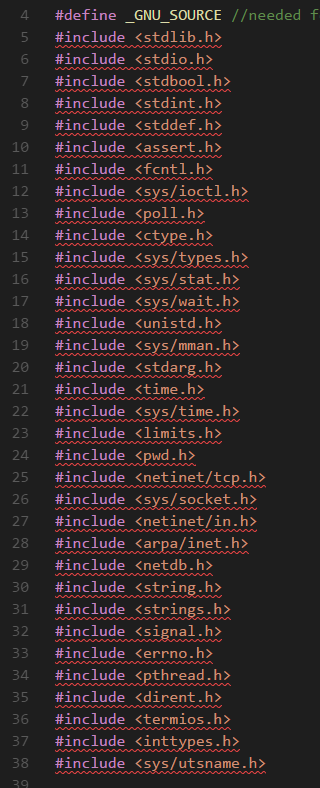
The header files that it complains about are basically all... See attached picture:
nautilus7
on 7 Aug 2018
Output of the cpp extension with "debug" enabled:
For my ASCII user name
ascii.txt
For my non-ASCII user name
non-ascii.txt
Similar output with Insiders build for both ASCII and non-ASCII users.
nautilus7
on 7 Aug 2018
I have both gcc and g++ installed on WSL through the sudo apt install build-essential command. No compiler is installed on Windows (outside of WSL).
Output of gcc -v -E -x c++ - < /dev/null
Using built-in specs.
COLLECT_GCC=gcc
OFFLOAD_TARGET_NAMES=nvptx-none
OFFLOAD_TARGET_DEFAULT=1
Target: x86_64-linux-gnu
Configured with: ../src/configure -v --with-pkgversion='Ubuntu 7.3.0-16ubuntu3' --with-bugurl=file:///usr/share/doc/gcc-7/README.Bugs --enable-languages=c,ada,c++,go,brig,d,fortran,objc,obj-c++ --prefix=/usr --with-gcc-major-version-only --with-as=/usr/bin/x86_64-linux-gnu-as --with-ld=/usr/bin/x86_64-linux-gnu-ld --program-suffix=-7 --program-prefix=x86_64-linux-gnu- --enable-shared --enable-linker-build-id --libexecdir=/usr/lib --without-included-gettext --enable-threads=posix --libdir=/usr/lib --enable-nls --with-sysroot=/ --enable-clocale=gnu --enable-libstdcxx-debug --enable-libstdcxx-time=yes --with-default-libstdcxx-abi=new --enable-gnu-unique-object --disable-vtable-verify --enable-libmpx --enable-plugin --enable-default-pie --with-system-zlib --with-target-system-zlib --enable-objc-gc=auto --enable-multiarch --disable-werror --with-arch-32=i686 --with-abi=m64 --with-multilib-list=m32,m64,mx32 --enable-multilib --with-tune=generic --enable-offload-targets=nvptx-none --without-cuda-driver --enable-checking=release --build=x86_64-linux-gnu --host=x86_64-linux-gnu --target=x86_64-linux-gnu
Thread model: posix
gcc version 7.3.0 (Ubuntu 7.3.0-16ubuntu3)
COLLECT_GCC_OPTIONS='-v' '-E' '-mtune=generic' '-march=x86-64'
 /usr/lib/gcc/x86_64-linux-gnu/7/cc1plus -E -quiet -v -imultiarch x86_64-linux-gnu -D_GNU_SOURCE - -mtune=generic -march=x86-64 -fstack-protector-strong -Wformat -Wformat-security
ignoring duplicate directory "/usr/include/x86_64-linux-gnu/c++/7"
ignoring nonexistent directory "/usr/local/include/x86_64-linux-gnu"
ignoring nonexistent directory "/usr/lib/gcc/x86_64-linux-gnu/7/../../../../x86_64-linux-gnu/include"
#include "..." search starts here:
#include <...> search starts here:
 /usr/include/c++/7
 /usr/include/x86_64-linux-gnu/c++/7
 /usr/include/c++/7/backward
 /usr/lib/gcc/x86_64-linux-gnu/7/include
 /usr/local/include
 /usr/lib/gcc/x86_64-linux-gnu/7/include-fixed
 /usr/include/x86_64-linux-gnu
 /usr/include
End of search list.
# 1 "<stdin>"
# 1 "<built-in>"
# 1 "<command-line>"
# 1 "/usr/include/stdc-predef.h" 1 3 4
# 1 "<command-line>" 2
# 1 "<stdin>"
COMPILER_PATH=/usr/lib/gcc/x86_64-linux-gnu/7/:/usr/lib/gcc/x86_64-linux-gnu/7/:/usr/lib/gcc/x86_64-linux-gnu/:/usr/lib/gcc/x86_64-linux-gnu/7/:/usr/lib/gcc/x86_64-linux-gnu/
LIBRARY_PATH=/usr/lib/gcc/x86_64-linux-gnu/7/:/usr/lib/gcc/x86_64-linux-gnu/7/../../../x86_64-linux-gnu/:/usr/lib/gcc/x86_64-linux-gnu/7/../../../../lib/:/lib/x86_64-linux-gnu/:/lib/../lib/:/usr/lib/x86_64-linux-gnu/:/usr/lib/../lib/:/usr/lib/gcc/x86_64-linux-gnu/7/../../../:/lib/:/usr/lib/
COLLECT_GCC_OPTIONS='-v' '-E' '-mtune=generic' '-march=x86-64'
The include paths in the extension settings are in the 1st post.
nautilus7
on 7 Aug 2018
Finally, I tried different versions of the cpp extension, on my ASCII user only.
Result is the same with the suggested version 0.17.4 (same errors and debug output as with 0.17.7), as well as with version 0.17.0 (the oldest one I can use with my Windows build).
nautilus7
on 7 Aug 2018
Okay, thanks. Looks like I hit a different bug when g++ isn't installed (https://github.com/Microsoft/vscode-cpptools/issues/2360 ).
Also, the "Unable to retrieve file system information for /mnt/c/libraries/lib1/include. error = -1" in your ASCII log is bug https://github.com/Microsoft/vscode-cpptools/issues/2361 .
I'll see if I can repro your issue soon...
sean-mcmanus
on 7 Aug 2018
It looks like the bug is when the WSL is installed with the non-ASCII user (other scenarios with the non-ASCII username don't repro an issue). I'll investigate tomorrow...
sean-mcmanus
on 7 Aug 2018
The bug has been fixed and should be in our next update. Did you have a workaround or did you want us to release a 2nd insiders soon?
sean-mcmanus
on 8 Aug 2018
No, I don't have a workaround, but I don't plan to work on any programming tasks at the moment, so I am not in a hurry.
Thanks for taking care of this so quickly!
nautilus7
on 8 Aug 2018
Fixed with 0.18.0.
sean-mcmanus
on 17 Aug 2018
Related issues
 vicatcu
·
3Comments
vicatcu
·
3Comments
 jyavenard
·
3Comments
jyavenard
·
3Comments
 chrisckc
·
3Comments
chrisckc
·
3Comments
 wdc596933938
·
3Comments
wdc596933938
·
3Comments
 CDitzel
·
3Comments
CDitzel
·
3Comments