Vscode-cpptools: When using recursive include paths for Qt, code doesn't find header files without a .h extension
Type: LanguageService
----- Input information below -----
Please review existing issues and our documentation at https://github.com/Microsoft/vscode-cpptools/tree/master/Documentation prior to filing an issue.
Describe the bug
- OS and Version: Win 10
- VS Code Version: 1.25.0
- C/C++ Extension Version: 0.17.6
- Other extensions you installed (and if the issue persists after disabling them):
- A clear and concise description of what the bug is.
Code can't find Qt headers (without a .h extension) even when the Qt source directory is added as a recursive search path.
To Reproduce
Steps to reproduce the behavior:
Provide a code sample including configuration files such as c_cpp_properties.json
{
    "configurations": [
        {
            "name": "null",
            "includePath": [
                "${workspaceFolder}/**",
                "C:/Qt/5.9.5/Src/**"
            ],
            "defines": [],
            "browse": {
                "path": [],
                "limitSymbolsToIncludedHeaders": true,
                "databaseFilename": ""
            },
            "intelliSenseMode": "clang-x64",
            "compilerPath": "/usr/bin/gcc",
            "cStandard": "c11",
            "cppStandard": "c++17"
        }
    ],
    "version": 4
}
- Have Qt and it's sources installed
- Create a cpp file and `include
- Watch it not be found
Expected behavior
When using recursive include paths and having Qt source available, these headers should be discovered.
Screenshots
If applicable, add screenshots to help explain your problem.

Additional context
 nholthaus
All 13 comments
I think you're hitting a bug where the extension file is being added to our "non-existent" list in our database. As a workaround for this, you can do a Reset IntelliSense Database command and/or remove the empty browse.path setting (or copy the includePath settings over). Does that fix it for you? If that doesn't fix it for you, then you're hitting some new issue. The .h and extensionless files are expected to behave the same.
 sean-mcmanus
on 11 Jul 2018
sean-mcmanus
on 11 Jul 2018
I tried both removing browse.path, and copying include settings into it. No change. Resetting the database also resulted in no change.
nholthaus
on 11 Jul 2018
It's possible recursive includes is picking the wrong includePaths due to files with the same name. If you set your C_Cpp.loggingLevel to Debug and then open a new file, you should be able to see what includePaths we end up using after the "sending compilation args" logging in the C/C++ tab in the Output window, so you can see if we're missing an include file or if the required ordering is incorrect, so you could manually add those particular paths to the includePath to fix the issue.
sean-mcmanus
on 11 Jul 2018
This works for me using both the Windows and WSL versions of QT. I noticed your includePath is starting from the QT Src/ folder. I don't have this folder in my installation. Do the headers live in there? I installed the msvc2017 kit and found the headers in there.


 bobbrow
on 11 Jul 2018
bobbrow
on 11 Jul 2018
+1 for me
 lygstate
on 6 Nov 2018
lygstate
on 6 Nov 2018
This problem also exists for Visual Studio 2017.
Problem
Using Visual Studio 2017 on Windows 10, if you load a folder that defines a Qt project with a CMakeLists.txt file, then Intellisense will not recognize the convenience headers Qt provides. For instance, when typing #include <QApplication> in a cpp file, VS will not suggest the QApplication header, and will instead suggestion qapplication.h.
Possible Solution
It seems Intellisense will ignore files without a filetype (.h/.hpp/etc). This behavior can be changed by editing the settings under _File Extensions_.
- In Visual Studio, navigate to
Tools > Options > Text Editor > File Extensions. - Check the
Map extensionless files to:check box, and from the drop down list, selectMicrosoft Visual C++.
Is this ideal? I couldn't say. It seems like this will create problems for the developers that use this feature with other languages.
 shogerr
on 10 Mar 2019
shogerr
on 10 Mar 2019
@shogerr, can you report your issue on the Visual Studio Developer Community so they can track it better? They won't look here for feedback.
I still don't repro any problem with auto including QT headers on Windows and I haven't heard back from the OP. If you are still having an issue with this, please let us know and provide additional details. I will close this issue for now.
bobbrow
on 11 Mar 2019
This problem also exists for Visual Studio 2017.
Problem
Using Visual Studio 2017 on Windows 10, if you load a folder that defines a Qt project with aCMakeLists.txtfile, then Intellisense will not recognize the convenience headers Qt provides. For instance, when typing#include <QApplication>in a cpp file, VS will not suggest theQApplicationheader, and will instead suggestionqapplication.h.Possible Solution
It seems Intellisense will ignore files without a filetype (.h/.hpp/etc). This behavior can be changed by editing the settings under _File Extensions_.1. In Visual Studio, navigate to `Tools > Options > Text Editor > File Extensions`. 2. Check the `Map extensionless files to:` check box, and from the drop down list, select `Microsoft Visual C++`.Is this ideal? I couldn't say. It seems like this will create problems for the developers that use this feature with other languages.
Absolutely true for VS Code too. Qt headers, have duplicate header files with no extension:

This files are not recognized by Intellisense parser, and are ignored. So you will not be able to include Qt headers like #include <QString> (it content is #include "qstring.h"), only #include <qstring.h> are available.
My configuration: latest VS Code with cpp-tools extension and cmake extension, mingw-64 compiler, QT build for mingw-64.
Workaround for VS Code: add this kind of no extension files mask to settings.json - "*.": "cpp".
 eacheveryhour
on 20 Nov 2019
eacheveryhour
on 20 Nov 2019
Confirmed, I'm also facing this issue.
 muesli
on 10 Mar 2020
muesli
on 10 Mar 2020
@Colengc can you take a look at this and reopen if appropriate? There should be no difference between QT and the STL as far as extensionless headers go. Perhaps the project is not configured to include the QT header paths?
bobbrow
on 3 Apr 2020
can't find the headers:
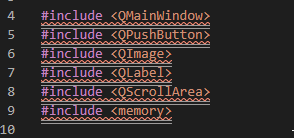

but the code can be compiled normally, which seems to be an intellisense error.
update:
i solved it by manually disabling IntelliSense error prompt
 stonedreamforest
on 9 Apr 2020
stonedreamforest
on 9 Apr 2020
@stonedreamforest you appear to be using configurationProvider which means your includePath is not active. If there are squiggles on your headers, CMake Tools is potentially sending the wrong configuration.
bobbrow
on 9 Apr 2020
@stonedreamforest you appear to be using
configurationProviderwhich means yourincludePathis not active. If there are squiggles on your headers, CMake Tools is potentially sending the wrong configuration.
you are right.
stonedreamforest
on 9 Apr 2020
Related issues
 igorPhelype
·
3Comments
igorPhelype
·
3Comments
 chrisckc
·
3Comments
chrisckc
·
3Comments
 BDZNH
·
3Comments
BDZNH
·
3Comments
 jyavenard
·
3Comments
jyavenard
·
3Comments
 CDitzel
·
3Comments
CDitzel
·
3Comments
Most helpful comment
Absolutely true for VS Code too. Qt headers, have duplicate header files with no extension:
This files are not recognized by Intellisense parser, and are ignored. So you will not be able to include Qt headers like
#include <QString>(it content is#include "qstring.h"), only#include <qstring.h>are available.My configuration: latest VS Code with cpp-tools extension and cmake extension, mingw-64 compiler, QT build for mingw-64.
Workaround for VS Code: add this kind of no extension files mask to settings.json -
"*.": "cpp".