Vscode-cpptools: Characters missing automatically while writing C++ code
_From @RMyang on June 21, 2018 13:38_
VS Code Version: 1.24.1
OS Version: Windows 10
I was confused when I tried to write C++ codes using VS Code. For example, after I wrote “int a=6;”, some characters missed automatically like below:
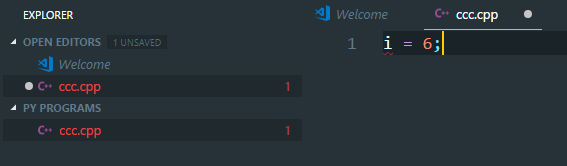
Sometimes, the code line turned to "int = 6;", and sometime the codes didn't go wrong after enter ";".
Would someone please tell me why it happened, and how can I fix it? Thanks!
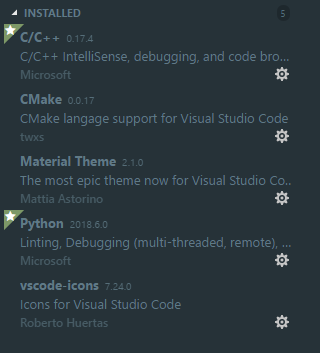
These are the extensions I installed:
This is my settings:

_Copied from original issue: Microsoft/vscode#52612_
 chrmarti
All 10 comments
@RMyang Does the bug repro without the C/C++ extension installed? You may also want to try setting "formatOnType" to false.
@chrmarti -- I don't think we control text editing directly, so I'm not sure how we could be causing this.
 sean-mcmanus
on 21 Jun 2018
sean-mcmanus
on 21 Jun 2018
@sean-mcmanus After tests about this problem, I found that if I:
Uninstall C/C++ extension, and keep setting "editor.formatOnType" true
or
Install C/C++ extension, and keep setting "editor.formatOnType" false
This problem disappeared, but I can't acquire the auto format (such as add space on both side of "=") while coding.
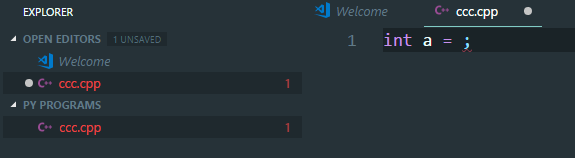
When I installed C/C++ extension and keep setting "editor.formatOnType" true, this problem appear again:
 jayoungo
on 22 Jun 2018
jayoungo
on 22 Jun 2018
@RMyang Okay, thanks for the info. It looks like it's a bug with our OnType formatting. I recommend you set our C_Cpp.formatting to "Disabled" and see if another formatting extension implements this correctly, such as the clang-format extension until we can get a fix (or set the formatOnType to false). We only handle formatting when ";" is entered so it's not particularly useful.
sean-mcmanus
on 22 Jun 2018
Hello. I have the same bug. As @sean-mcmanus said. With C_Cpp.formatting disabled, everything works.
 chriztheanvill
on 24 Jun 2018
chriztheanvill
on 24 Jun 2018
I'm not able to repro this bug. Any advice on how to get it to occur?
sean-mcmanus
on 28 Jun 2018
@sean-mcmanus In my tests, this problem occurred almost every time. The extensions and settings are like the pictures above, and I added "...Microsoft VS Codebin" to User Environment Variable "Path". In addition, with the same extensions and settings, the VS Code in my Ubuntu 16.04 works well all the time.
The gif below recorded the errors while coding:

jayoungo
on 28 Jun 2018
I reproed the bug -- it occurs when non-ASCII characters are in the file path (I noticed those characters in your GIF in the file open dialog).
UPDATE: Oh, that's odd, it stopped reproing…I reproed it again -- there appears to be some randomness (so I'm not sure yet if the non-ASCII path is required or not). The internal document is getting corrupted (input to formatting) -- this will cause most other functionality to break as well (i.e. IntelliSense stuff) even without doing a formatting.
If you set your C_Cpp.loggingLevel to "Debug" you can see the input to the formatting operation. I need to track down what exactly is corrupting the input document....oh, we fixed a bug with 0.17.6 in which the edits were being delayed (leading to operations on old data), which could be the same root cause: https://github.com/Microsoft/vscode-cpptools/issues/2184 .
sean-mcmanus
on 28 Jun 2018
@RMyang The bug occurs when our didOpen processing gets delayed until the folder settings are received and then a didChange occurs before the didOpen. A workaround should be to wait a few seconds before making edits to a document (only when the extension hasn't been previously activated). You can view the C/C++ logs and wait till you see a didOpen occur after didChangeFolderSettings. Something on your machine appears to be causing the didChangeFolder settings to take longer. Let us know if waiting doesn't cause the issue to stop reproing for you.
UPDATE: We've fixed it, but it probably won't make 0.17.6 which is shipping today [UPDATE: 0.17.6 got delayed], but it'll be in our next update.
sean-mcmanus
on 28 Jun 2018
@sean-mcmanus Just as you said, if I wait a moment before editing, everything works well! Thanks a lot!
jayoungo
on 29 Jun 2018
@RMyang Should be fixed with 0.17.6.
sean-mcmanus
on 2 Jul 2018
Related issues
 SkyRiderMike
·
3Comments
SkyRiderMike
·
3Comments
 wdc596933938
·
3Comments
wdc596933938
·
3Comments
 BDZNH
·
3Comments
BDZNH
·
3Comments
 ismadelgad11
·
3Comments
ismadelgad11
·
3Comments
 jheinzel
·
3Comments
jheinzel
·
3Comments