Vscode-cpptools: Multiroot autoformatting broken again
Issue Type: Bug
I think this might be broken again or at least weird...
Please look at this issue: https://github.com/Microsoft/vscode-cpptools/issues/1391
Download the repro case and follow the steps in that issue. The autoformatting sometimes works, sometimes doesn't, sometimes does different things in each of the two files in the repro zip. I've even had one case where the autoformatter started deleting/overwriting characters and just generally messed up everything.
I tried but couldn't figure out stable repro steps for that last one but the inconsistent formatting in the two files at least is easily reproducible.
Extension version: 0.17.4
VS Code version: Code 1.24.0 (6a6e02cef0f2122ee1469765b704faf5d0e0d859, 2018-06-06T17:35:40.560Z)
OS version: Windows_NT x64 10.0.17134
 azydevelopment
All 20 comments
Edit: It looks like it started working in my main project again but it's unreliable and I'd really like it to be reliable since I use it on all my files before committing to source control.
I'm finding it hard to pin point the exact repro that makes it inconsistent/straight up messed up but it's easy enough to repro at least one of the issues with the repro in the bug referenced above.
azydevelopment
on 8 Jun 2018
I'm not able to repro the issue. Can you set your loggingLevel to Debug and then do the repro? Do you see any "Formatting diffed output" message? When the result is garbage is the "Formatting input" also garbage?
You could also try 0.17.5-insiders, which may have unintentionally fix it: https://github.com/Microsoft/vscode-cpptools/releases/tag/v0.17.5-insiders .
 sean-mcmanus
on 8 Jun 2018
sean-mcmanus
on 8 Jun 2018
Re-reading the old issues, it doesn't seem like a fix was ever made on the VS Code side.
 bobbrow
on 11 Jun 2018
bobbrow
on 11 Jun 2018
@bobbrow I don't understand. The original issue was definitely fixed (on the VS Code side) or this wouldn't work at all. It appears there's some strange random issue. Are you able to repro the bug?
sean-mcmanus
on 11 Jun 2018
How do I set the loggingLevel?
azydevelopment
on 21 Jun 2018
@azydevelopment It's in settings.json, C_Cpp.loggingLevel.
sean-mcmanus
on 21 Jun 2018
Sorry for the delay. I set settings.json but where do I actually see the output messages?
Do you see any "Formatting diffed output" message? When the result is garbage is the "Formatting input" also garbage?
azydevelopment
on 29 Jun 2018

sean-mcmanus
on 29 Jun 2018
Oh -- we just found/fixed a bug with internal document corruption that is revealed when formatting occurs -- see https://github.com/Microsoft/vscode-cpptools/issues/2162 . Let us know if you think that's the same bug. It sounds like the same bug to me (caused by editting too soon after the extension activates with documents open).
sean-mcmanus
on 29 Jun 2018
Interesting. In either case, here are my two log files.
In them you should be able to see a few examples of formatting, some of which I put in a tab change and some where I didn't. In both cases, folder 0 and folder 1 in the workspace seem to produce different outputs despite the inputs being basically identical. For whatever reason, the whitespace it decides to format to is different in the two files.
azydevelopment
on 29 Jun 2018
Your issue is different (didChange isn't coming too soon). What exactly is the bug in the logs I should be looking for? I need to find with what operation the buggy result first appears.
VS Code has a "detectIndentation" setting, which can alter the formatting behavior in regards to tabs/spaces (with the default "Visual Studio" formatting style, we get our tabSize and insertSpaces directly from Vs Code).
sean-mcmanus
on 29 Jun 2018
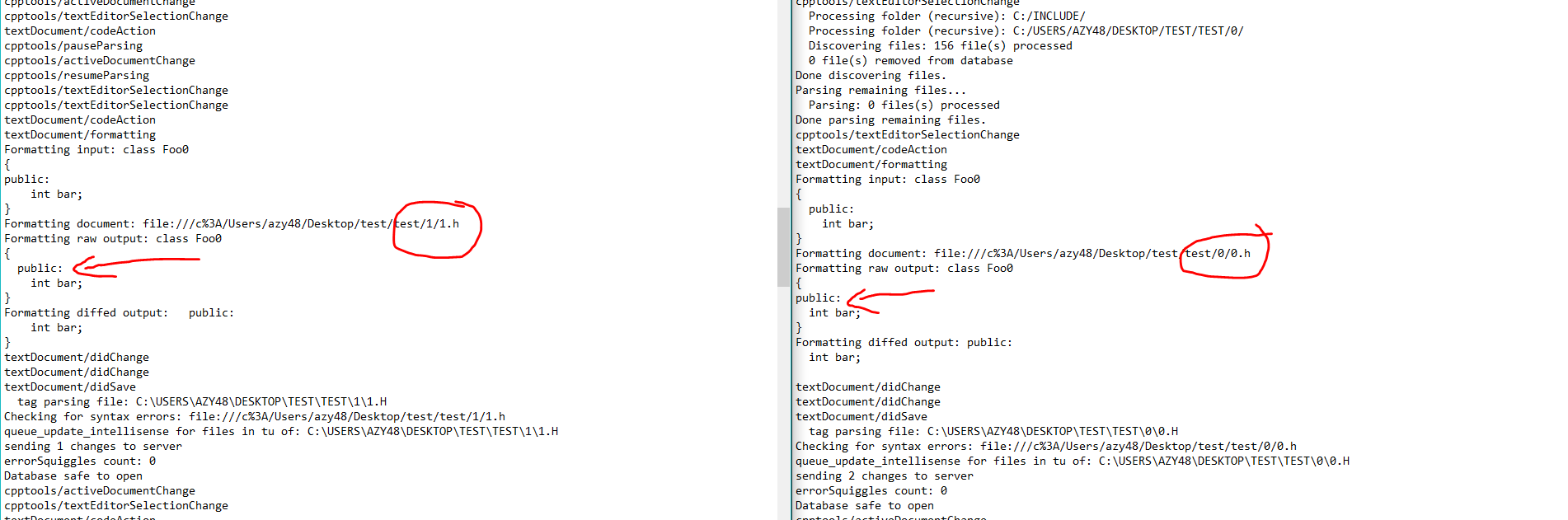
The very first formatting event is already different in the two files. Notice how one of them has 2 extra spaces indent for the inner part of the class.
azydevelopment
on 29 Jun 2018
The behavior of 0.h (no space to the left of "public") can occur when the VS Code's tabSize gets changed from 4 to 2 (detectIndentation can do this automatically if it detects a tabSize of 2). I don't understand why clang-format behaves that way though -- we pass the tabSize to IndentWidth, so it's strange that decreasing the indentWith to 2 sets the public with an indentation of 0 (I assume it's "by design").
You can adjust this via setting/modifying the C_Cpp.clang_format_style: "{ BasedOnStyle: LLVM, UseTab: Never, IndentWidth: 4, TabWidth: 4, BreakBeforeBraces: Allman, AllowShortIfStatementsOnASingleLine: false, IndentCaseLabels: false, ColumnLimit: 0 }"
}, or creating a .clang-format file.
sean-mcmanus
on 29 Jun 2018
FYI. This still happens on the latest build I got today.
I do use a .clang-format file for some projects but my question was more around why it produces different results for two different folders despite neither having a .vscode folder. It's as though there's a race condition or something based on the multi-root functionality.
azydevelopment
on 10 Aug 2018
I encountered this issue too. And I found that by modifying test.zip
from #1391 a bit, I can reproduce the bug stably.
Repro project: test2.zip
Steps to Reproduce:
- Unzip the attachment.
- Open the workspace named
test/test_ws.code-workspace. - Open
0/0.h; runFormat Documentand the command works. - Open
1/1.h; runFormat Documentand the command also works. - Go to
0/0.h, add some extra spaces to make the code looks awful. Then runFormat Documentand it doesn't work anymore. - Go to
1/1.h, add some extra spaces to make the code looks awful. Then runFormat Documentand it still works.
_Note 1:_ If you open 1/1.h before 0/0.h (i.e. swap step 3 and 4), the broken formatting functionality will swap from 0/0.h to 1/1.h.
_Note 2:_ test_ws.code-workspace contains a folder named nothing/. If you remove that folder from the workspace, the file that eventually become unable to format will always be 0/0.h.
Some observation
It seems like the extension creates individual language client for each of the workspace folder, but all of the language client share the exactly same document selector that matches all C/C++ files regardless to the file location, which causes vscode unable to choose the right formatting provider. A key evidence is that the command Format Document with ... shows 3 items in the case above. Actually, by trying them one by one, you can find the correct formatter.
Start from clientCollection.ts:192 --> client.ts#522, the extension dynamically starts the language client for the folder when a file in that folder is opened. The underlying procedure in vscode-languageserver-node registers a formatting provider to vscode for each creation of the language client. This line shows that the document selector of that formatting provider is the same as the one for the language client. Eventually all the registrations are handled by LanguageFeatureRegistry
Back to the extension part, if vscode sends the request to the wrong formatting provider, protocolFilter.ts:79 will simply ignore the request, hence the code-format functionality will look like "totally not working". So far I think the code logic explains the phenomenon we saw in this bug quite well: after a c++ file in another folder is opened, Format Document command in the original folders stops working.
Another interesting thing is that when the first c++ file is opened (which triggers vscode to activate this extension), vscode.workspaceFolders[0] seems always to be the workspace folder of index 0 at that moment. And during the initialization, the extension creates a language client for vscode.workspaceFolders[0] as a default client. This explains the phenomenon in _Note 2_! If the index of the folder 0/ is 0, the language client for it will always be created first no matter you open 0/0.h or 1/1.h first.
I've also tried a small patch locally that modifies client.ts#522 to
        const documentSelectorPattern = this.rootFolder ? { pattern: new vscode.RelativePattern(this.rootFolder, '**/*') } : {};
        let clientOptions = {
            documentSelector: [
                Object.assign({ scheme: 'file', language: 'cpp' }, documentSelectorPattern),
                Object.assign({ scheme: 'file', language: 'c' }, documentSelectorPattern)
            ],
            ...
and it solves the problems. However, I don't know if it will break other functionality or not...
_Note 3_: According to the document, pattern can only be a string so I guess more accurately it should be
pattern: `${this.rootFolder.uri.fsPath}/**/*`
However, it looks like vscode-languageclient-node module eventually just forward that instance to vscode directly so I just ignored the typescript checks...
 cathook
on 14 Aug 2019
cathook
on 14 Aug 2019
If I recall correctly, we were unable to use the document selector because most projects contain code outside the workspace folders (e.g. system headers & 3rd party libraries) and using the selector resulted in VS Code filtering out language server events for those files. We do intend to use a single client per workspace at some point and it seems based on your analysis that it would probably resolve this issue.
bobbrow
on 14 Aug 2019
Yes, restrict the document selector to workspace folders blocks out some features. If the user invokes commands like "peek definition" and intelliSense in a file in the workspace folder, the command will work fine even if the target class/function is located outside of the workspace folder because it's clangd which resolves the header files and parses them. But once the user navigate to that file by "goto definition", all the handy features are gone...
cathook
on 15 Aug 2019
I just experienced this bug, then came here and found this issue. I'm really glad to see the cause has been identified.
A key evidence is that the command Format Document with ... shows 3 items in the case above. Actually, by trying them one by one, you can find the correct formatter.
As I only run auto-formatting occasionally, it looks like I'll be using this as a workaround for now. For now I've set some keybindings for "Format Document With... " and "Format Selection With..." and am selecting the correct formatter from the dropdown each time. It's not ideal, but I'm willing to do it for a short while out of my own laziness to find/install/configure another extension to do formatting if a proper fix is coming to this extension soon.
 VictorYing
on 29 Sep 2019
VictorYing
on 29 Sep 2019
Our latest Insiders release has a new multi-root implementation (which fixes this bug): https://github.com/microsoft/vscode-cpptools/releases/tag/0.27.0-insiders. Please let us know if you find any multi-root-related bugs or regressions so we can prioritize fixing those for 0.27.0.
sean-mcmanus
on 4 Mar 2020
It's working for me. Thanks for all the work on this @sean-mcmanus! This really goes a long way towards keeping more of my workflow in vscode as I now lack one more a reason to run formatting from a separate command line.
VictorYing
on 4 Mar 2020
Related issues
 timothy
·
3Comments
timothy
·
3Comments
 chrisckc
·
3Comments
chrisckc
·
3Comments
 CDitzel
·
3Comments
CDitzel
·
3Comments
 thndrwrks
·
3Comments
thndrwrks
·
3Comments
 peterwoods1
·
3Comments
peterwoods1
·
3Comments