Vscode-cpptools: Stuck on Updating Intellisense..
Hello,
My issue is very similar to this: https://github.com/Microsoft/vscode-cpptools/issues/1852
VSCODE:
Version 1.23.1
Commit d0182c3417d225529c6d5ad24b7572815d0de9ac
Date 2018-05-10T17:11:38.209Z
Shell 1.7.12
Renderer 58.0.3029.110
Node 7.9.0
Architecture ia32
cpptools version 0.17.3
I can provide a slightly more specific description on when this happens to me.
I am using CMake and MS Visual Studio 2017's own nmake to build my project.
Here is my tasks.json:
{
    // See https://go.microsoft.com/fwlink/?LinkId=733558
    // for the documentation about the tasks.json format
    "version": "2.0.0",
    "options": {
        "cwd": "${workspaceRoot}/build"
    },
    "type": "shell",
    // "suppressTaskName": true,
    "presentation": {
        "echo": true,
        "reveal": "always",
        "focus": false,
        "panel": "shared"
    },
    "tasks": [
        {
            "label": "cmake",
            "command": "cmake -G 'MinGW Makefiles' .."
        },
        {
            "label": "make",
            "command": "nmake",
            "group": "build",
            "problemMatcher": []
        }
    ]
}
Every time I run the nmake command (through a task in tasks.json), I see the flame icon with tooltip "Updating Intellisense.."
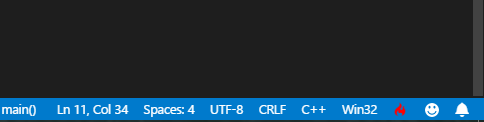
Which results in autocomplete/intellisense not working and requires a reload of the editor to fix.
Another odd thing I'm experiencing (not entirely sure if it's related to this) is that the use of the string standard library seems to break the compilation.
To demonstrate, the following simple program compiles and runs fine:
#include <iostream>
#include <string>
using namespace std;
int main(){
    cout<<"Hello world!"<<endl;
    return 0;
}

However, the following code results in successful compilation and then just an empty execution. No errors, exceptions, just nothing
#include <iostream>
#include <string>
using namespace std;
int main(){
    cout<<"Hello world!"<<endl;
    string myName = "Bob";
    cout<<"Hello "<<myName<<endl;
    return 0;
}

 mjaybaig
All 9 comments
Me too, on Linux. I just submitted #2063
 fultonm
on 30 May 2018
fultonm
on 30 May 2018
Can you check your c_cpp_properties.json and let us know if you're using the new recursive includes feature? (e.g. if there's a /** at the end of any of the entries in your includePath) We have a fix pending for this.
@fultonm, I'll close your issue since it sounds like the same thing.
2043 is the issue we're using for the recursive includes bug.
 bobbrow
on 31 May 2018
bobbrow
on 31 May 2018
@bobbrow I do not have a c_cpp_properties.json. Does that mean my issue is different than the one you're thinking of?
fultonm
on 31 May 2018
I responded in #2063. If you don't have the configuration file, then you _are_ using recursive includes.
bobbrow
on 31 May 2018
Hi @bobbrow
I think you've got it smack on the head. I do have a c_cpp_properties.json and the include path looks like this:
            "includePath": [
                "${workspaceFolder}/**"
            ]
Further, removing the two asterisk seems to have fixed the issue regarding the broken intellisense.
Would you recommend I keep it like this? I'm not sure exactly what recursive includes means here, can you shed some light?
mjaybaig
on 31 May 2018
Same issue, with difference that I am generating vs2017 project files instead of nmake files. When I opened my project, it will work fine until I have built the project. Then it will show "updating intellisense" forever and cannot format, swith header/source, auto completion ...,etc.
 HughLo
on 31 May 2018
HughLo
on 31 May 2018
@mjaybaig I recommend removing the double asterisks until we release the fix for the bug causing the problem. We're tracking this with issue #2043 and intend to release an insiders build this week so the people affected can confirm that we have the right fix in place before we push the fix out to everyone. We'll let everyone know when this update is ready by updating the issues that mention this problem.
The purpose of the recursive includes is so that you don't have to manually list out all of the folders in your project that have header files in them in the "includePath" array. This feature is trying to reduce the configuration burden for people opening new code folders.
bobbrow
on 31 May 2018
For current version, you can set this in your global User Settings, then regenerate c_cpp_properties.json.
{
    ...
    "C_Cpp.default.includePath": [
        "${workspaceFolder}"
    ],
    ...
}
I hope this will help you.
 chuling
on 31 May 2018
chuling
on 31 May 2018
We released 0.17.4 with a fix for the livelock, so this issue should be resolved now. There are still some performance issues with recursive includes that we are working on, so you might still see some high CPU usage when opening files, but it should eventually catch up. We are going to track performance problems with recursive includes using issue #2068.
bobbrow
on 1 Jun 2018
Related issues
 jheinzel
·
3Comments
jheinzel
·
3Comments
 narutse
·
3Comments
narutse
·
3Comments
 igorPhelype
·
3Comments
igorPhelype
·
3Comments
 BDZNH
·
3Comments
BDZNH
·
3Comments
 jrieken
·
3Comments
jrieken
·
3Comments
Most helpful comment
We released 0.17.4 with a fix for the livelock, so this issue should be resolved now. There are still some performance issues with recursive includes that we are working on, so you might still see some high CPU usage when opening files, but it should eventually catch up. We are going to track performance problems with recursive includes using issue #2068.