Vscode-cpptools: [Feature Request] Add macro expansion when hovering over a macro to show resulting code
When hovering over a macro, the definition is given, but it would be nice to see what the macro would expand to be.
#define MIN(_x, _y) (((_x) < (_y)) ? (_x) : (_y))
z = MIN(3, 4); // this would expand to show (((3) < (4)) ? (3) : (4))
Maybe there could be an option/toggle to show the actual define, or the expansion.
 motobud31
All 12 comments
Would you want MIN(3, 4) to expand to 3 instead? This feature request would probably have to made on the VS 2017 side. I could re-report this there if you want.
 sean-mcmanus
on 26 Mar 2018
sean-mcmanus
on 26 Mar 2018
I would like to see what the C preprocessor would expand the macro to be. The result of compiling with gcc -E
motobud31
on 26 Mar 2018
What you're describing works with constexpr instead of macros, but that's not an option if you need to use C. There's a related VS 2017 feature request at https://visualstudio.uservoice.com/forums/121579-visual-studio-ide/suggestions/12485550-provide-a-macro-visualization-tool you could upvote (assuming the implementation is in code that we share).

sean-mcmanus
on 27 Mar 2018
Our latest 0.21.0-insiders3 adds "Expands to: " to macro hover info, which matches what VS shows.
It seems a little odd to me to show that when there isn't any expansion occurring (e.g. #define FOO 1 shows "Expands to: 1".), but that's what VS shows, so I'm not sure if that's worth changing.
Setting C_Cpp.updateChannel to "Insiders" is another way to get the update.
sean-mcmanus
on 4 Jan 2019
I tried the latest 0.21.0-insiders3 and the update works as I would expect. I think leaving the code that shows "Expands to: 1" is fine.
motobud31
on 8 Jan 2019
I tried the 0.21.0-insiders3 build, but it seems this doesn't work very well for long, complex macros - it strips all line breaks and renders it in a variable-width font. It also seems to be interpreting parts of the code as Markdown markup.
 CelticMinstrel
on 9 Jan 2019
CelticMinstrel
on 9 Jan 2019
Just noticed it also doesn't substitute __func__, which I guess doesn't matter that much, but if it's easy to add...
CelticMinstrel
on 9 Jan 2019
@CelticMinstrel Thanks a lot for the feedback -- you are correct about the variable-width font markdown issue -- we weren't tagging it as "cpp" or "text" correctly, so both doc comments and the macro expansions were being treated as "markdown". We'll try to release the fix for that for 0.21.0.
Does this appear okay to you? We have to put "Expands to" on a separate line because VS Code's markdown parser doesn't appear to support "text" and "cpp" on the same line. The doc comment has also been changed to fixed-width "text", because otherwise it renders as "markdown" (which we don't want yet until we expose explicit support for it, e.g. doxygen stuff).
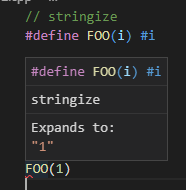
#defines are not able to contain new lines except via \, which escapes the newline, so it sounds like you'd prefer that we add the newlines back? Would the newlines appear in the hover's definition at the top or the "Expands to: " part or both?
Our doc comments implementation currently strips all line breaks. VS Code imposes it own line breaking on us (e.g. leading to awkward lines with 1 word if we add line breaks), so we haven't decided on a better way to handle that yet.
What do you mean by "doesn't substitute __func__"? The substitution is just occurs with the input parameters of the macro plus other preprocessor operators -- it doesn't evaluate/collapse C/C++ code that results (e.g. "1 + 1" won't expand to "2"). Hovering over __func__ itself should show its value from IntelliSense, but if it's used in a macro, the expansion is expected to be just __func__. You or I could file a feature request on the VS C++ team to implement a more aggressive expansion, similar to a constexpr evaluation.
sean-mcmanus
on 9 Jan 2019
What do you mean by "doesn't substitute __func__"?
Well, exactly like it says. It's not really a problem honestly, I just happened to notice it. I did notice hovering over __func__ itself shows the value as if it were declared as a variable, so I guess that's why the macro expansion doesn't show its value, which makes sense.
#definesare not able to contain new lines except via\, which escapes the newline, so it sounds like you'd prefer that we add the newlines back? Would the newlines appear in the hover's definition at the top or the "Expands to: " part or both?
Yeah, if possible it would be nice to have the newlines put back, probably in both the definition and the expansion, as removing them makes it rather difficult to read.
And your screenshot looks good to me!
CelticMinstrel
on 12 Jan 2019
Does this only expand one level of macros?
That is, if I have two macros like
#define BAR(l,r) (l + r)
#define FOO(x) BAR(x,2)
and I write FOO(1) I would want this to say "Expands to (1 + 2)" since that is the final fully expanded form. Instead, it seems to say "Expands to BAR(1,2)" which is much less useful.
Or if showing the final form immediately isn't desirable maybe an way to trigger further expansion. Many macros are multiple levels in practice and the first expansion only doens't show much.
 travisdowns
on 3 May 2019
travisdowns
on 3 May 2019
@sean-mcmanus Could you please add a context-menu option (or even further - a shortcut) to expand macro in-place, right inside the code. This is currently available in Clion and I think it is very easy to implement. Just substitute the macro call with the string that is are currently appearing in Expands to: tooltip.
For example:
When you hover over FOO(ss) and click the RMB you'll see an item "Expand macro".
#define FOO(bar) foo##bar
int main() {
   FOO(ss);
}
And after you click "Expand macro" you get the expanded version of the macro you clicked on in place where it was:
#define FOO(bar) foo##bar
int main() {
   ssbar;
}
 Veetaha
on 2 Sep 2019
Veetaha
on 2 Sep 2019
( @Veetaha Why not just open a new issue about that though?)
CelticMinstrel
on 3 Sep 2019
Related issues
 peterwoods1
·
3Comments
peterwoods1
·
3Comments
 DemoCrazer
·
3Comments
DemoCrazer
·
3Comments
 arl
·
3Comments
arl
·
3Comments
 montery8
·
3Comments
montery8
·
3Comments
 thndrwrks
·
3Comments
thndrwrks
·
3Comments
Most helpful comment
Does this only expand one level of macros?
That is, if I have two macros like
and I write
FOO(1)I would want this to say "Expands to(1 + 2)" since that is the final fully expanded form. Instead, it seems to say "Expands toBAR(1,2)" which is much less useful.Or if showing the final form immediately isn't desirable maybe an way to trigger further expansion. Many macros are multiple levels in practice and the first expansion only doens't show much.