Vscode-cpptools: Add support for .rsp files in compileCommands
Funnily it seems to be the reverse of #1520. Here is a snippet:
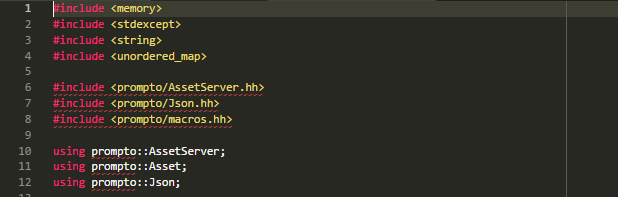
As you can see, vscode seems to correctly find the location of the stdlib headers, but cannot find the custom headers (they are made available through target_include_directories("mylib" PUBLIC "includes")).
I checked the content of the compile_commands.json file, and if I cd into the directory field from a terminal before running the associated command, everything works out-of-the-box.
Do you have any idea of what could cause this, or any tips that would help give you more useful data?
 arcanis
All 39 comments
What OS are you on and what compiler are you targetting? Our insider build might fix the issue and also has additional logging added that shows what include paths are being picked up from the compile_commands: https://github.com/Microsoft/vscode-cpptools/releases/tag/v0.16.0-insiders (temporarily set the loggingLevel to "6" and look for the "sending compilation args" message).
 sean-mcmanus
on 22 Mar 2018
sean-mcmanus
on 22 Mar 2018
I'm using Windows, and my cmake generates makefile using gcc 7. Following your directives, the errors still happen and I get the following in the output window:
0 include path suggestion(s) discovered.
I tried with both an absolute and relative path in the compileCommands field. My c_cpp_properties.json is as such:
{
    "configurations": [
        {
            "name": "Win32",
            "compileCommands": "D:\\Manaflair\\prompto\\builds\\artifacts\\tcgame\\desktop-win32-devel\\compile_commands.json",
            "intelliSenseMode": "msvc-x64",
            "compilerPath": "",
            "cStandard": "c11",
            "cppStandard": "c++17"
        }
    ],
    "version": 3
}
Can you share the entry from your compile_commands.json that applies to the file you are trying to get IntelliSense for (in the screenshot above)?
There will be no include path suggestions if there is no "browse" object in your c_cpp_properties,json configurations.
 bobbrow
on 22 Mar 2018
bobbrow
on 22 Mar 2018
Oh, oops, totally missed that you said you're using gcc, but your "intelliSenseMode" is set to "msvc-x64". You'll need to change that to "clang-x64"
bobbrow
on 22 Mar 2018
Just tried, I still get the same error :( This is the command I have in my compile_commands.json file:
[
{
  "directory": "D:/Manaflair/prompto/builds/artifacts/tcgame/desktop-win32-devel/prompto/core",
  "command": "C:\\PROGRA~2\\MINGW-~1\\I686-7~1.0-P\\mingw32\\bin\\G__~1.EXE  -DPROMPTO_IS_DEVEL=1 @CMakeFiles/prompto-core.dir/includes_CXX.rsp -O2 -g -DNDEBUG   -std=gnu++1z -o CMakeFiles\\prompto-core.dir\\sources\\AssetServer.cc.obj -c D:\\Manaflair\\prompto\\modules\\core\\sources\\AssetServer.cc",
  "file": "D:/Manaflair/prompto/modules/core/sources/AssetServer.cc"
}
]
I'm reproing the issue now. Investigating...
sean-mcmanus
on 23 Mar 2018
Umm...not reproing it anymore. Not sure what happened.
sean-mcmanus
on 23 Mar 2018
Is there a way I can break into the VSCode plugin and see what it loads from the file? I'm not familiar with the environment, so I haven't found the cpptools source codes in the devtools.
arcanis
on 23 Mar 2018
I think this is the problem: @CMakeFiles/prompto-core.dir/includes_CXX.rsp. We don't dig into rsp files to look for include paths. I bet they are in there. @arcanis, can you check?
bobbrow
on 23 Mar 2018
Yep, they contain the following:
-ID:/Manaflair/prompto/modules/core/includes -isystem C:/.hunter/_Base/d820123/5cd65de/176a942/Install/include -isystem C:/.hunter/_Base/d820123/5cd65de/176a942/Install/include/freetype2
I figured out the repro for the bug I was seeing -- if your compiler supports c++17 instead of only c++1z you might be hitting the same issue. We're overwriting the compile_commands includes with the system ones...if you modify the compilePath or cppStandard and it stops reproing then that could be the same issue. This bug shipped with 0.16.0-insiders -- I'm surprised it took us so long to discover this. We should have a fix with the released version. The issue with the rsp might be an additional issue.
sean-mcmanus
on 23 Mar 2018
Where does this file live relative to your ${workspaceRoot}? Is it actually at ${workspaceRoot}/CMakeFiles/prompto-core.dir/includes_CXX.rsp, or somewhere else?
bobbrow
on 23 Mar 2018
No, it's deeper. The path of the rsp in the compile_commands.json file is relative to the one specified in the directory key of the entry. So in this case, the full file path is:
D:/Manaflair/prompto/builds/artifacts/tcgame/desktop-win32-devel/prompto/core/CMakeFiles/prompto-core.dir/includes_CXX.rsp
@sean-mcmanus I tried switching the cppStandard to c++1z and still got the error - but maybe I hit both bugs at once 😄
arcanis
on 23 Mar 2018
Thanks. That's good to know so that we can add support for reading that file.
bobbrow
on 23 Mar 2018
It's still there in the 0.16.x releases - do you know whether it will be fixed for the 0.17 ?
arcanis
on 4 Apr 2018
It sounds like the remaining issue is with the @CMakeFiles/prompto-core.dir/includes_CXX.rsp. I'm not sure yet when we'll add support for that.
sean-mcmanus
on 5 Apr 2018
Something I don't understand - how come cpptools works for other people using CMake? I haven't explicitely enabled the rsp files, so it should break for everyone using CMake, is that correct? Or is there a workaround I might have missed?
arcanis
on 28 Apr 2018
You're the only user we've heard about hitting this rsp file issue so far. We use CMake and compile_commands.json and I haven't seen the rsp file before. I haven't investigated yet what the rsp file is or what causes it to be generated.
sean-mcmanus
on 30 Apr 2018
Hm ... I'm using cmake w/ Make on windows, maybe it uses a different generator than on linux :/ Would you accept a PR if I find out a clean way to implement it?
arcanis
on 30 Apr 2018
We accept PR's, but unfortunately the code that does this processing happens to be in the closed-source portion of our extension.
bobbrow
on 30 Apr 2018
Just to add some color, I've run into this too. I think it only happens when you have a sufficiently long set of command line params.
I managed to "fix" this by just doing a find and replace, swapping @CMakeFiles/XXX.dir/includes_CXX.rsp with the contents of that file.
 RichiCoder1
on 9 May 2018
RichiCoder1
on 9 May 2018
My simple powershell script for pre-processing the commands file btw:
$rspLines = Get-Content .\build\debug\compile_commands.json |
    ConvertFrom-Json |
    Where-Object { $_.command -match "@(?<rsp>[\w].+\.rsp)" }

$result = [System.Collections.ArrayList]@()
foreach ($line in $rspLines) {
    $line.command -match "@(?<rsp>[\w].+\.rsp)" | Out-Null
    $rspFile = $Matches["rsp"]
    $rspDir = $line.directory
    $rspContent = Get-Content "$rspDir/$rspFile"

    $line.command = $line.command -replace "@$rspFile", $rspContent
    $result.Add($line) | Out-Null
}

ConvertTo-Json $result | Out-File .\build\debug\compile_commands.json
I fixed my compile_commands.json using a similar method, but still no luck:
0 include path suggestion(s) discovered.
It also isn't able to find the std headers:
could not open source file "functional" (no directories in search list)
My fixed compile_commands.json is as such:
[
    {
        "directory": "D:/Manaflair/prompto/builds/artifacts/tcgame/desktop-win32-devel/prompto/core",
        "command": "C:\\PROGRA~2\\MINGW-~1\\I686-7~1.0-P\\mingw32\\bin\\G__~1.EXE  -DPROMPTO_IS_DEVEL=1 -ID:/Manaflair/prompto/modules/core/includes -isystem C:/.hunter/_Base/d820123/5cd65de/176a942/Install/include -isystem C:/.hunter/_Base/d820123/5cd65de/176a942/Install/include/freetype2 -O2 -g -DNDEBUG   -std=gnu++1z -o CMakeFiles\\prompto-core.dir\\sources\\Asset.cc.obj -c D:\\Manaflair\\prompto\\modules\\core\\sources\\Asset.cc",
        "file": "D:/Manaflair/prompto/modules/core/sources/Asset.cc"
    }
]
Does gcc return the correct set of system includes for you when you run C:\\PROGRA~2\\MINGW-~1\\I686-7~1.0-P\\mingw32\\bin\\G__~1.EXE -v -E -x c++ nul?
You can also try setting the "compilerPath" property in c_cpp_properties.json to override what our compile_commands logic is doing if the above command works for you.
bobbrow
on 11 May 2018
Yep, this is what it returns:
D:\Manaflair\prompto>C:\\PROGRA~2\\MINGW-~1\\I686-7~1.0-P\\mingw32\\bin\\G__~1.EXE -v -E -x c++ nul
Using built-in specs.
COLLECT_GCC=C:\\PROGRA~2\\MINGW-~1\\I686-7~1.0-P\\mingw32\\bin\\G__~1.EXE
Target: i686-w64-mingw32
Configured with: ../../../src/gcc-7.1.0/configure --host=i686-w64-mingw32 --build=i686-w64-mingw32 --target=i686-w64-mingw32 --prefix=/mingw32 --with-sysroot=/c/mingw710/i686-710-posix-dwarf-rt_v5-rev2/mingw32 --enable-shared --enable-static --disable-multilib --enable-languages=c,c++,fortran,lto --enable-libstdcxx-time=yes --enable-threads=posix --enable-libgomp --enable-libatomic --enable-lto --enable-graphite --enable-checking=release --enable-fully-dynamic-string --enable-version-specific-runtime-libs --enable-libstdcxx-filesystem-ts=yes --disable-sjlj-exceptions --with-dwarf2 --disable-libstdcxx-pch --disable-libstdcxx-debug --enable-bootstrap --disable-rpath --disable-win32-registry --disable-nls --disable-werror --disable-symvers --with-gnu-as --with-gnu-ld --with-arch=i686 --with-tune=generic --with-libiconv --with-system-zlib --with-gmp=/c/mingw710/prerequisites/i686-w64-mingw32-static --with-mpfr=/c/mingw710/prerequisites/i686-w64-mingw32-static --with-mpc=/c/mingw710/prerequisites/i686-w64-mingw32-static --with-isl=/c/mingw710/prerequisites/i686-w64-mingw32-static --with-pkgversion='i686-posix-dwarf-rev2, Built by MinGW-W64 project' --with-bugurl=https://sourceforge.net/projects/mingw-w64 CFLAGS='-O2 -pipe -fno-ident -I/c/mingw710/i686-710-posix-dwarf-rt_v5-rev2/mingw32/opt/include -I/c/mingw710/prerequisites/i686-zlib-static/include -I/c/mingw710/prerequisites/i686-w64-mingw32-static/include' CXXFLAGS='-O2 -pipe -fno-ident -I/c/mingw710/i686-710-posix-dwarf-rt_v5-rev2/mingw32/opt/include -I/c/mingw710/prerequisites/i686-zlib-static/include -I/c/mingw710/prerequisites/i686-w64-mingw32-static/include' CPPFLAGS=' -I/c/mingw710/i686-710-posix-dwarf-rt_v5-rev2/mingw32/opt/include -I/c/mingw710/prerequisites/i686-zlib-static/include -I/c/mingw710/prerequisites/i686-w64-mingw32-static/include' LDFLAGS='-pipe -fno-ident -L/c/mingw710/i686-710-posix-dwarf-rt_v5-rev2/mingw32/opt/lib -L/c/mingw710/prerequisites/i686-zlib-static/lib -L/c/mingw710/prerequisites/i686-w64-mingw32-static/lib -Wl,--large-address-aware'
Thread model: posix
gcc version 7.1.0 (i686-posix-dwarf-rev2, Built by MinGW-W64 project)
COLLECT_GCC_OPTIONS='-v' '-E' '-shared-libgcc' '-mtune=generic' '-march=i686'
 C:/PROGRA~2/MINGW-~1/I686-7~1.0-P/mingw32/bin/../libexec/gcc/i686-w64-mingw32/7.1.0/cc1plus.exe -E -quiet -v -iprefix C:/PROGRA~2/MINGW-~1/I686-7~1.0-P/mingw32/bin/../lib/gcc/i686-w64-mingw32/7.1.0/ -D_REENTRANT nul -mtune=generic -march=i686
ignoring duplicate directory "C:/PROGRA~2/MINGW-~1/I686-7~1.0-P/mingw32/lib/gcc/../../lib/gcc/i686-w64-mingw32/7.1.0/include/c++"
ignoring duplicate directory "C:/PROGRA~2/MINGW-~1/I686-7~1.0-P/mingw32/lib/gcc/../../lib/gcc/i686-w64-mingw32/7.1.0/include/c++/i686-w64-mingw32"
ignoring duplicate directory "C:/PROGRA~2/MINGW-~1/I686-7~1.0-P/mingw32/lib/gcc/../../lib/gcc/i686-w64-mingw32/7.1.0/include/c++/backward"
ignoring duplicate directory "C:/PROGRA~2/MINGW-~1/I686-7~1.0-P/mingw32/lib/gcc/../../lib/gcc/i686-w64-mingw32/7.1.0/include"
ignoring nonexistent directory "C:/mingw710/i686-710-posix-dwarf-rt_v5-rev2/mingw32C:/msys64/mingw32/lib/gcc/i686-w64-mingw32/7.1.0/../../../../include"
ignoring duplicate directory "C:/PROGRA~2/MINGW-~1/I686-7~1.0-P/mingw32/lib/gcc/../../lib/gcc/i686-w64-mingw32/7.1.0/include-fixed"
ignoring duplicate directory "C:/PROGRA~2/MINGW-~1/I686-7~1.0-P/mingw32/lib/gcc/../../lib/gcc/i686-w64-mingw32/7.1.0/../../../../i686-w64-mingw32/include"
ignoring nonexistent directory "C:/mingw710/i686-710-posix-dwarf-rt_v5-rev2/mingw32/mingw/include"
#include "..." search starts here:
#include <...> search starts here:
 C:/PROGRA~2/MINGW-~1/I686-7~1.0-P/mingw32/bin/../lib/gcc/i686-w64-mingw32/7.1.0/include/c++
 C:/PROGRA~2/MINGW-~1/I686-7~1.0-P/mingw32/bin/../lib/gcc/i686-w64-mingw32/7.1.0/include/c++/i686-w64-mingw32
 C:/PROGRA~2/MINGW-~1/I686-7~1.0-P/mingw32/bin/../lib/gcc/i686-w64-mingw32/7.1.0/include/c++/backward
 C:/PROGRA~2/MINGW-~1/I686-7~1.0-P/mingw32/bin/../lib/gcc/i686-w64-mingw32/7.1.0/include
 C:/PROGRA~2/MINGW-~1/I686-7~1.0-P/mingw32/bin/../lib/gcc/i686-w64-mingw32/7.1.0/include-fixed
 C:/PROGRA~2/MINGW-~1/I686-7~1.0-P/mingw32/bin/../lib/gcc/i686-w64-mingw32/7.1.0/../../../../i686-w64-mingw32/include
End of search list.
# 1 "nul"
# 1 "<built-in>"
# 1 "<command-line>"
# 1 "nul"
COMPILER_PATH=C:/PROGRA~2/MINGW-~1/I686-7~1.0-P/mingw32/bin/../libexec/gcc/i686-w64-mingw32/7.1.0/;C:/PROGRA~2/MINGW-~1/I686-7~1.0-P/mingw32/bin/../libexec/gcc/;C:/PROGRA~2/MINGW-~1/I686-7~1.0-P/mingw32/bin/../lib/gcc/i686-w64-mingw32/7.1.0/../../../../i686-w64-mingw32/bin/
LIBRARY_PATH=C:/PROGRA~2/MINGW-~1/I686-7~1.0-P/mingw32/bin/../lib/gcc/i686-w64-mingw32/7.1.0/;C:/PROGRA~2/MINGW-~1/I686-7~1.0-P/mingw32/bin/../lib/gcc/;C:/PROGRA~2/MINGW-~1/I686-7~1.0-P/mingw32/bin/../lib/gcc/i686-w64-mingw32/7.1.0/../../../../i686-w64-mingw32/lib/../lib/;C:/PROGRA~2/MINGW-~1/I686-7~1.0-P/mingw32/bin/../lib/gcc/i686-w64-mingw32/7.1.0/../../../../lib/;C:/PROGRA~2/MINGW-~1/I686-7~1.0-P/mingw32/bin/../lib/gcc/i686-w64-mingw32/7.1.0/../../../../i686-w64-mingw32/lib/;C:/PROGRA~2/MINGW-~1/I686-7~1.0-P/mingw32/bin/../lib/gcc/i686-w64-mingw32/7.1.0/../../../
COLLECT_GCC_OPTIONS='-v' '-E' '-shared-libgcc' '-mtune=generic' '-march=i686'
Ok, can you set "C_Cpp.loggingLevel": "6" in your settings file and then close and reopen the .cc file? The extension will print out in the Output window what we resolved the include path to be. (set the log filter to "C/C++" to see our extension's output)
bobbrow
on 11 May 2018
Ok so I figured out one of the issue, but not all: I had the following, which was causing VS Code to still try to use this compiler even if it was an empty string:
...
    "compilerPath": ""
...
Now after removing this bogus entry it correctly finds the system headers, but it doesn't seem to crawl any directory listed with the -I options of my compile_commands.json file. I checked the log, none of those path ever appear (not sure at which place they should be).
arcanis
on 11 May 2018
Do you not see PROMPTO_IS_DEVEL=1 defined either?
And just curious, do you remember if you intentionally set the "compilerPath" to an empty string? I'm pretty sure that our extension doesn't do that since it is a special case that we left in for the Platform.io extension that means "I will supply my own include paths", though I think we might need to update the logic to not follow that path when compile_commands are being used since it doesn't make any sense to turn off system includes for compile_commands. I'll fix it either way, but I ask because I want to get a feel for whether other customers might be hitting this too.
bobbrow
on 11 May 2018
Nope, this string doesn't appear either in the logs. Trimming what I think doesn't make sense (mostly a bunch of headers from boost and the standard defines), I have the following:
initialized
IntelliSense Engine = Default.
Autocomplete is enabled.
Error squiggles are enabled.
File exclude: **/.git
File exclude: **/.svn
File exclude: **/.hg
File exclude: **/CVS
File exclude: **/.DS_Store
File exclude: builds
File exclude: **/.vscode
Search exclude: **/node_modules
Search exclude: **/bower_components
Search exclude: **/.vscode
Attempting to get defaults from compiler found on the machine: /usr/bin/gcc
Code browsing service initialized
Attempting to get defaults from compiler found on the machine: /usr/bin/gcc
  Folder: C:/Users/Mael/AppData/Local/Packages/CanonicalGroupLimited.UbuntuonWindows_79rhkp1fndgsc/LocalState/rootfs/usr/lib/gcc/x86_64-linux-gnu/5/include/ will be indexed
Discovering files...
textDocument/didOpen
Checking for syntax errors: file:///d%3A/Manaflair/prompto/modules/android/includes/prompto/android/AssetServerAndroid.hh
  Processing folder (recursive): C:/Users/Mael/AppData/Local/Packages/CanonicalGroupLimited.UbuntuonWindows_79rhkp1fndgsc/LocalState/rootfs/usr/lib/gcc/x86_64-linux-gnu/5/include/
  Discovering files: 29201 file(s) processed
  10 file(s) removed from database
Removed file: D:\Manaflair\manaflair\libraries\mf\tcgame\includes\mf\tcgame\UserCallback.hh
Removed file: C:\Users\Mael\AppData\Local\Packages\CanonicalGroupLimited.UbuntuonWindows_79rhkp1fndgsc\LocalState\rootfs\usr\include\linux\netfilter\xt_dscp.h
Removed file: C:\Users\Mael\AppData\Local\Packages\CanonicalGroupLimited.UbuntuonWindows_79rhkp1fndgsc\LocalState\rootfs\usr\include\X11\bitmaps\stipple
Attempting to get defaults from compiler found on the machine: /usr/bin/gcc
Attempting to get defaults from compiler found on the machine: /usr/bin/gcc
sending compilation args for D:\Manaflair\prompto\modules\android\includes\prompto\android\AssetServerAndroid.hh
  include: C:\Users\Mael\AppData\Local\Packages\CanonicalGroupLimited.UbuntuonWindows_79rhkp1fndgsc\LocalState\rootfs\usr\include\c++\5
  include: C:\Users\Mael\AppData\Local\Packages\CanonicalGroupLimited.UbuntuonWindows_79rhkp1fndgsc\LocalState\rootfs\usr\include
  define: __STDC__=1
  other: --header_only_fallback
  stdver: --c++17
queue_update_intellisense for files in tu of: D:\Manaflair\prompto\modules\android\includes\prompto\android\AssetServerAndroid.hh
  tag parsing file: D:\Manaflair\prompto\modules\android\includes\prompto\android\AssetServerAndroid.hh
  tag parsing file: C:\Users\Mael\AppData\Local\Packages\CanonicalGroupLimited.UbuntuonWindows_79rhkp1fndgsc\LocalState\rootfs\usr\local\include\boost\archive\detail\interface_oarchive.hpp
Done parsing open files.
Database safe to open
And just curious, do you remember if you intentionally set the "compilerPath" to an empty string?
Not sure, but when you type the field name in the settings editor it automatically add the empty string quotes. Maybe during my previous tests I decided to not fill it (or maybe I removed it for testing later), thinking that it would be coerced to false 😅
arcanis
on 11 May 2018
Now that I think about it, it's interesting most of those paths are referencing my WSL compiler rather than MinGW (which is the one declared in my compile_commands.json) ... is it to be expected?
arcanis
on 11 May 2018
@arcanis It falls back to that (WSL if it's installed) when it fails to get the compiler from compile_commands.json. Looks like we may not be correctly resolving the mangled short name "G__~1.EXE"? Setting the compilerPath explicitly should fix it.
sean-mcmanus
on 11 May 2018
Try opening a .cc file. .hh files aren't listed in the compile_commands.json file and the extension might not be mapping it to a .cc file correctly, so it goes through the default resolution pass which picks WSL over MinGW if no compilerPath is set.
I think you should set the compilerPath property to the compiler from compile_commands.json to at least get past this issue.
bobbrow
on 11 May 2018
Listing C:\\Program Files (x86)\\mingw-w64\\i686-7.1.0-posix-dwarf-rt_v5-rev2\\mingw32\\bin\\g++.exe got VS Code to use the right headers for .cc files! That's great! Is there a workaround that would allow it to work for hh files as well?
arcanis
on 12 May 2018
If you've already opened a .cc file that includes the .hh file, IntelliSense for the .hh will piggy-back onto the translation unit used by the .cc file. When there is no open translation unit that includes the .hh file, we will try to guess a .cc file that will work for it, but this heuristic doesn't always work.
We are planning to make some changes to this heuristic in the near future to make it more reliable.
bobbrow
on 12 May 2018
I see, thanks. If I may, something that might be useful would be to let this heuristic be configurable. For example, in my case, something like this would have worked:
{
  "headerCompilationUnits": [{
    "from": "prompto/modules/(.*?)/includes/(.*?).hh",
    "to": "prompto/modules/$1/sources/$2.cc"
  }]
}
@sean-mcmanus , this thread gives a little background for cases where cmake might generate .rsp files. In short, they work around command-line length limitations (e.g. AFAIK cmd limits you to approximately 2^13 = 8192 wchars). Some generators use them as a default, even when the lines are short enough that they're not needed.
For anyone who stumbles on this. I'm running the mingw64 version of cmake within MSYS2 on Windows 10. I get .rsp files referenced in the generated compile_commands.json if I'm using the "Unix Makefiles" generator. Calling cmake with -G"Ninja" -DCMAKE_EXPORT_COMPILE_COMMANDS=1 give compile_commands.json files that vscode-cpptools can handle.
Calling cmake with -G"MSYS Makefiles" eliminates the use of .rsp files, but uses MSYS2 paths in the compile_commands.json file, so that won't work without downstream tweaking of the path format.
If you need to use the "Unix Makefiles" generator for some reason, a couple ideas are that you can write a custom toolchain file that calls set(CMAKE_CXX_USE_RESPONSE_FILE_FOR_INCLUDES OFF), or you can hack your mingw64\share\cmake-3.11\Modules\Platform\Windows-GNU.cmake file to include this option. There's probably a cleaner approach that I'm unaware of.
 ryan-feeley
on 5 Aug 2018
ryan-feeley
on 5 Aug 2018
Same happens with -G"MinGW Makefiles"
It does not process the rsp file and I get missing includes
 nidefawl
on 11 Apr 2019
nidefawl
on 11 Apr 2019
The workaround from @ryan-feeley addresses the problem for me, but this is definitely a long-term issue I may end up encountering again with some of the larger projects I work on that may hit that character limit. We really need to add support for use of *.rsp files as a permanent solution.
 emanspeaks
on 9 Sep 2019
emanspeaks
on 9 Sep 2019
RSP file support is available with 0.26.0 -- let us know if there's still a problem.
sean-mcmanus
on 16 Oct 2019
Related issues
 narutse
·
3Comments
narutse
·
3Comments
 ismadelgad11
·
3Comments
ismadelgad11
·
3Comments
 jheinzel
·
3Comments
jheinzel
·
3Comments
 CDitzel
·
3Comments
CDitzel
·
3Comments
 lutianqi
·
3Comments
lutianqi
·
3Comments
Most helpful comment
@sean-mcmanus , this thread gives a little background for cases where cmake might generate .rsp files. In short, they work around command-line length limitations (e.g. AFAIK cmd limits you to approximately 2^13 = 8192 wchars). Some generators use them as a default, even when the lines are short enough that they're not needed.
For anyone who stumbles on this. I'm running the mingw64 version of cmake within MSYS2 on Windows 10. I get .rsp files referenced in the generated
compile_commands.jsonif I'm using the "Unix Makefiles" generator. Calling cmake with-G"Ninja" -DCMAKE_EXPORT_COMPILE_COMMANDS=1givecompile_commands.jsonfiles that vscode-cpptools can handle.Calling cmake with
-G"MSYS Makefiles"eliminates the use of .rsp files, but uses MSYS2 paths in thecompile_commands.jsonfile, so that won't work without downstream tweaking of the path format.If you need to use the "Unix Makefiles" generator for some reason, a couple ideas are that you can write a custom toolchain file that calls
set(CMAKE_CXX_USE_RESPONSE_FILE_FOR_INCLUDES OFF), or you can hack yourmingw64\share\cmake-3.11\Modules\Platform\Windows-GNU.cmakefile to include this option. There's probably a cleaner approach that I'm unaware of.