Vscode-cpptools: mistake on identify include path
- Platform: ArchLinux
- VS version: 1.20.1
- C/C++ extension version: 0.15.0
- Other extensions you installed and if the issue persists after disabling them: 'C/C++ Clang Command Adapter(disabled, but the issue still present)', 'C++ Intellisense(disabled, but the issue still present)'
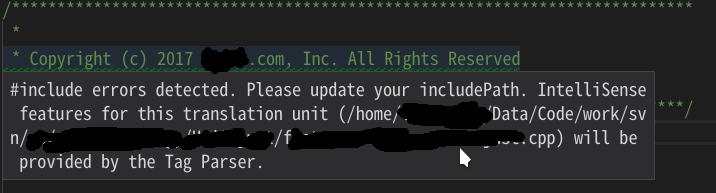
- step-by-step instructions to reproduce the issue: I open a project with comments like the following, and the the extension mark it as an include error. But I don't know how to reproduce it in a simple project. It just happens. I'm sorry.

- Any log messages present in the Output window (use "C_Cpp.loggingLevel": "Information" in settings.json)
 TorosFanny
All 5 comments
When you open a header file, we attempt to identify a .cpp file that includes it so that we can compute IntelliSense with a more useful context. The error you are seeing is because the .cpp file we attached this header to has some include errors. If you open up the file that is redacted in your screenshot, you will see which #include error is causing the problem.
 bobbrow
on 8 Mar 2018
bobbrow
on 8 Mar 2018
Can you give more detail to what you said? I can't figure out your point. Sorry.
TorosFanny
on 9 Mar 2018
Let's say you open "foo.h" which is included by "foo.cpp". Our engine detects that foo.h is included by foo.cpp and we start an IntelliSense server for foo.cpp. Let's say that foo.cpp also includes "bar.h", but the includePath is not set up and we can't find bar.h. In this case foo.cpp has an "include error" and our policy is to disable squiggles for the whole translation unit (which consists of foo.cpp, foo.h and bar.h). Since foo.h doesn't have any include errors, but squiggles have been disabled for the whole translation unit, we put this message in foo.h so that you will know why you are not getting the full IntelliSense experience.
To resolve the issue, you need to open the .cpp file shown in the message and resolve the "include errors". If the missing header files are in your workspace folder, you should be able to resolve the errors by clicking on the green squiggle, then clicking the lightbulb icon that appears to get some suggestions of what to do.
This document has more information about configuring your include path.
bobbrow
on 9 Mar 2018
thank you, i will check it when it is Monday.
TorosFanny
on 9 Mar 2018
Closing this issue due to long inactivity.
 michelleangela
on 21 Aug 2019
michelleangela
on 21 Aug 2019
Related issues
 chrisckc
·
3Comments
chrisckc
·
3Comments
 arl
·
3Comments
arl
·
3Comments
 ecbrodie
·
3Comments
ecbrodie
·
3Comments
 igorPhelype
·
3Comments
igorPhelype
·
3Comments
 jheinzel
·
3Comments
jheinzel
·
3Comments
Most helpful comment
Let's say you open "foo.h" which is included by "foo.cpp". Our engine detects that foo.h is included by foo.cpp and we start an IntelliSense server for foo.cpp. Let's say that foo.cpp also includes "bar.h", but the includePath is not set up and we can't find bar.h. In this case foo.cpp has an "include error" and our policy is to disable squiggles for the whole translation unit (which consists of foo.cpp, foo.h and bar.h). Since foo.h doesn't have any include errors, but squiggles have been disabled for the whole translation unit, we put this message in foo.h so that you will know why you are not getting the full IntelliSense experience.
To resolve the issue, you need to open the .cpp file shown in the message and resolve the "include errors". If the missing header files are in your workspace folder, you should be able to resolve the errors by clicking on the green squiggle, then clicking the lightbulb icon that appears to get some suggestions of what to do.
This document has more information about configuring your include path.