Vscode-cpptools: command 'extension.cppdbgAdapterExecutableCommand
I am using c/c++ 0.15.0 for debugging. But it shows error: "command 'extension.cppdbgAdapterExecutableCommand' not found." My launch.json is as follow:
{
"configurations": [
    {
        "name": "(gdb) Launch",
        "type": "cppdbg",
        "request": "launch",
        "program": "${workspaceFolder}/main.exe",
        "args": [],
        "stopAtEntry": false,
        "cwd": "$workspaceFolder}",
        "environment": [],
        "externalConsole": true,
        "MIMode": "gdb",
        "miDebuggerPath": "C:/MinGW/bin/gdb.exe",
        "setupCommands": [
            {
                "description": "Enable pretty-printing for gdb",
                "text": "-enable-pretty-printing",
                "ignoreFailures": true
            }
        ]
    }
]
}
Could you please help me collect this error?
 LlorandoLau
All 14 comments
Same here. Im also get this message when debug.
command 'extension.cppdbgAdapterExecutableCommand' not found
launch.json
{
    // Use IntelliSense to learn about possible Node.js debug attributes.
    // Hover to view descriptions of existing attributes.
    // For more information, visit: https://go.microsoft.com/fwlink/?linkid=830387
    "version": "0.2.0",
    "configurations": [
        {
            "name": "(gdb) Launch",
            "type": "cppdbg",
            "request": "launch",
            "program": "${workspaceRoot}/dbn.exe",
            "args": [
                "compile",
                "samples/triangle.dbn",
                "samples/triangle.svg"
            ],
            "stopAtEntry": false,
            "cwd": "${workspaceRoot}",
            "environment": [],
            "externalConsole": true,
            "MIMode": "gdb",
            "miDebuggerPath": "E:\\g++\\gcc\\bin\\gdb.exe",
            "setupCommands": [
                {
                    "description": "Enable pretty-printing for gdb",
                    "text": "-enable-pretty-printing",
                    "ignoreFailures": true
                }
            ]
        }
    ]
}
 0xdw
on 26 Feb 2018
0xdw
on 26 Feb 2018
Try to uninstall extension and remove the extension folder from VSCode extensions directory (_ms-vscode.cpptools-0.15.0_) and install again. This works for me. :)
0xdw
on 26 Feb 2018
@LlorandoLau @DininduWanniarachchi
Which version of VsCode are you using?
Also, does this error occur if you first click on a .c/.cpp file then try to F5?
 WardenGnaw
on 26 Feb 2018
WardenGnaw
on 26 Feb 2018
@DininduWanniarachchi @WardenGnaw I'm sorry to reply so late. I forgot to check it.
I have updated it after the error occured. And a new one showed as pictures followed:
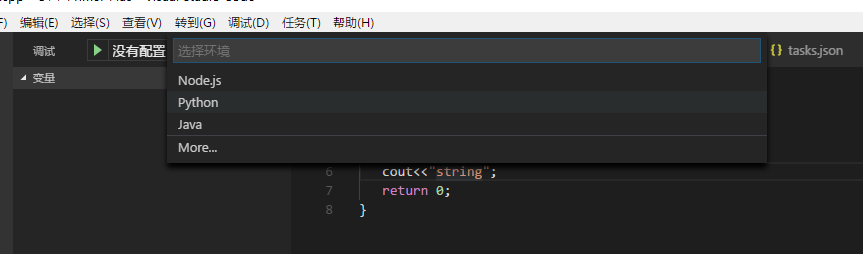
You could see no c/c++ configuration is allowed. I have copied launch.json file which I have showed before under the .vscode folder. When try to F5, no reaction. By the way, the task could be built when try to Ctrl+shift+B.
LlorandoLau
on 28 Feb 2018
@LlorandoLau the error is because something is happening to our registration in our package.json that happens when the extension is loaded. Can you provide your version of VSCode also?
 pieandcakes
on 1 Mar 2018
pieandcakes
on 1 Mar 2018
@pieandcakes 1.20
LlorandoLau
on 2 Mar 2018
@WardenGnaw This happened when try to F5. Which means when i'm going to debug my code. Here it the version that i'm using. Currently this is the latest one
Version 1.20.1
Commit f88bbf9137d24d36d968ea6b2911786bfe103002
Date 2018-02-13T15:34:36.336Z
Shell 1.7.9
Renderer 58.0.3029.110
Node 7.9.0
Architecture x64
0xdw
on 2 Mar 2018
@WardenGnaw But after done i provided process, it's worked for me.
0xdw
on 2 Mar 2018
@DininduWanniarachchi Can you go to your .vscode/extensions and zip up your ms-vscode.cpptools-* folder and post it here? I am hoping to reproduce your issue using the version you have installed.
Also, is there anything specific you are doing when you encounter this issue? E.g. Open VsCode and the only file it sees is a non-c or cpp file.
WardenGnaw
on 2 Mar 2018
@WardenGnaw But this is working now. I have deleted my old extension and reinstalled. Attached one is working.
I remember that happened after i updated VSCode from previous version to this version.
0xdw
on 3 Mar 2018
just ran into the same problem with this error and tried re-installing cpptools. Uninstalling worked but it was automatically reinstalled to version 0.16.0. Now, I no longer get the dreaded error but a new one: Unable to start debugging. UseShellExecute must be false when redirecting I/O.
Im running on Mac OS High Sierra and VSC 1.21.1 and all worked fine until I switched workspaces. Any ideas regarding the above error?
I've also tried installing 0.15 from above, but this didn't work either. At this point, I am unable to debug my C code.
 paulmadejong
on 29 Mar 2018
paulmadejong
on 29 Mar 2018
Has this issue been fixed with 0.16.1?
 sean-mcmanus
on 2 Apr 2018
sean-mcmanus
on 2 Apr 2018
Possibly. It seemed like the fix for this was re-installing due to invalid packages. Will close for now.
Please reopen if the issue appears again.
WardenGnaw
on 2 Apr 2018
0.16.1 here, I had the same issue. Fixed by re-installing.
 LIII-XXII
on 16 Apr 2018
LIII-XXII
on 16 Apr 2018
Related issues
 vicatcu
·
3Comments
vicatcu
·
3Comments
 igorPhelype
·
3Comments
igorPhelype
·
3Comments
 timothy
·
3Comments
timothy
·
3Comments
 chrisckc
·
3Comments
chrisckc
·
3Comments
 lutianqi
·
3Comments
lutianqi
·
3Comments