Vscode-cpptools: Cpp IntelliSense is not working with certain characters in the file path
Even though I set the path of MinGW like document says (https://code.visualstudio.com/docs/languages/cpp)
But autocompletion doesn't work at all.
    {
        "name": "Win32",
        "includePath": [
            "C:/Program Files (x86)/Microsoft Visual Studio 14.0/VC/include/*",
            "C:/Program Files (x86)/Microsoft Visual Studio 14.0/VC/atlmfc/include/*",
            "C:/Program Files (x86)/Windows Kits/8.1/Include/um",
            "C:/Program Files (x86)/Windows Kits/8.1/Include/shared",
            "C:/Program Files (x86)/Windows Kits/8.1/Include/winrt",
            "${workspaceRoot}"
        ],
        "defines": [
            "_DEBUG",
            "UNICODE"
        ],
        "intelliSenseMode": "msvc-x64",
        "browse": {
            "path": [
                "C:/Program Files (x86)/Microsoft Visual Studio 14.0/VC/include/*",
                "C:/Program Files (x86)/Microsoft Visual Studio 14.0/VC/atlmfc/include/*",
                "C:/Program Files (x86)/Windows Kits/8.1/Include/um",
                "C:/Program Files (x86)/Windows Kits/8.1/Include/shared",
                "C:/Program Files (x86)/Windows Kits/8.1/Include/winrt",
                "C:/MinGW/lib/gcc/mingw32/5.3.0/include/c++",
                "${workspaceRoot}"
            ],
            "limitSymbolsToIncludedHeaders": true,
            "databaseFilename": ""
        }
    }
I checked the exact path of MinGW and it exists in that path.
Is it because of version of MinGW? Do I have to upgrade it to 6.3.0?
 cmh1027
All 35 comments
This is the document you want to follow.
 bobbrow
on 14 Feb 2018
bobbrow
on 14 Feb 2018
I changed it as instruction, but It still doesn't work.
    {
        "name": "Win32",
        "includePath": [
            "${workspaceRoot}",
            "C:/MinGW/lib/gcc/mingw32/5.3.0/include/c++",
            "C:/MinGW/lib/gcc/mingw32/5.3.0/include/c++/mingw32",
            "C:/MinGW/lib/gcc/mingw32/5.3.0/include/c++/backward",
            "C:/MinGW/lib/gcc/mingw32/5.3.0/include",
            "C:/MinGW/include",
            "C:/MinGW/lib/gcc/mingw32/5.3.0/include-fixed"
        ],
        "defines": [
            "_DEBUG",
            "UNICODE",
            "__GNUC__=6",
            "__cdecl=__attribute__((__cdecl__))"
        ],
        "intelliSenseMode": "clang-x64",
        "browse": {
            "path": [
                "C:/MinGW/lib/gcc/mingw32/5.3.0/include",
                "C:/MinGW/lib/gcc/mingw32/5.3.0/include-fixed",
                "C:/MinGW/include/*",
                "${workspaceRoot}"
            ],
            "limitSymbolsToIncludedHeaders": true,
            "databaseFilename": ""
        }
    }
And an error message was printed even though I don't know if it is related to this issue.
[Error - 15:03:37] Request textDocument/codeAction failed.
Error: Connection got disposed.
at Object.dispose (C:UsersAaron.vscodeextensionsms-vscode.cpptools-0.14.6node_modulesvscode-jsonrpclibmain.js:825:25)
at Object.dispose (C:UsersAaron.vscodeextensionsms-vscode.cpptools-0.14.6node_modulesvscode-languageclientlibclient.js:57:35)
at LanguageClient.handleConnectionClosed (C:UsersAaron.vscodeextensionsms-vscode.cpptools-0.14.6node_modulesvscode-languageclientlibclient.js:1864:38)
at LanguageClient.handleConnectionClosed (C:UsersAaron.vscodeextensionsms-vscode.cpptools-0.14.6node_modulesvscode-languageclientlibmain.js:78:15)
at closeHandler (C:UsersAaron.vscodeextensionsms-vscode.cpptools-0.14.6node_modulesvscode-languageclientlibclient.js:1852:18)
at CallbackList.invoke (C:UsersAaron.vscodeextensionsms-vscode.cpptools-0.14.6node_modulesvscode-jsonrpclibevents.js:71:39)
at Emitter.fire (C:UsersAaron.vscodeextensionsms-vscode.cpptools-0.14.6node_modulesvscode-jsonrpclibevents.js:135:36)
at closeHandler (C:UsersAaron.vscodeextensionsms-vscode.cpptools-0.14.6node_modulesvscode-jsonrpclibmain.js:221:26)
at CallbackList.invoke (C:UsersAaron.vscodeextensionsms-vscode.cpptools-0.14.6node_modulesvscode-jsonrpclibevents.js:71:39)
at Emitter.fire (C:UsersAaron.vscodeextensionsms-vscode.cpptools-0.14.6node_modulesvscode-jsonrpclibevents.js:135:36)
cmh1027
on 15 Feb 2018
that error implies that the extension crashed. Can you try setting __GNUC__=5 to match your version of MinGW?
bobbrow
on 15 Feb 2018
Still doesn't work, without error message. I just guess that it is because of my mingw. Maybe I have to use Visual studio 2017 when I write cpp code. Thanks for helping me
cmh1027
on 16 Feb 2018
Where did you get your MinGW from?
bobbrow
on 16 Feb 2018
I can't remember. It has been 2 years since I downloaded it.
Would it work if I reinstall minGW? (Is IntelliSense available for every versions of minGW?)
cmh1027
on 18 Feb 2018
I am able to get IntelliSense to work with MinGW from both http://mingw.org and http://msys2.org in combination with this guide
bobbrow
on 20 Feb 2018
I just noticed that the problem is not related to my MinGW. If I remove all paths of c_cpp_properties, include lines like #include
And the bulb disappears after I added a path. This definitely means that intellisense reads files from paths I add, but It doesn't make autocorrection for some reason
cmh1027
on 21 Feb 2018
This is my setting (I changed __GNUC__ to 7 after I updated my gcc to 7.2.0)
{
    "configurations": [
        {
            "name": "Win32",
            "intelliSenseMode": "clang-x64",
            "includePath": [
                "${workspaceRoot}"
            ],
            "defines": [
                "_DEBUG",
                "UNICODE",
                "__GNUC__=7",
                "__cdecl=__attribute__((__cdecl__))"
            ],
            "browse": {
                "path": [
                    "${workspaceRoot}"
                ],
                "limitSymbolsToIncludedHeaders": true,
                "databaseFilename": ""
            }
        }
    ],
    "version": 3
}
That config won't be able to find any system headers. Can you add the system header paths back in so that all of the #include statements can resolve? (run the gcc -v -E -x c++ - command again and copy the paths to "includePath" and "browse.path") Then paste it in here. We'll work from that point.
Note also that GCC 7.2.0 might also need you to add "__SIZE_TYPE__=unsigned int" to the "defines" array.
bobbrow
on 21 Feb 2018
{
    "configurations": [
        {
            "name": "Win32",
            "intelliSenseMode": "clang-x64",
            "includePath": [
                "${workspaceRoot}",
                "c:/mingw/bin/../lib/gcc/x86_64-w64-mingw32/7.2.0/../../../../include/c++/7.2.0",
                "c:/mingw/bin/../lib/gcc/x86_64-w64-mingw32/7.2.0/../../../../include/c++/7.2.0/x86_64-w64-mingw32",
                "c:/mingw/bin/../lib/gcc/x86_64-w64-mingw32/7.2.0/../../../../include/c++/7.2.0/backward",
                "c:/mingw/bin/../lib/gcc/x86_64-w64-mingw32/7.2.0/include",
                "c:/mingw/bin/../lib/gcc/x86_64-w64-mingw32/7.2.0/include-fixed",
                "c:/mingw/bin/../lib/gcc/x86_64-w64-mingw32/7.2.0/../../../../x86_64-w64-mingw32/include"
            ],
            "defines": [
                "_DEBUG",
                "UNICODE",
                "__GNUC__=7",
                "__cdecl=__attribute__((__cdecl__))",
                "__SIZE_TYPE__=unsigned int"
            ],
            "browse": {
                "path": [
                    "${workspaceRoot}",
                    "c:/mingw/bin/../lib/gcc/x86_64-w64-mingw32/7.2.0/../../../../include/c++/7.2.0",
                    "c:/mingw/bin/../lib/gcc/x86_64-w64-mingw32/7.2.0/../../../../include/c++/7.2.0/x86_64-w64-mingw32",
                    "c:/mingw/bin/../lib/gcc/x86_64-w64-mingw32/7.2.0/../../../../include/c++/7.2.0/backward",
                    "c:/mingw/bin/../lib/gcc/x86_64-w64-mingw32/7.2.0/include",
                    "c:/mingw/bin/../lib/gcc/x86_64-w64-mingw32/7.2.0/include-fixed",
                    "c:/mingw/bin/../lib/gcc/x86_64-w64-mingw32/7.2.0/../../../../x86_64-w64-mingw32/include"
                ],
                "limitSymbolsToIncludedHeaders": true,
                "databaseFilename": ""
            }
        }
    ],
    "version": 3
}
Actually, it doesn't make autocorrection not only for system headers but also for my header in same folder. Is there any configuration that turns off autocorrection? It doesn't seem like a problem of path setting
cmh1027
on 22 Feb 2018
Ok, based on your paths, it looks like you're using msys2. MinGW and mingw-w64 both put the c++ folder under lib/gcc. I pasted your config into my instance of VSCode and it works fine for me with a minor change from c:/mingw to my installation root so I'm confused as to what is going wrong for you. Can you paste a code sample, screenshot, or GIF so I can see exactly what you're talking about?
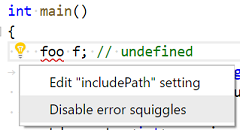
What do you mean by 'autocorrection'? Are you talking about the red underlines? The setting that controls that is 'C_Cpp.errorSquiggles". You can also disable them by using the lightbulb that appears when you click on any of the red underlines.
bobbrow
on 22 Feb 2018
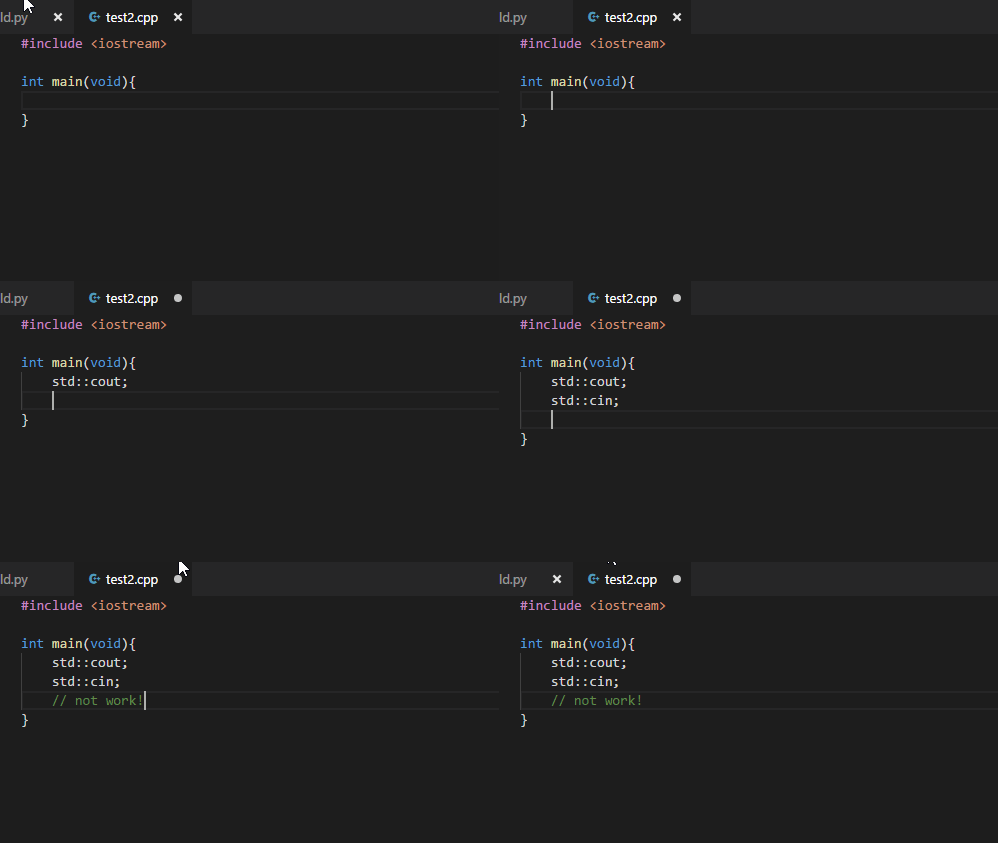
( in cpp )
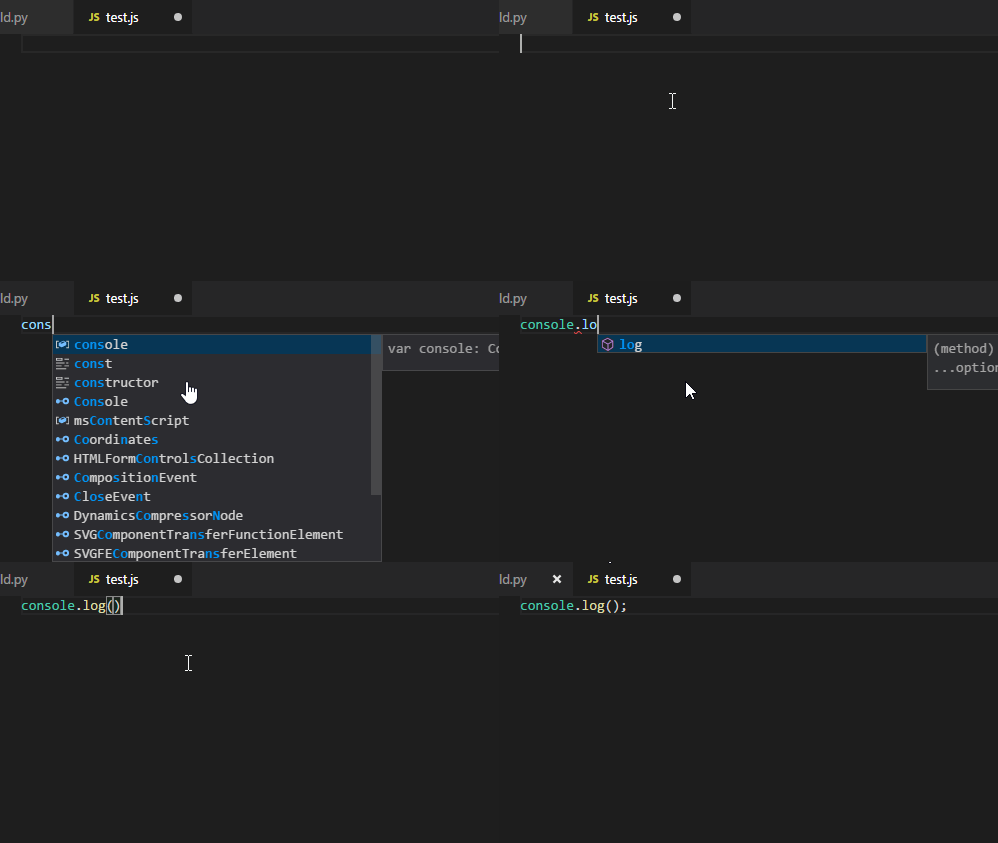
( in javascript )
Sorry for my short English. I hope that you can understand what I mean.
Cpp intellisense doesn't show the list
cmh1027
on 23 Feb 2018
There must be something else going on. This works fine for me:
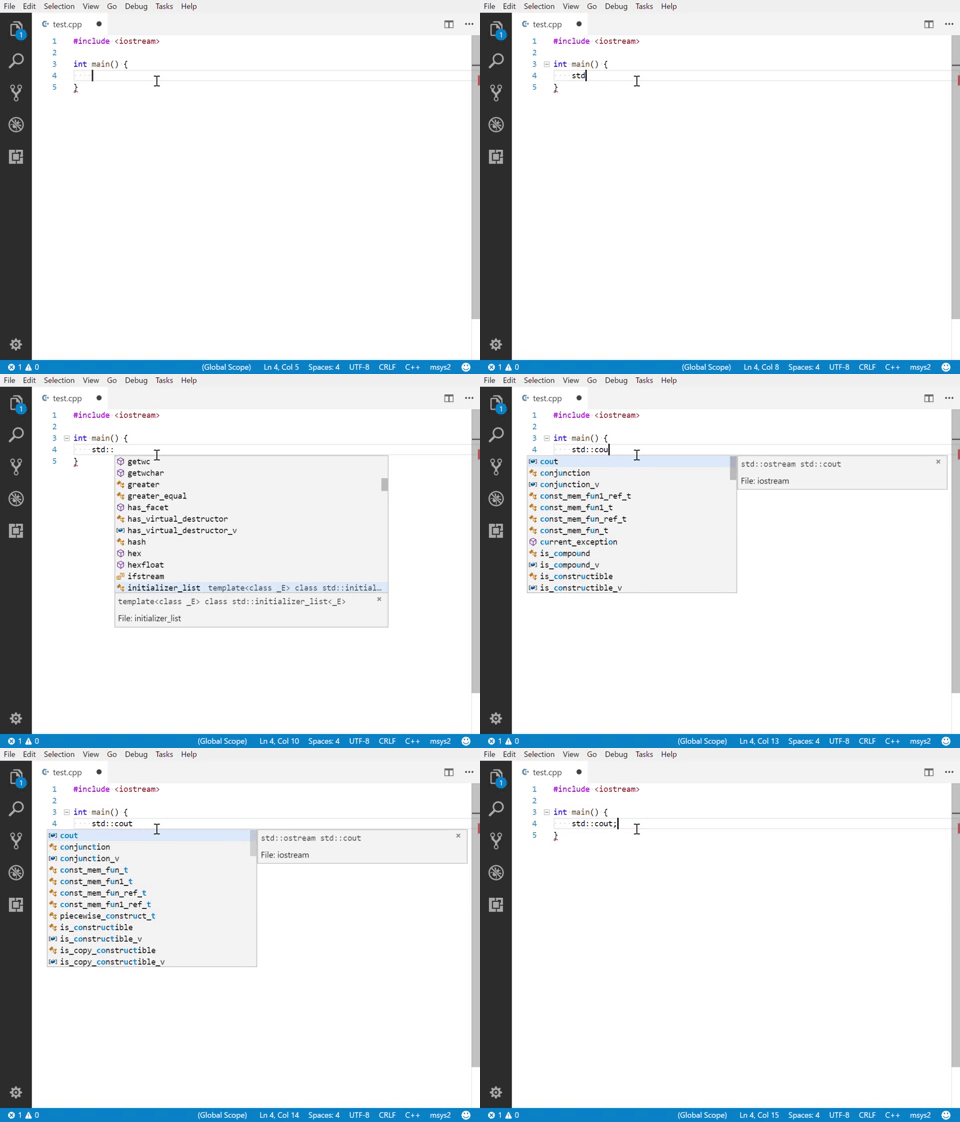
If you set "C_Cpp.loggingLevel": "Information" you should be able to see if the IntelliSense processes are crashing. We will log it to the Output Window in the "C/C++" channel. Also, check your settings to see if "C_Cpp.autocomplete" is set to "Default".
One last thing... I see a .py file open in your GIF. Take a look at #1294 and see if anything in there applies to your project.
bobbrow
on 23 Feb 2018
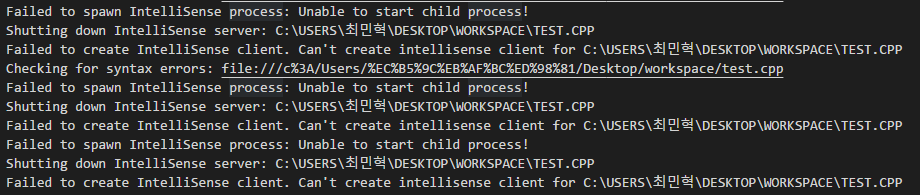
Here's the error log
cmh1027
on 25 Feb 2018
Thanks. That looks helpful. I'll try adding some extended characters to my path and see if I can reproduce. Would you be able to paste those characters here as well? We do have tests that cover folders with wide characters in them, but these particular characters may be causing a problem for our extension for some reason.
bobbrow
on 26 Feb 2018
Failed to spawn IntelliSense process: Unable to start child process!
Shutting down IntelliSense server: C:USERS최민혁DESKTOPWORKSPACETEST.CPP
Failed to create IntelliSense client. Can't create intellisense client for C:USERS최민혁DESKTOPWORKSPACETEST.CPP
Checking for syntax errors: file:///c%3A/Users/%EC%B5%9C%EB%AF%BC%ED%98%81/Desktop/workspace/test.cpp
Here, thanks
cmh1027
on 27 Feb 2018
It seems that this error is because of extended characters (unicode, like Korean or Japanese, Chinese words etc) in the path. I just solved this by making another English-name Windows account and working in that account. I hope for this bug to be fixed soon.
cmh1027
on 9 Apr 2018
I'm going to reopen this issue so we don't lose it.
bobbrow
on 11 Apr 2018

When I remove the includePath for mingw, the path defaults to

 gmastergreatee
on 22 Oct 2018
gmastergreatee
on 22 Oct 2018
@gmastergreatee Do you have non-ASCII characters in the file path?
 sean-mcmanus
on 23 Oct 2018
sean-mcmanus
on 23 Oct 2018
No. There are no non-ASCII chars. I tried installing the extension on another system(which didn't had vs2017 installed) & it worked there flawlessly. It's only happening on my system.
The information log :
IntelliSense Engine = Default.
The extension will use the Tag Parser for IntelliSense when #includes don't resolve.
Autocomplete is enabled.
Error squiggles are enabled.
File exclude: **/.git
File exclude: **/.svn
File exclude: **/.hg
File exclude: **/CVS
File exclude: **/.DS_Store
File exclude: **/.vscode
Search exclude: **/node_modules
Search exclude: **/bower_components
Search exclude: **/.vscode
Code browsing service initialized
  Folder: C:/TDM-GCC-64/LIB/GCC/X86_64-W64-MINGW32/5.1.0/INCLUDE/ will be indexed
  Folder: C:/TDM-GCC-64/INCLUDE/ will be indexed
  Folder: C:/TDM-GCC-64/LIB/GCC/X86_64-W64-MINGW32/5.1.0/INCLUDE-FIXED/ will be indexed
  Folder: C:/TDM-GCC-64/X86_64-W64-MINGW32/INCLUDE/ will be indexed
  Folder: E:/TEST/KAMLESH/CPP/ will be indexed
Discovering files...
  Processing folder (recursive): C:/TDM-GCC-64/LIB/GCC/X86_64-W64-MINGW32/5.1.0/INCLUDE/
  Processing folder (recursive): C:/TDM-GCC-64/INCLUDE/
  Processing folder (recursive): C:/TDM-GCC-64/LIB/GCC/X86_64-W64-MINGW32/5.1.0/INCLUDE-FIXED/
  Processing folder (recursive): C:/TDM-GCC-64/X86_64-W64-MINGW32/INCLUDE/
  Processing folder (recursive): E:/TEST/KAMLESH/CPP/
  Discovering files: 2292 file(s) processed
  0 file(s) removed from database
Done discovering files.
Populate include completion cache.
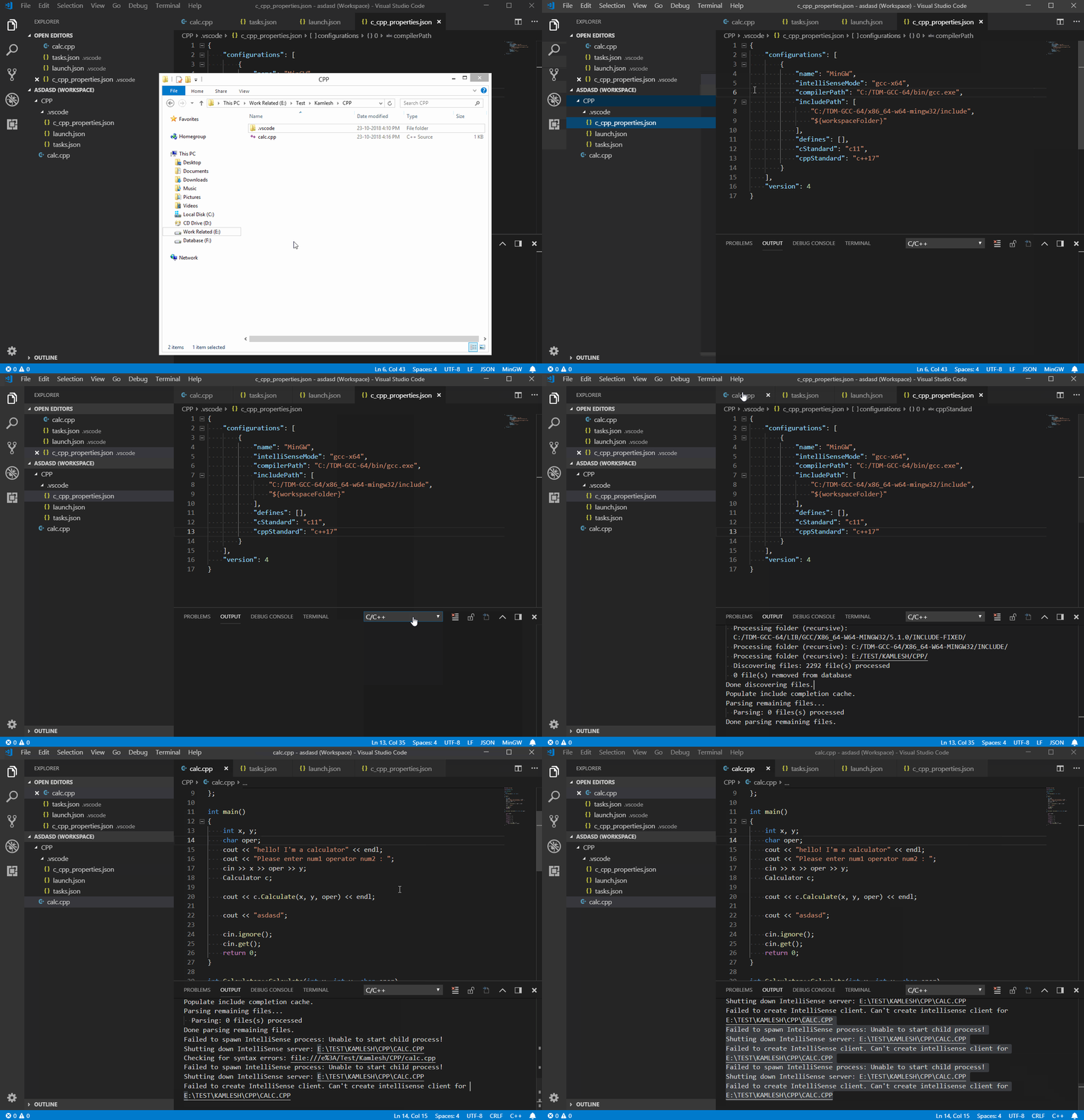
Failed to spawn IntelliSense process: Unable to start child process!
Shutting down IntelliSense server: E:\TEST\KAMLESH\CPP\CALC.CPP
Checking for syntax errors: file:///e%3A/Test/Kamlesh/CPP/calc.cpp
Failed to spawn IntelliSense process: Unable to start child process!
Shutting down IntelliSense server: E:\TEST\KAMLESH\CPP\CALC.CPP
Failed to create IntelliSense client. Can't create intellisense client for E:\TEST\KAMLESH\CPP\CALC.CPP
Parsing open files...
Parsing remaining files...
  Parsing: 0 files(s) processed
Done parsing remaining files.
Done parsing open files.
Maybe my problem is related to #2176
This is the problem when I have "Default" selected as the Intelli-Sense Engine but when I switch to "Tag Parser", everything works(although it's not context-aware).
gmastergreatee
on 23 Oct 2018
This is what's happening here. I'm using version 0.19.0 here.
gmastergreatee
on 23 Oct 2018
This is very strange. I built the extension locally & while debugging, there were no problems at all. But when I packaged the extension & installed it, the problem came back.
Edit:
I also did a clean install of VSCode & test it but there was the same error.
Previously I was using the user-installer version of VSCode but this time I tried the system-installer version, same intelli-sense error.
gmastergreatee
on 23 Oct 2018
@gmastergreatee Yeah, https://github.com/Microsoft/vscode-cpptools/issues/2176 appears to be the same issue you are hitting -- we were not able to figure out what is causing that yet (@bobbrow maybe we could add more diagnostics?). We can fail if your workspace has the case-sensitive file system enabled on Windows (we have another issue tracking that).
What do you mean by "built the extension locally"? I assume you mean the TypeScript part, right? Which branch of the TypeScript are you using? You should use the Release branch (https://github.com/Microsoft/vscode-cpptools/tree/release), otherwise the binaries that are downloaded may not be compatible. The packaged/installed version of the extension might use a different binary. I don't think the problem would be caused by VS Code itself -- something strange is going on with your binary.
sean-mcmanus
on 23 Oct 2018
Yeah I was actually referring to the Typescript part, sorry for not being clear earlier.
No, I don't have the case-sensitive file system enabled.
Earlier I was using the master branch where the debug succeeded but the package failed(for intellisense), same for the release branch.
gmastergreatee
on 25 Oct 2018
I am getting the same error. Please fix this at the earliest.
 starkblitz
on 15 Jan 2019
starkblitz
on 15 Jan 2019
@starkblitz Can you give more repro details? What special characters in the path are causing the issue and what location are the characters? What OS are you using? We test with special characters in the path but aren't seeing a problem. You might want to try the 0.21.0-insiders3 as well, which may have fixed the issue.
sean-mcmanus
on 15 Jan 2019
I'm experiencing a similar problem recently and I tried many attempts to find out the cause of this problem, but I couldn't solve this problem. IntelliSense is still not working with default engine. (With the tag parser engine, IntelliSense doesn't crash.)
Environment
- Windows 10 x64
- VSCode 1.34.0
- C/C++ Extension 0.23.1
- MinGW g++ 6.3.0
Information Output
IntelliSense Engine = Default.
Autocomplete is enabled.
Error squiggles are enabled if all header dependencies are resolved.
File exclude: **/.git
File exclude: **/.svn
File exclude: **/.hg
File exclude: **/CVS
File exclude: **/.DS_Store
File exclude: **/.vscode
Search exclude: **/node_modules
Search exclude: **/bower_components
Search exclude: **/.vscode
Code browsing service initialized
  Folder: C:/MINGW/LIB/GCC/MINGW32/6.3.0/INCLUDE/ will be indexed
  Folder: C:/MINGW/INCLUDE/ will be indexed
  Folder: C:/MINGW/LIB/GCC/MINGW32/6.3.0/INCLUDE-FIXED/ will be indexed
  Folder: C:/MINGW/MINGW32/INCLUDE/ will be indexed
  Folder: C:/USERS/김정현/ONEDRIVE - 서울시립대학교/알림/ will be indexed
Populate include completion cache.
Discovering files...
Checking for syntax errors: file:///c%3A/Users/%EA%B9%80%EC%A0%95%ED%98%84/OneDrive%20-%20%EC%84%9C%EC%9A%B8%EC%8B%9C%EB%A6%BD%EB%8C%80%ED%95%99%EA%B5%90/%EC%95%8C%EB%A6%BC/%EB%B0%B1%EC%A4%80%20%EC%BD%94%EB%93%9C/7%EC%A3%BC%EC%B0%A8%20%EC%B9%B4%EC%B9%B4%EC%98%A4%202018/%EC%88%8F%EC%BD%94%EB%94%A9.cpp
  Processing folder (recursive): C:/MINGW/LIB/GCC/MINGW32/6.3.0/INCLUDE/
Checking for syntax errors: file:///c%3A/Users/%EA%B9%80%EC%A0%95%ED%98%84/OneDrive%20-%20%EC%84%9C%EC%9A%B8%EC%8B%9C%EB%A6%BD%EB%8C%80%ED%95%99%EA%B5%90/%EC%95%8C%EB%A6%BC/%EB%B0%B1%EC%A4%80%20%EC%BD%94%EB%93%9C/7%EC%A3%BC%EC%B0%A8%20%EC%B9%B4%EC%B9%B4%EC%98%A4%202018/%EC%88%8F%EC%BD%94%EB%94%A9.cpp
Failed to spawn IntelliSense process: Unable to start child process!
Shutting down IntelliSense server: C:\USERS\김정현\ONEDRIVE - 서울시립대학교\알림\백준 코드\7주차 카카오 2018\숏코딩.CPP
Failed to create IntelliSense client. Can't create intellisense client for C:\USERS\김정현\ONEDRIVE - 서울시립대학교\알림\백준 코드\7주차 카카오 2018\숏코딩.CPP
Failed to spawn IntelliSense process: Unable to start child process!
Shutting down IntelliSense server: C:\USERS\김정현\ONEDRIVE - 서울시립대학교\알림\백준 코드\7주차 카카오 2018\숏코딩.CPP
Failed to create IntelliSense client. Can't create intellisense client for C:\USERS\김정현\ONEDRIVE - 서울시립대학교\알림\백준 코드\7주차 카카오 2018\숏코딩.CPP
Failed to spawn IntelliSense process: Unable to start child process!
Shutting down IntelliSense server: C:\USERS\김정현\ONEDRIVE - 서울시립대학교\알림\백준 코드\7주차 카카오 2018\숏코딩.CPP
Failed to create IntelliSense client. Can't create intellisense client for C:\USERS\김정현\ONEDRIVE - 서울시립대학교\알림\백준 코드\7주차 카카오 2018\숏코딩.CPP
  Processing folder (recursive): C:/MINGW/INCLUDE/
  Processing folder (recursive): C:/MINGW/LIB/GCC/MINGW32/6.3.0/INCLUDE-FIXED/
  Processing folder (recursive): C:/MINGW/MINGW32/INCLUDE/
  Processing folder (recursive): C:/USERS/김정현/ONEDRIVE - 서울시립대학교/알림/
  Discovering files: 2855 file(s) processed
  0 file(s) removed from database
Done discovering files.
Parsing remaining files...
  Parsing: 143 files(s) processed
Done parsing remaining files.
In my case, there are non-ASCII characters (Korean characters) and the error code was 267. The error was occurred regardless of the Intellisense mode. (gcc-x64, msvc-x64, clang-x64 ...)
Additionally, this problem is occurring only on my laptop, although it doesn't happen on my desktop system. The environment of them including extensions, settings, OS version, g++ version, file path is exactly same. I tried to find differences between their settings, but I couldn't.
 powergee
on 24 May 2019
powergee
on 24 May 2019
@powergee, does your desktop and laptop system have different language or encoding settings?
I couldn't reproduce the issue with the following:
- created a username path with Korean character
- set the Windows OS language to use Korean
- set VS Code to use Korean language pack
 michelleangela
on 16 Oct 2019
michelleangela
on 16 Oct 2019
@melhior61, you referenced this issue from #4239, are you also using non-ASCII characters in your user path?
michelleangela
on 16 Oct 2019
Root cause:
If the code page on Windows is Korean or some language with non-ASCII characters and there are non-ASCII characters in directory path of IntelliSense executable, then the extension will fail to create the IntelliSense process.
michelleangela
on 16 Oct 2019
@michelleangela Thank you for your question!
No, I don't, the user path is strictly ASCII-compatible.
Sorry for the late response!
 melhior61
on 17 Oct 2019
melhior61
on 17 Oct 2019
@michelleangela Thank you for your reply!
My laptop and desktop had the same language and encoding settings (Korean).
After I read your comment about the root cause, I checked my system locale setting of my laptop and changed it to English (United States). After that, C/C++ IntelliSense worked fine. However, g++ compilation didn't work because it couldn't read Korean characters. I thought I could solve this problem by changing the system encoding, so I checked "Beta: Use Unicode UTF-8 for worldwide language support" in Region Settings as a trial, and everything including IntelliSense and compilation worked perfectly!
To sum up, in my case, checking "Beta: Use Unicode UTF-8 for worldwide language support" in Region Settings was the solution. Checking it made IntelliSense work fine regardless of system locale.
Thank you very much for letting me know the root cause of the problem!
powergee
on 17 Oct 2019
Fixed in version 0.26.2-insiders, available at https://github.com/microsoft/vscode-cpptools/releases/tag/0.26.2-insiders.
michelleangela
on 12 Nov 2019
Related issues
 igorPhelype
·
3Comments
igorPhelype
·
3Comments
 SkyRiderMike
·
3Comments
SkyRiderMike
·
3Comments
 jheinzel
·
3Comments
jheinzel
·
3Comments
 wdc596933938
·
3Comments
wdc596933938
·
3Comments
 chrisckc
·
3Comments
chrisckc
·
3Comments