Vscode-cpptools: Identifier not found but able to ctrl+click for definition
Using latest msys2 (pacman -Syuu)
The error is identifier "lua_State" is undefined, but as you see in the picture, it is not, it is able to find/it

My c_cpp_properties.json is:
{
    "configurations": [
        {
            "name": "gnu",
            "cwd": "${workspaceFolder}",
            "includePath": [
                "W:/SDKs/msys2/usr/local/include",
                "W:/SDKs/msys2/usr/include",
                "W:/SDKs/msys2/opt/lib/gcc/x86_64-w64-mingw32/6.3.0/include",
                "W:/SDKs/msys2/opt/lib/gcc/x86_64-w64-mingw32/6.3.0/include-fixed",
                "W:/SDKs/msys2/opt/x86_64-w64-mingw32/include",
                "W:/SDKs/msys2/mingw64/include",
                "./src/LuaAutoC",
                "./src/nanovg/src",
                "./src/nanosvg/src",
                "./src"
            ],
            "intelliSenseMode": "clang-x64",
            "browse": {
                "path": [
                    "W:/SDKs/msys2/usr/local/include",
                    "W:/SDKs/msys2/usr/include",
                    "W:/SDKs/msys2/opt/lib/gcc/x86_64-w64-mingw32/6.3.0/include",
                    "W:/SDKs/msys2/opt/lib/gcc/x86_64-w64-mingw32/6.3.0/include-fixed",
                    "W:/SDKs/msys2/opt/x86_64-w64-mingw32/include",
                    "W:/SDKs/msys2/mingw64/include",
                    "./src/LuaAutoC",
                    "./src/nanovg/src",
                    "./src/nanosvg/src",
                    "./src"
                ],
                "limitSymbolsToIncludedHeaders": true,
                "databaseFilename": ""
            }
        }
    ],
    "version": 3
}
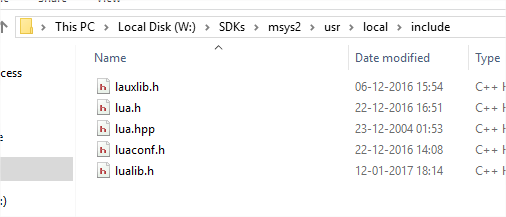
I have built and compiled lua5.3 from source, is present in the /usr/local/include , on disk it resides in:
 iongion
All 35 comments
I have attached the problematic project too
xmoonvg.zip
Lua5.3 is installed using:
wget https://www.lua.org/ftp/lua-5.3.4.tar.gz
tar -zxvf lua-5.3.4.tar.gz
cd lua-5.3.4
make mingw
make install
If Go to Definition works on the file that means the variable is found recursively via the browse.path, but it ignores #if macros, so your includePath could be missing a path your or defines could be missing something. What file is lua_State defined in? I don't remember if we support "./" in the paths -- you may want to change that to use "${workspaceRoot}/". See https://github.com/Microsoft/vscode-cpptools/blob/c26d6441be544bc9b1f572f480f94a99d2344e26/Documentation/LanguageServer/MinGW.md .
 sean-mcmanus
on 23 Jan 2018
sean-mcmanus
on 23 Jan 2018
There is only the typedef, without the body of the struct, it is present in W:SDKsmsys2usrlocalincludelua.h
When I compile and install lua 5.3:
istoica@gion-pc MINGW64 /W/Workspace/moonlibs/lua-5.3.4
$ make mingw install
cd src && make mingw
make[1]: Entering directory '/W/Workspace/moonlibs/lua-5.3.4/src'
make "LUA_A=lua53.dll" "LUA_T=lua.exe" \
"AR=gcc -std=gnu99 -shared -o" "RANLIB=strip --strip-unneeded" \
"SYSCFLAGS=-DLUA_BUILD_AS_DLL" "SYSLIBS=" "SYSLDFLAGS=-s" lua.exe
make[2]: Entering directory '/W/Workspace/moonlibs/lua-5.3.4/src'
make[2]: 'lua.exe' is up to date.
make[2]: Leaving directory '/W/Workspace/moonlibs/lua-5.3.4/src'
make "LUAC_T=luac.exe" luac.exe
make[2]: Entering directory '/W/Workspace/moonlibs/lua-5.3.4/src'
make[2]: 'luac.exe' is up to date.
make[2]: Leaving directory '/W/Workspace/moonlibs/lua-5.3.4/src'
make[1]: Leaving directory '/W/Workspace/moonlibs/lua-5.3.4/src'
cd src && mkdir -p /usr/local/bin /usr/local/include /usr/local/lib /usr/local/man/man1 /usr/local/share/lua/5.3 /usr/local/lib/lua/5.3
cd src && install -p -m 0755 lua luac /usr/local/bin
cd src && install -p -m 0644 lua.h luaconf.h lualib.h lauxlib.h lua.hpp /usr/local/include
cd src && install -p -m 0644 liblua.a /usr/local/lib
cd doc && install -p -m 0644 lua.1 luac.1 /usr/local/man/man1
I see the file being present in W:\Workspace\moonlibs\lua-5.3.4\src
The lstate.h contains the body of the struct - https://www.lua.org/source/5.3/lstate.h.html#lua_State
The lstate.h file is not deployed to /usr/local/include, the lua installation does not deploy this file, it is as intended.
iongion
on 23 Jan 2018
From this, it is rather obvious that VSCode cannot find it, but what should I do ?
Keep the sources of lua-5.3.4 and add all *.h files to search path ?
I guess it is a common case to have the struct defined in a non publicly exposed API
iongion
on 23 Jan 2018
The typedef should be sufficient to get rid of the error message -- it looks like it's not finding the typedef.
sean-mcmanus
on 23 Jan 2018
Weird, as the tooltip in the first screenshot tells that it has found it, If I ctrl+hover, I get this:

iongion
on 23 Jan 2018
It's found via our symbol engine not IntelliSense -- it appears to be a bug with the clang-x64 mode, which doesn't repro with msvc-x64.
sean-mcmanus
on 23 Jan 2018
Thank you, I would have used ${workspaceRoot} but the docs only mention ${workspaceFolder} that is https://code.visualstudio.com/docs/editor/tasks#_variable-substitution but that one does not work, changed it as you instructed and it truly works indeed, as with the ./
iongion
on 23 Jan 2018
So is the issue gone now? The error I was seeing with clang-x64 mode was caused by another issue (size_t not found), but it worked after I fixed that.
sean-mcmanus
on 23 Jan 2018
Sorry @sean-mcmanus , I was not clear and I rushed, if I use the ${workspaceRoot} then it is unable to find the includes for those submodules projects(lautoc.h and the others). I have created a project https://github.com/iongion/xmoonvg where I also committed the vscode files. When I code on Windows, I have solved it by using "intelliSenseMode": "msvc-x64", when I develop on mac or linux, if I switch to clang-x64 I still get the issue.
You mentioned:
The error I was seeing with clang-x64 mode was caused by another issue (size_t not found), but it worked after I fixed that.
So if it is fixed, you can close the issue and I will just wait for a new release :+1:
iongion
on 24 Jan 2018
No, I fixed it via replacing size_t by int in the header. You generally should only use msvc-64 if your compiler is cl.exe and not gcc/clang, on any OS. Are you getting any error squiggles in the header that contains the typedef? I'll take a look at your repro project at this later....
sean-mcmanus
on 24 Jan 2018
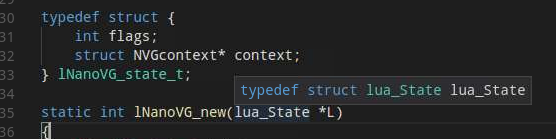
Yeah, I'm not able to get this bug to repro still. I used the xmoonvg project and then added the 4 lua header files and commented out the 4 header files I didn't have (lautoc.h/nano*.h") and IntelliSense finds lua_State. I had to add "${workspaceRoot}/src" to the includePath.
sean-mcmanus
on 24 Jan 2018
I have the same problem. Many macros from the CL/cl.h header are underlined, and generate a problem entry, but I can peek at, and go to their definitions.
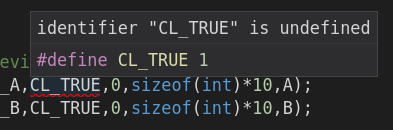
I actually get two definitions, one from /usr/include/CL/cl.h and one from /usr/local/include/CL/cl.h.
Removing "/usr/local/include" and "${workspaceRoot}/" from c_cpp_properties.json does not change anything (they are both present in two places: in includePath and in browse.path).
Fedora 27, VS Code 1.19.3, cpptools 0.14.6.
 torokati44
on 8 Feb 2018
torokati44
on 8 Feb 2018
@torokati44 What does your include statement look like? #include <CL/cl.h>? The includePath is not recursive.
It works for me (I'm hovering over the +):

sean-mcmanus
on 8 Feb 2018
Yes, it is #include <CL/cl.hpp>.
torokati44
on 8 Feb 2018
If my code is very simple, for example
#include <CL/cl.h>

int main() {
    int a = CL_TRUE + 1;
}
Then there is no issue. Regardless of whether I include cl.h or cl.hpp. I'll try to reduce the more complicated source to a simpler form where the problem still occurs.
torokati44
on 8 Feb 2018
Oh, that is very strange. I've never seen more complicated code causing a definition to become undefined. You might want to try 0.15.0-insiders (https://github.com/Microsoft/vscode-cpptools/releases/tag/v0.15.0-insiders ) -- we updated the IntelliSense parser and fixed our highest hitting crashes.
Also, if your file contains UTF-8 characters > 1 byte, the intellisense parsing can randomly become messed up due to https://github.com/Microsoft/vscode-cpptools/issues/1504 .
sean-mcmanus
on 8 Feb 2018
Oh, I think I've got it!
This triggers the error for me:
#include "foo.h"
#include <CL/cl.h>
#include "foo.h"
static int a = CL_TRUE;
Even if foo.h is an empty (but existing) file. The same thing if #include <iostream> is before and after #include <CL/cl.h>. It does not matter if I include cl.h or cl.hpp in the middle.
If foo.h (or iostream) is included only after, or only before CL/cl.h (even multiple times), then the problem marker goes away. It only happens if the same header is included both before and after CL/cl.h.
UPDATE 1:
The "middle header" doesn't even have to be CL/cl.h[pp]. If it's a local file, say bar.h, with a single line in it, like #define ONE 1, and in the source file I use ONE instead of CL_TRUE, the result is the same.
UPDATE 2:
And in the latter case, the problem only occurs if ONE is a macro. If I replace it with say const int ONE = 1;, then no matter how many times, and in what combination I include foo.h and bar.h, ONE is never reported as undefined.
torokati44
on 8 Feb 2018
The exact same thing happens with VS Code 1.18.0-insider and cpptools 0.15.0-insiders.
torokati44
on 8 Feb 2018
@torokati44 Okay, I'm reproing it now. Yikes -- looks like all macro definitions become undefined after a duplicate #include is used in a file. The bug is inherited from VS 2017 -- so I'll follow up with them to get it fixed. Thanks a lot for reporting this and finding a repro. I'm not sure if it's the same issue as the original post though :)
sean-mcmanus
on 9 Feb 2018
Thank you!
Well, I don't see it as being as simple as a "duplicate include", since doing this for example:
#include "foo.h"

#include "bar.h"

#include "foo.h"
#include "foo.h"

#include "bar.h"
#include "bar.h"
#include "bar.h"

static int a = ONE;
With foo.h being empty, and bar.h only containing #define ONE 1, I don't get the "identifier is undefined" error. But if I include "foo.h" once (or many times) more before declaring a, it comes back. So it's weird. But you see the code, so you probably have a better idea of what's going on. I'm just trying to provide more exotic cases.
And finally, yes, I was worried about the same thing. Since the original issue described it with a typedef, and I only experienced it with a macro, these might be two separate issues, exhibiting the same symptoms.
torokati44
on 9 Feb 2018
I have the same issue. As a workaround, moving the #include so that its not in the middle, gets rid of the error squiggles
 adarshmk
on 22 Jun 2018
adarshmk
on 22 Jun 2018
Any update on this? I'm still facing the issue.
 aleeraser
on 2 Aug 2019
aleeraser
on 2 Aug 2019
@aleeraser Go to Definition is a general symptom and different scenarios are probably different root cause bugs. Can you file a new bug with any more repro details? We have found/fixed some major bugs with Go to Def failing in our pending Insider release, e.g. when "using namespace" is used.
sean-mcmanus
on 3 Aug 2019
@sean-mcmanus thanks for the answer. I'll file a new bug as soon as possible. As a quick reference, I'm working on the linux kernel with the latest stable releases, and I have the feeling that the mix of macros, constants, type definitions, etc. cause vscode to get somehow crazy (and I can't blame it).
aleeraser
on 5 Aug 2019
I also see the problem originally reported, embedding Lua 5.3 into my programs written in C++. All macros defined in the Lua headers have red squigglies and the hover tooltips say they're both defined and undefined:

The problem doesn't happen in Visual Studio, only VSCode, even though same project structure, include paths, and both built from same CMake files.
If more information is needed, I'd gladly construct a MCVE or answer any questions the devs have. The problem is one of only a few things that I've seen wrong with the vscode-cpptools for a long time, so it would be awesome if it could be fixed.
 rhymu8354
on 8 Nov 2019
rhymu8354
on 8 Nov 2019
I think I'm having a similar issue but I'm not sure how to fix it.
I've got this block of code in a global header file
#if PRECISION == 1
#ifndef FLOAT_TYPEDEF_DEFINED
typedef float Real;
#endif //FLOAT_TYPEDEF_DEFINED
#endif //PRECISION == 1
#if PRECISION == 2
#ifndef FLOAT_TYPEDEF_DEFINED
typedef double Real;
#endif //FLOAT_TYPEDEF_DEFINED
#endif //PRECISION == 2
But anywhere that I use Real it give the error "identifier Real is undefined"
 bcaddy
on 18 Apr 2020
bcaddy
on 18 Apr 2020
@bcaddy What does it show when you hover over PRECISION? It sounds like it may be undefined.
sean-mcmanus
on 21 Apr 2020
That's what it was. I was using the Defines section of the linter incorrectly. PRECISION is defined in the Makefile and I assumed the linter would look there
bcaddy
on 21 Apr 2020
Found here when googling for solution, in my case (zephyr rtos), the issue was that i had a foo.h file with #define FOO 3 and i got warnings of identifier is undefined (although hovering showed proper value).
The issue seems ot be related to
#include <logging/log.h>
LOG_MODULE_REGISTER(mymod)
include and macro -- if the include/macro is before the #include "foo.h" then the errors appear.
But not nice, since i would prefer to have 'system includes' before my own includes. For the record the problem file is log.h
TLDR; Got fixed by resorting includes/moving macro call after the include of the file containing defines.
 susundberg
on 21 May 2020
susundberg
on 21 May 2020
I have the same error as @susundberg, and I worked around it the same way. I have a macro #define IS_EQUAL_TO 0 that shows up with red squigglies when I try to reference it in a different file... unless I move the include that has that macro to the very beginning of that file, in which case the red squigglies go away. I am using VS Code on Debian Linux when I see this happen.
Would be nice if we could resolve this at some point so I don't have to shuffle the order of my includes.
 RedZone908
on 16 Jul 2020
RedZone908
on 16 Jul 2020
I was having the same problem on Linux with GCC. For me the problem was that vs code was pointed to the wrong default includes for the compiler. I think this happened because I have both GCC 9 and 10 installed with 9 being the default (the one the gcc symlink points to).
$ ls -la $(which gcc)
lrwxrwxrwx 1 root root 5 Mar 20  2020 /usr/bin/gcc -> gcc-9
$ ls -la $(which gcc-10)
lrwxrwxrwx 1 root root 23 Aug  8 08:12 /usr/bin/gcc-10 -> x86_64-linux-gnu-gcc-10
I was already aware of this, but I never thought about this potentially being a problem for vscode, especially since I set my compilerPath to /usr/bin/g++-10. The next thing to do to test my theory was to look at the GCC 10 includes.
$ echo | gcc-10 -E -Wp,-v -
ignoring nonexistent directory "/usr/local/include/x86_64-linux-gnu"
ignoring nonexistent directory "/usr/lib/gcc/x86_64-linux-gnu/10/include-fixed"
ignoring nonexistent directory "/usr/lib/gcc/x86_64-linux-gnu/10/../../../../x86_64-linux-gnu/include"
#include "..." search starts here:
#include <...> search starts here:
 /usr/lib/gcc/x86_64-linux-gnu/10/include
 /usr/local/include
 /usr/include/x86_64-linux-gnu
 /usr/include
End of search list.
# 1 "<stdin>"
# 1 "<built-in>"
# 1 "<command-line>"
# 31 "<command-line>"
# 1 "/usr/include/stdc-predef.h" 1 3 4
# 32 "<command-line>" 2
# 1 "<stdin>"
GCC 10 points to an include directory specific to itself rather than some other version. After I added /usr/lib/gcc/x86_64-linux-gnu/10/include to my includePath the include issues were resolved.
In my opinion compilerPath should automatically inform the extension of the compiler's version/configuration specific include directories.
 Yevano
on 4 Nov 2020
Yevano
on 4 Nov 2020
@Yevano Do you have g++-10 installed? What happens if you change your compilerPath to /usr/bin/gcc-10? You shouldn't need to add system includes to your includePath. You can use the C/C++: Log Diagnostics command to get more info on the system includes that are obtained from the compilerPath.
sean-mcmanus
on 6 Nov 2020
Yup 🤦 I changed the compiler path as you said and that fixed it. No need to specify the include path myself.
Yevano
on 6 Nov 2020
I think I had the same issues as many here. For me, it looked like this:

Also some other defines from libpng further up looked like that. Found the following workaround by @adarshmk further up:
I have the same issue. As a workaround, moving the #include so that its not in the middle, gets rid of the error squiggles
And indeed, my test code were like #include this and that, define a struct, and then #include even more. After I put all #include to the top before defining anything else, it seems to be fixed for me.
VS Code 1.51.1
C/C++ IntelliSense v1.1.2
Linux Mint 19 Tara
gcc 7.5.0 and clang-10 (10.0.0-4ubuntu1~18.04.2) are installed
 tenry92
on 1 Dec 2020
tenry92
on 1 Dec 2020
Related issues
 BDZNH
·
3Comments
BDZNH
·
3Comments
 lutianqi
·
3Comments
lutianqi
·
3Comments
 ismadelgad11
·
3Comments
ismadelgad11
·
3Comments
 igorPhelype
·
3Comments
igorPhelype
·
3Comments
 arl
·
3Comments
arl
·
3Comments
Most helpful comment
I have the same issue. As a workaround, moving the #include so that its not in the middle, gets rid of the error squiggles