Vscode-cpptools: Do colorization of inactive preprocessor blocks
Splitting this out from #230 and tagging it for the February release. This feature is achievable using VSCode's text decorations. We still need to investigate whether using text decorations is fast enough to color the whole file, so we won't be implementing all of the colorization features at once.
 bobbrow
All 25 comments
I’m really looking forward to the next release.
 hyeonchang
on 19 Jan 2018
hyeonchang
on 19 Jan 2018
@hyeonchang You can try a preview .vsix at https://github.com/Microsoft/vscode-cpptools/releases/tag/v0.15.0-insiders (the final version is planned for next week). A couple things to note: for this feature to work, the intelliSenseEngine has to be "Default" and the red flame has to be gone (IntelliSense has to finish processing).
 sean-mcmanus
on 5 Feb 2018
sean-mcmanus
on 5 Feb 2018
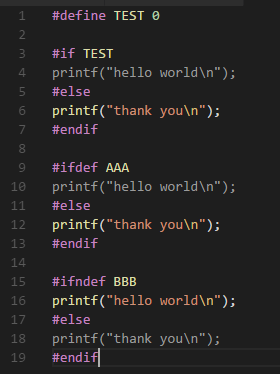
Great!
Can I change the background color of the inactive area?
hyeonchang
on 6 Feb 2018
The color is currently hardcoded at .vscode/extensions/ms-vscode.cpptools-<version>/out/src/LanguageServer/client.js (line 486/487), so you could change it there if you really wanted, but it'd be overwritten after an update. We'd also accept a pull request to add a setting for this, but we weren't currently planning to add a setting ourselves. We want to change the color to be alpha blended with the original color like in VS, but we have to get VS Code itself to add support for that first.
sean-mcmanus
on 6 Feb 2018
Oh, I misread your comment -- I don't know how to change the "background" color (does VS Code allow that?). I thought you were referring to the text color itself.
sean-mcmanus
on 6 Feb 2018
@sean-mcmanus Sorry, I'm probably ignorant, but: a) Can this be disabled, or b) is there a way to "bootstrap" IntelliSense with symbols?
The thing is, our make-based build system deduces the effective set of symbols from parameters to make (something like "make HWPLATFORM=X PRODUCT=Y" which then informs half a gazillion other symbols) -- and without a way to "seed" IntelliSense, many of my files end up gray because of file-scope #ifdef guards.
 eskild
on 6 Feb 2018
eskild
on 6 Feb 2018
@sean-mcmanus Right, I was ignorant. Had never really "seen" the 'defines' in c_cpp_properties... Was messing around with cpp.hint with little luck, hence the previous message. Pardon the noise.
eskild
on 6 Feb 2018
Yeah, if you want to get rid of the gray, you should set the defines appropriately. One side benefit is that it makes it easier to detect what code is getting skipped by IntelliSense due to incorrect defines.
sean-mcmanus
on 6 Feb 2018
Hi,
First, thank you for this awesome extension.
Concerning this feature, I understand that it may be useful for many people, but I would love to see a setting that could disable it if wanted.
Indeed, I use VSCode as my main editor, but I use IAR Workbench as embedded system programming/debugging platform. A lot of my defines are declared in the IAR Project file, and this feature greys almost all of my code.
I am pretty sure that a lot of people could also be interested in turning this feature OFF too. (Maybe there is one, and I could not find it though)
For reference and as temporary fix, I found that commenting out the following line in .vscode\extensions\ms-vscode.cpptools-0.15.0\out\src\LanguageServer\client.js@327 sorts of disables the feature:
// this.languageClient.onNotification(InactiveRegionNotification, (e) => this.updateInactiveRegions(e));
Thanks again.
 ArnaudNe
on 16 Feb 2018
ArnaudNe
on 16 Feb 2018
@sean-mcmanus Hi, is there a way to disable this new function, like @eskild, many defined are passed by makefiles. Now almost all my code is grey. I'm not sure to understand the "defines" in the c_cpp_properties. There is no way I'm inputting all the defines there. Please, is there a way to turn this off or revert back to the last version of VS CODE.... Thanks !
P.S.: I'm a bit of a noob with vs code settings ...
 ghost
on 16 Feb 2018
ghost
on 16 Feb 2018
EDIT: As of v0.16.0, there exists a setting to disable inactive region colorization. Look at my post below for directions on how to change the setting
Hey @ArnaudNe. Your request is completely reasonable and we think there should be a way to turn off the setting as well. We are currently working on a new way to expose our extension's settings, which is currently targeted for March.
For now, your solution is the "correct" way to disable the feature. Keep in mind that future updates will rollback any changes to client.js, so disabling it repeatedly might be annoying until we get the new interface in (sorry!). For those who are interested in a complete set of instructions on how to disable the feature:
- Navigate to the
client.jsfile for the current version of the extension (0.15.0 at the time of writing):
- Ubuntu:
/home/<user>/.vscode/extensions/ms-vscode.cpptools-0.15.0/out/src/LanguageServer/client.js - Mac:
/Users/<user>/.vscode/extensions/ms-vscode.cpptools-0.15.0/out/src/LanguageServer/client.js - Windows:
C:\Users\<user>\.vscode\extensions\ms-vscode-cpptools-0.15.0\out\src\LanguageServer\client.js
- Ubuntu:
- Search for and comment out the line in
client.jswhich tells VSCode to respond to inactive regions messages from the extension (line 327 at the time of writing):
this.languageClient.onNotification(InactiveRegionNotification, (e) => this.updateInactiveRegions(e));
- Reload your VSCode window by opening up the command palette (
Ctrl + Shift + P), typingReload Windowand selectingReload Window. OR open up a new instance of VSCode - Observe that inactive regions are no longer colorized
I hope this helps. Let me know if any further clarification would be helpful. :smiley:
 grdowns
on 16 Feb 2018
grdowns
on 16 Feb 2018
Thank you @grdowns for the complete solution 😊
Looking forward to March iteration !
ArnaudNe
on 20 Feb 2018
Note the path for Windows is:
C:\Users\
In our code base there is no chance of getting the defines right, as they are from a mixture of source code and build system (scons). I've not even managed to get the include paths set correctly. As well as off switch, it might be useful to have a simple switch where only #if etc that evaluated with defines (e.g. #if 0) are coloured.
 BillDenton
on 21 Feb 2018
BillDenton
on 21 Feb 2018
With the new setting the extension should be able to revert back to the previous behavior when disabled, so #if 0 should go back to doing the colorization defined by the regex grammar.
bobbrow
on 21 Feb 2018
In my case, I have a section of code inside an #ifdef xxx but it is defined: when I hover the variable it says "#define xxx 1". So I don't understand why it's not colored.
 malafaya
on 28 Feb 2018
malafaya
on 28 Feb 2018
@malafaya Is your intelliSenseEngine set to "Default"? By "not colored" do you mean "gray"? When you hover over a literal number, does it show something like (int)100? If not, then the intelliSense is falling back to the tag parser for the "xxx" variable so the variable might be not be visible to the intelliSense engine.
It looks like when the intelliSenseEngine crashes, the inactive regions are not updated/reset, so that can cause stale gray text.
sean-mcmanus
on 28 Feb 2018
@sean-mcmanus IntellisenseEngine is set to Default. Yes, sorry: "not colored" as in "gray". Hover a numeric literal shows nothings.
I restarted VSCode hoping to get it fixed but to no avail.
I'll wait for that magic setting that will always show colors no matter what defines you have.
malafaya
on 1 Mar 2018
@malafaya Something in the translation unit is crashing our intelliSense process causing it to fall back to the tag parser for hover, which is where the "#define xxx 1" is coming from (we fixed one common case causing 50% of the issues for our next release). You could try adding the macro to the "defines" list to make sure the intellisense sees it, but if it still crashes it might not update the coloring in time. If you're on Mac, you can find crash logs under <user>/Library/Logs/DiagnosticReports.
sean-mcmanus
on 1 Mar 2018
Not fixed yet. Just updated and had to do (again) what @grdowns posted. Hopefully this will get fixed someday.
 ivsanro1
on 4 Apr 2018
ivsanro1
on 4 Apr 2018
Hey @ivsanro1, thanks for bumping this issue. We added a setting in v0.16.0 to turn this off from settings.json.
To disable the setting:
- Navigate to
settings.jsonvia the default shortcut ofctrl + ,or by using the menu barFile > Preferences > Settings - Select
User SettingsorWorkspace Settingsin the right panel depending on whether you'd prefer the setting to affect your user settings or your workspace settings - In the settings search bar, enter
C_Cpp.dimInactiveRegions - Move the cursor to the left side of
C_Cpp.dimInactiveRegionsentry in theDefault Settingspanel (left panel) - Select the pencil icon
- Select
false - Observe that the
C_Cpp.dimInactiveRegionsentry exists in the user/workspace settings panel (right panel), set tofalse - Observe that inactive regions are no longer colorized
I'll edit my former post with a header so that people stumbling upon this thread don't get confused. Thanks again!
grdowns
on 4 Apr 2018
Yeah, if you want to get rid of the gray, you should set the defines appropriately. One side benefit is that it makes it easier to detect what code is getting skipped by IntelliSense due to incorrect defines.
@sean-mcmanus What is the correct way to set the defines appropriately? Now it's done via ./configure --enable-option.
 rvanlaar
on 12 May 2020
rvanlaar
on 12 May 2020
@rvanlaar It depends on how you're configuring IntelliSense. You could add the defines to c_cpp_properties.json or the setting C_Cpp.default.defines. If you use compileCommands or configurationProvider, then the defaults should come automatically from those.
sean-mcmanus
on 13 May 2020
Thank you for your comments. I've configured the c_cpp_properties.json via the cpp plugin and generated a compile_commands.json via bear make.
rvanlaar
on 13 May 2020
@rvanlaar Then if you have the compileCommands property set, the defines should get picked up from your compile_commands.json. Let us know if that isn't working for you.
sean-mcmanus
on 15 May 2020
It works.
rvanlaar
on 15 May 2020
Related issues
 vicatcu
·
3Comments
vicatcu
·
3Comments
 thndrwrks
·
3Comments
thndrwrks
·
3Comments
 CDitzel
·
3Comments
CDitzel
·
3Comments
 timothy
·
3Comments
timothy
·
3Comments
 jyavenard
·
3Comments
jyavenard
·
3Comments
Most helpful comment
Hi,
First, thank you for this awesome extension.
Concerning this feature, I understand that it may be useful for many people, but I would love to see a setting that could disable it if wanted.
Indeed, I use VSCode as my main editor, but I use IAR Workbench as embedded system programming/debugging platform. A lot of my defines are declared in the IAR Project file, and this feature greys almost all of my code.
I am pretty sure that a lot of people could also be interested in turning this feature OFF too. (Maybe there is one, and I could not find it though)
For reference and as temporary fix, I found that commenting out the following line in
.vscode\extensions\ms-vscode.cpptools-0.15.0\out\src\LanguageServer\client.js@327sorts of disables the feature:Thanks again.