Vscode-cpptools: code formatting not working on multiple archlinux workstations
- VSCode Version: Code 1.19.1 (0759f77, 2017-12-19T09:41:01.414Z)
- OS Version: Linux 4.14.6-1-ARCH
- Extensions: ms-vscode.cpptools 0.14.5, austin.code-gnu-global 0.2.2
I'm having an issue when trying to format .c and .cpp files. No indentation is happening, thus working on javascript and all other languages I tested. Same issue for a coworker with the same up-to-date archlinux install. Tried multiple reinstallations and other packages (visual-studio-code-bin, code, code-git). No relevant settings.json or c_cpp_properties.json parameter used.
 acauquil
All 10 comments
You're using Format Document, right? We rely on clang-format to do formatting. Does /home/user/.vscode/extensions/ms-vscode.cpptools-0.14.5/LLVM/bin/clang-format --version output the version for you? You're using 1 workspace root folder, right?
 sean-mcmanus
on 2 Jan 2018
sean-mcmanus
on 2 Jan 2018
Hi, thanks for your fast answer. The issue was that clang-format uses libtinfo and it was not installed in my system.
acauquil
on 3 Jan 2018
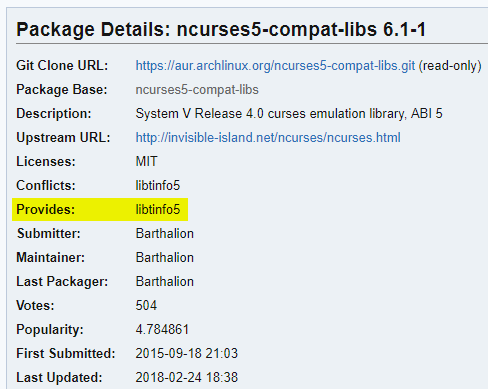
install package ncurses5-compat-libs on aur fixed it for me
 minhng99
on 12 Apr 2018
minhng99
on 12 Apr 2018
When formatting:
/home/user/.vscode/extensions/ms-vscode.cpptools-0.16.1/bin/../LLVM/bin/clang-format: error while loading shared libraries: libtinfo.so.5: cannot open shared object file: No such file or directory
clang-format need libtinfo.so.5 which is not in my system.
$ ls /lib/ | grep libtinfo
libtinfo.so
libtinfo.so.6
@SandPox package ncurses5-compat-libs in aur fixed it.
 nopyhe
on 18 Apr 2018
nopyhe
on 18 Apr 2018
Same here, using Manjaro Arch Linux.
Installing the package ncurses5-compat-libs fixed it.
 marciopamplona
on 5 Dec 2018
marciopamplona
on 5 Dec 2018
Doing a sudo apt install libtinfo5 on Ubuntu 18.10 fixed it for me... must have broken something when removing unused packages / changing DE.
 pfeerick
on 9 Feb 2019
pfeerick
on 9 Feb 2019
April 8th, 2019
@minhng99 huge shoutout! working fix for me on manjaro / arch linux.
note: i had to pull the ncurses5-compat-libs package from aur.
 gagandaroach
on 9 Apr 2019
gagandaroach
on 9 Apr 2019
Guys don't download rnd shit from AUR if you have libtinfo.so.6.
Run: ls /lib/ | grep libtinfo.
if you can see libtinfo.so.6 then run:
sudo link /lib/libtinfo.so.6 /lib/libtinfo.so.5
 GiuseppeCesarano
on 14 May 2019
GiuseppeCesarano
on 14 May 2019
Random, eh? I don't think so. libtinfo5 is the shared library for ncurses v5, as opposed to libtinfo6 to match ncurses v6. However, if linking to the wrong version if you have it installed already works for you, you could have simply said that.
pfeerick
on 15 May 2019
Okay i did check the AUR installer, it pulls the files from the GNU ftp server, so isn't random shit. That being said, i checked the ncurses's releases notes and v6 is backwards compatible with v5, so it's still better create a system link instead of installing an older version of the same lib. Sorry i never feel confident using the AUR if i don't check the installer.
GiuseppeCesarano
on 15 May 2019
Related issues
 jheinzel
·
3Comments
jheinzel
·
3Comments
 lutianqi
·
3Comments
lutianqi
·
3Comments
 timothy
·
3Comments
timothy
·
3Comments
 narutse
·
3Comments
narutse
·
3Comments
 SkyRiderMike
·
3Comments
SkyRiderMike
·
3Comments
Most helpful comment
install package
ncurses5-compat-libson aur fixed it for me