Vscode-cpptools: Not registering a formatter for c files.
C/C++ tools version 0.14.2
VSCode version 1.18
Attempting to format a c file raises the error: Sorry, but there is no formatter for c files installed.
Only started happening after updating both VSCode and C/C++ tools.
 Alistair401
All 39 comments
Hmm... This is this second report of that. We don't pop up that message. What other extensions do you have installed?
 bobbrow
on 10 Nov 2017
bobbrow
on 10 Nov 2017
No other extensions installed
Alistair401
on 10 Nov 2017
I looked at the source for VS Code and found where this message comes from.
I can only repro this when "C_Cpp.formatting" is set to "Disabled". Do you have this set in your settings.json file?
bobbrow
on 10 Nov 2017

"C_Cpp.formatting" is set to "Default"
Alistair401
on 10 Nov 2017
That is the default setting, but do you have it overridden in your "User" or "Workspace" settings file?
The other possibility is that the extension is not actually running. I don't know what OS you're using, but can you see if there is a "Microsoft.VSCode.CPP.Extension.*" process running or not?
bobbrow
on 10 Nov 2017
@bobbrow
I think this might be connected to Issue https://github.com/Microsoft/vscode-cpptools/issues/1240
And might be a bit more general of a problem.
 aseeon
on 13 Nov 2017
aseeon
on 13 Nov 2017
Apologies for the delay.
Here are my user settings:
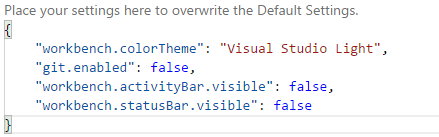
I haven't made any changes to the C_Cpp.formatting option.
I'm on Windows, using task manager I can't see a Cpp Extension running but I may be looking in the wrong place.
Alistair401
on 13 Nov 2017
Thanks @aseeon, I saw that issue this morning and have a fix for it. @Alistair401, are you able to get it to work by applying the fix in #1240?
bobbrow
on 13 Nov 2017
Same issue in VSCode on macOS. C formatting doesn't work after the update. It's not working with VSCode Insiders either
 rmrnc
on 13 Nov 2017
rmrnc
on 13 Nov 2017
@rmrnc, can you try the fix in #1240?
bobbrow
on 13 Nov 2017
Not sure whether the fix you've mentioned in #1240 was even meant to be applicable for this bug as well, but I tried anyway and it doesn't.
rmrnc
on 13 Nov 2017
Sorry, our messages overlapped. No, unfortunately it doesn't.
rmrnc
on 13 Nov 2017
Just to make sure, I've applied the fix in ~/.vscode/extensions/ms-vscode.cpptools-0.14.2/out/src/LanguageServer/client.js and this is how the file looks like now (lines 152-154)
if (vscode.workspace.workspaceFolders && vscode.workspace.workspaceFolders.length > 1) {
    storagePath = path.join(storagePath, serverName);
}
yes, that is the fix for #1240. You're saying that this doesn't fix the formatter issue? Do you have an instance of the extension's language server running (Microsoft.VSCode.CPP.Extension.darwin)?
bobbrow
on 13 Nov 2017
Uh, I don't know why that is, but there appear to be multiple instances ...
$ ps aux | grep Microsoft.VSCode.CPP.Extension.darwin
xxx  78248   0.0  0.0  4546380    168   ??  S    Fri01PM   1:38.31 ~/.vscode/extensions/ms-vscode.cpptools-0.14.2/bin/Microsoft.VSCode.CPP.Extension.darwin
xxx  73977   0.0  0.0  4922016    168   ??  S    Fri10AM   1:44.85 ~/.vscode/extensions/ms-vscode.cpptools-0.14.2/bin/Microsoft.VSCode.CPP.Extension.darwin
xxx  97441   0.0  0.0  4276968   1032 s002  S+    2:20PM   0:00.00 grep Microsoft.VSCode.CPP.Extension.darwin
xxx  95100   0.0  1.0  4470928 163532   ??  S     1:05PM   0:50.78 ~/.vscode/extensions/ms-vscode.cpptools-0.14.2/bin/Microsoft.VSCode.CPP.Extension.darwin
Do you have multiple folders opened in VS Code? This is expected if you have 3 folders open in VS Code.
bobbrow
on 13 Nov 2017
Cleaned up (rebooted) so there is now only one instance running (and only one open folder). Still, no code formatting. And yes, applying the fix #1240 in client.js appears not to do the job on my box.
rmrnc
on 13 Nov 2017
ok. I can't seem to reproduce your problem. ☹️ Do you have any other extensions installed?
bobbrow
on 13 Nov 2017
@bobbrow just so you know - the fix in client.js fixed problems with formatting, at least on my machine that is
aseeon
on 13 Nov 2017
Maybe @rmrnc modified the wrong client.js file? If you're on insiders you have to change the version under .vscode-insiders not the one under .vscode.
 sean-mcmanus
on 13 Nov 2017
sean-mcmanus
on 13 Nov 2017
@bobbrow My VSCode Insiders has no other extension installed and I've stripped VSCode down to only one more extension which I really need to keep on working.
@sean-mcmanus Nah, I've changed client.js in both .vscode extension folders, so ...
Ok, if I am the only one who is affected, so be it. Thank you all for your suggestions. Hope, it will work again on my box in a later release.
rmrnc
on 13 Nov 2017
It just occured to me that the issue appears to be with "C_Cpp.clang_format_style": "file" and the location of the .clang-format file, although, I would have expected that the C_Cpp.clang_format_fallbackStyle would kick in when .clang-format couldn't be loaded. Where exactly is .clang-format supposed to be located starting with VSCode 1.18 (or is this a red-herring after all)?
Note: when using a standard style, e.g., "C_Cpp.clang_format_style": "LLVM", fix #1240 works for me as well.
rmrnc
on 15 Nov 2017
@rmrnc Yes, the fallbackStyle should be used if the .clang-format file isn't found in the current or a parent folder. We haven't changed any of this behavior in a while.
sean-mcmanus
on 15 Nov 2017
Has the same problem for several days
C/C++ tools version 0.14.2
VSCode version 1.18.0
 Strideradu
on 16 Nov 2017
Strideradu
on 16 Nov 2017
Same problem for css
Sorry, but there is no formatter for 'css'-files installed.
VSCode version 1.18.1
 totalamd
on 28 Nov 2017
totalamd
on 28 Nov 2017
Are you using version 0.14.3 of the extension? We fixed #1240 which causes some of these errors, but there may be something else involved.
@totalamd css formatting support should be built in to VS Code. The C/C++ extension does not supply a formatter for css.
bobbrow
on 28 Nov 2017
Same problem here, formating stopped working after recent update.
VSCode version 1.21.1
C++ extension version 0.15.0
 kihot122
on 15 Mar 2018
kihot122
on 15 Mar 2018
@kihot122 We're not able to repro a problem with formatting. Can you provide more repro details?
sean-mcmanus
on 15 Mar 2018
Well, it's hard to describe really. Problem occurred after recent VS update to 1.21.1
Not re-installation nor deleting whole stuff from appdata solved the problem.
Looks like it has something to do with broken plugin configuration after VS patch since deleting VS plugins folder + clean reinstall solved it.
kihot122
on 16 Mar 2018
faced the same problem. VS Code showed "there is no formatter for cpp-files installed.". Nothing worked(reinstallation, deleting appdata, above fixes) until i noticed that i had paused installation of vs 2017 in its installer. completed the installation and it started working fine.
 aaravpandya
on 6 Apr 2018
aaravpandya
on 6 Apr 2018
A similar situation happened to me as well. When I create a new file using ctrl-n and not save it on the disk, it gives me this error when formatting. When I do save it on the disk, it formats just fine. Is this a possible bug?
 ZijunH
on 7 May 2018
ZijunH
on 7 May 2018
@ZijunH Is this when the document name is "Untitled-1"? I don't even see a formatting option in that case. I don't think any of our extension's features work unless the file is first saved to disk.
sean-mcmanus
on 7 May 2018
I am also seeing this error after updating to 0.17.0 - There is no document formatter for 'cpp'-files installed.
Immediately after update, I started seeing symantec errrors. I am occasionally seeing this error now too:
The language server crashed 5 times in the last 3 minutes. It will not be restarted.
I tried adding "C_Cpp.loggingLevel": "Information" to my settings, but I still don't see any log information - maybe I am looking in the wrong place.
 daltairwalter
on 8 May 2018
daltairwalter
on 8 May 2018
To see the log, open the Output panel and select the "C/C++" log from the dropdown selector.

bobbrow
on 8 May 2018
The C/C++ log seems to go away when the language server crashes 5 times and isn't restarted. Other than Symantec Enpoint protection, I don't see a reason why it is crashing for me - though I don't see a log when it crashes either.
daltairwalter
on 8 May 2018
Really? 😕 I'll open a new issue for this and add you to it.
bobbrow
on 8 May 2018
I'm closing old issues marked "more info needed". If you are still having issues with the extension, please ensure you have installed the latest version and open a new issue with the issue details.
bobbrow
on 4 Feb 2019
@ZijunH Is this when the document name is "Untitled-1"? I don't even see a formatting option in that case. I don't think any of our extension's features work unless the file is first saved to disk.
@sean-mcmanus I don't know about this extension, but some other extensions can format documents that was not saved on disk (like you say, "Untitled-n"). All you need to do is to set corresponding language manually via "Change Language Mode".
 lorond
on 25 Aug 2019
lorond
on 25 Aug 2019
@bobbrow Issue still exist with documents that was not saved on disk. Version 0.25.0. Steps to reproduce (via command palette):
- New Untitled File
- Change Language Mode -> C
- Format Document
But if you save that document, problem will gone.
lorond
on 25 Aug 2019
Related issues
 jheinzel
·
3Comments
jheinzel
·
3Comments
 peterwoods1
·
3Comments
peterwoods1
·
3Comments
 timothy
·
3Comments
timothy
·
3Comments
 thndrwrks
·
3Comments
thndrwrks
·
3Comments
 CDitzel
·
3Comments
CDitzel
·
3Comments