Vscode-cpptools: IntelliSense not working
Hi!
After having successfully set up my project (see https://github.com/Microsoft/vscode-cpptools/issues/916) I sadly had to reinstall my machine, and with it Visual Studio Code. However, I restored all of my project settings as before.
Now I have no errors or warnings in the Problems window - but nevertheless IntelliSense doesn't work as expected:
Goto definition works most of the time, but auto-complete only shows arbitrary symbols, see
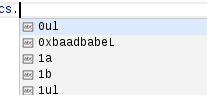
(I trimmed the screenshot for security reason, but the entire list is filled with suggestions of type "Words")
I'm using VS Code 1.16.0 on SLES 12.2 Linux with cpptools v0.12.4. My settings are the same as when the issue 916 was resolved, so the problem should not be related to the settings. I also use the default parser instead of the Tag-based one:
"C_Cpp.intelliSenseEngine": "Default",
And I also tried disabling the intelliSenseEngineFallback - however since I don't see any errors this obviously had no effect. Besides from this I don't have any settings related to the cpptools.
Best regards,
Torsten
 hensz
hensz
All 14 comments
Yeah, the "abc" icon means the results are not being provided by our extension. I'm able to repro the problem you describe, so we'll investigate to see if it's the same issue.
 sean-mcmanus
on 25 Sep 2017
sean-mcmanus
on 25 Sep 2017
Actually, I'm not able to repro the problem (my code was just incorrect). Does this simple example autocomplete for you in a new file?:
struct s {
  int a;
};

int main() {
  s ss;
  ss.// Does this autocomplete?
  return 0;
}
There is a bug in VS Code where they will auto-fill the list with "words" if the extension doesn't return any completion results. That is probably happening here. If you are expecting there to be real suggestions here, then it would help if you could narrow this down to a small code snippet that illustrates the problem. e.g.
class foo {
public:
    int n;
};

void func() {
    foo f;
    f.   // <-- if you get "words" here instead of "n", we'd want to know about it.
}
 bobbrow
on 25 Sep 2017
bobbrow
on 25 Sep 2017
Hi!
@sean-mcmanus No, there's no autocomplete available:

Same for the example that @bobbrow posted, only word suggestions.
With what info can I provide you for further analysis?
Thanks,
Torsten
hensz
on 26 Sep 2017
Just to double-check, does C or C++ show up as the language in the status bar (at the bottom right corner of VS Code)?

I don't see any syntax highlighting in your screenshot and that makes me a little suspicious. If VS Code doesn't know which language you are working with, then it won't ask our extension for autocomplete suggestions in your code.
bobbrow
on 26 Sep 2017
Hi!
Yuck, I forgot to save. After saving I get syntax highlighting, and also suggestions work as expected:

However in my productive code suggestions still don't work (even with the latest update, I now run 0.13.0).
The C++ indicator is visible in the status bar, no Fire is displayed (indexing is finished), I see no errors, Goto Definition on symbol works, but suggestions on symbols where I checked "Goto Definition" doesn't work.
My problem is, it's quite difficult to set up a small example that reproduces the issue, since I cannot post parts of our productive code here due to copyright reason... Are there other ways of getting diagnostic information?
hensz
on 27 Sep 2017
We spawn a Microsoft.VSCode.CPP.IntelliSense.Msvc.linux process for each translation unit open in VS Code. If that process is crashing, that could explain why you don't see any code suggestions. I would check for that first. If you are then able to attach a debugger to our process and get a callstack for the crash site, that would be the most helpful.
Otherwise, you can use our instructions for turning on logging and send us the logs that are generated. Do note that file paths are stored in the logs, so if there is any sensitive information that you cannot share, you would want to scrub the log before sending it to us.
bobbrow
on 27 Sep 2017
If the IntelliSense process crashes, it will fallback to the tag parser for autocomplete results, so showing no results suggests that the IntelliSense engine found no accessible members. @hensz Are you still seeing the abc results or a bunch of results for other symbols that don't belong to the class? Do the abc results automatically appear after typing . or do need to use Ctrl+Space? There are also known bugs in which IntelliSense autocomplete can fail to give results inside of lamdbas because it thinks it doesn't have access to the private variables in a class.
sean-mcmanus
on 27 Sep 2017
Comparing to classical IDE ( such as pyCharm, visual studio, eclipse), I must say VSCode.CPP.IntelliSense is not outstanding at all...
 Yensan
on 28 Sep 2017
Yensan
on 28 Sep 2017
Hi!
I just checked in htop that when I open a cpp file a new process Microsoft.VSCode.CPP.IntelliSense.Msvc.linux is spawned. This process keeps alive during editing, and even though I try to trigger autocomplete, it does not disappear. So I doubt that the issue is caused by crashing IntelliSense processes. I'll try to enable logging later and send the results.
@sean-mcmanus When I start typing the suggested symbols are obviously symbols from the tag parser, since they all don't make any sense in the location I'm currently editing. However, their type seems to be recognized (variables, methods, classes, ...). If I enter '.' or '->' to access a member, first there are no suggestions displayed. They only appear when I press Ctrl+Space.
hensz
on 29 Sep 2017
Now this is "interesting". I added this really simple code snippet to an existing file from my project, just at the end, outside any scope. When I start typing the local variable (I know that this won't be found with the current version of cpptools) I get some useless suggestions:

When I type the full variable name and type '.' nothing happens:
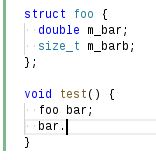
Finally when I press Ctrl+Space I see the already familiar list of suggestions:

During all these tests the IntelliSense process is always alive.
hensz
on 29 Sep 2017
By the way, I also have this issue (FE: 'Compiler exited with error - No IL available'), perhaps this is related?
hensz
on 29 Sep 2017
@hensz Yeah, the FE error will cause IntelliSense to not work (I think in that case we don't fall back to the tag parser and just fail to give results). The tag parser results that appear when you type without ". -> ::" is by design currently. I'm not able to repro that with the code in your screenshot, so I assume there's other code before that that is causing the IntelliSense engine to error out.
sean-mcmanus
on 29 Sep 2017
I'm closing old issues marked "more info needed". If you are still having issues with the extension, please ensure you have installed the latest version and open a new issue with the issue details.
bobbrow
on 4 Feb 2019
Related issues
 wdc596933938
·
3Comments
wdc596933938
·
3Comments
 arl
·
3Comments
arl
·
3Comments
 chrisckc
·
3Comments
chrisckc
·
3Comments
 narutse
·
3Comments
narutse
·
3Comments
 ismadelgad11
·
3Comments
ismadelgad11
·
3Comments
Most helpful comment
Comparing to classical IDE ( such as pyCharm, visual studio, eclipse), I must say VSCode.CPP.IntelliSense is not outstanding at all...