Vscode-cpptools: IntelliSense process is holding access to a file
- Operating System and version: Latest Windows 10
- VS Code version and if you are using the Insiders build: 1.15.1, no
- C/C++ extension version: 0.12.4
Repro: I'm not sure if this would be consistent, but it here's how I ran into the bug:
- I git cloned https://github.com/jamesqo/systems-hw
- Added a new subdirectory & added a
.cfile in that subdirectory via VSCode
- A new tab popped up. I think it suggested that I should try the new C/C++ IntelliSense engine from August 2017. I closed the window.
- I added another
.cfile to the subdirectory. - When I type stuff in and try to save, this happens:

As you can also see from the terminal, Microsoft.VSCode.CPP.IntelliSense.Msvc.exe appears to be the process that's locking the file.
 jamesqo
All 40 comments
The same is here:
Windows 8
VS Code 1.16.0
cpptools 0.12.4
Reproducing:
- Create new editor tab (File->New)
- Type some code (for example include large header file)
- Save the file:

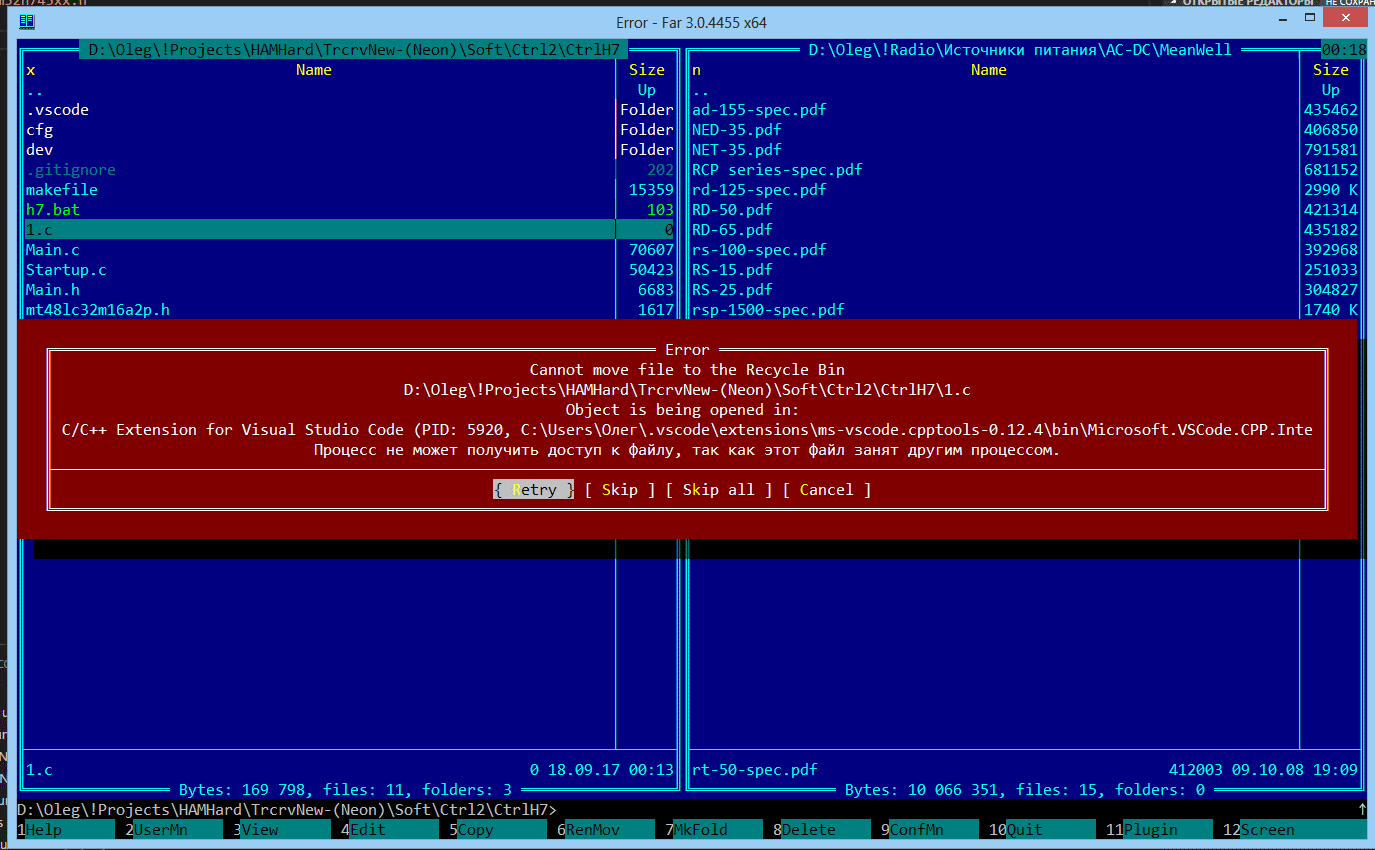
As you can see on the next picture the file was created (with zero size) and is locked by IntelliSense process:
 UR3IQO
on 17 Sep 2017
UR3IQO
on 17 Sep 2017
Thanks for reporting this issue. I have also reproed this bug randomly many times for the past few months, so I didn't understand why we hadn't gotten any user reports about it. I can repro the problem easily via making modifications to a large file repeatedly, although in that case I'm able to retry to save the file.
 sean-mcmanus
on 18 Sep 2017
sean-mcmanus
on 18 Sep 2017
Bump for me as well. This is SUPER annoying. I keep a procexp.exe open and use it to clobber the intellisense process when this happens.
 kewarken
on 19 Sep 2017
kewarken
on 19 Sep 2017
Using Process Monitor (https://docs.microsoft.com/en-us/sysinternals/downloads/procmon ), it looks like the process is reading the file a lot and then immediately closing it (i.e. from calling stat to check for file existence), which is blocking the write (maybe this is a VS Code saving bug -- if the write can't be done, maybe it should wait/retry automatically). But that's what I see in the case where Retry eventually solves the problem. If anyone can get the process "permanently stuck", reporting what Process Monitor says might be useful, i.e. if we're doing a CreateFile without a Close.
sean-mcmanus
on 19 Sep 2017
Hard to say for sure but it REALLY looks like a handle leak from my end.
Retrying never works until I either a) kill the intellisense process or b)
close the handle it's holding.
On Tue, Sep 19, 2017 at 12:06 PM, Sean McManus notifications@github.com
wrote:
Using Process Monitor, it looks like the process is reading the file a lot
and then immediately closing it (i.e. from calling stat to check for file
existence), which is blocking the write (maybe this is a VS Code saving bug
-- if the write can't be done, maybe it should wait/retry automatically).
But that's what I see in the case where Retry eventually solves the
problem. If anyone can get the process "permanently stuck", reporting what
Process Monitor says might be useful, i.e. if we're doing a CreateFile
without a Close.—
You are receiving this because you commented.
Reply to this email directly, view it on GitHub
https://github.com/Microsoft/vscode-cpptools/issues/1040#issuecomment-330589134,
or mute the thread
https://github.com/notifications/unsubscribe-auth/AAKN-nGtHkLWLvNK9qrOwhze8xy6d9qzks5sj-aagaJpZM4PaPw1
.
kewarken
on 19 Sep 2017
@kewarken Yeah, I also remember getting what seemed like a permanent file lock, but I don't know how to repro it consistently (my easy repro with a large file might be a different issue). So far we're unable to locate any place in our code where an unclosed file handle would be possible. It's more likely that an infinite loop is occurring with a stat call. Is the Microsoft.VSCode.CPP.IntelliSense.Msvc.exe process using CPU while the file lock is being held?
sean-mcmanus
on 19 Sep 2017
It seems to be happening to me almost constantly at the moment. I'll fire
up a procmon and see if I can catch it in the act.
On Tue, Sep 19, 2017 at 12:19 PM, Sean McManus notifications@github.com
wrote:
@kewarken https://github.com/kewarken Yeah, I also remember getting
what seemed like a permanent file lock, but I don't know how to repro it
consistently (my easy repro with a large file might be a different issue).
So far we're unable to locate any place in our code where an unclosed file
handle would be possible. It's more likely that an infinite loop is
occurring with a stat call. Is the Microsoft.VSCode.CPP.IntelliSense.Msvc.exe
process using CPU while the file lock is being held?—
You are receiving this because you were mentioned.
Reply to this email directly, view it on GitHub
https://github.com/Microsoft/vscode-cpptools/issues/1040#issuecomment-330593096,
or mute the thread
https://github.com/notifications/unsubscribe-auth/AAKN-o3Me8nAICxVfIx-vfpMaommf7oaks5sj-mSgaJpZM4PaPw1
.
kewarken
on 19 Sep 2017
So of course I've been procmonning all afternoon and not seen it happen
again. It literally happened a dozen times this morning with practically
every time I changed branches or edited code. I'll keep trying.
On Tue, Sep 19, 2017 at 12:21 PM, Chris Warkentin kewarken@gmail.com
wrote:
It seems to be happening to me almost constantly at the moment. I'll fire
up a procmon and see if I can catch it in the act.On Tue, Sep 19, 2017 at 12:19 PM, Sean McManus notifications@github.com
wrote:@kewarken https://github.com/kewarken Yeah, I also remember getting
what seemed like a permanent file lock, but I don't know how to repro it
consistently (my easy repro with a large file might be a different issue).
So far we're unable to locate any place in our code where an unclosed file
handle would be possible. It's more likely that an infinite loop is
occurring with a stat call. Is the Microsoft.VSCode.CPP.IntelliSense.Msvc.exe
process using CPU while the file lock is being held?—
You are receiving this because you were mentioned.
Reply to this email directly, view it on GitHub
https://github.com/Microsoft/vscode-cpptools/issues/1040#issuecomment-330593096,
or mute the thread
https://github.com/notifications/unsubscribe-auth/AAKN-o3Me8nAICxVfIx-vfpMaommf7oaks5sj-mSgaJpZM4PaPw1
.
kewarken
on 19 Sep 2017
I just reproed the bug. The IntelliSense process is not using any CPU and the file lock is permanent. The modified file was only 13 lines with no #includes. I wasn't running proc mon before the repro, but I started it afterwards and I just see the normal events from stat checking for file existence, so it looks like those stat events are a different issue, and there's some other dangling file lock. I'll try to run proc mon all the time now (unfortunately, it randomly seems to die). I'm not sure if running proc mon yourself will be useful without having the symbols for the call stack, but let me know (the symbols are supposed to be publically available, but there might be some issue with that). If the bug is timing-related, running proc mon might cause the bug to not repro, due to timing changes.
sean-mcmanus
on 20 Sep 2017
I reproed the bug with proc mon running. Unfortunately, there are an equal number of Create/Close files (each Close coming after the Create). But process explorer shows the process still has the file handle locked. Hmm...let me know if anyone sees anything different with proc mon. I'm investigating caching the stat results to fix the stat calls temporarily blocking writes, which should also make investigating this issue easier.
sean-mcmanus
on 20 Sep 2017
Seen repeatedly for C++ source files of all sizes. Definitely the Intellisense process, as killing it Process Explorer allows saving. Also seen when editing same file in Sublime Text while file open unchanged in Visual Studio Code. Had almost got to point of deleting Sublime Text, but only held off by this. Is there any information I can provide to help investigation?
 michael-mayes
on 24 Sep 2017
michael-mayes
on 24 Sep 2017
@michael-mayes Yes, I have seen the same behavior (randomly). If you can run the process monitor app (https://docs.microsoft.com/en-us/sysinternals/downloads/procmon ) and see what event is causing the permanent locking of the file, that would help. I tried doing that but I haven't found any problematic event yet. Our pending 0.13.0 update will reduce the number of reads (stat calls) and we'll continuing to investigate to try to find the event that is locking the file.
sean-mcmanus
on 25 Sep 2017
Thanks for your reply Sean. Of course it is refusing to fail most of the time for me now that I am actually trying to reproduce it! Who would work with computers, really?! I do wonder if there is some interplay with the Clang as I updated that from LLVM-5.0.0-r306282-win32 to LLVM-6.0.0-r313013-win32 today before finding that things were improved. I have disabled Clang for now in VSC and will see if it crops up again randomly during normal use
michael-mayes
on 25 Sep 2017
@michael-mayes I don't think changing clang should matter.
sean-mcmanus
on 25 Sep 2017
And just happened with one instance of the file open under one instance of VSC while Clang is still disabled. And again after another save. Did not have Proc Mon running at the time, as under normal use, but once the EBUSY occurs the properties for further attempts to save are (probably not a surprise to you) as:
Name Code.exe
Class: File System
Operation: CreateFile
Result: SHARING VIOLATION
Desired Access: Generic Write, Read Attributes
Disposition: OverwriteIf
Options: Synchronous IO Non-Alert
Attributes: N
ShareMode: Read, Write, Delete
AllocationSize: 0
michael-mayes
on 25 Sep 2017
I finally got a repro with proc mon -- we are doing 2 CreateFile, 1 CloseFile, 3 ReadFile, but then no 2nd CloseFile. I'm still working on getting symbols for the call stack though.
sean-mcmanus
on 25 Sep 2017
I found the call stack, how to repro the bug reliably, and a fix, but it won't be released until 0.13.1 (not sure when that will be yet). The bug repros (randomly) when an open file is done on a file that has not been tag parsed yet and the Default IntelliSense is enabled (so for those that mysteriously stopped reproing it, it was because your files were finished parsing). If the bug still repros under other conditions we'll have to investigate additional fixes.
BTW, proc mon is buggy and blue screened my computer, so be careful when using it (particularly for long periods of time).
sean-mcmanus
on 26 Sep 2017
Thanks for your great work so far. I look forward to 0.13.01 and will report back if I see any further instances thereafter
michael-mayes
on 26 Sep 2017
We have a fix for this in 0.13.1. Please give it a try and let us know if you continue to get the file lock pop ups.
 bobbrow
on 5 Oct 2017
bobbrow
on 5 Oct 2017
Thanks.
On Oct 5, 2017 5:48 PM, "Bob Brown" notifications@github.com wrote:
We have a fix for this in 0.13.1. Please give it a try and let us know if
you continue to get the file lock pop ups.—
You are receiving this because you were mentioned.
Reply to this email directly, view it on GitHub
https://github.com/Microsoft/vscode-cpptools/issues/1040#issuecomment-334601538,
or mute the thread
https://github.com/notifications/unsubscribe-auth/AAKN-kaDvAaxTwW5fog1E-f2iYVts_tlks5spU6ZgaJpZM4PaPw1
.
kewarken
on 6 Oct 2017
Thanks Bob and Sean. I shall keep a watch out after the upgrade hits
michael-mayes
on 6 Oct 2017
@michael-mayes 0.13.1 should be available now.
sean-mcmanus
on 6 Oct 2017
I've just had it happen to me on 0.13.1 :cry:. I tried to format the file and noticed that it was still analyzing at the time (red icon in the bottom right), which for some reason caused the format to never complete.
After this, i couldn't save the file anymore as Microsoft.VSCode.CPP.IntelliSense.Msvc.exe was holding onto a handle.
 trixnz
on 6 Oct 2017
trixnz
on 6 Oct 2017
@trixnz Hmm, this could be a different repro scenario from the one we fixed. Are you sure it's a permanent lock? We need to somehow get a procmon log of both the Microsoft.VSCode.CPP.Extension and Microsoft.VSCode.CPP.IntelliSense.Msvc.exe process when it repros the CreateFile without a Close File. Does this only happen with formatting? The previous issue would repro randomly whenever you had the Default IntelliSense enabled and you opened a file that had not yet been tag parsed (editing/saving was only required to see the symptom of the locked file). So doing a Reset IntelliSense Database could cause the bug to repro again, but waiting till the database is finished being built would cause it to stop reproing (the red flame doesn't necessarily mean it's tag parsing, it could just be checking the file system for potentially new files). I was able to repro the previous issue pretty easily. I'll try some more to get a repro.
sean-mcmanus
on 6 Oct 2017
@sean-mcmanus I wasn't able to get it to repro again reliably, but i'll keep procmon running while using it and see if I can get something useful to report too.
trixnz
on 6 Oct 2017
Please give it a try and let us know if you continue to get the file lock pop ups
I have been using VSC a bit less intensively since the update due to changing project priorities, but no repeat instances so far
I did see just the one single instance where Sublime Text could not save a header file until after I closed the source files I had open in VSC, but this is such a massive improvement still that it's mentioned more for interest
michael-mayes
on 13 Oct 2017
@trixnz @michael-mayes I've also reproed this issue again. We've found and fixed some additional scenarios where this could repro in our pending update, although there still might be more scenarios that need to be protected later.
sean-mcmanus
on 13 Oct 2017
Reproducible in the 1.17.2. Newly created files are always locked by IntelliSense and could not be saved. Sometimes the "magic" combination "Ctrl+A, Ctrl+C, Ctrl+W, Do not save, reopen, Ctrl+V" helps, but not always. For old files even the magic combination does not help, the file remains blocked by IntelliSense.

 knell
on 24 Oct 2017
knell
on 24 Oct 2017
@knell We're able to repro this and are working on a fix. You can kill the Microsoft.VSCode.Cpp.IntelliSense.Msvc process to save the file successfully.
sean-mcmanus
on 25 Oct 2017
Everything seemed much improved in 0.13.1, but got an update on Monday and it was back with a vengeance. Seemed to be happening for existing files, not just newly created files as seen by @knell
Looking forward to further fixes and I will get you any details if I can
michael-mayes
on 25 Oct 2017
Okay, we finally figured out the root cause and fixed it -- the intellisense process was inheriting (and never closing) the open file handle that occurred while tag parsing. The previous fix just reduced the occurrences in some scenarios. The bug should only be occurring on Windows, so if anyone hits it on Linux, then we have another issue.
@michael-mayes You probably started hitting this again, because the update forced a database reset. If you wait for the database to finish building, then it shouldn't happen anymore until a tag parse is required for a new file.
sean-mcmanus
on 25 Oct 2017
Excellent news. Well done on finding the root cause. I know how good that can feel from my own development work
michael-mayes
on 26 Oct 2017
vscode 1.17.2,
cpptools version 0.14.0
and the problem has appeared to me for the 1st time. it happens when database is being rebuilt and problem persists after database is built. My database has been rebuilt a few times since last update... why? no big changes haven't been done. Only a few modifications, about 20 of 47k files, have been made.
Intellisense is also failing when an icon of a red flame appears i can see only a text "Loading...".
After closing VSCode, two processes still opened:

Until now i had no such problems.
 martanec
on 31 Oct 2017
martanec
on 31 Oct 2017
@martanec We've fixed the permanent and temporary file locking issues for our next update. We've also fixed the database resetting that can occur if our engine takes > 1 second to shutdown when VS Code is closed (if you change your loggingLevel to 3, you'll see a "Database safety check failed. message when the re-build occurs". I'm not sure what the IntelliSense failure is. We need more repro details.
sean-mcmanus
on 31 Oct 2017
@sean-mcmanus Thank you!
The issue with IntelliSense failure: I found a comma after last item in my file-exclude list:
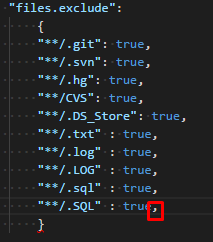
After removing the comma, intellisense makes sense again :)
martanec
on 6 Nov 2017
The file locking issues should all be resolved now in 0.14.1+. If you continue to have issues, please let us know.
bobbrow
on 13 Nov 2017
I've gotten this often on one-off files lately (last couple weeks only). I tried to follow along and find something, but I'm not sure what else to say. Still happens to me on a new C: file, just a heads up
Version 1.19.2
Commit 490ef761b76b3f3b3832eff7a588aac891e5fe80
Date 2018-01-10T15:55:03.538Z
Shell 1.7.9
Renderer 58.0.3029.110
Node 7.9.0
Architecture x64
 jsehull
on 24 Jan 2018
jsehull
on 24 Jan 2018
@jsehull can you create a new issue and specify your OS and the cpptools extension version?
bobbrow
on 24 Jan 2018
I messed up :/ no cpptools - I saw this issue all over the place and replied here on accident thinking it was a different general issue (wrong tab). Sorry about that! I'll have to decide where to feedback on this...
Maybe this helps shed light that it's not just cpptools? Sorry!
jsehull
on 24 Jan 2018
I think I just hit this on vscode 1.20.1 / cpptools 0.15.0.
Microsoft.VSCode.CPP.IntelliSense.Msvc.exe is holding a file handle, even after I closed that file in vscode. Of course I don't have a syscall trace prior to the problem, but I will try to take a dump of the intellisense process before killing it in case that it useful to anyone.
 0xabu
on 26 Feb 2018
0xabu
on 26 Feb 2018
Related issues
 narutse
·
3Comments
narutse
·
3Comments
 peterwoods1
·
3Comments
peterwoods1
·
3Comments
 ismadelgad11
·
3Comments
ismadelgad11
·
3Comments
 CDitzel
·
3Comments
CDitzel
·
3Comments
 DemoCrazer
·
3Comments
DemoCrazer
·
3Comments
Most helpful comment
We have a fix for this in 0.13.1. Please give it a try and let us know if you continue to get the file lock pop ups.