Vscode-cpptools: How do I update my includePath for a "nan" project?
I'm writing a native node addon and things seem to mostly work but I see warnings about an includePath:

Notice the include_dirs in the opened file likely maps to the include path but I'm not sure how to tell the extension. Most Node developers aren't great with C++ so nudging the user in the right direction would be a good idea. A native node addon has package.json and binding.gyp files in the root if you need to detect.
 Tyriar
All 8 comments
If you click on the problem it will take you to the source line where we report the error. From there, you should see a lightbulb that will give you an option to update your includePath.
We don't know where nan.h is, but we are working on a way to find missing includes and help you update your includePath. For now, you'll have to tell us where it is. Can you search your workspace folder for it? That .gyp file doesn't look like something that will help us find the file.
 bobbrow
on 4 Aug 2017
bobbrow
on 4 Aug 2017
So I did this, now it complains about not knowing where node_version.h is:
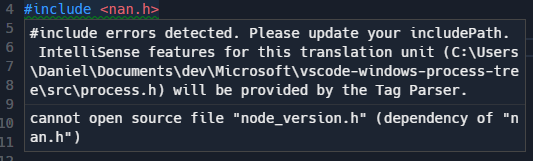
It's also complaining about the following system-level header files which I wouldn't expect needing to configure:
#include <windows.h>
#include <psapi.h>
#include <tlhelp32.h>
Here's my Windows config:
{
    "name": "Win32",
    "includePath": [
        "C:/Program Files (x86)/Microsoft Visual Studio 14.0/VC/include/*",
        "C:/Program Files (x86)/Windows Kits/10/Include/10.0.10240.0/um",
        "C:/Program Files (x86)/Windows Kits/10/Include/10.0.10240.0/ucrt",
        "C:/Program Files (x86)/Windows Kits/10/Include/10.0.10240.0/shared",
        "C:/Program Files (x86)/Windows Kits/10/Include/10.0.10240.0/winrt",
        "${workspaceRoot}",
        "${workspaceRoot}/node_modules/nan"
    ],
    "defines": [
        "_DEBUG",
        "UNICODE"
    ],
    "intelliSenseMode": "msvc-x64",
    "browse": {
        "path": [
            "C:/Program Files (x86)/Microsoft Visual Studio 14.0/VC/include/*",
            "C:/Program Files (x86)/Windows Kits/10/Include/10.0.10240.0/um",
            "C:/Program Files (x86)/Windows Kits/10/Include/10.0.10240.0/ucrt",
            "C:/Program Files (x86)/Windows Kits/10/Include/10.0.10240.0/shared",
            "C:/Program Files (x86)/Windows Kits/10/Include/10.0.10240.0/winrt",
            "${workspaceRoot}"
        ],
        "limitSymbolsToIncludedHeaders": true,
        "databaseFilename": ""
    }
}
FYI this is the output of the binding.gyp include_dirs which is needed to compile:
PS C:\Users\Daniel\Documents\dev\Microsoft\vscode-windows-process-tree> node -e "require('nan')"
node_modules\nan
Unfortunately, you're going to have to search for the missing dependencies (node_version.h this time) and add their paths to the "includePath" manually right now.
What are the specific complaints about your system headers (windows.h, etc)? Our extension should already be checking when it sets up the default config, but do those paths you listed in your "includePath" exist on your hard drive?
bobbrow
on 4 Aug 2017
The windows.h issue seems to be gone now.
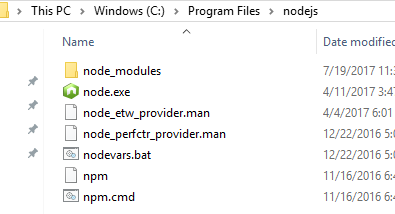
As for node_version.h, I don't know where it is. It's pointing at node_version.h inside NodeJS but I don't know where this is on disk
https://github.com/nodejs/node/blob/master/src/node_version.h
Tyriar
on 21 Aug 2017
Did anyone figure this out? I have the same issue, I have no idea where to locate node.h and v8.h
Edit: I had the obvious idea to make a computer wide search and found mine at C:\Users\[USERNAME]\.node-gyp\10.13.0\include\node after installing node-gyp. So ill leave this here for anyone with the same problem in the future.
 henrikvik
on 10 Jan 2019
henrikvik
on 10 Jan 2019
It seems the headers are installed into a cache folder (verified by watching with procmon on install). On my system, it was here:
C:\Users\myuser\AppData\Local\node-gyp\Cache\10.16.2\include\node
I updated my c_cpp_properties.json to include the following:
        "includePath": [
            "${workspaceFolder}/**",
            "${env:USERPROFILE}/AppData/Local/node-gyp/Cache/10.16.2/include/node"
        ],
Now the vscode errors have gone.
 CraigMason
on 9 Aug 2019
CraigMason
on 9 Aug 2019
This issue appears to be addressed. If I'm mistaken, please re-open or open a new issue with new details.
 Colengms
on 1 May 2020
Colengms
on 1 May 2020
Related issues
 peterwoods1
·
3Comments
peterwoods1
·
3Comments
 wdc596933938
·
3Comments
wdc596933938
·
3Comments
 DemoCrazer
·
3Comments
DemoCrazer
·
3Comments
 jheinzel
·
3Comments
jheinzel
·
3Comments
 chrisckc
·
3Comments
chrisckc
·
3Comments
Most helpful comment
Did anyone figure this out? I have the same issue, I have no idea where to locate node.h and v8.hEdit: I had the obvious idea to make a computer wide search and found mine at
C:\Users\[USERNAME]\.node-gyp\10.13.0\include\nodeafter installing node-gyp. So ill leave this here for anyone with the same problem in the future.