Vscode-cpptools: IntelliSense include error on Mac: cannot open source file "endian.h"
- VSCode Version: Code 1.13.1 (379d2efb5539b09112c793d3d9a413017d736f89, 2017-06-14T18:13:05.928Z)
- OS Version: Darwin x64 16.6.0
- Extensions:
|Extension|Author|Version|
|---|---|---|
|latex-workshop|James-Yu|2.7.0|
|python|donjayamanne|0.6.5|
|code-runner|formulahendry|0.6.24|
|cpptools|ms-vscode|0.12.0|
|java|redhat|0.6.0|;
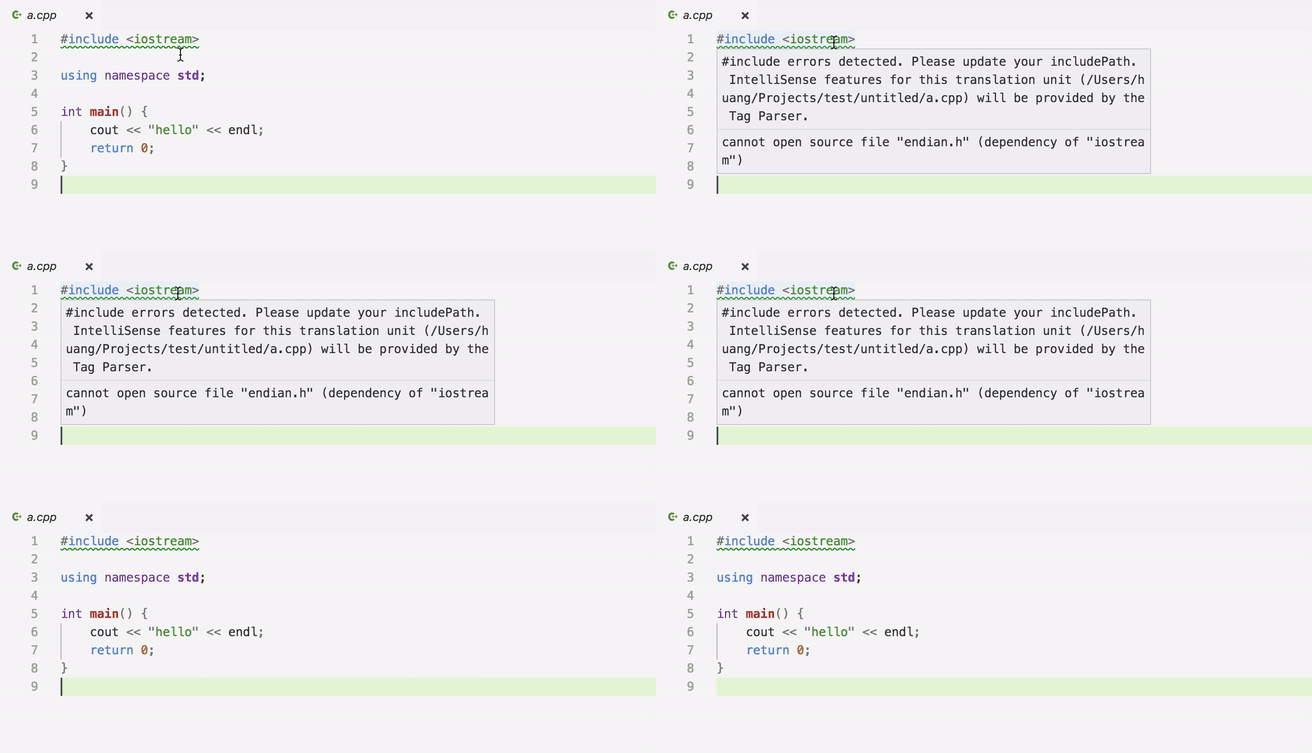
I've been playing with the IntelliSense feature by setting C_Cpp.intelliSenseEngine as Default. However, I found there's a green squiggly line under my first #include, saying "endian.h" file cannot be opened.
Screenshot:
Steps to Reproduce:
- Write a simple C++ file under an empty directory, open it in VSCode.
- Set the engine as
Default, then the error above appears.
 lihuanglx
All 11 comments
You need to add the path to endian.h. I believe it's at /usr/include/i386. We will consider adding the path to the default macOS includePath if it exists.
 sean-mcmanus
on 28 Jun 2017
sean-mcmanus
on 28 Jun 2017
Thanks, I also found files under /usr/include/machine are wrappers of files under the i386 directory. Adding either one could resolve the problem.
lihuanglx
on 29 Jun 2017
Thanks for the hint.. Same problem here.
But on my Mac, neither /usr/include/i386/ nor /usr/include/machine exists. IntelliSense also complains about missing math.h and time.h
I can compile C and C++ code using clang on my Mac, though.
 Leedehai
on 20 Jul 2017
Leedehai
on 20 Jul 2017
@Leedehai Can you search for endian.h, math.h, and time.h on your machine? If you're using those to build, it has to be somewhere on your build path. You can use clang -v -E -x c++ - < /dev/null to find build paths used by clang internally.
sean-mcmanus
on 20 Jul 2017
@sean-mcmanus Thanks for the reply. I searched - time.h and math.h are found - they came with mac's Xcode IDE. I use clang to build small programs in command-line, but clang's default include paths contain Xcode's files. Edit - I further investigated the IntelliSense's error message about missing "endian.h" - it turns out that the error originates from a "#include \
However, endian.h is missing. Then I tried to use clang to compile a test.c that includes one header - \
Leedehai
on 21 Jul 2017
@Leedehai It sound like you might be missing something in your "defines" list. I'd recommend opening up the files that are claiming to require endian.h and look for an #ifdef that is missing. You could also try creating a dummy endian.h file, but if our IntelliSense engine is actually trying to use stuff from that file, then it might complain about the endian.h declarations being missing.
sean-mcmanus
on 21 Jul 2017
I get the same error as @Leedehai
 AndersenTobias
on 29 Jul 2017
AndersenTobias
on 29 Jul 2017
@AndersenTobias I created a fake "endian.h" in the include directory and problem solved. I know it is far from ideal, though.
Leedehai
on 30 Jul 2017
I have the same issue. It seems to me that VSCode reads the wrong string file. Instead of one of the files from my includePath (/Applications/Xcode.app/Contents/Developer/Toolchains/XcodeDefault.xctoolchain/usr/include/c++/v1/string), it seems to read /usr/include/c++/4.2.1/string, which is not defined in my includePath.
@bobbrow would it be possible to re-open this issue?
 tcwalther
on 12 Aug 2017
tcwalther
on 12 Aug 2017
This disappeared for me with the latest version of VS Code.
AndersenTobias
on 13 Aug 2017
The root cause for this is being tracked by new issue: #1005. Add "__LITTLE_ENDIAN__" to your "defines" array in c_cpp_properties.json and you won't need to add a path to "endian.h".
 bobbrow
on 30 Aug 2017
bobbrow
on 30 Aug 2017
Related issues
 jheinzel
·
3Comments
jheinzel
·
3Comments
 narutse
·
3Comments
narutse
·
3Comments
 ecbrodie
·
3Comments
ecbrodie
·
3Comments
 timothy
·
3Comments
timothy
·
3Comments
 vicatcu
·
3Comments
vicatcu
·
3Comments
Most helpful comment
@Leedehai Can you search for endian.h, math.h, and time.h on your machine? If you're using those to build, it has to be somewhere on your build path. You can use
clang -v -E -x c++ - < /dev/nullto find build paths used by clang internally.