Vscode-cpptools: Show function documentation for C/C++ function with Intellisense
Would like to know if Intellisense (auto-completion and hover) is supposed to show documentation for the specified function or variable. Similar to what Visual Studio shows.
If yes, what is the proper format of the comments to show that on VS Code Intellisense?
If not, please consider this as a suggestion for a future enhancement.
 josesimoes
All 11 comments
We don't show documentation yet. It is on our backlog and is tracked by #399
Thank you for the feedback.
 bobbrow
on 9 Mar 2017
bobbrow
on 9 Mar 2017
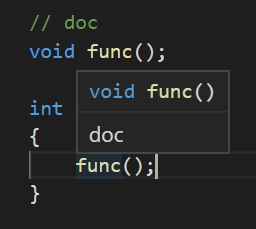
Docs comments should work now with our latest Insiders release: https://github.com/Microsoft/vscode-cpptools/releases . If you're using VS Code Insiders or have http.proxySupport not set to "off", you might not get the 0.21.0-insiders2 update automatically with C_Cpp.updateChannel set to "Insiders".
 sean-mcmanus
on 18 Dec 2018
sean-mcmanus
on 18 Dec 2018
Is there a way to check this? Can we add an example?
 ntindle
on 9 Apr 2019
ntindle
on 9 Apr 2019
@ntindle I don't understand your comment. What do you want to check? An example of what? See the screenshot:
sean-mcmanus
on 9 Apr 2019
Perfect thanks. I think I have something configured wrong because mine isn't working.
ntindle
on 9 Apr 2019
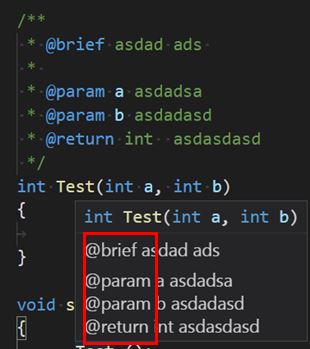
I notice that if i use @brief in the comment block then it show the comment behind it. I think thats a good Function. But it dosent work in .cpp files. I dont kown if there is an option I didnt notice. Will it add more customized options?
 Shapeno
on 3 Dec 2019
Shapeno
on 3 Dec 2019
@Shapeno I don't understand what you are seeing. Can you give more info or a screenshot?
sean-mcmanus
on 6 Dec 2019
How to fill in correctly so that service words are not visible?
 mike2003
on 10 Feb 2020
mike2003
on 10 Feb 2020
@mike2003 We're tracking that with https://github.com/microsoft/vscode-cpptools/issues/658 .
sean-mcmanus
on 11 Feb 2020
So did I download the wrong software? I don't usually develope something for Windows unless it's cross platform like Java.
I have VSCodium, but it was seriously lacking features. Then somebody told me that it's only an editor with syntax highlighting, and that was it. They said I needed Visual Studio Coder? I want documentation for function calls/api calls, etc. inside the code editor.
 BullShark
on 23 Aug 2020
BullShark
on 23 Aug 2020
@BullShark You should download Visual Studio Code and the C/C++ extension.
sean-mcmanus
on 24 Aug 2020
Related issues
 DemoCrazer
·
3Comments
DemoCrazer
·
3Comments
 wdc596933938
·
3Comments
wdc596933938
·
3Comments
 lutianqi
·
3Comments
lutianqi
·
3Comments
 SkyRiderMike
·
3Comments
SkyRiderMike
·
3Comments
 jheinzel
·
3Comments
jheinzel
·
3Comments
Most helpful comment
We don't show documentation yet. It is on our backlog and is tracked by #399
Thank you for the feedback.