Vscode-cpptools: highlight the code, based on preprocessor definitions
is it possible to implement like this does most of IDEs:
grayed (or other highlightiing) the code blocks of inactive preprocessor definitions.
look at the screenshot to understand what I mean

 amigo421
All 29 comments
VS Code doesn't provide any interface for the C++ extension to report which range of text is inactive and we don't control any of the colorization (it's done by atom/language-c), so I don't think this is currently possible.
 sean-mcmanus
on 21 Feb 2017
sean-mcmanus
on 21 Feb 2017
seems that is possible,
please look at the linked request in vscode repository,
the reply there refers to the API for the discussed feature
amigo421
on 5 Mar 2017
Ok, but showing inactive regions will have to wait till after we add the IntelliSense engine (which processes #define/#ifdef).
sean-mcmanus
on 8 Mar 2017
thank you!
amigo421
on 8 Mar 2017
@sean-mcmanus when can we expect that engine? any dates or some hope 😅
 agauniyal
on 23 Mar 2017
agauniyal
on 23 Mar 2017
We're planning to release some IntelliSense engine-based features in April, but it won't include "inactive regions", which we don't have any schedule for yet.
sean-mcmanus
on 23 Mar 2017
good news , thank you! (I'm about intellisense)
amigo421
on 24 Mar 2017
Merging this issue with #230
 bobbrow
on 6 Jul 2017
bobbrow
on 6 Jul 2017
Any update to this?
 bigwave-in-boulder
on 15 Feb 2018
bigwave-in-boulder
on 15 Feb 2018
@bigwave-in-boulder Yeah, we should be releasing the feature today in 0.15.0 (and the feature has been in the 0.15.0-insiders release for 2 weeks: https://github.com/Microsoft/vscode-cpptools/releases/tag/v0.15.0-insiders ).
sean-mcmanus
on 15 Feb 2018
@amigo421 @agauniyal @bigwave-in-boulder Inactive region highlighting has been added with 0.15.0.
sean-mcmanus
on 15 Feb 2018
How do you disable this feature now ! I have many defined that are passed by makefile ! Now 80% of my code is grey.....
 ghost
on 16 Feb 2018
ghost
on 16 Feb 2018
@Darkstarxt You can set intelliSenseEngine to "Tag Parser". You could also follow the steps at https://github.com/Microsoft/vscode-cpptools/issues/1466#issuecomment-366304132. However -- if you see gray text, it means the code is not visible to the IntelliSense engine, so you won't get any of those features for that section of code.
sean-mcmanus
on 16 Feb 2018
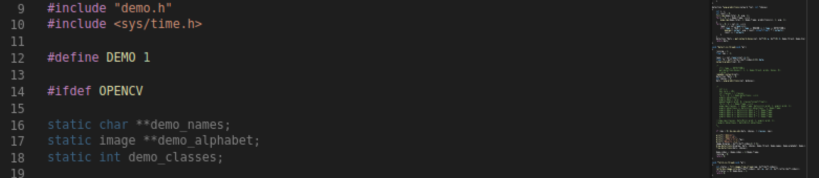
@sean-mcmanus , I installed IntelliSense on my Visual Studio. I have defined a few macros (.e.g., OPENCV and CUDA etc) in Makefile and I use task.json to call my Makefile to build the project. Now the problem is that VSCode could not recognize all my macros defined in Makefile. See the below screenshot. I actually defined OPENCV in Makefile but VSCode could not recognize it thus lines 16 and below are shown as inactive. I wonder if there is a solution to overcome this issue.
##############################task.json
{
"version": "2.0.0",
"tasks": [
{
"label": "darknetMakefile",
"type": "shell",
"command": "make",
"options": {
"cwd": "/home/xxx/workdir/"
},
"group": {
"kind": "build",
"isDefault": true
},
"presentation": {
"echo": true,
"reveal": "always",
"focus": false,
"panel": "shared"
},
"args": [
"QUIET=0"
],
"problemMatcher": {
"owner": "cpp",
"fileLocation": [
"absolute"
],
"pattern": {
"regexp": "^(.):(\d+):(\d+):\s+(warning|error):\s+(.)$",
"file": 1,
"line": 2,
"column": 3,
"severity": 4,
"message": 5
}
}
}
]
}
##############################task.json
 WeiZRPW
on 25 Aug 2018
WeiZRPW
on 25 Aug 2018
@Iamthegeekdavid, tasks.json is not used by IntelliSense. Take a look at c_cpp_properties.json (you can use the "Edit Configurations..." command to open it). There is a property in the configuration called defines where you can add macros that should be applied for IntelliSense.
Full reference here: https://github.com/Microsoft/vscode-cpptools/blob/master/Documentation/LanguageServer/c_cpp_properties.json.md
bobbrow
on 27 Aug 2018
@bobbrow the pre-defined MACRO feature is good on my VSCode now. I wonder if c_cpp_properties.json only affect the code displaying but will not impact building my project, i.e., code compiling and linking.
Thanks,
WeiZRPW
on 28 Aug 2018
Correct, c_cpp_properties.json is just for IntelliSense, not for compiling or linking.
bobbrow
on 28 Aug 2018
@bobbrow , hi Bob, one more question. I found that "debug disabled for cuda code in vscode". I wrote one issue about it: https://github.com/kriegalex/vscode-cuda/issues/4 Nobody replies yet. I wonder if you have any clue on this. Thanks,
WeiZRPW
on 25 Sep 2018
I'm sorry, I don't know anything about that extension.
bobbrow
on 1 Oct 2018
@bobbrow , thanks for replying my message. I know that Visual Studio has a debugging tool, parallel stack, which show a hierarchical graph of all running threads. I wonder if VSCode has this feature or will have it in the future. Thanks again!
WeiZRPW
on 1 Oct 2018
@Iamthegeekdavid VS Code and the C/C++ extension doesn't implement the parallel stacks feature -- you could open a feature request for that.
sean-mcmanus
on 1 Oct 2018
@sean-mcmanus , thanks for replying my issue. For me to write feature request of parallel stack, shall I write a request on GitHub page of VSCode-cpptool (https://github.com/Microsoft/vscode-cpptools/issues) or VScode (https://github.com/Microsoft/vscode/issues)? Thanks again!
WeiZRPW
on 3 Oct 2018
@Iamthegeekdavid I would try https://github.com/Microsoft/vscode-cpptools/issues first.
sean-mcmanus
on 3 Oct 2018
@sean-mcmanus , thanks. I have submitted a feature request there.
https://github.com/Microsoft/vscode-cpptools/issues/2598
WeiZRPW
on 3 Oct 2018
Here's an issue I met. I work on mac's vscode, and I don't want code related to linux platform to be inactive. The following is not what I want. #else part should be highlighted. How could I do that ?

 baiwfg2
on 4 Nov 2019
baiwfg2
on 4 Nov 2019
@baiwfg2 There's a thread on this issue at https://github.com/microsoft/vscode-cpptools/issues/1083 . Cross-platform support (e.g. Mac to Linux) is a missing feature, with some potential workarounds users have found. Using the VS Code remoting extensions to remote into a Linux machine from Mac would also work.
sean-mcmanus
on 4 Nov 2019
So, I know it's bad form to hijack a bug, but hopefully this enough of the same issue to be ok here?
From this bug, ifdefs should now be parsed for colorization, is that also true for includes?
In this case I'm getting a warning for an include I don't have but don't care about since the ifdef does not apply to me.
Is that the same issue and it should be fixed?
Is that a new issue that needs a bug?
Or is that an existing issue with an existing bug I wasn't able to find?
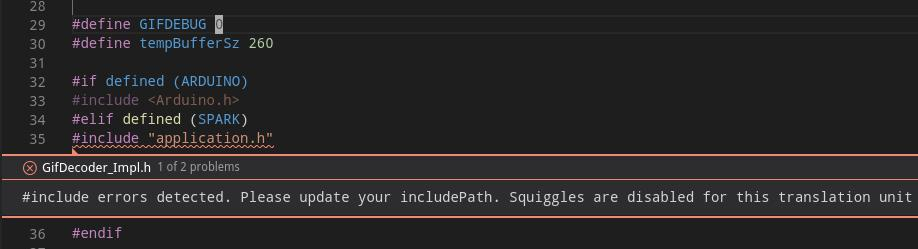
This is 1.44.2-1587059832 on linux/debian. Thanks.
 marcmerlin
on 11 May 2020
marcmerlin
on 11 May 2020
@marcmerlin IntelliSense appears to think that SPARK is defined. If that's not true, can you file a new issue with more repro/logging details?
sean-mcmanus
on 12 May 2020
@sean-mcmanus sure thing. I tried to gather the best I could in this bug:
https://github.com/microsoft/vscode-cpptools/issues/5514
marcmerlin
on 17 May 2020
Related issues
 chrisckc
·
3Comments
chrisckc
·
3Comments
 thndrwrks
·
3Comments
thndrwrks
·
3Comments
 ecbrodie
·
3Comments
ecbrodie
·
3Comments
 arl
·
3Comments
arl
·
3Comments
 jheinzel
·
3Comments
jheinzel
·
3Comments
Most helpful comment
How do you disable this feature now ! I have many defined that are passed by makefile ! Now 80% of my code is grey.....