Vscode-cpptools: Clang format should respect tab settings
I think that the formatter should respect the user/workbench/document tab settings automatically. I know it is possible to set those values myself in settings.json but why do I need to manually edit this? It should default to the active settings.
Note that things like EditorConfig exist. It adjusts the tab settings of the current document based on a .editorconfig file. I work on different projects with different tab preferences and EditorConfig is a great way to control this.
 ffes
ffes
All 8 comments
I don't understand what you're asking for. Can you give more repro/scenario details and an example? What are your C_Cpp.clang_format_* and editor.* settings? Are you using a .clang-format file? In general, it should use the user tab settings for formatting if the Visual Studio style is used. If you have more specific formatting, those will be used instead.
 sean-mcmanus
on 10 Nov 2016
sean-mcmanus
on 10 Nov 2016
I have a these lines in my user settings. No other related settings (like C_Cpp.clang_*) are done.
"editor.tabSize": 4,
"editor.insertSpaces": false,
When I press Alt+Shift+F to reformat the current file clang uses the default clang settings. So the first indent is 4 spaces, the second level indent is done with 1 tab (of 8 chars). But since my tabs are 4 chars wide there is no visible difference between the first level (4 physical spaces) and the second level (1 tab = resulting in 4 spaces).
So these lines of code:
    if (stmt.GetNextRecord())
        lastUsed = stmt.GetIntColumn("LibraryID");
now look like:
    if (stmt.GetNextRecord())
    lastUsed = stmt.GetIntColumn("LibraryID");
And gone is the indention!
I would have expected that before running Alt+Shift+F the tabs styles used when calling the clang formatter would be taken from my current document (and not from the user or workbench to keep it compatible with tools like EditorConfig).
And yes, I can set the styles needed to get the proper result manually, but that I would expect the plugin to help me out here.
I am mainly talking about the basic tabs styles here, like IndentWidth, TabWidth and UseTab. Other styles may be relevant too I have no idea if they can/need to be set based on the document settings.
ffes
on 11 Nov 2016
This appear to be a bug on Linux/Mac. It doesn't repro on Windows (on which the 4 spaces changes to 1 tab and the 1 tab changes to 2 tabs, which gives correct indentation). The current code sets UseTab based on the insertSpaces setting and IndentWidth based on the tabSize (we don't set the TabWidth different from the LLVM style), but the settings seem to not be correct on Linux for some reason (it could be a bug in VS Code itself). We'll put it on the list of bugs to fix in a future release.
sean-mcmanus
on 11 Nov 2016
But I am using vs code on Windows.
It there a log file (or alike) somewhere so I can see what happens when I press Alt+Shift+F?
ffes
on 11 Nov 2016
Oops, you're right. I'm observing the same behavior on Windows now (I didn't notice I had a .clang-format file with IndentWidth:8, TabWidth:8, UseTab: Always). The behavior appears "by design" for the detectIndentation setting, in which case we're getting an IndentWidth of 4 due to the 4 spaces being used (i.e. if you set the tabSize to 8, we would use the value of 4 instead, which is the value VS code computes from analyzing the document). Turning the detectIndentation to false seems to give the results you expect. We supply default values for formatting to clang-format, so if you have better suggestions for what we should use let us know. We've received suggestions previously to add some sort of hard/soft tab setting to enable tabs in documents to be viewed with different spacings from when a tab is entered via the keyboard.
sean-mcmanus
on 11 Nov 2016
Turning the detectIndentation to false seems to give the results you expect.
He? Why does editor.detectIndention influence this?
We supply default values for formatting to clang-format, so if you have better suggestions for what we should use let us know.
I would just expect it works as described in the docs:
UseTab: (VS Code current setting)
IndentWidth: (VS Code current setting)
No matter what editor.detectIndention is set to. That setting should no be of any influence on the plugin IMHO. The plugin should just take the tab settings from the document.
ffes
on 13 Nov 2016
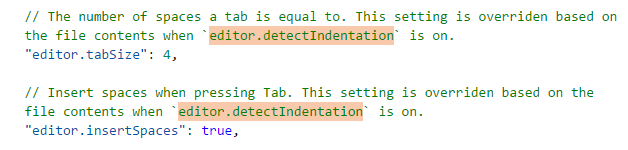
Our code gets sent a UseTab/IndentWidth setting from VS code itself through the API they define for text formatting -- the value they send us is the "VS Code current setting" which takes the editor.detectIndentation into account. The design of the "editor.detectIndentation" setting is to override the tabSize and insertSpaces user/workspace settings; instead, it sets those based on the current document.
sean-mcmanus
on 14 Nov 2016
Unfortunately, VS Code is making the rules here, not the extension. It would be incorrect for us to contradict it. In the settings page the following descriptions can be found for editor.tabSize and editor.insertSpaces which explain that editor.detectIndentation can override the value.
 bobbrow
on 7 Jul 2017
bobbrow
on 7 Jul 2017
Related issues
 peterwoods1
·
3Comments
peterwoods1
·
3Comments
 narutse
·
3Comments
narutse
·
3Comments
 jheinzel
·
3Comments
jheinzel
·
3Comments
 jyavenard
·
3Comments
jyavenard
·
3Comments
 chrisckc
·
3Comments
chrisckc
·
3Comments