Vscode-cpptools: Symbols are not found when using Visual Studio Windows Debugger.
I use Visual Studio Windows Debugger after compiling my source code by using command cl /Zi source.c /link /out:run.exe . It shows that some symbols are not found. OS: win 10 64 bit and the VS code: 1.5.3. However, the code can run correctly without debugging.

 aoyulong
All 4 comments
Thanks for reporting this. This is the way symbols work when debugging works on windows. System modules do not load symbols by-default as they constantly change. In order to obtain them, you can download them from the Microsoft public symbol server which is located here: https://msdl.microsoft.com/download/symbols
If you set the symbol search path to include the symbol server, they will download. Example:
"symbolSearchPath": "https://msdl.microsoft.com/download/symbols"
 jacdavis
on 23 Sep 2016
jacdavis
on 23 Sep 2016
To whoever might see this in the future, symbolSearchPath is a key of launch.json -> configurations[n].
 uuf6429
on 14 Jun 2018
uuf6429
on 14 Jun 2018
"symbolSearchPath": "C:\\Symbols",
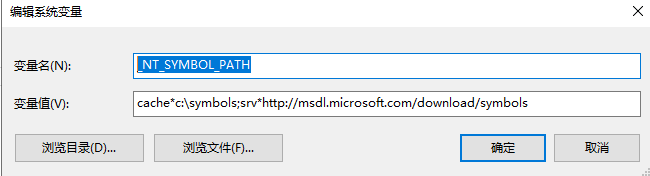
_NT_SYMBOL_PATH = cache*c:\symbols;srv*http://msdl.microsoft.com/download/symbols
 bsed
on 18 Apr 2019
bsed
on 18 Apr 2019
@bsed I don't understand. Where is that UI from? Our extension uses launch.json, but the text you're using isn't valid json.
 sean-mcmanus
on 18 Apr 2019
sean-mcmanus
on 18 Apr 2019
Related issues
 BDZNH
·
3Comments
BDZNH
·
3Comments
 chrisckc
·
3Comments
chrisckc
·
3Comments
 arl
·
3Comments
arl
·
3Comments
 DemoCrazer
·
3Comments
DemoCrazer
·
3Comments
 thndrwrks
·
3Comments
thndrwrks
·
3Comments
Most helpful comment
To whoever might see this in the future,
symbolSearchPathis a key oflaunch.json -> configurations[n].