Vscode-code-runner: command 'code-runner.run' not found
One day, I open my vscode but find that the code cannot run any more, and I got a error "command 'code-runner.run' not found".
 Yeba
Yeba
All 48 comments
Could you try to reinstall the Code Runner extension?
 formulahendry
on 11 Mar 2018
formulahendry
on 11 Mar 2018
thanks,now it runs well.
Yeba
on 15 Mar 2018
Good to know~
formulahendry
on 18 Mar 2018
@formulahendry ,I did try everything - reinstall Code Runner several times, add the default settings, etc, but still getting the error 'command 'code-runner.run' not found'. I ma testing it with simple app.js file with 2 console.logs in in and every time I press Code Run button I am getting this error. When I try with Ctr+Alt+N I am getting the same error too :command 'code-runner.run' not found. Just for the reference the extension worked perfectly some months ago
 VeselinAtanasov
on 13 Nov 2018
VeselinAtanasov
on 13 Nov 2018
Having the same issue. Tried Reinstall. I can find no reference to this.
 altimmons
on 9 Dec 2018
altimmons
on 9 Dec 2018
I am experiencing the same issue as well, after reinstall. Any updates?
 cwest28
on 30 Mar 2019
cwest28
on 30 Mar 2019
update: Solution found in another thread
Please delete the C:\Users*.vscode\extensions\formulahendry.code-runner-* folder and install extension again.
cwest28
on 30 Mar 2019
update: Solution found in another thread
Please delete the C:\Users.vscode\extensions\formulahendry.code-runner- folder and install extension again.
Not working though.
 itsmasud
on 5 Apr 2019
itsmasud
on 5 Apr 2019
Same issue here. Any update?
 GuoweiYang19891101
on 11 Apr 2019
GuoweiYang19891101
on 11 Apr 2019
I have the same problem.-19-6-1
 zlzzq
on 2 Jun 2019
zlzzq
on 2 Jun 2019
I have same issue,have any solution to deal with it?
 KimberlyZou
on 3 Jun 2019
KimberlyZou
on 3 Jun 2019
I have the same problem.-19-6-1
I delete all of my extension and downland the latest version of VsCode, then cover the last version file. It works well now, but I don't know why.
zlzzq
on 3 Jun 2019
发生这个问题的原因是micromatch引起的,
请尝试打开formulahendry.code-runner-0.9.10/out/src/codeManager.js
把以下位置的代码注释掉,禁用micromatch。保存然后重新打开编辑器。问题解决!
line 12:
//const micromatch = require("micromatch");
line 225~236:
/* if (executor == null) {
const executorMapByGlob = this._config.get("executorMapByGlob");
if (executorMapByGlob) {
const fileBasename = path_1.basename(this._document.fileName);
for (const glob of Object.keys(executorMapByGlob)) {
if (micromatch.isMatch(fileBasename, glob)) {
executor = executorMapByGlob[glob];
break;
}
}
}
} */
 juntaosun
on 4 Jun 2019
juntaosun
on 4 Jun 2019
@juntaosun I comment those code, and it works well, thanks !
 csunny
on 4 Jun 2019
csunny
on 4 Jun 2019
@juntaosun Yeah,thanks!
 CimXin
on 5 Jun 2019
CimXin
on 5 Jun 2019
发生这个问题的原因是micromatch引起的,
请尝试打开formulahendry.code-runner-0.9.10/out/src/codeManager.js
把以下位置的代码注释掉,禁用micromatch。保存然后重新打开编辑器。问题解决!line 12:
//const micromatch = require("micromatch");line 225~236:
/* if (executor == null) {
const executorMapByGlob = this._config.get("executorMapByGlob");
if (executorMapByGlob) {
const fileBasename = path_1.basename(this._document.fileName);
for (const glob of Object.keys(executorMapByGlob)) {
if (micromatch.isMatch(fileBasename, glob)) {
executor = executorMapByGlob[glob];
break;
}
}
}
} */
it works, thx
 Craig-Cheng
on 6 Jun 2019
Craig-Cheng
on 6 Jun 2019
发生这个问题的原因是micromatch引起的,
请尝试打开formulahendry.code-runner-0.9.10/out/src/codeManager.js
把以下位置的代码注释掉,禁用micromatch。保存然后重新打开编辑器。问题解决!line 12:
//const micromatch = require("micromatch");line 225~236:
/* if (executor == null) {
const executorMapByGlob = this._config.get("executorMapByGlob");
if (executorMapByGlob) {
const fileBasename = path_1.basename(this._document.fileName);
for (const glob of Object.keys(executorMapByGlob)) {
if (micromatch.isMatch(fileBasename, glob)) {
executor = executorMapByGlob[glob];
break;
}
}
}
} */
Thanks a million, works again.
 phith0n
on 8 Jun 2019
phith0n
on 8 Jun 2019
@juntaosun That's interesting.. How do you find it is the problem of micromatch?
formulahendry
on 9 Jun 2019
发生这个问题的原因是micromatch引起的,
请尝试打开formulahendry.code-runner-0.9.10/out/src/codeManager.js
把以下位置的代码注释掉,禁用micromatch。保存然后重新打开编辑器。问题解决!
line 12:
//const micromatch = require("micromatch");
line 225~236:
/* if (executor == null) {
const executorMapByGlob = this._config.get("executorMapByGlob");
if (executorMapByGlob) {
const fileBasename = path_1.basename(this._document.fileName);
for (const glob of Object.keys(executorMapByGlob)) {
if (micromatch.isMatch(fileBasename, glob)) {
executor = executorMapByGlob[glob];
break;
}
}
}
} */
This Worked!! Thansk a Lot.
 Suriya1994
on 12 Jun 2019
Suriya1994
on 12 Jun 2019
Hi All,
I am having code runner issue as well.
Apologies for asking dumb question but where do you run above code to fix the issue.
Thanks
 atulkumar323
on 27 Jun 2019
atulkumar323
on 27 Jun 2019
Hi,
Got the same issue. my visual studio was working fine. I was able to run my code and everything was running perfect. .But the moment i came back from my break i got this issue now. What would be the root cause of this issue? and how do we fix it?
Appreaciate your suggestions.
Thanks alot.
 azhar2ds
on 3 Jul 2019
azhar2ds
on 3 Jul 2019
Hi,
I am having the same error message (command 'code-runner.run' not found). I have uninstalled and re-installed the code runner several times now. It still doesn't work. Please, reply if anyone has figured out what to do.
Thanks.
 b-rtn
on 12 Jul 2019
b-rtn
on 12 Jul 2019
it works for me, thanks for @juntaosun
 bozhouyongqi
on 18 Jul 2019
bozhouyongqi
on 18 Jul 2019
same error and I did this:
发生这个问题的原因是micromatch引起的,
请尝试打开formulahendry.code-runner-0.9.10/out/src/codeManager.js
把以下位置的代码注释掉,禁用micromatch。保存然后重新打开编辑器。问题解决!
line 12:
//const micromatch = require("micromatch");
line 225~236:
/* if (executor == null) {
const executorMapByGlob = this._config.get("executorMapByGlob");
if (executorMapByGlob) {
const fileBasename = path_1.basename(this._document.fileName);
for (const glob of Object.keys(executorMapByGlob)) {
if (micromatch.isMatch(fileBasename, glob)) {
executor = executorMapByGlob[glob];
break;
}
}
}
} */
I don't get the error anymore but it is not running when i push the run button.
Any suggestions?
 ghost
on 20 Jul 2019
ghost
on 20 Jul 2019
This error appears:
Extension host terminated unexpectedly.
ghost
on 20 Jul 2019
@Bernt-jan @azhar2ds, Are you able to resolve this issue mate? I am also facing this issue from past few days. Reinstallation did not help me.
 singhrajgithub
on 13 Aug 2019
singhrajgithub
on 13 Aug 2019
I delete all my extentions and reinstal it, that was working for me
ghost
on 13 Aug 2019
@Bernt-jan, Let me try the same process.
singhrajgithub
on 13 Aug 2019
@Bernt-jan, Thanks it has worked for me.
singhrajgithub
on 13 Aug 2019
Fresh install of VSCode today, the only extension is this, and we have this problem when trying to execute Python. I've patched the file which fixes the issue. Weirdly I'm getting v0.9.10, but the marketplace says that we should be on v0.9.14? I've tried to install that version from a VSIX but it doesn't work, and keeps asking me to reload the editor.
In the end I've just gone back to v0.9.10 amd patched the file as others have above.
 Antnee
on 3 Sep 2019
Antnee
on 3 Sep 2019
I am facing the same issue, just looked at the replies, seems for windows platform. Is there any solution for Macos?
 scott-x
on 6 Oct 2019
scott-x
on 6 Oct 2019
I have this problem .. first it was java and python .. I installed A LOT of java extensions and it worked .. now python :sob:
 RoseRiyadh
on 19 Oct 2019
RoseRiyadh
on 19 Oct 2019
@rosecollins , this issue is already closed. In my opinion, you would need to do the same for python what you did for java.
Are you using any extension for python?
singhrajgithub
on 19 Oct 2019
@rosecollins , this issue is already closed. In my opinion, you would need to do the same for python what you did for java.
Are you using any extension for python?
Whenever I close the program and re-open it .. it stops .. now even when extensions are installed .. the runner is not working .. :(
RoseRiyadh
on 19 Oct 2019
The runner is not working for while now. I tried reinstalling and it still doesn’t work :(
On Oct 19, 2019, at 11:12 AM, rosecollins notifications@github.com wrote:
@rosecollins https://github.com/rosecollins , this issue is already closed. In my opinion, you would need to do the same for python what you did for java.
Are you using any extension for python?
Whenever I close the program and re-open it .. it stops .. now even when extensions are installed .. the runner is not working .. :(—
You are receiving this because you commented.
Reply to this email directly, view it on GitHub https://github.com/formulahendry/vscode-code-runner/issues/268?email_source=notifications&email_token=AIW2IV27R5GWT5Z4A7OQNC3QPMWX3A5CNFSM4EUVCCL2YY3PNVWWK3TUL52HS4DFVREXG43VMVBW63LNMVXHJKTDN5WW2ZLOORPWSZGOEBXVFTQ#issuecomment-544166606, or unsubscribe https://github.com/notifications/unsubscribe-auth/AIW2IV6ISH4IJ5IC5DK2ELTQPMWX3ANCNFSM4EUVCCLQ.
b-rtn
on 19 Oct 2019
Having the same issue, is there any fix? Tried everything in this thread with no result :(
 edvilme
on 19 Feb 2020
edvilme
on 19 Feb 2020
I did the same as KimAdrian and it also got mine working as it should.
It makes me think truly uninstalling the extension (deleting it and all associated files in xxxx/AppData/xxxx is what actually fixed it.
If you do not know how to do this, there are plenty of help threads out there.
cwest28
on 29 Mar 2020
Hey,
Having the same Issue. I have tried all the things mentioned above. Tried Re-installing the Extension and Re-installing the Whole Visual Studio Code but nothing worked for me
Can anybody Help PLEASE !!!
 pritishmishra703
on 9 Apr 2020
pritishmishra703
on 9 Apr 2020
I tried every solutopn listed here but it still didnt work.
 abhinav285
on 5 Sep 2020
abhinav285
on 5 Sep 2020
I discovered what my problem was:
I was running my JS code with F8 (Node.js Exec extension), and trying to stop the execution with ctrl + alt + M (Code runner extension). Disabled Node.js Exec extension and now it works perfectly.
 markushkc
on 7 Sep 2020
markushkc
on 7 Sep 2020
Was experiencing the same issues I just restarted my vs code and it works my code is running
 Moses-dot1
on 17 Sep 2020
Moses-dot1
on 17 Sep 2020
If Anyone is Reading this and still the Problem persists then probably your AntiVirus Software is creating this issue !! In my Case, Quick Heal was Quarantining my one of the files (This was one of the Code Runner Extension File) and as soon as I removed it from my Quarantined files all was working fine. Should try!
pritishmishra703
on 1 Oct 2020
If you had runned it many times and after so many days it shows such type of error then you must close the Vscode then open it again and then try running ,it will run well. (if then also error shows then uninstall the code runner extension and then install it then close Vscode and open it again the error will be fixed.)
 Tejas21-design
on 28 Feb 2021
Tejas21-design
on 28 Feb 2021
If Anyone is Reading this and still the Problem persists then probably your AntiVirus Software is creating this issue !! In my Case, Quick Heal was Quarantining my one of the files (This was one of the Code Runner Extension File) and as soon as I removed it from my Quarantined files all was working fine. Should try!
Agreee......
Tejas21-design
on 28 Feb 2021
update: Solution found in another thread
Please delete the C:\Users.vscode\extensions\formulahendry.code-runner- folder and install extension again.
Thats works here, thanks
 Vinintheskies
on 3 Mar 2021
Vinintheskies
on 3 Mar 2021
发生这个问题的原因是micromatch引起的,
请尝试打开formulahendry.code-runner-0.9.10/out/src/codeManager.js
把以下位置的代码注释掉,禁用micromatch。保存然后重新打开编辑器。问题解决!
line 12:
//const micromatch = require("micromatch");
line 225~236:
/* if (executor == null) {
const executorMapByGlob = this._config.get("executorMapByGlob");
if (executorMapByGlob) {
const fileBasename = path_1.basename(this._document.fileName);
for (const glob of Object.keys(executorMapByGlob)) {
if (micromatch.isMatch(fileBasename, glob)) {
executor = executorMapByGlob[glob];
break;
}
}
}
} */发生这个问题的原因是micromatch引起的,
请尝试打开formulahendry.code-runner-0.9.10/out/src/codeManager.js
把以下位置的代码注释掉,禁用micromatch。保存然后重新打开编辑器。问题解决!
line 12:
//const micromatch = require("micromatch");
line 225~236:
/* if (executor == null) {
const executorMapByGlob = this._config.get("executorMapByGlob");
if (executorMapByGlob) {
const fileBasename = path_1.basename(this._document.fileName);
for (const glob of Object.keys(executorMapByGlob)) {
if (micromatch.isMatch(fileBasename, glob)) {
executor = executorMapByGlob[glob];
break;
}
}
}
} */
 etherRAWRR
on 14 Mar 2021
etherRAWRR
on 14 Mar 2021
update: Solution found in another thread
Please delete the C:\Users.vscode\extensions\formulahendry.code-runner- folder and install extension again.
This worked to me, thnx :)
 EmiREstGon
on 17 Mar 2021
EmiREstGon
on 17 Mar 2021
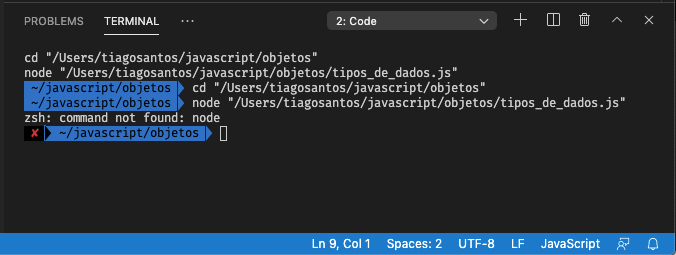
Hello, it didn't work for me!
mcOS Mojave(10.14.6)
 tiagobalsas
on 23 Apr 2021
tiagobalsas
on 23 Apr 2021
Related issues
 waithope
·
5Comments
waithope
·
5Comments
 ElektroStudios
·
4Comments
ElektroStudios
·
4Comments
 eegod
·
5Comments
eegod
·
5Comments
 Salil03
·
5Comments
Salil03
·
5Comments
 sstorey-nephila
·
5Comments
sstorey-nephila
·
5Comments
Most helpful comment
发生这个问题的原因是micromatch引起的,
请尝试打开formulahendry.code-runner-0.9.10/out/src/codeManager.js
把以下位置的代码注释掉,禁用micromatch。保存然后重新打开编辑器。问题解决!
line 12:
//const micromatch = require("micromatch");
line 225~236:
/* if (executor == null) {
const executorMapByGlob = this._config.get("executorMapByGlob");
if (executorMapByGlob) {
const fileBasename = path_1.basename(this._document.fileName);
for (const glob of Object.keys(executorMapByGlob)) {
if (micromatch.isMatch(fileBasename, glob)) {
executor = executorMapByGlob[glob];
break;
}
}
}
} */