Vscode-cmake-tools: Error parsing
I'm currently facing the issue that cmake builds with ninja produce relative paths during build and especially so in the produces error/warning messages. These are not relative to the "${workspaceFolder}", but relative to "${workspaceFolder}/someBuildDir", which breaks the cpp-tools problem matcher at least (that is, if that is executed at all when building through cmake-tools or the prompt) Additionally I have installed the MS cpp-tools. I don't know which extensions actually gets to parse the errors, when I
a) build through CMake-Tools
b) build through manual ninja-invocation on the prompt
I'm only somewhat accustomed to be able to define custom problem-matchers for tasks I define in tasks.json. How do Extensions register their problem-matchers and are all the registered problem-matchers active at once?
When I build on the built-in terminal, is that maybe no problem-matcher at all which allows to ctrl-click on paths it can identify?
 decimad
All 17 comments
CMake Tools doesn't use problem-matchers because it does not use tasks.json (problem matchers only apply in tasks.json tasks). The diagnostics should be parse correctly, where relative paths are resolve relative to the binary dir. If not, that's a bug. Would you be able to create a minimal test case that shows the issue?
 vector-of-bool
on 26 Jul 2018
vector-of-bool
on 26 Jul 2018
Before I conduct an analysis regarding this, am I mistaken that the extension's output parser runs unconditionally when the extension is loaded? Does it maybe only run if you build by clicking the "build"-button?
decimad
on 26 Jul 2018
@decimad I think the OutputConsumer runs when CMake Tools is outputting anything to the output window, be it CMake, Ninja or any other compiler/linker that CMT/CMake invokes.
 Randshot
on 26 Jul 2018
Randshot
on 26 Jul 2018
Okay, so when I build from the prompt instead, then I need to find some different way to get the output parsed... hmm.
decimad
on 26 Jul 2018
There seems to be a default prompt parser that tries to parse anything for file paths it seems, which does not really work for relative paths to something else than ${workspaceFolder}. I'll quadruple check wether the CMake-Tools build really is at fault when parsing its own output tomorrow, I might have mixed that up.
decimad
on 26 Jul 2018
I can confirm this is an issue, at least on Linux. I don't get error parsing whether I click on the "build" button from this extension, or run from command line. I'm pretty sure I've even tried tasks.json and had it not work because I do out-of-source builds everywhere. Happy to provide more information
 rpavlik
on 27 Jul 2018
rpavlik
on 27 Jul 2018
What compilers are you all using, and can you paste an example diagnostic that you expect to be parsed but isn't?
vector-of-bool
on 27 Jul 2018
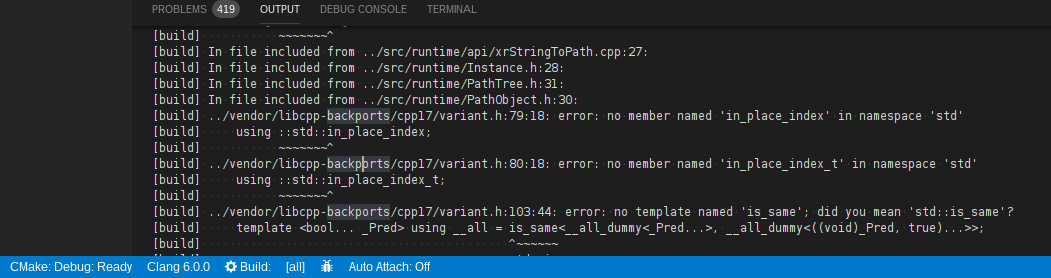
Clang 6.0.0 on Debian Stretch, here.
[build] ../vendor/libcpp-backports/cpp17/variant.h:79:18: error: no member named 'in_place_index' in namespace 'std'
[build]     using ::std::in_place_index;
[build]           ~~~~~~~^
is what I see on the "CMake/Build" page of the "Output" tab. All that I see in "Problems" are ways in which the code is confusing whatever built-in parser/intellisense engine is in use at the moment.
This is using (what I think is default) a build directory of build inside of ${workspacePath}, and this is from a simple single-directory workspace. So, effectively, ${workspacePath}/../vendor/libcpp-backports/cpp17/variant.h is the file that caused the error I pasted.
rpavlik
on 27 Jul 2018
Hmm, so it does actually work apparently in a trivial sample using GCC or Clang, it's just buried under a lot of additional warnings from the intellisense stuff.
The intellisense issues are duplicates of the single/two real problem(s) in the case of this trivial program with an error, but issues because of headers/includes/etc in a real project. Things like Unknown type name 'namespace' where I'm using a namespace in a header file included by a source file, or use of undeclared identifier 'spdlog' in a file that quite clearly includes the required headers and actually successfully builds...
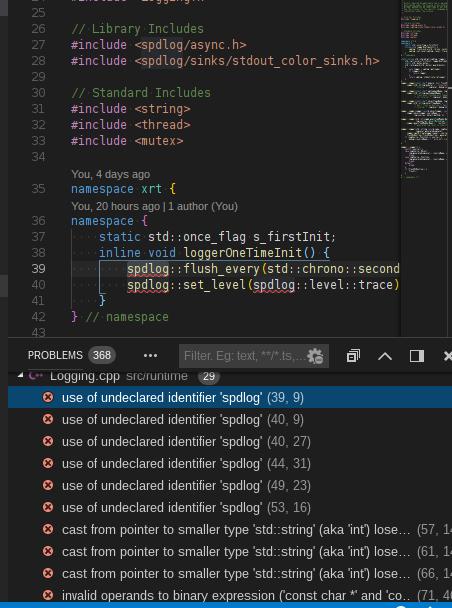
Here's my simple test case that does have correct parsing, but duplicated problems.
https://gist.github.com/rpavlik/3808b2fb5812a14443e17ebe99242729


rpavlik
on 27 Jul 2018
Well the duplicate error messages are all sourcing from the ms c++ extension's parser. Even though that one can work with the compile_commands generated during a cmake build, it does not reload on change of that and even worse, it parses relative paths in the output stream of its doing unconditionally from ${workspaceRoot}.
And then there seems to be a default parser that parses the output for anything that looks like a path, and if it's relative, then it is taken as relative to ${workspaceRoot} as well.
So we have 3 parsers:
- CMake: Creates "problems", but does not make paths as clickable links in the output itself
- C++-Tools: Creates "problems" with its intellisense engine, but only parses build errors if it is building itself
- Stock VSCode: Does not create problems, parses for paths relative to ${workspaceRoot}
Hope I got that right so far.
Add to that, that vscode may treat paths to the same file differently, when they're relative or not, or the casing differs on windows.
So all in all this is a real mess.
decimad
on 27 Jul 2018
The text in the OutputChannel (which is how CMake prints its output) is very limited, actually. Unfortunately, it's the only good way to print the output with the way CMake Tools works. In a future vscode version there will be a way to use custom terminals, and those will support clickable links/colorization/etc. For now, though, CMake Tools uses the OutputChannel.
The cpptools errors aren't under directory control of CMake Tools. The best option is to make sure it is using the most up-to-date configurations. If you haven't already, look into the CMake Tools+cpptools IntelliSense integrations, which may better support cpptools that compile_commands.json.
vector-of-bool
on 30 Jul 2018
Have a similar problem. I use ccache + distcc + gcc 4.8.5.
We have building machines with different system locale in our company's network (our distributed build system uses developer's machines). So problem's parser cannot handle this.
So i see two dirty ways to fix it:
- to edit /vector-of-bool.cmake-tools-1.1.3/out/src/diagnostics/gcc.js script.
- to write a script that mimics the compiler, and sed/awk output of distcc executable.
We need an entry point to parse any vscode output, maybe?
P.S.
I cannot change system locale on these machines.
 xscavx
on 30 Apr 2019
xscavx
on 30 Apr 2019
I also have a similar problem but I don't think it's related to locales. In the default configuration with Clang 9, builds with errors don't populate the problems view. Putting this here because I feel like there's probably an overarching meta-issue based on the above but happy to split it out into a separate issue if warranted.
 ahicks92
on 27 Feb 2020
ahicks92
on 27 Feb 2020
What's the state of this issue? I don't see an assignee and the labels make it appear as if it wasn't actionable?
I can still reproduce the misbehavior from the original report by @decimad in v1.5.3: CMake Tools output goes to the Output tab and relative paths are not clickable there. It's a pretty annoying detail for me and it seems to happen to other people using Ninja.
Two workarounds I use frequently:
Put the root CMakeLists.txt in a subdirectory and ascend into parent/sibling directories during configuration. This forces CMake and Ninja to use absolute paths and avoids the issue. For an example see llvm-project with main CMakeLists.txt in
llvm.Rerun failed builds in
Terminaltab manually. File locations will be clickable as long as terminal cwd is the build directory.
This "DIY extension" by @GrandChris slightly improves the latter by keeping them clickable even after cd'ing away from the build directory:
https://marketplace.visualstudio.com/items?itemName=GrandChris.just-let-me-click-this-freaking-paths
Last but not least: Ninja prefers relative paths for good reasons, but unfortunately tooling has issues with it and VSCode is not alone in this struggle. The never-ending thread on absolute paths for Ninja -- please don't treat it as an excuse:
https://github.com/ninja-build/ninja/issues/1251
 weliveindetail
on 30 Nov 2020
weliveindetail
on 30 Nov 2020
I also found the unclickable build errors within Output tab annoying, resorted to building within Terminal as @weliveindetail suggested. The Problems tab still has clickable errors, would be satisfied with that if the tab focus didn't always return to Output on a CMake build. Is there a way to disable Output tab focus during a build?
 artyeffem
on 15 Feb 2021
artyeffem
on 15 Feb 2021
I am not aware of any way to disable the output channel focus as a user of VSCode. We can do some changes in the implementation about this. I opened a new report about this: https://github.com/microsoft/vscode-cmake-tools/issues/1675.
 andreeis
on 16 Feb 2021
andreeis
on 16 Feb 2021
I also found the unclickable build errors within
Outputtab annoying, resorted to building withinTerminalas @weliveindetail suggested. TheProblemstab still has clickable errors, would be satisfied with that if the tab focus didn't always return toOutputon a CMake build. Is there a way to disableOutputtab focus during a build?
It is possible to put Problems side-to-side with Output (just drag the tab onto one side of the output area) thus alleviating the issue.
 cdsousa
on 17 Mar 2021
cdsousa
on 17 Mar 2021
Related issues
 gabyx
·
5Comments
gabyx
·
5Comments
 DavidA2014
·
4Comments
DavidA2014
·
4Comments
 danielmrussell
·
5Comments
danielmrussell
·
5Comments
 OleksandrKvl
·
3Comments
OleksandrKvl
·
3Comments
 Nightlights524
·
3Comments
Nightlights524
·
3Comments
Most helpful comment
What's the state of this issue? I don't see an assignee and the labels make it appear as if it wasn't actionable?
I can still reproduce the misbehavior from the original report by @decimad in v1.5.3: CMake Tools output goes to the
Outputtab and relative paths are not clickable there. It's a pretty annoying detail for me and it seems to happen to other people using Ninja.Two workarounds I use frequently:
Put the root CMakeLists.txt in a subdirectory and ascend into parent/sibling directories during configuration. This forces CMake and Ninja to use absolute paths and avoids the issue. For an example see llvm-project with main CMakeLists.txt in
llvm.Rerun failed builds in
Terminaltab manually. File locations will be clickable as long as terminal cwd is the build directory.This "DIY extension" by @GrandChris slightly improves the latter by keeping them clickable even after cd'ing away from the build directory:
https://marketplace.visualstudio.com/items?itemName=GrandChris.just-let-me-click-this-freaking-paths
Last but not least: Ninja prefers relative paths for good reasons, but unfortunately tooling has issues with it and VSCode is not alone in this struggle. The never-ending thread on absolute paths for Ninja -- please don't treat it as an excuse:
https://github.com/ninja-build/ninja/issues/1251