Vscode-bookmarks: Bookmarks: Explorer not working
I just installed the plugin today and the bookmarks explorer appears to be caught in an infinite loop of refreshing - I see no bookmarks (even though I have added some) and the little blue line keeps animating across the top. I tried reloading the plugin and restarting vscode, but nothing seems to make a difference.
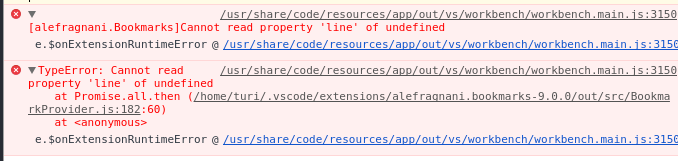
See the attached screenshot for errors I saw in the dev tools.
I also tried to disable the explorer with the setting "bookmarks.treeview.visible": false but this had no effect.
I am running:
- vscode-bookmarks 9.0.0
- vscode 1.25.1
- Ubuntu 16.04
 turijs
All 13 comments
HI @turijs ,
I'm sorry to hear that 😢
I saw a similar message appears when I was developing the new version, while switching between the _new_ and _old_ extension versions in the same folder/workspace, but not after using exclusively the new version. It happened because the JSON structure that stores the bookmarks has changed to suport line/column/label, and some parts in the extension weren't still updated to correctly use it. It _should_ be fixed now, but appears not ...
If you could paste the bookmarks.json content here, I could take a look to identify what's wrong, and release a bugfix. To do this, you should use the Developer Tools, goes to Application, Local Storage and then file:// and search for alefragnani.bookmarks for the folder/workspace that raises the error.
About the _animation_, I have no idea. Maybe an _infinite loop_ caused by that error is the reason.
If you can't get the bookmarks.json for any reason, or if you don't care about losing the bookmarks for that folder/workspace, you could simply clear them, using the Bookmarks: Clear from All Files commands. It should _reset_ the bookmarks and let you work as before.
Hope this helps
 alefragnani
on 16 Jul 2018
alefragnani
on 16 Jul 2018
Hey, I appreciate the reply. When I opened it up today, the situation was a bit different. I was not seeing the infinite loading indicator, rather the bookmarks explorer did show up, and it showed the file I had added bookmarks to, but there were no bookmarks visible (I clicked a few times to confirm it wasn't collapsed). But when I opened up the actual file with the bookmarks, they were there. Anyways, I ended up clearing them since there were only a couple, and it is working now. Sounds like it the issue is probably what you described, I just find it odd because I don't remember ever installing the extension before yesterday.
Is that bookmarks.treeview.visible setting meant to control whether the bookmarks explorer is visible? If so, it doesn't appear to be working for me, as I have it set to false, but the bookmarks tab in the activity bar is still there.
turijs
on 17 Jul 2018
I'm having the same issue mentioned above.
 simkessy
on 19 Jul 2018
simkessy
on 19 Jul 2018
I have the same issue. Since the last update of VSC bookmarks disappeared from the explorer view. There is no way to toggle it on/off as it was before, as well. Deleted bookmarks.json, reinstalled - same. Any way to fix it?
 Rusenec
on 19 Jul 2018
Rusenec
on 19 Jul 2018
If could be of help, here the content of local storage:
storage: //workspace/empty: 1528094734947/alefragnani.bookmarks{
    "bookmarks": "{\"onDidClearBookmarkEmitter\":{},\"onDidClearAllBookmarksEmitter\":{},\"onDidAddBookmarkEmitter\":{},\"onDidRemoveBookmarkEmitter\":{},\"onDidUpdateBookmarkEmitter\":{},\"bookmarks\":[]}"
}storage: //workspace/empty: 1530373036327/alefragnani.bookmarks{
    "bookmarks": "{\"onDidClearBookmarkEmitter\":{},\"onDidClearAllBookmarksEmitter\":{},\"onDidAddBookmarkEmitter\":{},\"onDidRemoveBookmarkEmitter\":{},\"onDidUpdateBookmarkEmitter\":{},\"bookmarks\":[{\"fsPath\":\"d:\\\\Montessori\\\\Articolo Eva-Maria\\\\References.bib\",\"bookmarks\":[92]}]}"
}storage: //workspace/root: 201e2505020dff3820e977b4267911b6/alefragnani.bookmarks{
    "bookmarks": "[]"
}
Note that I have deleted all bookmarks, hence the last entry (I suppose). The first two "empty" entries apparently are from files opened with VC, but not from a workspace. Now I try to delete them and see what happens.
 crystalfp
on 20 Jul 2018
crystalfp
on 20 Jul 2018
Yes, removed the two lines "workspace/empty" no more spinning! Added a bookmark in a file in the workspace. Again the spinning.
crystalfp
on 20 Jul 2018
Same error as @turijs in the console:
/C:/Program Files/Microsoft VS Code/resources/app/out/vs/workbench/workbench.main.js:1376   ERR Cannot read property 'line' of undefined: TypeError: Cannot read property 'line' of undefined
    at Promise.all.then (C:\Users\Mario Valle\.vscode\extensions\alefragnani.bookmarks-9.0.0\out\src\BookmarkProvider.js:182:60)
    at <anonymous>
Hi @Rusenec ,
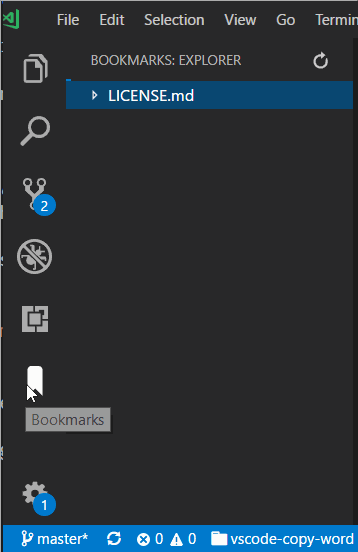
The Bookmarks _are not_ in the Explorer view anymore. It received its own Activity Bar.
https://github.com/alefragnani/vscode-bookmarks/blob/master/images/bookmarks-activity-bar.gif
alefragnani
on 21 Jul 2018
Hi,
For those that are experiencing this issue, _even after clearing the bookmarks_, how is your folder/workspace? I mean, are you using:
- Single folder
- Named Workspace
- No-named workspace
- No folder/workspace selected (Using VS Code to edit single files)
Thanks for the aditional info
alefragnani
on 21 Jul 2018
Same issue here.
I'm using single folder, and have overriden the following bookmark settings in User Settings:
- "bookmarks.saveBookmarksInProject": true
- "bookmarks.navigateThroughAllFiles": true
I've cleared all the bookmarks (confirmed .vscode/bookmarks.json removed), hide bookmarks view from the side bar and restarted vscode. Placing a new bookmark in one file worked (displayed in Bookmarks view). Placing bookmark in another file triggered infinite loop. Note that I was able to jump between bookmarks using shortcuts, even if the second bookmark was not displayed in Bookmarks view.
After another vscode restart (without clearing bookmarks), entering the bookmarks view triggers infinite loop immediatelly (and no bookmarks visible in view). Still able to jump between bookmarks using shortcuts.
 zmijat
on 21 Jul 2018
zmijat
on 21 Jul 2018
Thank you @alefragnani.
Hadn't noticed that, I hide the activity bar, but I guess will have to use the extension from there.
Rusenec
on 21 Jul 2018
I finally could reproduce the error.
I'll do some more tests to be sure. Let's hope this is the only one, so a fix should be released soon.
Thanks for your patience.
alefragnani
on 24 Jul 2018
It works! Thanks for your work. mario
crystalfp
on 25 Jul 2018
Related issues
 DamienAlb
·
6Comments
DamienAlb
·
6Comments
 fgarcia
·
6Comments
fgarcia
·
6Comments
 longv2go
·
6Comments
longv2go
·
6Comments
 GaryFurash
·
5Comments
GaryFurash
·
5Comments
 pankajpatel
·
6Comments
pankajpatel
·
6Comments
Most helpful comment
It works! Thanks for your work. mario