Vscode-bookmarks: Bookmarks not saved
I'm not sure if I'm using the extension as it is supposed to: I have a simple file (no folder/workspace opened) for which I set some bookmarked lines. After closing VS code and reopening the file, the bookmarks are gone.
Does the extension only save bookmarks for files inside a workspace?
 Otiel
Otiel
All 18 comments
Hi @Otiel ,
First of all, sorry for taking so long to answer you. It's been a busy period and I'm not being able to give the proper attention to some projects.
About your issue, it _should_ work. No matter if you have a Project, a Workspace or No Folder (as in your case), it should be able to save/restore the bookmarks. But first, if you need this behavior, you must be sure to have set bookmarks.saveBookmarksInProject to true (it is false by default) on File / Preferences / Settings.
Hope this helps
 alefragnani
on 4 Apr 2018
alefragnani
on 4 Apr 2018
No worries, I understand, and no need to apologize. 😊
I have set bookmarks.saveBookmarksInProject to true but it doesn't look like it is working properly. I reproduced the following:
- Create new txt file
- Open txt file in VS Code
- Write "test" on the first line
- Add bookmark to the first line
- Save file
- Close VS Code
- Open txt file in VS Code. I observe that the bookmark is not remembered.
Where are the bookmarks supposed to be saved when using bookmarks.saveBookmarksInProject? I looked inside my .vscode folder but there's no bookmarks.json file.
Otiel
on 4 Apr 2018
Ops, I messed the comments 😢 .
The bookmarks.saveBookmarksInProject will not work for No Folder and Workspace scenarios, because in fact, there is no _project/base folder_ to store .vscode\bookmarks.json file. The _multi-root_ adoption was discussed in #82.
alefragnani
on 4 Apr 2018
I see. I thought that you meant the user profile .vscode folder (C:\Users\[user]\.vscode\ on Windows).
So if I understand correctly, there's no way to get the bookmarks saved for a No Folder, No Workspace file?
What happens when bookmarks.saveBookmarksInProject is set to false? Where are the bookmarks saved?
Otiel
on 4 Apr 2018
So if I understand correctly, there's no way to get the bookmarks saved for a No Folder, No Workspace file?
For Workspace/Multi-root scenario, not yet. I need to refactor how bookmarks are stored to be able to have this (probably having a .vscode\bookmarks for each folder in the workspace).
For No Folder scenario, it will never happen, because _there is not root folder_ to store, so it will always be stored in VS Code internals.
What happens when bookmarks.saveBookmarksInProject is set to false? Where are the bookmarks saved?
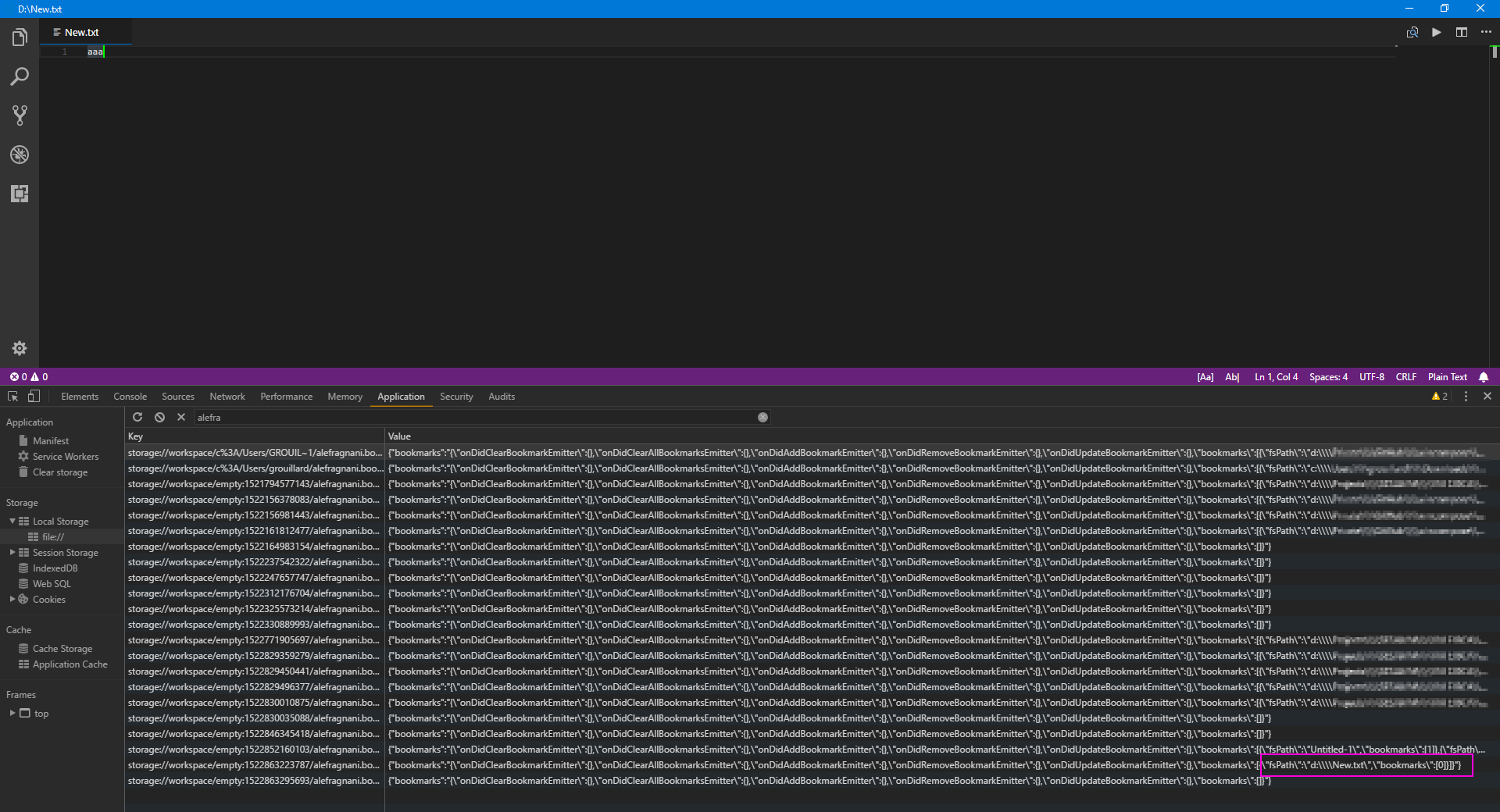
It is stored in VS Code internals, which is a Local Storage (from Chromium). You could see it in Toggle Developer Tools \ Application \ Local Storage \ file:// and filter by alefragnani.bookmarks. Each project/workspace that you opened will be there, with its bookmarks.
Hope this helps
alefragnani
on 4 Apr 2018
I'm not sure I follow you.
For No Folder scenario, it will never happen, because there is not root folder to store, so it will always be stored in VS Code internals.
So if I'm using bookmarks.saveBookmarksInProject set to false, the bookmarks should be stored in the Local Storage, thus they should be remembered even for alone files?
Otiel
on 4 Apr 2018
Exactly 😄
alefragnani
on 4 Apr 2018
Alright, thanks for the confirmation. 😃
So in that case, this bookmark one line 1 should be displayed, correct? 😊
Otiel
on 4 Apr 2018
Hi @Otiel ,
Sorry for the silence. I was a bit busy and totally forgot to answer you. Really sorry.
Yes, that json entry means that it _should_ have a bookmark in line 1. I will take a look at it
Thanks
alefragnani
on 22 Apr 2018
when I save the file (I've set editor formatting on save: editor.formatOnSave: true) after I set bookmark and edit file, its cleared. any reason?
In a word, when the line number bookmarked is changed, the bookmark is cleared.
This is critical issue.
 harleyguru
on 28 May 2018
harleyguru
on 28 May 2018
@harleyguru I recently switched from windows to mac and am seeing this behavior as well when saving files (bookmarks disappear after save even if line numbers don't change). It used to work for windows, but I no longer have that laptop to test again for sure.
 robertmirro
on 11 Dec 2018
robertmirro
on 11 Dec 2018
If you are losing your bookmarks “after saving” and have formatOnSave turned on, or if you use a formatter like Prettier, you may be facing the same issue as #118 .
alefragnani
on 11 Dec 2018
Thanks for the prompt response! Before I posted I verified that editor.formatOnSave was not on and also that Prettier is not used for this project. I also disabled some other vscode plugins just to be sure they're not interfering.
I just turned off eslint.autoFixOnSave and the bookmarks no longer disappear on save.
The vscode user settings I'm using on this mac were taken from the windows laptop, so I guess something is mac specific.
robertmirro
on 11 Dec 2018
Really weird, unless you don’t have eslint installed/active on that Windows machine.
Unfortunately I don’t have a Mac anymore to test, but I guess that based on its similarities with formatOnSave settings, the root cause should be the same in both cases. I’ll probably have to chat with VSCode team to see how to deal with it, because some API is needed.
Thanks you for your feedback 👍
alefragnani
on 11 Dec 2018
This project uses eslint so it was installed on windows as both a vscode plugin and as dependency via package.json.
I've noticed other format-on-save weirdness on this mac that seems to be related to eslint, so maybe that is the culprit.
I use the vscode Sync Settings plugin to produce identical settings in windows vs mac and verified they were the same (including plugin versions and npm package versions) before I turned the windows laptop back into IT, so I'm at a loss...
Anyway, thanks again!
robertmirro
on 11 Dec 2018
@robertmirro yeah I am always using macOS.
Have you found out the solution for this issue?
harleyguru
on 12 Dec 2018
@harleyguru no, I didn't find a solution yet, because in fact, maybe there isn't 😢
If the problem is really created by these _formatters/format_on_save events_, I would need a new VS Code API that could tell me how the lines moved, to be able to _update_ the bookmarks. What I'm seeying as a _potential workaround_ is to turn off the _sticky behavior_, so it wouldn't update the bookmarks position when you change the text. That's the proposal for #118 .
Unfortunately, I don't have a MacOS available, so if the issue happens only on MacOS, I have no way to fix it.
alefragnani
on 12 Dec 2018
Alessandro
OK I need to move a project folder which has bookmarks.
My search to ensure the bookmarks are retained led to this thread.
So I followed your 1st response and set saveBookmarksInProject to true.
I came back to Code, and to my dismay, Bookmarks: Explorer is now empty!
and .vscode folder does not have any bookmarks info.
.vscode/bookmarks.json only showed up when I added a bookmark for test.
So in your next comment you revealed where the bookmarks info are stored, and I found the data.
What can I do now ? Is there a way to convert that string to json to paste into bookmarks.json
thanks
 robertcatgithub
on 31 Dec 2018
robertcatgithub
on 31 Dec 2018
Related issues
 jbengineer
·
6Comments
jbengineer
·
6Comments
 versionsix
·
4Comments
versionsix
·
4Comments
 GaryFurash
·
5Comments
GaryFurash
·
5Comments
 919Studios
·
4Comments
919Studios
·
4Comments
 ogamal
·
6Comments
ogamal
·
6Comments
Most helpful comment
Hi @Otiel ,
First of all, sorry for taking so long to answer you. It's been a busy period and I'm not being able to give the proper attention to some projects.
About your issue, it _should_ work. No matter if you have a Project, a Workspace or No Folder (as in your case), it should be able to save/restore the bookmarks. But first, if you need this behavior, you must be sure to have set
bookmarks.saveBookmarksInProjecttotrue(it isfalseby default) onFile / Preferences / Settings.Hope this helps