Vscode-arduino: Not finding header files - is it reading c_cpp_properties?
Hopefully someone can help - I have spent 2 weeks trying to fix this and exhausted pages of google results :(
I use a Mac mostly these days and wanted a nice "proper" IDE for Mac and VSCODE seemed to fit the bill.
I have it working fine if I place my custom headers in the actual project folder and use"" to point to them, but when placed in another folder using <>, it always fails.
I have added the path to the c_cpp_properties.json and played with "Default" and "Tag Parser" intellisense.
The Colours header in this example is located in "/Users/antonysutton/Arduino_H/" and called Colours.h (I have also tried ""/Users/antonysutton/Arduino_H/**"
When I try to compile, the error is "TonyTouchScreen:7:66: error: Colours.h: No such file or directory"
Headers in code:
include
include
include "TouchScreen_kbv.h"
include
Using the following syntax compiles fine, so it si not looking in the includepath unless explicitly stated :
include
include
include "TouchScreen_kbv.h"
include
c_cpp_properties.json
{
"configurations": [
{
"name": "Mac",
"includePath": [
"/Applications/Arduino.app/Contents/Java/tools/",
"/Applications/Arduino.app/Contents/Java/hardware/arduino/avr/",
"/Users/antonysutton/Arduino_H/",
"${workspaceFolder}/"
    ],
    "defines": [],
    "intelliSenseMode": "clang-x64",
    "browse":{
        "path":[
            "/Applications/Arduino.app/Contents/Java/tools/**",
            "/Applications/Arduino.app/Contents/Java/hardware/arduino/avr/**",
            "/Users/antonysutton/Arduino_H/**",
            "${workspaceFolder}/**"
        ]
    },
    "macFrameworkPath": [
        "/Library/Developer/CommandLineTools/SDKs/MacOSX10.14.sdk/System/Library/Frameworks"
    ],
    "compilerPath": "/usr/bin/clang",
    "cStandard": "c11",
    "cppStandard": "c++17",

    "forcedInclude": [
        "/Applications/Arduino.app/Contents/Java/hardware/arduino/avr/cores/arduino/Arduino.h"
    ]
}
],
"version": 4
}
Settings.json
"C_Cpp.intelliSenseEngine": "Tag Parser",
 ImolaS3
All 14 comments
I am pretty sure the3 compilation is not even looking at c_cpp_properties.json as whatever i do to it, the error remains the same, none added, none taken away even if i delete the .json file it still has exactly the same error
Someone please help :(
ImolaS3
on 28 Jul 2019
dev is working on intellisense issue.
 zunhu
on 17 Sep 2019
zunhu
on 17 Sep 2019
This bug makes the whole extension next to useless. Please advise as to a work around...
 Jeff-Birt
on 23 Sep 2019
Jeff-Birt
on 23 Sep 2019
My VS Code installation started closing randomly so I removed it and downloaded the system installer version for windows (not local user installer) . Now the Arduino extension works properly, i.e. it finds the header files and will compile. Perhaps this is an issue with the local installer version??
Jeff-Birt
on 7 Oct 2019
My VS Code installation started closing randomly so I removed it and downloaded the system installer version for windows (not local user installer) . Now the Arduino extension works properly, i.e. it finds the header files and will compile. Perhaps this is an issue with the local installer version??
I tried this and still had the same issue.
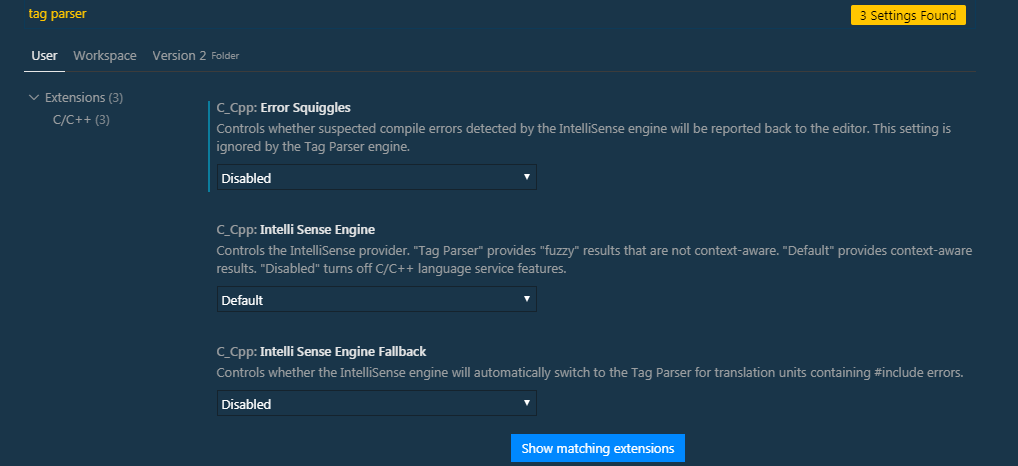
What I found to work was to have the following set (search for "tag parser" in settings):
 dean-rowntree
on 11 Oct 2019
dean-rowntree
on 11 Oct 2019
Yes, the intellisense does not work. I gave up and moved to Visual Micro. It works...
Jeff-Birt
on 11 Oct 2019
Hi none of the suggestions worked.
* When including custom libraries --> The plugin seemed to be able to F12 navigate to source files,
* When verifying the code it could not find the file.
For some reason it only works when I put the custom .h and .cpp files
in C:Users\[USERNAME]\DocumentsArduinolibraries folder.
 fclante
on 27 Oct 2019
fclante
on 27 Oct 2019
The C/C++ extension with c_cpp_properties.json is only used for syntax highlighting, smart suggestions, but not involved in compile, verify or build. It is expected as fclante mentioned above. The correct c_cpp_properties.json can make you F12 navigate to source files, but to verify/compile, you still need to ensure your custom .h and .cpp files in the project path or the system path that compiler already known.
 hellyzh
on 31 Oct 2019
hellyzh
on 31 Oct 2019
It works for me, but I find I must be very careful with case in the paths in c_cpp_properties.json.
Found empirically on Windows 10:
1) the drive letter must be upper case.
2) the case of each element of the path must match exactly what is used is on disk.
For example, for me:
c:/Users/MYNAMEHERE/AppData/Local/Arduino15/packages/mcci/hardware/stm32/**doesn't work.C:/Users/MYNAMEHERE/AppData/Local/Arduino15/packages/mcci/hardware/stm32/**does.
Similarly:
C:/Users/MYNAMEHERE/Documents/arduino/libraries/**doesn't workC:/Users/MYNAMEHERE/Documents/Arduino/libraries/**does (upper caseAinArduino, as it is on my system).
Intellisense is also slow to pick up changes; I find that saving all files and then selecting Arduino as the C/C++ Configuration causes a rescan.
With these settings, and making sure the compiler path, cStandard, cppStandard, and intelliSenseMode settings are right, I get proper hinting and pretty good preview of compile errors. With the Arduino environment being so slow when compiling, that saves a lot of time.
 terrillmoore
on 6 Dec 2019
terrillmoore
on 6 Dec 2019
Yes, make sure all set correctly especially compilerPath, intelliSenseMode will work well to give smart suggestion.
hellyzh
on 6 Dec 2019
Close the issue because it doesn't have recent activity. Please feel free to open a new issue if you would like further discussion. Thank you for your contributions.
hellyzh
on 6 Jan 2020
@hellyzh, is it not a bug that things are case sensitive on Windows? On the command line or in Exploror, the file system paths are not case sensitive. The drive letters are not case sensitive. But clearly, in my testing, Intellisense setup is case sensitive. I note that @ImolaS3 was also using a mac, which like Windows is also case insensitive (for the default the file system setup).
terrillmoore
on 6 Jan 2020
@terrillmoore, I have tested from my side, it is not case sensitive for windows file path. When you do the test, you can also try to clear the Intellisense cache by running "C/C++: Reset intelliSense Database" or restart VSCode. If you find it is really a bug, please feel free to open a new bug, thank you.
hellyzh
on 7 Jan 2020
I found this setting to be key for me. In settings.json set "C_Cpp.intelliSenseEngine" to "Tag Parser"
{
  "C_Cpp.intelliSenseEngine": "Tag Parser"
}
 jrobertson-insite
on 23 Jun 2020
jrobertson-insite
on 23 Jun 2020
Related issues
 clarkbremer
·
6Comments
clarkbremer
·
6Comments
 boskoe
·
3Comments
boskoe
·
3Comments
 ghent360
·
3Comments
ghent360
·
3Comments
 micahalan
·
6Comments
micahalan
·
6Comments
 shizn
·
4Comments
shizn
·
4Comments
Most helpful comment
I found this setting to be key for me. In settings.json set "C_Cpp.intelliSenseEngine" to "Tag Parser"
{
  "C_Cpp.intelliSenseEngine": "Tag Parser"
}